
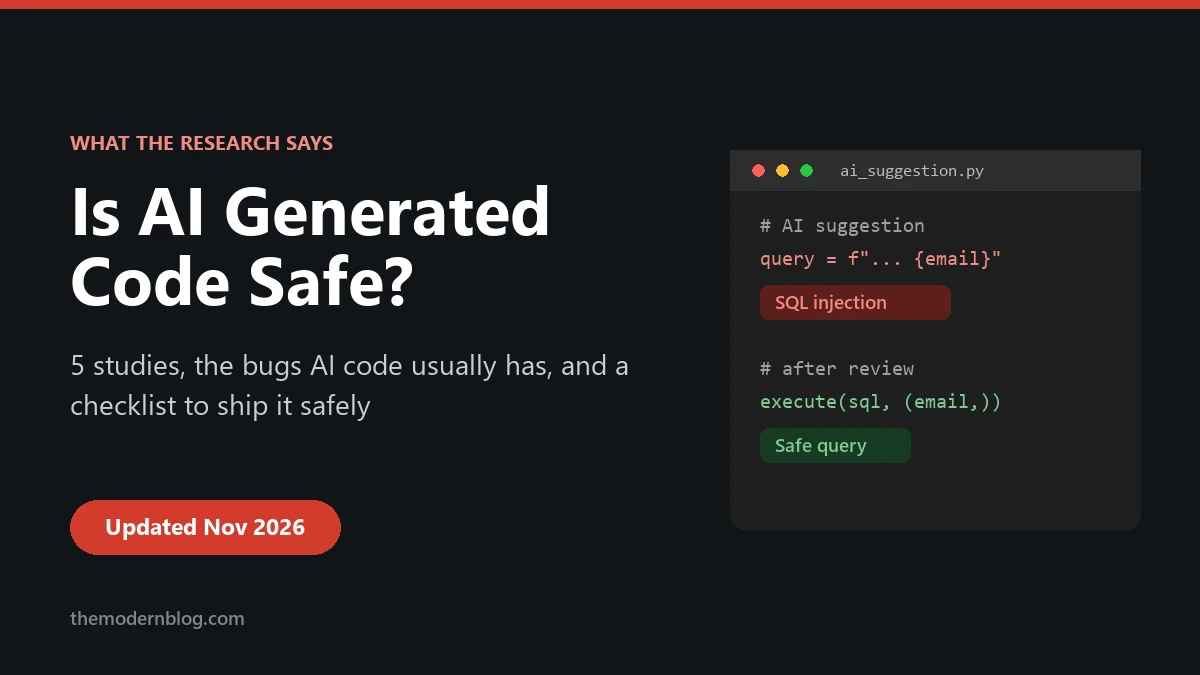
Is AI generated code safe? It’s one of the most common questions developers type into Google right now, and the honest answer is a bit annoying: it can be, but not by default. Out of the box, code from an AI assistant fails basic security checks surprisingly often. With the right checks around it, you can ship it with the same confidence as code from a human teammate.
I want to skip the hype in both directions here. No “AI will hack your company” panic, and no “the model is smart, just trust it.” Instead, let’s look at what the research has actually measured, which bugs show up again and again, and the practical checks that catch most of them before they reach production.
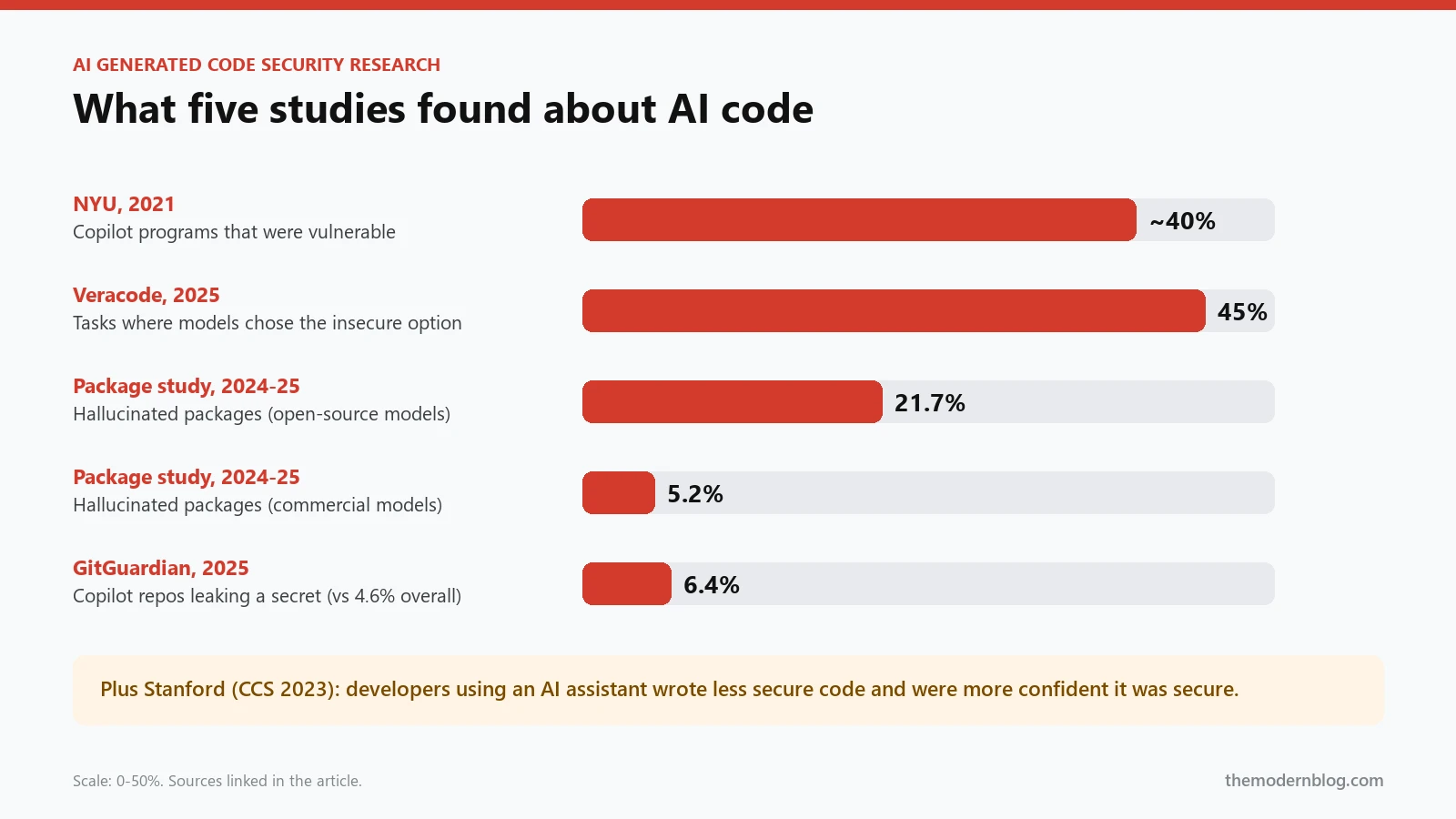
The short answer: AI generated code is not safe by default. Several independent studies found security flaws in roughly 40–45% of AI-written samples, often the same classic bugs (injection, cross-site scripting, hardcoded secrets). It becomes safe when you treat it as untrusted input: review it, scan it, test it, and limit what AI agents are allowed to touch.
What the research says about AI generated code security
A lot of articles quote scary numbers without saying where they came from. Here are five studies worth knowing, with links so you can check them yourself.
1. NYU, 2021: about 40% of Copilot’s programs were vulnerable
In the paper “Asleep at the Keyboard?”, researchers at NYU built 89 scenarios around high-risk weaknesses from MITRE’s CWE Top 25 and let GitHub Copilot complete them. Of the 1,689 programs it produced, roughly 40% were vulnerable. It was presented at IEEE Security & Privacy 2022, and it’s still the study everyone cites, because it was the first to measure the problem properly.
2. Stanford, 2022–2023: developers with AI wrote less secure code, and felt more confident
This one is my favourite, because it’s about people, not models. In “Do Users Write More Insecure Code with AI Assistants?” (published at ACM CCS 2023), 47 participants solved security-related tasks, some with an AI assistant and some without. The group with the assistant wrote significantly less secure code and was more likely to believe their code was secure. The participants who did best were the ones who trusted the AI less and kept rewriting their prompts.
That second finding is the important one. The risk isn’t only the model. It’s the false sense of safety it gives us.
3. Veracode, 2025: 45% of AI generated code failed security tests
Veracode’s 2025 GenAI Code Security Report tested more than 100 large language models on 80 coding tasks built around common weaknesses. When a model could choose between a secure and an insecure way to write the code, it picked the insecure one 45% of the time. Java was worst, with a failure rate above 70%. Cross-site scripting and log injection were failed in the large majority of cases.
The most worrying part: newer and bigger models wrote more correct code, but not more secure code. Keep in mind that Veracode sells security scanning, so treat this as vendor research, but the direction matches the academic studies.
4. Package hallucinations, 2024–2025: models invent dependencies
“We Have a Package for You!” analysed 576,000 code samples from 16 models. On average, at least 5.2% of the packages suggested by commercial models and 21.7% of those suggested by open-source models didn’t exist. That sounds harmless until you realise attackers can register those made-up names and wait for someone to run npm install. Security folks call it “slopsquatting.” Our post on AI hallucinations in software development goes deeper into why this happens.
5. GitGuardian, 2025: more leaked secrets in AI-assisted repos
GitGuardian’s State of Secrets Sprawl 2025 looked at roughly 20,000 repositories where Copilot was active and found that 6.4% leaked at least one secret, compared with 4.6% across public repositories in general. That’s about 40% higher. AI doesn’t invent your API keys, but it makes it very easy to paste one into code and commit it without noticing.
Where AI generated code can actually be safer
It’s not all bad news, and it’s worth being fair here. In some situations AI generated code is more consistent than what a rushed human would write.
- It follows rules every time you state them. Tell an assistant to always use parameterised queries and your project’s auth helper, and it usually will, file after file. Humans forget on a Friday afternoon.
- It doesn’t get bored of boilerplate. Input validation, error handling and logging are tedious to write by hand. An assistant will happily write them for every endpoint if you ask.
- It’s a decent first reviewer. Asking a model “what could an attacker do with this function?” often surfaces a missing check in seconds. It isn’t a replacement for a real security review, but it’s a cheap extra pass.
- It writes the tests you’d skip. Generating tests for empty, huge and malicious input takes a minute with AI, so there’s less excuse not to have them.
The pattern is simple. AI code security improves dramatically when you tell the model your rules and then verify the output. The bad results in the studies mostly come from accepting the first suggestion as-is.
So, is AI generated code safe enough to ship?
Put those studies together and a clear picture appears. AI generated code is not more dangerous than code from an inexperienced developer. In many ways it looks exactly like it: it works on the happy path, it’s confident, and it skips the boring defensive parts.
The difference is speed and volume. A junior developer writes a few hundred lines a day, and someone reviews them. An AI assistant can produce thousands of lines in an hour, and the review often doesn’t scale with it. That’s where the risk really comes from.
So yes, it can be safe to ship, as long as three things are true:
- A human understood it. Not skimmed it. Understood it, especially anything touching auth, payments, file uploads or user data.
- Automated checks ran on it. Secret scanning, static analysis and dependency checks on every pull request, with no exceptions for “small” AI changes.
- The agent that wrote it had limited power. If an AI agent can run commands or push code, its permissions decide how bad a mistake can get.
The security bugs AI code usually has
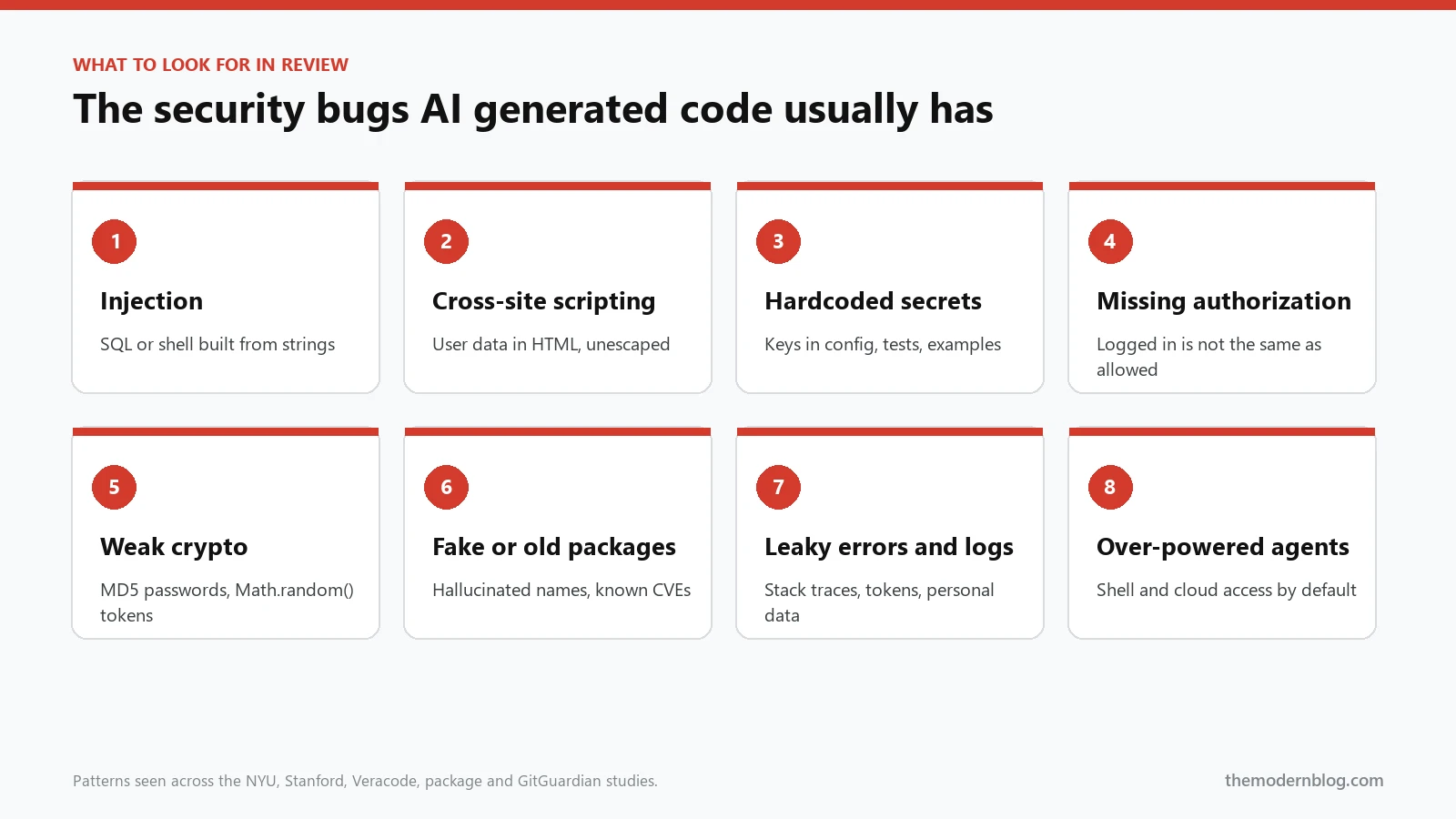
If you review AI generated code, these are the patterns to look for first. They come up in almost every study above, and they’re easy to miss because the code otherwise looks clean.
- Injection. SQL queries built with string concatenation, shell commands built from user input, and template strings passed into
eval. - Cross-site scripting. User data written straight into HTML without escaping, or React components that reach for
dangerouslySetInnerHTML. - Hardcoded secrets. API keys and passwords in config files, test fixtures and “temporary” example code that never gets removed.
- Missing authorization checks. The endpoint checks that you’re logged in, but not that the record you’re editing belongs to you.
- Weak crypto and randomness. MD5 or SHA-1 for passwords,
Math.random()for tokens, homemade encryption. - Made-up or outdated dependencies. Packages that don’t exist, or old versions with known vulnerabilities pulled from the model’s training data.
- Verbose errors and logs. Stack traces returned to users, and logs that quietly include tokens or personal data.
Here’s the classic example. Ask an assistant for a quick “find user by email” function and you’ll often get the first version:
# What assistants often suggest: open to SQL injection
cursor.execute(f"SELECT * FROM users WHERE email = '{email}'")

# What you want: a parameterised query
cursor.execute("SELECT * FROM users WHERE email = %s", (email,))
The two lines look almost identical, and both work in a demo. Only one of them survives an attacker typing ' OR '1'='1 into your login form.
How AI coding agents add new security risks
Chat assistants suggest code. AI coding agents act: they run terminal commands, install packages, edit many files and sometimes open pull requests on their own. That changes the threat model in a few specific ways.
- Prompt injection. An agent that reads a README, an issue or a web page can be tricked by instructions hidden inside it. The OWASP Top 10 for LLM Applications lists prompt injection as the number one risk, and there’s still no complete fix.
- Too much access. If the agent’s shell has your cloud credentials, a bad suggestion becomes a bad action. Excessive agency is on the OWASP list too.
- Tool connections. Every MCP server or plugin you connect is new attack surface. Our MCP guide covers how to lock those down.
- Review fatigue. When you run several agents in parallel, the diffs pile up fast. Tired reviewers approve things. If you work that way, read our notes on running parallel coding agents safely.
For a full breakdown of each risk, see our companion guide to AI coding security risks. This article is about the practical question: how do you know the code in front of you is safe?
How to check if your AI generated code is safe
You don’t need a big security team for this. Most of the protection comes from a handful of habits and a few free tools that run automatically.
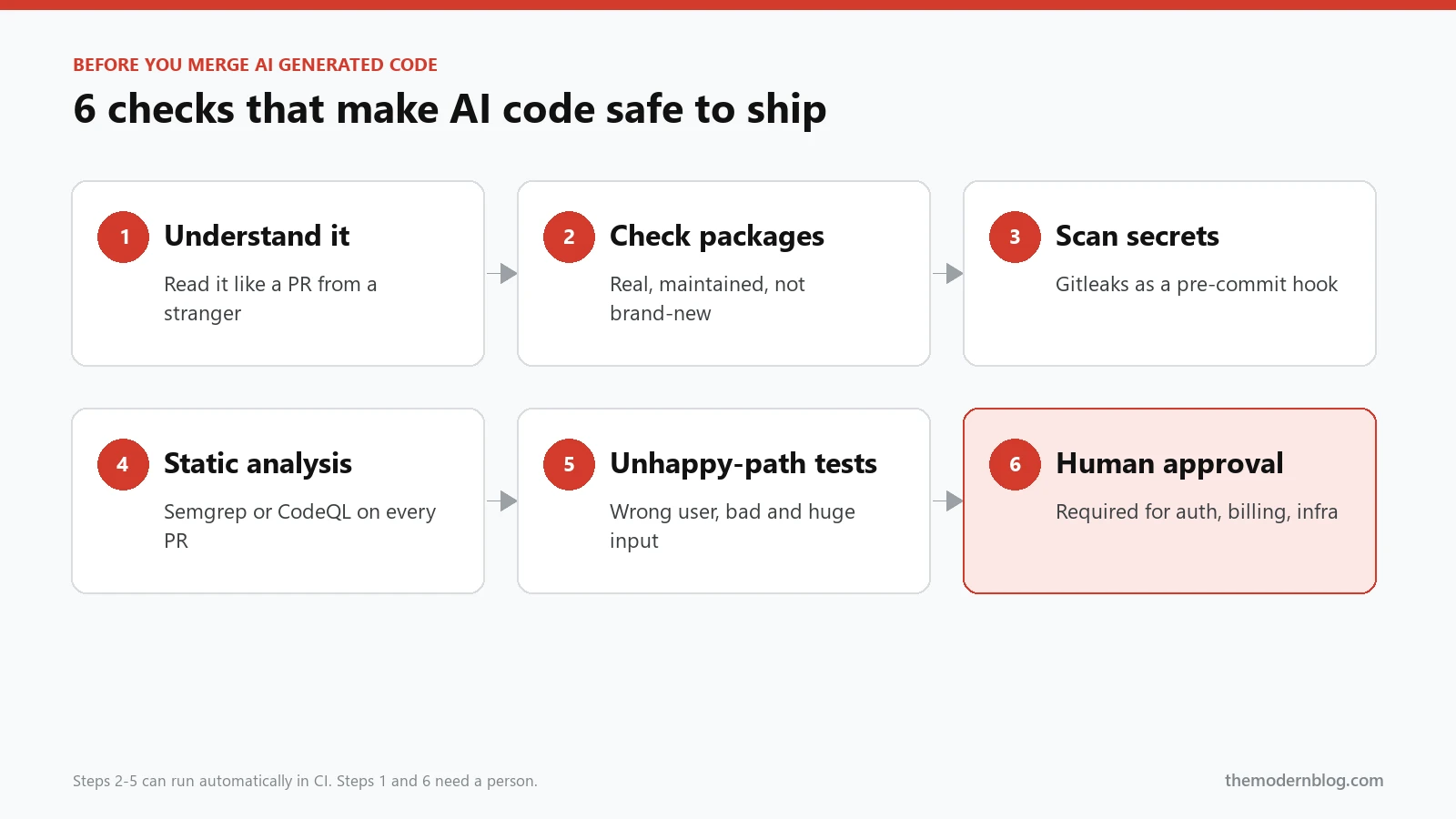
Step 1: Read it like a pull request from a stranger
Before anything else, ask yourself one question for every block of code: “Do I understand exactly what this does?” If the answer is no, don’t merge it. Ask the assistant to explain it, rewrite it more simply, or write it yourself. Pay extra attention to anything that touches authentication, permissions, payments, file paths or user input.
Step 2: Check every new dependency
Never install a package just because the AI mentioned it. Look it up on npm or PyPI first. A real, maintained package has a history: a creation date, many versions, a repository and real downloads. You can check the creation date in one line:
# a brand-new package with a convenient name is a red flag
npm view some-package-name time.created
If the package was created last week, has one version and no repository, stop.
Step 3: Scan for secrets before you commit
Add a secret scanner such as Gitleaks as a pre-commit hook. It takes a few minutes to set up and catches the most embarrassing kind of leak, the one you push yourself. Keep real keys in environment variables or a secrets manager, never in code the AI can see and copy.
Step 4: Run static analysis on every pull request
Static analysis tools like Semgrep or GitHub’s CodeQL find injection, XSS and weak crypto automatically. They aren’t perfect, but they’re very good at exactly the mechanical bugs AI tends to produce.
Step 5: Write tests for the unhappy path
AI is great at writing tests that prove the code works. Ask it, or yourself, for tests that prove the code fails safely: wrong user, empty input, huge input, malicious input. Our guide on how AI agents write unit tests shows how to prompt for these.
Step 6: Keep a human in the loop for anything risky
Automation catches patterns. People catch intent. For changes to security-sensitive areas, require a second human reviewer, even if an AI wrote the code and another AI reviewed it. We explain why in why AI agents need human review.
Add AI code governance to your CI/CD pipeline
The easiest way to cut security rework is to stop relying on memory. Put the checks in your pipeline so every change, human or AI, goes through the same gate. Here’s a minimal GitHub Actions workflow that scans for secrets and runs static analysis on each pull request:
name: ai-code-gate
on: pull_request

jobs:
  security:
    runs-on: ubuntu-latest
    steps:
      - uses: actions/checkout@v4
        with:
          fetch-depth: 0
      - name: Secret scan
        uses: gitleaks/gitleaks-action@v2
        env:
          GITHUB_TOKEN: ${{ secrets.GITHUB_TOKEN }}
      - name: Static analysis
        run: |
          pipx install semgrep
          semgrep scan --config auto --error
A few practical notes. Gitleaks’ GitHub Action needs a free licence key for repositories owned by an organisation, so check its README. Start Semgrep in report-only mode for a week if your codebase is old, otherwise the first run can flood you with findings. Then make the job required in your branch protection rules, so nobody can merge around it.
If AI agents open pull requests in your repo, add two more rules: agents can’t approve their own changes, and changes to sensitive paths (auth, billing, infrastructure) need a code owner’s review. Our guide to AI agents in DevOps and CI/CD covers this in more detail.
What secure-by-default AI coding looks like
“Secure by default” means the safe path is the easy path, so a tired developer or an over-eager agent can’t easily do the wrong thing. For AI coding, that usually comes down to a few settings:
- Least privilege for agents. Give them a sandbox or dev container, scoped tokens and no production credentials.
- Approval for dangerous actions. Deleting files, running migrations, pushing to main and installing packages should ask a human first.
- Project rules the AI can read. Put your security rules (parameterised queries only, no secrets in code, use our auth helper) in the repo’s agent memory file. Our guide to AI agent .md files shows how.
- Same gates for everyone. AI generated code goes through exactly the same CI checks and review rules as human code. No shortcuts because “it’s just a small AI change.”
Frequently asked questions
Is AI generated code safe to use in production?
It can be, once it has been reviewed by someone who understands it, passed automated security checks and been tested for bad input. Code that skipped those steps isn’t production-ready, whoever or whatever wrote it.
How do we know AI generated code is safe?
You don’t know until you check. Combine human review, secret scanning, static analysis, dependency checks and tests for failure cases. Together they catch the large majority of the bugs these studies found.
What research exists on AI generated code vulnerabilities?
Good starting points are NYU’s “Asleep at the Keyboard?” (2021), Stanford’s “Do Users Write More Insecure Code with AI Assistants?” (CCS 2023), Veracode’s 2025 GenAI Code Security Report, the 2024 package hallucination study “We Have a Package for You!” and GitGuardian’s State of Secrets Sprawl reports. All five are linked above.
Will AI agents replace code reviewers?
Not for security-sensitive work. AI reviewers are useful for catching obvious problems quickly, but the Stanford study shows why a confident tool can make people less careful. Use AI review as a first pass and keep a human as the final approver.
Can AI refactor code without adding vulnerabilities?
It can, but refactoring is exactly where subtle security checks get lost, such as a permission check that quietly disappears during a cleanup. Run your full test suite and security scans after every AI refactor. Our list of the best AI tools for code refactoring covers which tools handle this best.
The bottom line
Is AI generated code safe? Not by default, and the research is pretty consistent on that. But it isn’t a reason to stop using AI. It’s a reason to stop treating AI output as finished work.
Read it, scan it, test it, and keep your agents on a short leash. Do that, and AI generated code is as safe as any other code in your repo, and you still keep most of the speed that made you try it in the first place. If you want the bigger picture of where these tools are heading, our complete guide to AI coding agents is a good next read.