
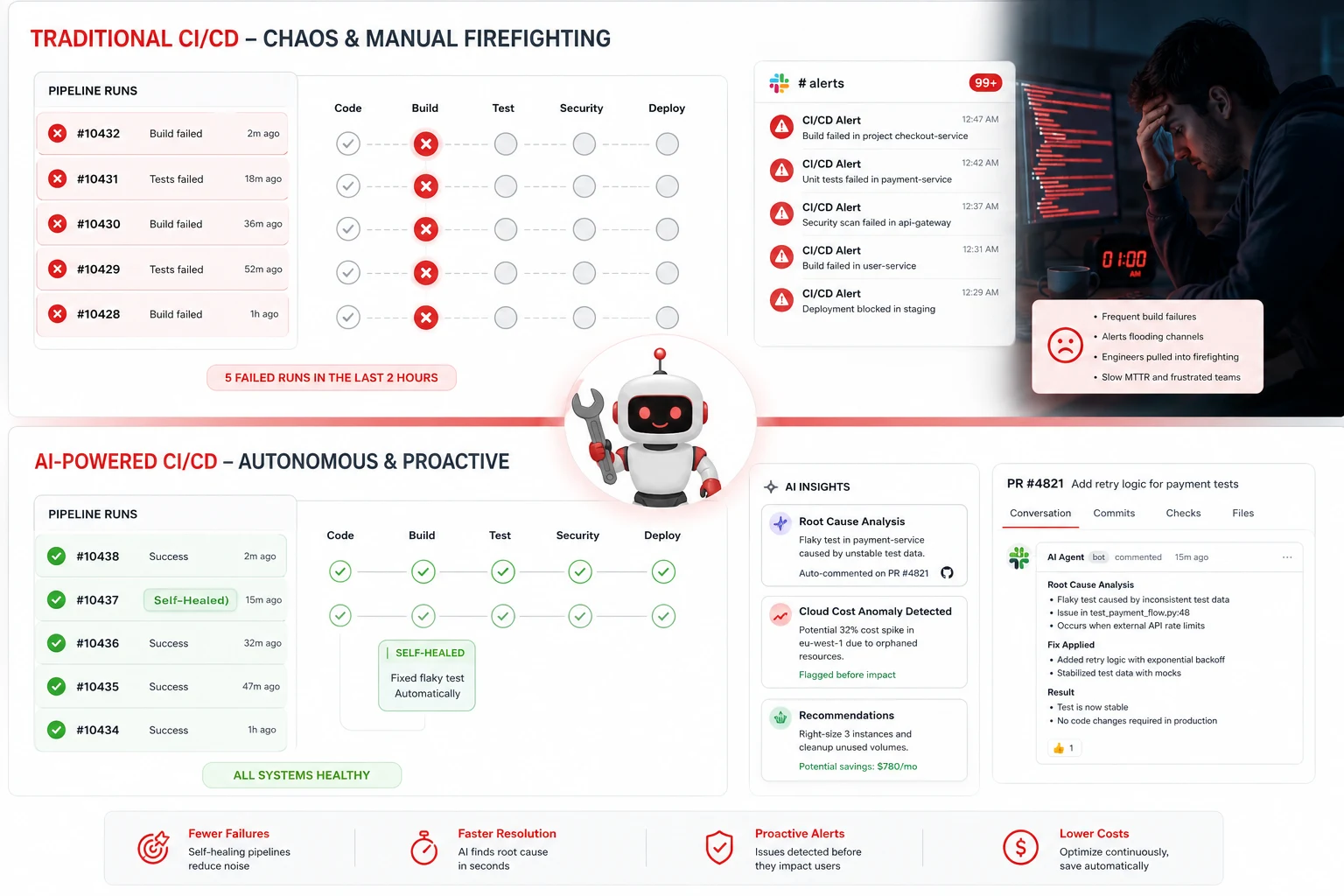
The alert that woke me up at 1:47 AM
PagerDuty fired at 1:47 AM on a Wednesday.
Build pipeline down. Deployment blocked. Eight engineers were waiting on a release that had been ready since 5 PM the previous day, now sitting behind a failing CI job that nobody had looked at because it had been intermittently red for three weeks, and everyone had silently decided to just re-run it until it went green.
I spent ninety minutes reading through four hundred lines of build logs trying to figure out whether the failure was a flaky test, a dependency version conflict, an environment issue, or an actual regression. It was a transient Docker registry timeout that had nothing to do with our code. The fix was one line in the pipeline config.
Ninety minutes of my night. One line of YAML.
That kind of story is so common in engineering teams that it barely registers as a problem anymore. It has just become the ambient cost of running a CI/CD pipeline at scale. And it is exactly the category of problem that AI agents embedded in DevOps pipelines are starting to actually solve in 2026. Not theoretically. In production, right now, at teams shipping real software.
This article is about what is genuinely working, what the real numbers look like, and where the hype is still running ahead of reality (AI Agents in DevOps).
The problem AI agents in DevOps are actually solving
Before getting into tools and techniques, you need to understand what is happening to software delivery metrics right now. Because without this context, the urgency around AI agents in DevOps looks like vendor marketing. With it, it looks like a structural necessity.
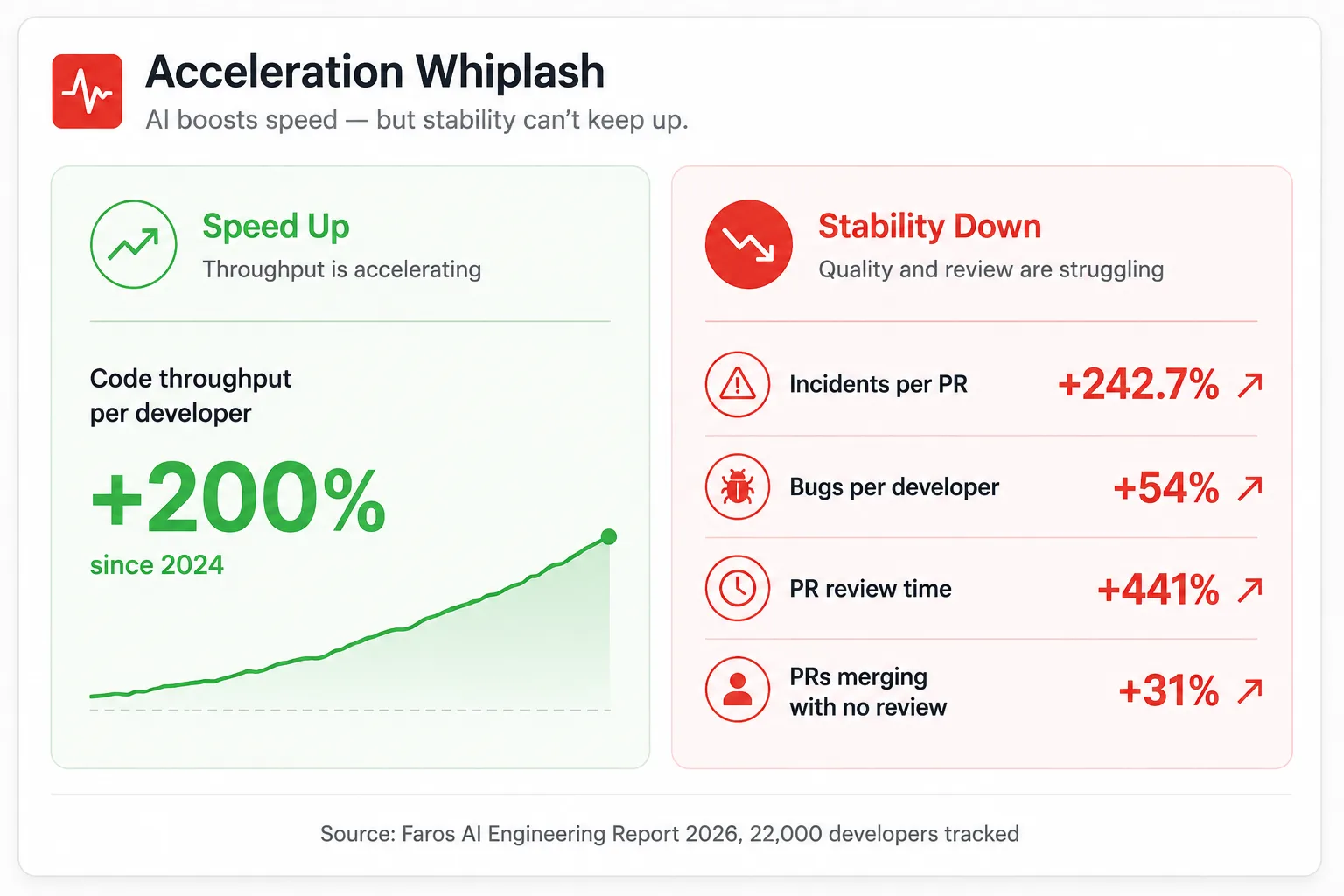
Faros AI’s 2026 telemetry across 22,000 developers shows that while individual and organizational throughput are up significantly, quality and stability signals have worsened considerably. Median time in PR review is up 441 percent. Bugs per developer are up 54 percent. And incidents per PR are up 242.7 percent, meaning for every code change merged, the probability of a production incident has more than tripled.
The researchers named this pattern the Acceleration Whiplash. Code is being written faster than ever, much of it AI-assisted. But the delivery, security, and operational infrastructure around that code have not scaled to match the pace.
GitLab named the same problem on the platform side. GitLab called it the AI Paradox: AI-generated code moves faster than the systems around it can keep up with, creating faster code generation without faster delivery, security, or operations to match.
This is the specific problem that AI agents in DevOps pipelines are being deployed to address. Not to replace DevOps engineers. To close the gap between how fast code is being written and how fast it can safely reach production.
The five places AI agents are delivering real ROI in CI/CD today
I want to be specific here because the generic version of this conversation is useless. “AI will transform DevOps” is a sentence that has been true in various forms since 2019 and tells you nothing actionable.
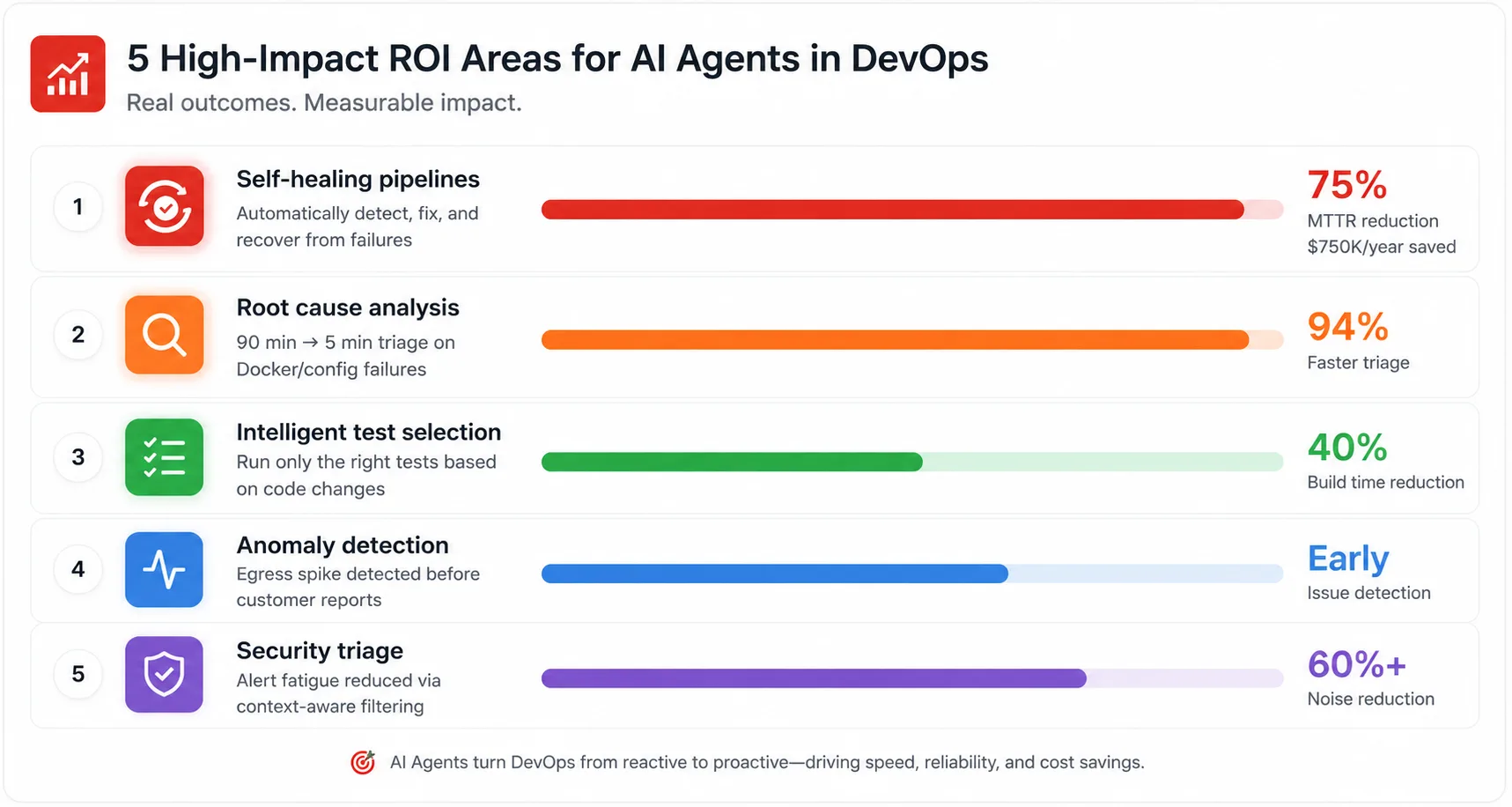
These are the five specific areas where AI agents are producing measurable results in production CI/CD pipelines right now, backed by real data from real deployments.
1. Self-healing builds pipelines
This is the use case I wish had existed on that Wednesday night.
AI agents embedded in CI/CD pipelines are helping teams catch issues earlier. Specifically: summarizing what a PR actually changes in plain English so reviewers do not have to parse diffs alone, flagging when a PR affects a high-risk area of the codebase based on historical incident data, and identifying which test failures in a CI run are likely related to the code change versus flaky tests.
The flaky test detection piece is the one that compounds most aggressively. A test suite with fifteen percent flaky tests requires re-running failed jobs until they go green. Each re-run takes time, consumes CI compute, and delays the feedback loop that the entire pipeline exists to provide. An agent that classifies failures as “likely flaky” versus “likely real regression” in real time changes how engineers respond to a red build.
Tools like Git are making this concrete. Common CI failures, including dependency installation failure, flaky UI tests, and runner pod waiting timeout, have F1 detection scores of 92 percent, 97.3 percent, and 98.8 percent, respectively. Teams save approximately $750,000 per year in time and remove more than $5,000 in tool costs while cutting MTTR by up to 75 percent.
Teams using AI-powered intelligent test selection, where ML models select only high-impact tests based on previous failures, report 40 percent reductions in overall build times while maintaining quality standards. Forty percent faster builds means forty percent faster feedback loops, which compounds across every developer on every PR for the entire year.
2. Automated root cause analysis for pipeline failures
The ninety minutes I spent reading build logs is a solved problem for a certain class of failure. Not all failures, but the ones with enough signal in the logs that a trained model can map them to a known cause category.
GitLab Duo can now propose correct YAML snippets to resolve pipeline configuration failures. For SREs and on-call engineers, this acts like a smart assistant that not only explains failures but points the way forward.
The system effectively addresses three primary categories of CI/CD pipeline failures: syntax errors, compilation failures, and Docker build failures during container image creation. That last one, Docker build failures, is the category that caused my 1:47 AM call. The agent reads the failure output, identifies the pattern, and proposes the fix. The on-call engineer reviews the proposal instead of reading four hundred lines of logs from scratch.
The GitLab Duo Agent Platform, which reached general availability in January 2026, built this directly into the pipeline. The Fix CI/CD pipeline flow analyzes failures, identifies likely causes, and prepares recommended changes. You get the analysis in the merge request, not buried in a log file you have to go find.
# Example: What an AI root cause analysis comment looks like in a failed CI job
# Posted automatically by the pipeline agent when a build fails

## Pipeline Failure Analysis

**Job:** build-and-test (failed at 02:14 UTC)
**Failure category:** Docker build failure — registry timeout

**What happened:**
The Docker build failed on `COPY --from=builder /app/dist ./dist` with error:
`failed to do request: Head "https://registry-1.docker.io/v2/": dial tcp: i/o timeout`

This is a transient connectivity issue to Docker Hub, not a code regression.
The same job passed in 3 of the last 4 runs this week.

**Recommended fix:**
Add a retry block to the Docker build step in `.gitlab-ci.yml`:

```yaml
build:
  script:
    - docker build --network=host -t $IMAGE_TAG .
  retry:
    max: 2
    when:
      - runner_system_failure
      - stuck_or_timeout_failure
```

**Confidence:** High (same failure pattern seen in 47 prior runs across this project)
**Action required:** Review and apply the retry config, or re-run the job manually.
This does not require a code change or a wake-up call.
That is the output I wanted at 1:47 AM. The analysis is done. The fix is proposed. Me asleep.
3. Intelligent test selection and pipeline optimization
Running the full test suite on every commit is the right default and an expensive habit at scale.
A monorepo with eight hundred services and a fifteen-minute test suite means that changing one line in a utility module triggers fifteen minutes of testing for six hundred services that could not possibly be affected. The cognitive overhead of maintaining a manual test selection policy is high enough that most teams do not bother. They run everything and accept the cost.
AI agents make selective test execution tractable by learning the dependency graph dynamically. They analyze which files changed, which modules depend on those files, and which tests historically fail when those modules change. Then they run the tests that actually matter for this specific change.
# Example: AI-driven test selection configuration in GitHub Actions
# The agent analyzes the diff and selects relevant test suites

name: Intelligent Test Pipeline

on: [pull_request]

jobs:
  analyze-changes:
    runs-on: ubuntu-latest
    outputs:
      test-scope: ${{ steps.ai-selector.outputs.scope }}
      affected-services: ${{ steps.ai-selector.outputs.services }}

    steps:
      - uses: actions/checkout@v4
        with:
          fetch-depth: 0

      - name: AI test scope analysis
        id: ai-selector
        uses: your-org/ai-test-selector@v2
        with:
          # Agent reads the diff and codebase dependency graph
          changed-files: ${{ steps.changes.outputs.files }}
          dependency-map: ./dependency-map.json
          historical-failures: true   # Uses past failure data to weight selection
          confidence-threshold: 0.85  # Only skip tests the agent is 85%+ confident are unaffected

      - name: Report scope
        run: |
          echo "Running tests for: ${{ steps.ai-selector.outputs.services }}"
          echo "Skipping: ${{ steps.ai-selector.outputs.skipped-count }} test suites"
          echo "Estimated time saved: ${{ steps.ai-selector.outputs.time-saved-minutes }} minutes"

  run-selected-tests:
    needs: analyze-changes
    runs-on: ubuntu-latest
    strategy:
      matrix:
        service: ${{ fromJson(needs.analyze-changes.outputs.affected-services) }}

    steps:
      - name: Run tests for affected service
        run: npm test --workspace=packages/${{ matrix.service }}
The output of this approach is not just faster pipelines. It is the feedback loops that actually close. When a developer gets test results in three minutes instead of fifteen, they are still in the context of the change they just made. When feedback takes fifteen minutes, they have already switched tasks, and the context switch back adds overhead that does not show up in any metric but is very real in practice.
4. Proactive incident response and anomaly detection
The most valuable thing an AI agent can do in a production environment is tell you something is wrong before you find out from a customer.
Agents that watch your cloud spend and flag anomalies, such as “your egress costs spiked 300% in the last 6 hours, here is what changed,” are proving their worth at teams running on major cloud platforms. The connection between the anomaly and the change is the part that is genuinely new. Any monitoring tool can tell you egress costs spiked. An AI agent that correlates the spike to the specific deploy that happened four hours before it started is giving you the starting point for the investigation, not just the alert.
Harness AI’s Human-Aware Change Agent takes this further. The change-centric investigation approach means the agent correlates production anomalies with the specific code changes, configuration changes, and deployment events that preceded them. Instead of starting an incident investigation from logs and metrics, you start from the change that most likely caused the issue.
The MTTR impact of starting from the right hypothesis versus starting from raw logs is significant. Teams that implement this pattern report cutting their initial triage time from thirty to forty minutes to under five minutes on the class of incidents where a recent deployment was the root cause.
5. Security scanning and vulnerability triage inside the pipeline
Security scanning has been part of CI/CD pipelines for years. What AI agents add is triage intelligence: the difference between a tool that dumps every potential vulnerability as a critical alert and an agent that understands which vulnerabilities are actually exploitable in your specific application context.
GitLab 18.11, released in April 2026, expanded agentic AI across the security lifecycle with automated security remediation as part of the DevSecOps pipeline. The Security Analyst Agent, which reached general availability in January 2026, automates vulnerability analysis and triaging, prioritizes vulnerabilities based on context and risk, and reduces alert fatigue by filtering false positives.
Alert fatigue is the actual problem that security scanning in CI/CD faces. A scanner that fires on every possible issue produces a stream of noise that engineers learn to ignore. An agent that filters that stream to the issues that are real, exploitable, and relevant to this specific codebase produces a signal that engineers act on.
IDC’s projection for where this is heading is specific. IDC forecasts that by 2030, 70 percent of organizations will embed AI agents into DevOps and DevSecOps pipelines, making orchestration platforms an increasingly important category.
The “AI Paradox” inside your pipeline: why more agents can make things worse
Here is the part that most AI Agents in DevOps coverage do not tell you.
Adding AI agents to a broken pipeline does not fix the pipeline. It makes the breakage faster and more expensive.
AI amplifies good processes and bad processes equally. A team without proper observability, test coverage, or incident response procedures will get worse output, not better, when they layer agents on top of those missing foundations.
I have watched this play out. A team runs an AI code review agent on a codebase with 12 percent test coverage. The agent flags issues. Engineers fix the flagged issues. But because the test coverage is too thin to validate the fixes, the patches introduce new problems. The incident rate goes up because the change in velocity went up without the quality infrastructure to support it.
The fix is not to remove the agent. The fix is to build the foundation first. The adoption reality check from 2026 surveys is sobering: roughly 25 percent of organizations are piloting agents in DevOps, but only about 11 percent have them fully in production at scale. The rest are still in “cool demo to production nightmare” territory.
The teams in the 11 percent that have agents running in production at scale have several things in common. They have strong test coverage. They have meaningful observability. They have defined what human oversight looks like and built governance structures around it. They did not deploy agents and then think about governance. They thought about governance first.
The DORA metric problem nobody is talking about
If you measure your DevOps performance with DORA metrics, you need to know that the AI era has broken two of the four metrics, and nobody is updating their dashboards.
Deployment frequency and lead time for changes have become misleading when AI generates 30 to 70 percent of committed code. MTTR holds up well. Change failure rate has a partial value.
The specific problem is that deployment frequency looks fantastic on teams using AI-assisted development. They are shipping more commits more often. But if those commits are generating incidents at 242.7 percent the rate they were two years ago, the deployment frequency metric is telling you about throughput while hiding the quality collapse underneath it.
The Acceleration Whiplash pattern shows real throughput gains at the top with compounding quality costs at every stage below. Measuring only throughput is like measuring a car’s speed without measuring whether the brakes work.
Teams that are serious about measuring the impact of AI agents in their DevOps pipeline need to add AI Code Share (what percentage of committed code is AI-generated) and incident frequency broken down by whether the triggering code was human-written or AI-generated, alongside the standard DORA metrics. Without those additional dimensions, you cannot distinguish between a high-performing pipeline and one that is burning down slowly.
# Supplementary metrics to add alongside DORA in the AI era
# Track these in your observability platform alongside standard deployment frequency and MTTR

metrics:
  # Standard DORA (keep these)
  - deployment_frequency
  - lead_time_for_changes
  - change_failure_rate
  - mean_time_to_recovery

  # New required additions for AI-assisted development
  - ai_code_share:
      description: "Percentage of committed lines that were AI-generated or AI-modified"
      tool: "Pull from Copilot/Cursor telemetry or via git blame analysis"
      alert_threshold: "> 70% without corresponding test coverage increase"

  - incident_frequency_by_code_origin:
      description: "Production incidents per 100 deploys, split by AI-generated vs human-written code"
      tool: "Correlate PagerDuty/incident data with commit metadata"
      alert_threshold: "AI-generated code incident rate > 1.5x human-written rate"

  - pr_review_coverage:
      description: "Percentage of merged PRs that received at least one substantive human review comment"
      tool: "GitHub/GitLab API"
      alert_threshold: "< 70% (flag for Acceleration Whiplash risk)"

  - flaky_test_rate:
      description: "Percentage of CI failures caused by flaky tests vs real regressions"
      tool: "Gitar, GitLab Duo analytics, or custom classifier"
      target: "< 5% of total CI failures should be flaky"
The tools will do this work in June 2026
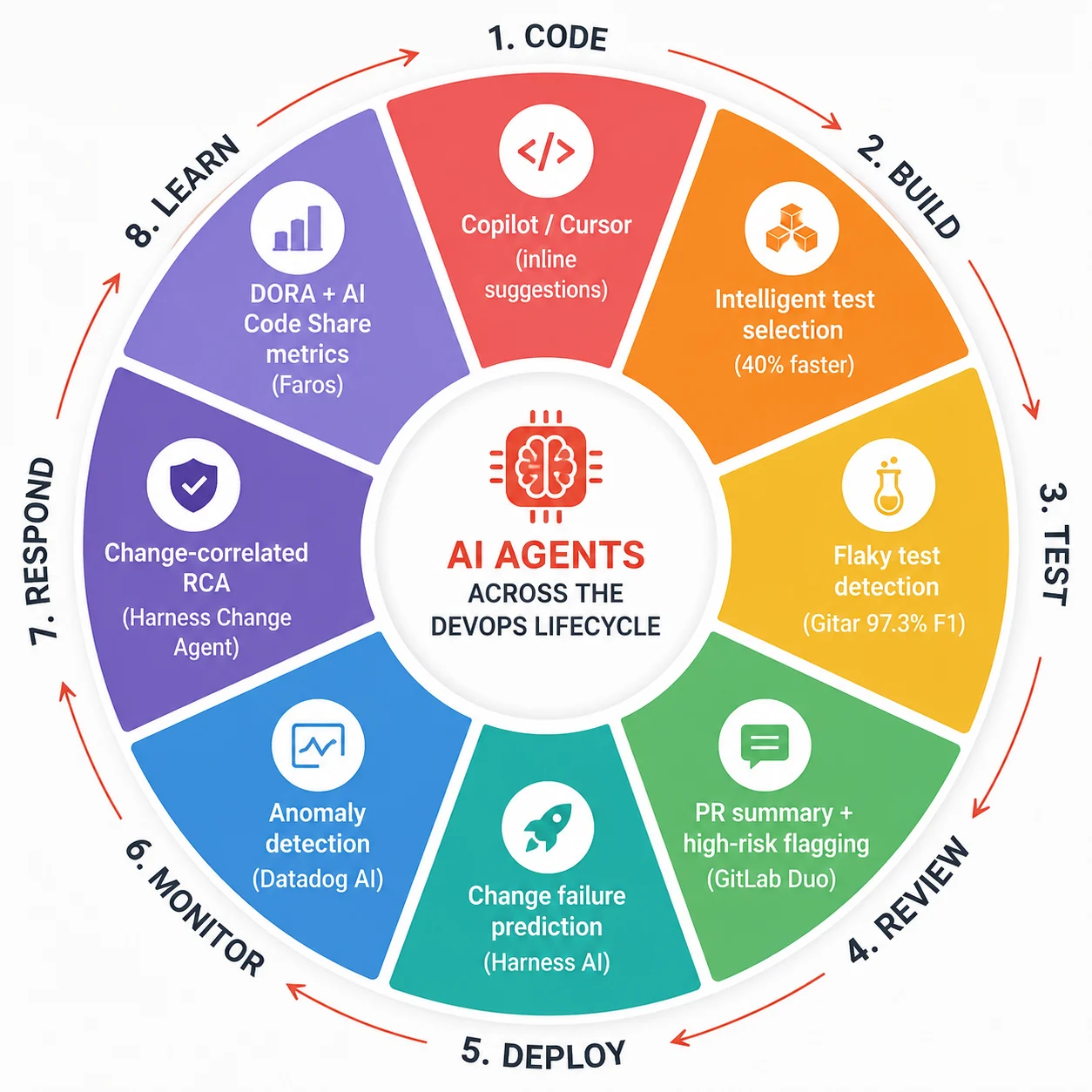
| Tool | Primary DevOps role | Key AI capability | Platform support | Best for |
|---|---|---|---|---|
| GitLab Duo Agent Platform | End-to-end DevSecOps pipeline | Fix CI/CD flow, Security Analyst Agent, Value Stream Forecasting | GitLab only (cloud + self-managed) | Teams already on GitLab want all-in-one AI agents |
| Harness AI | Deployment intelligence and incident response | Human-Aware Change Agent, change-correlated incident triage | GitHub, GitLab, Azure DevOps, Jenkins | Teams prioritizing deployment safety and incident correlation |
| Gitar | Self-healing CI pipeline | Failure classification (92-98.8% F1), auto-fix with validation | GitHub, GitLab, CircleCI, Buildkite | Teams with high flaky test or infra failure rates are burning CI time |
| TeamCity 2026.1 | Build configuration and pipeline setup | AI agents configure full build chains via MCP/Context7 | Most major VCS platforms | Teams wanting an AI-assisted pipeline configuration without manual YAML |
| GitHub Copilot for PRs | PR review and CI context | PR summaries, high-risk area flagging, and test failure classification | GitHub only | Teams already on GitHub who want lightweight AI in their review flow |
| Claude Code (Anthropic) | Autonomous pipeline repair and code changes | Cloud auto-fix: follows PRs, fixes CI failures, addresses comments unattended | GitHub (primary), CLI for others | Teams wanting async CI repair while engineers focus on feature work |
| Datadog / Dynatrace with AI | Observability and anomaly detection | Predictive anomaly detection, AI-driven root cause correlation | All major cloud platforms | Teams needing production observability with AI-assisted triage |
How to introduce AI agents into your pipeline without blowing it up
The practical question is not whether to add AI agents to your DevOps pipeline. The question is how to do it without the “cool demo to production nightmare” transition that 14 percent of organizations that started piloting are apparently still stuck in.
Start with the failure classification problem, not the autonomous remediation problem. Getting an agent to correctly identify that a build failure is a flaky test versus a real regression is a bounded, high-value task with a clear success metric. Getting an agent to autonomously fix CI failures and push commits is a much higher-stakes capability that requires significant trust-building first. Walk before you run.
Add one agent at a time and measure its impact before adding the next. The temptation is to deploy every available capability simultaneously and see what sticks. The problem is that when something goes wrong, and your pipeline behaviour changes unexpectedly, you have no way to attribute the change. Sequential rollout with clear before-and-after metrics is slower and produces results you can actually learn from.
Define the human oversight policy before the agents go live. For any agent action that touches production code, deploys, or modifies pipeline configuration, define explicitly what requires human approval and what can proceed autonomously. As AI agents become more capable and more autonomous, how you build governance mechanisms that scale with them, and what meaningful human oversight looks like when a pipeline is processing hundreds of AI-generated changes per day, are not hypothetical questions. They are the questions that will define how CI/CD evolves over the next few years.
Instrument everything. You cannot improve what you cannot measure and you cannot debug what you did not log. Every agent action should produce a structured event: what it observed, what decision it made, what it did, and what the outcome was. This log is what you use to improve prompt quality, tune confidence thresholds, and catch the agent making a class of systematic mistakes before it becomes a pattern.
The honest answer to “is it worth it?”
For a team with strong test coverage, decent observability, and a clear governance policy around what agents can do autonomously, yes. The ROI case for AI agents in CI/CD in June 2026 is real and supported by production data from real teams.
Forty percent build time reductions. Seventy-five percent MTTR cuts. $750,000 per year in recovered developer time. These are not projections. They are reported outcomes from teams using these tools in production today.
For a team without those foundations, the answer is more complicated. The agents will work. They will also amplify whatever is broken about the existing process. The teams in the “cool demo to production nightmare” category are not there because AI agents do not work. They are there because the agents work exactly as designed and the design was applied on top of a pipeline that was not ready to support autonomous action.
The investment that pays off most reliably before deploying any pipeline agent is the same investment that pays off most reliably in software generally: test coverage, observability, and a team culture that treats a red build as information to act on rather than noise to route around.
Fix those first. Then the agents compound the good foundation instead of amplifying the gaps.
Further reading
- GitLab Duo Agent Platform General Availability: Official GitLab Announcement, January 2026
- Acceleration Whiplash: Faros AI Engineering Report 2026, 22,000 Developer Dataset
- AI Agents in DevOps: Hype vs. Reality in Production Pipelines, DevOps.com
The pipeline that fixes itself is not a fantasy anymore
I want to go back to that Wednesday night for a second.
The ninety minutes I spent reading the build logs were not wasted in the sense that I eventually found the answer. But it was wasted in the sense that a trained classification model could have found that answer in under thirty seconds and proposed the fix before I even opened my laptop. The knowledge required to identify a Docker registry timeout from log output is exactly the kind of pattern-matching that LLMs are trained on. It is not a hard problem. It is a repetitive one.
That is the category of work that AI agents in DevOps pipelines are eating right now. Not the architectural decisions. Not the incident response judgment calls about whether to roll back or push a hotfix. Not the engineering judgment about whether a failing test is exposing a real problem or testing the wrong thing. Those remain human decisions, and they should.
The 1:47 AM pages for transient infrastructure failures, the forty-five minutes spent re-running flaky tests until they go green, the three hours of log archaeology to answer a question that is already in the pattern library: those are the costs that AI agents in CI/CD are starting to actually take off the table.
That is not a transformation. It is a relief. And right now, for most engineering teams, it is enough.