
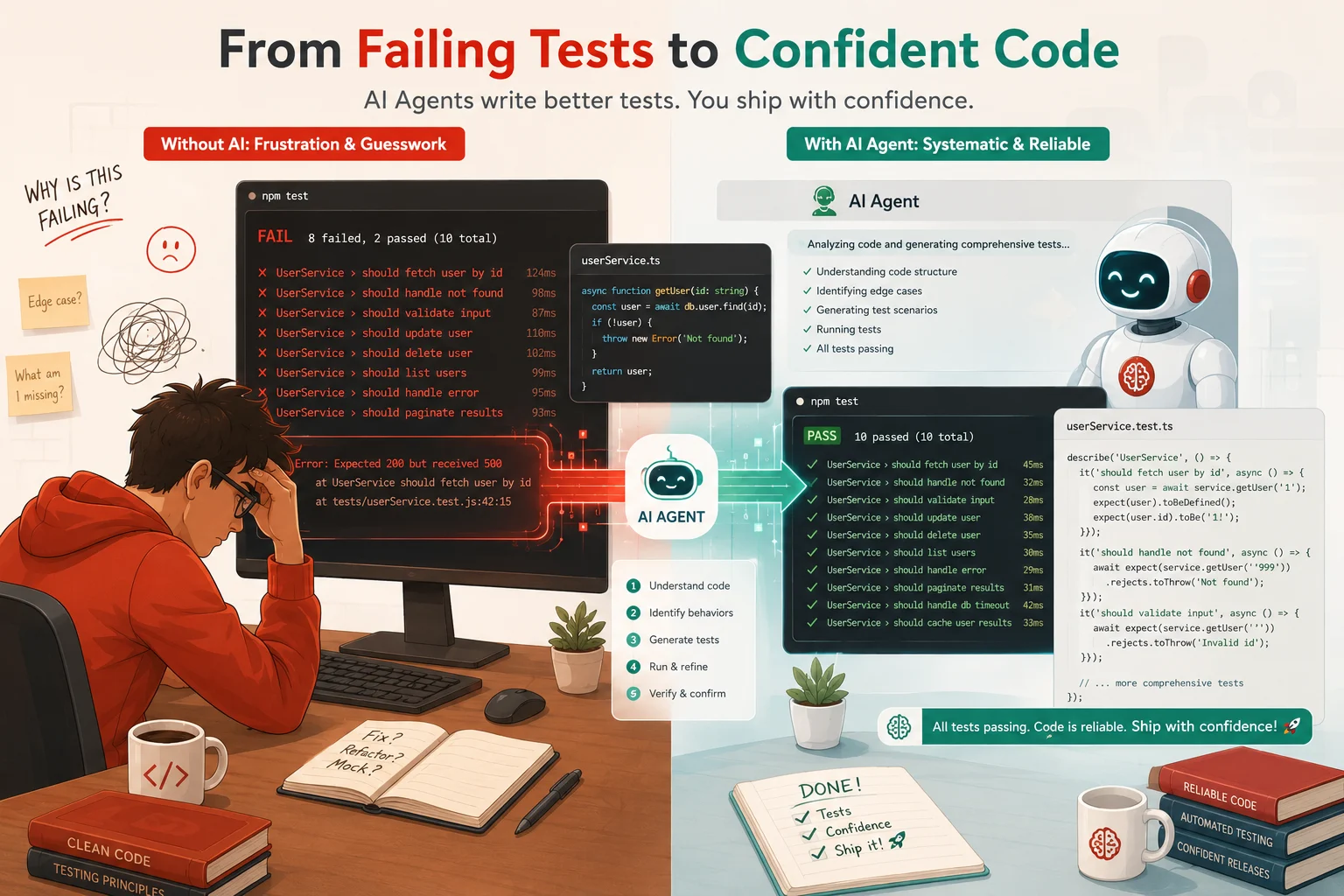
The day I realized writing tests was the bottleneck, not the code
I remember the exact sprint where it hit me(how AI agents write unit tests). We had shipped a solid feature, the code was clean, and the PR was sitting in review. My tech lead commented on one thing: “Where are the tests?” I had written maybe three. The function had fourteen edge cases I had mentally accounted for and completely failed to cover. I sat down and spent the next two hours writing tests instead of building the next feature. That felt wrong.
When I first heard about AI agents that could write unit tests, I was skeptical. I had tried GitHub Copilot’s inline test suggestions and found them shallow. They would generate a happy path test and call it done. But agentic test generation is a different category of tool entirely. These systems do not just autocomplete a single test. They read your codebase, understand the function’s dependencies, reason about edge cases, run the tests, observe failures, and rewrite until the suite passes.
This guide explains exactly how that works, where it breaks down, and what you need to know to use AI agents for unit testing without shipping a false sense of security along with your coverage badge.
What AI agent test generation actually is
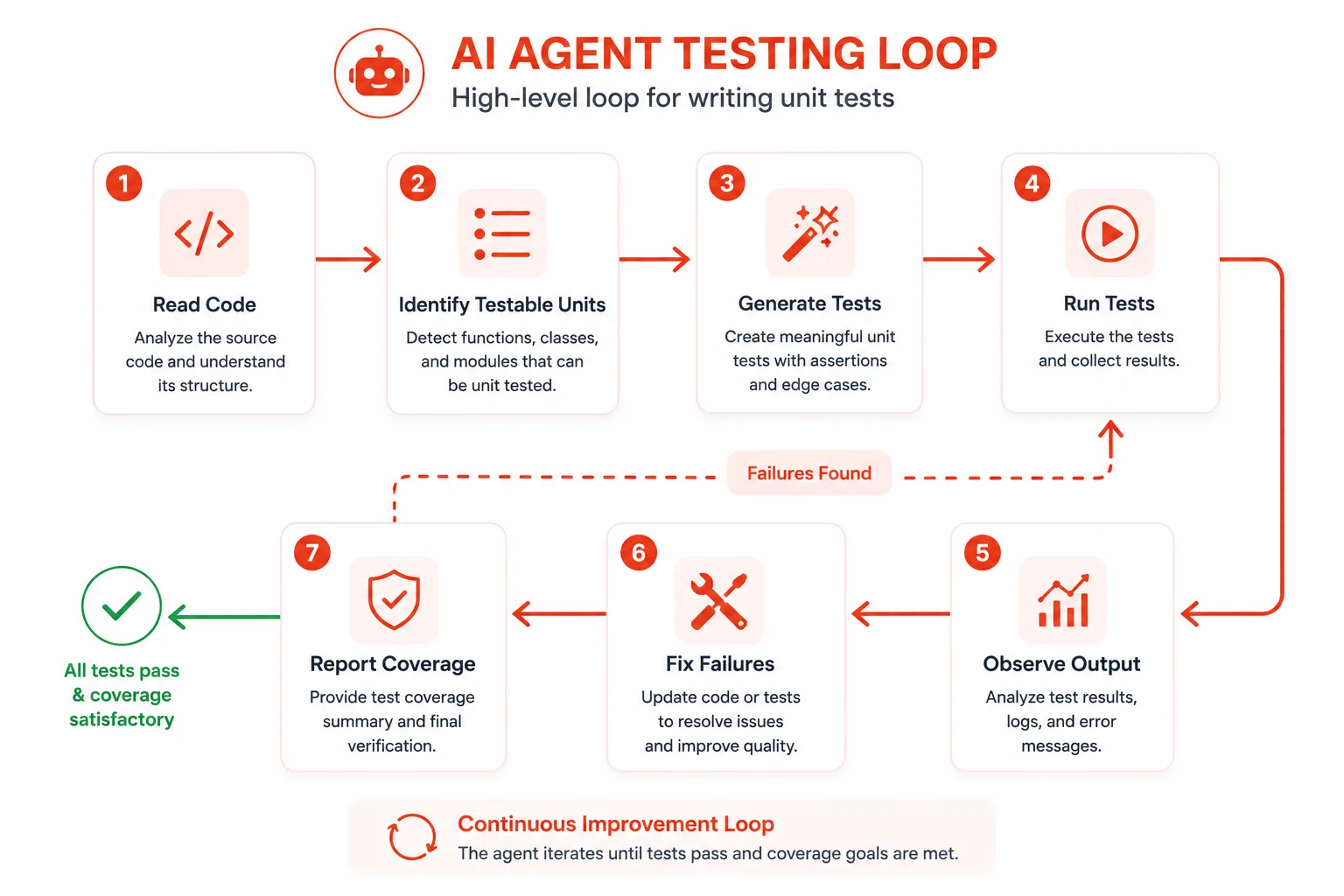
AI agent test generation is an autonomous, multi-step process where an LLM-powered agent analyzes source code, produces test cases, executes them in a real environment, interprets the results, and iterates until the tests pass. It is not a single-shot prompt. It is a loop.
The key distinction is tool use. A plain LLM like GPT-4 or Claude can suggest a test if you paste code into a chat window. An AI agent does the same reasoning but also has access to tools: a file reader, a code executor, a shell, and often a linter or static analyzer. That toolchain is what turns a suggestion into a working, committed test file.
Frameworks like AutoGen, Claude’s agent APIs, and tools like Devin and SWE-agent all operate on this principle. The agent is not just a smarter autocomplete. It is a worker you can assign a task to and leave running.
Why autonomous test writing exists: the real problem it solves
Developers universally understand that tests are valuable. They also universally skip writing them when deadlines tighten. That gap between knowing and doing is the problem that AI agents target.
Manual test writing is time-consuming, not because the act of typing is slow, but because thinking through edge cases requires context switching. You wrote the function; now you have to mentally become its adversary. You have to ask: what happens if this argument is null? What if the list is empty? What if the network is down? That adversarial mindset takes effort to summon, especially after you have already spent cognitive energy writing the implementation.
AI agents are well-suited for exactly this kind of systematic enumeration. They do not have cognitive fatigue. They will methodically consider the null case, the empty case, the boundary case, the exception path, and the concurrency scenario without losing focus. That is the genuine edge they provide.
How AI agents read and understand code before writing tests
Before any test gets written, the agent needs to understand what the code does. This step is more sophisticated than it looks.
Static analysis and AST traversal
Most agents start with static analysis. They parse the source file into an Abstract Syntax Tree (AST) to extract function signatures, argument types, return types, and any decorators or annotations. This gives the agent a structural map of the code before it ever reads a line of logic.
In Python, tools like ast and They libcst are commonly used for this. In JavaScript and TypeScript, agents often rely on @babel/parser the TypeScript compiler API. The agent uses the AST to identify every testable unit: public functions, class methods, and exported modules.
# Example: An agent using Python's ast module to extract function signatures
import ast

source = open("payments.py").read()
tree = ast.parse(source)

for node in ast.walk(tree):
    if isinstance(node, ast.FunctionDef):
        args = [a.arg for a in node.args.args]
        print(f"Function: {node.name}, Args: {args}")

# Output:
# Function: calculate_refund, Args: ['order_id', 'reason', 'partial_amount']
# Function: validate_payment_method, Args: ['method', 'user_id']
Dependency tracing
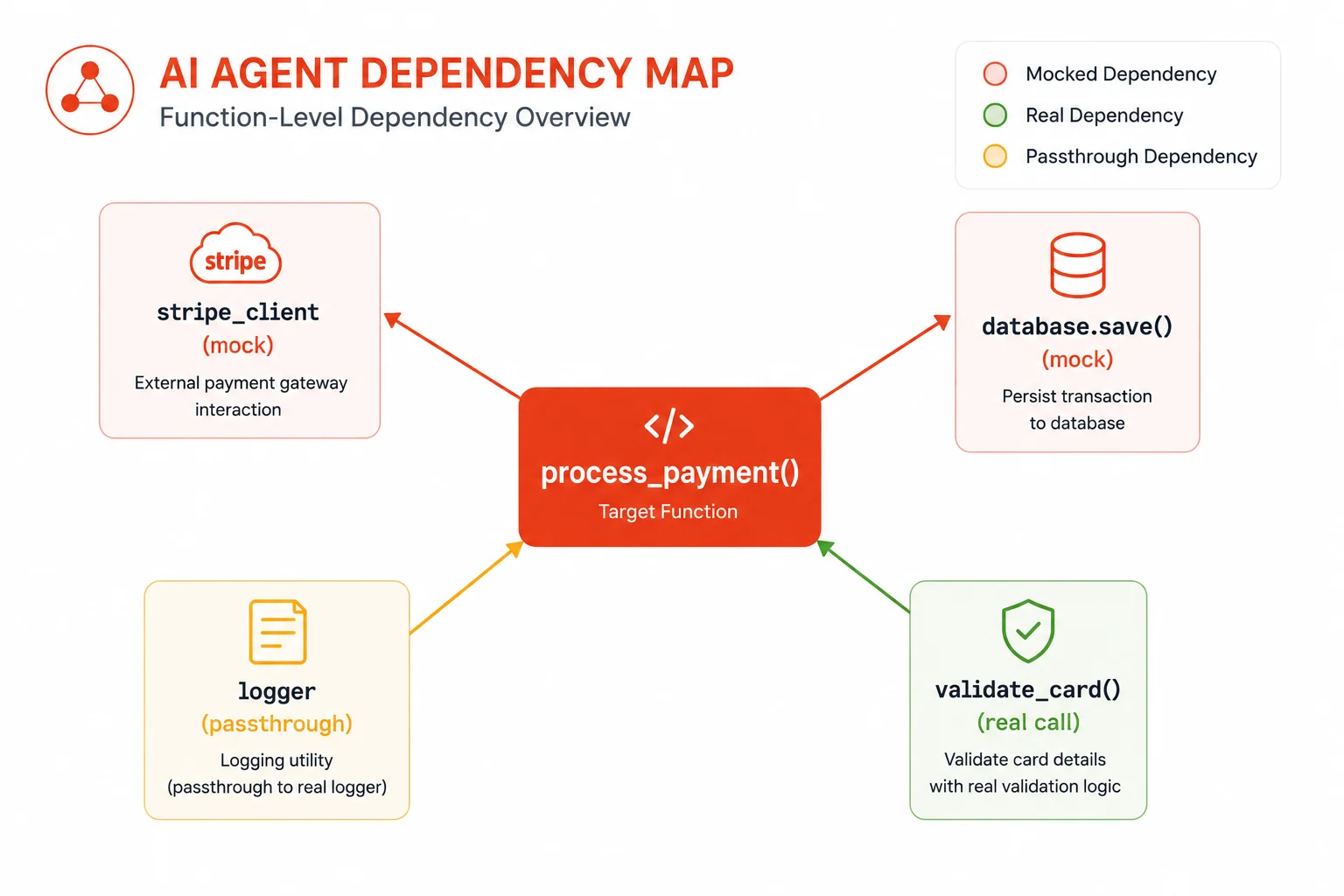
After mapping the structure, the agent traces dependencies. It looks at what the function calls, what it imports, and what external state it touches. This matters because the agent needs to decide what to mock. A function that calls a database needs a mocked database client in its tests. A function that reads from an environment variable needs a patched environment.
Agents that skip this step produce tests that fail not because the logic is wrong, but because a real network call times out or a real file does not exist in the test environment. Dependency tracing is what separates a working test suite from a collection of broken stubs.
Reading docstrings and comments
Well-documented code makes agent test generation significantly better. Docstrings that describe what a function does, what its arguments expect, and what it raises give the agent explicit contract information. The agent treats docstrings as a specification and tests against that specification rather than just inferring behavior from the implementation.
If you are working with a codebase that has strong docstrings, you will notice immediately that the generated tests are more precise and more complete. This is one of the places where good developer habits and AI capabilities compound each other.
How agents generate test cases: the reasoning process
Once the agent understands the code, it enters a planning phase where it enumerates the test scenarios it wants to cover. This is the step where the LLM’s reasoning capabilities provide the most leverage.
Happy path tests
The agent starts with the expected behavior: what should happen when valid inputs are provided? It generates at least one test per public function that exercises the normal flow and asserts on the expected output. These are the baseline tests that confirm the function works at all.
Boundary and edge case tests
This is where agents outperform most developers under time pressure. The agent systematically considers: zero, one, and many for collections; negative and zero for numerics; None and empty string for optional arguments; maximum values and overflow conditions for integers. It does not need to be reminded. It generates these cases by default because the LLM has internalized patterns from millions of test files in its training data.
# Example of edge case tests an agent might generate for a discount calculator
import pytest
from pricing import apply_discount

def test_apply_discount_standard_case():
    assert apply_discount(100.0, 0.10) == 90.0

def test_apply_discount_zero_discount():
    # Edge: discount of zero should return original price
    assert apply_discount(100.0, 0.0) == 100.0

def test_apply_discount_full_discount():
    # Edge: 100% discount should return zero
    assert apply_discount(100.0, 1.0) == 0.0

def test_apply_discount_negative_price():
    # Edge: negative price should raise ValueError
    with pytest.raises(ValueError, match="Price cannot be negative"):
        apply_discount(-50.0, 0.10)

def test_apply_discount_discount_exceeds_one():
    # Edge: discount over 100% should raise ValueError
    with pytest.raises(ValueError, match="Discount must be between 0 and 1"):
        apply_discount(100.0, 1.5)
Exception and error path tests
The agent reads every raise statement in the function and generates a corresponding test that triggers that exception. It constructs the input conditions that lead to the error path, calls the function, and asserts that the correct exception type is raised with the correct message. This is one of the most consistently underwritten areas of human test suites.
Mocking and patching
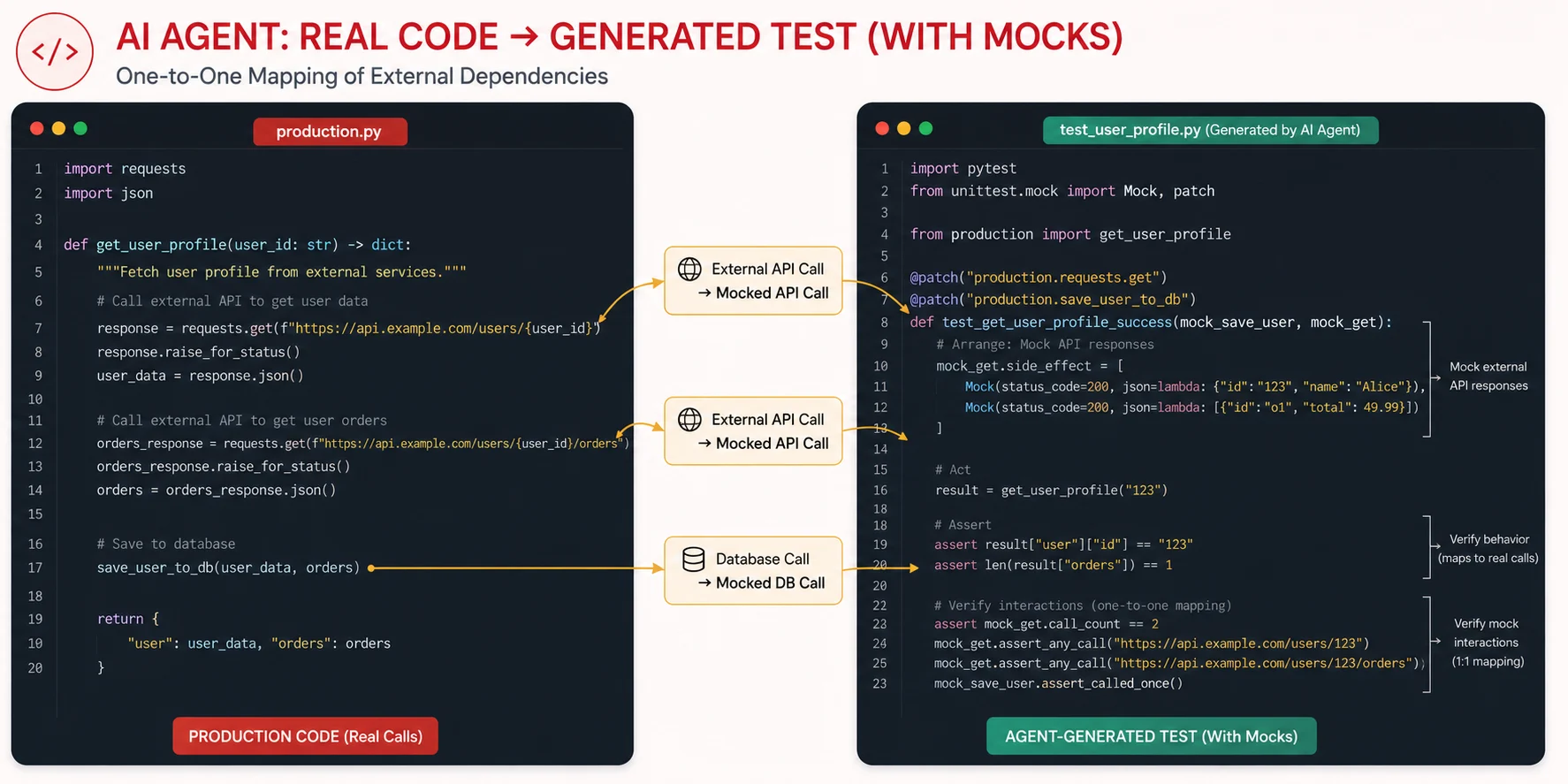
For functions with external dependencies, the agent selects the appropriate mocking strategy. Python, it uses unittest.mock.patch or pytest-mock. In JavaScript, it uses jest.fn() and jest.spyOn(). It assigns return values to the mocks that match the real interface of the dependency, then verifies the function under test interacts with those mocks correctly.
# Example: Agent-generated test with dependency mocking
from unittest.mock import patch, MagicMock
from notifications import send_order_confirmation

@patch("notifications.email_client")
@patch("notifications.order_repository")
def test_send_order_confirmation_success(mock_repo, mock_email):
    # Arrange: configure mocks to return realistic data
    mock_repo.get.return_value = {
        "id": "ord_123",
        "user_email": "user@example.com",
        "items": ["Widget A", "Widget B"],
        "total": 49.99
    }
    mock_email.send.return_value = {"status": "sent"}

    # Act
    result = send_order_confirmation("ord_123")

    # Assert: function returned success and called email client correctly
    assert result["status"] == "sent"
    mock_email.send.assert_called_once_with(
        to="user@example.com",
        subject="Your order is confirmed",
        body_contains="ord_123"
    )
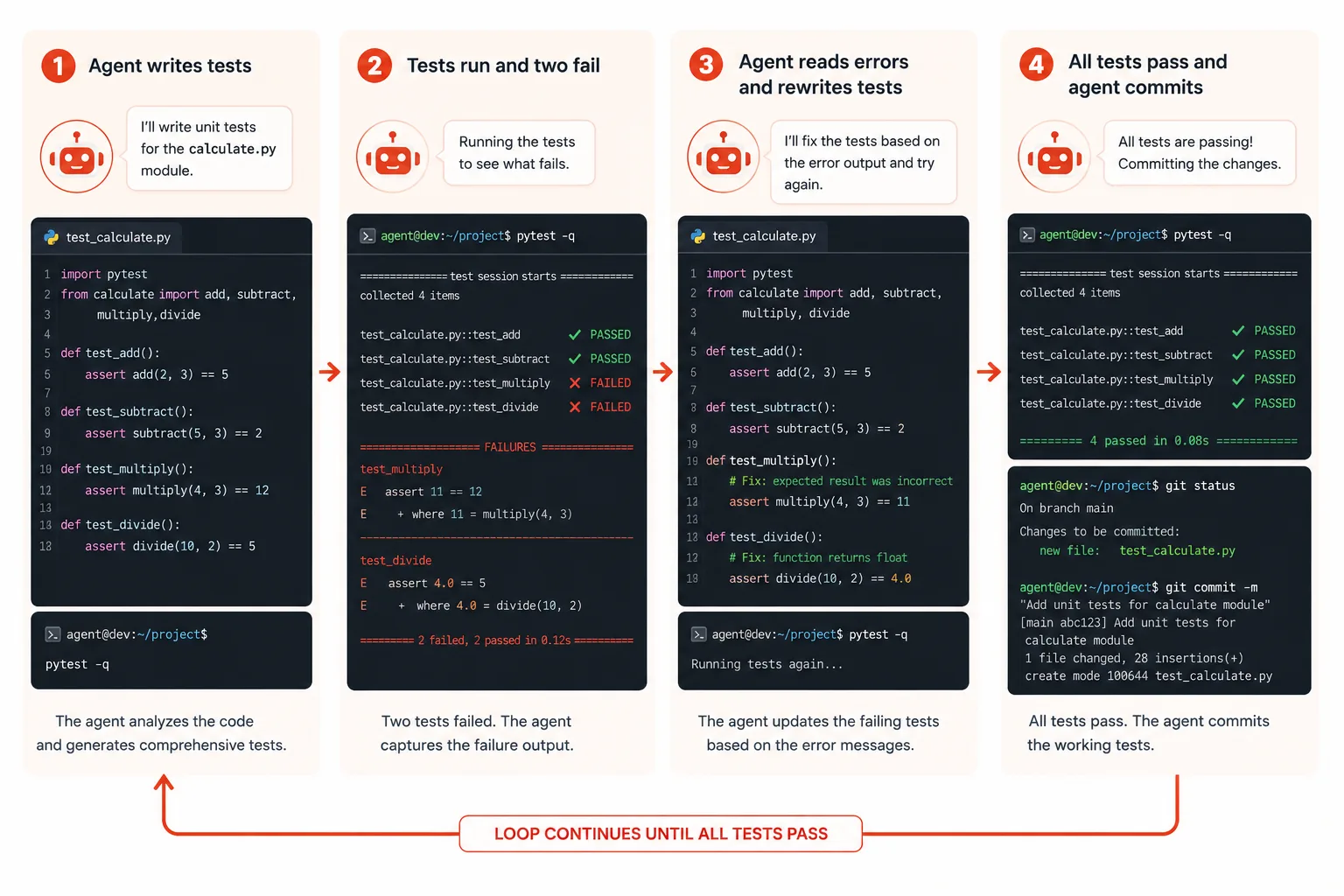
The execution loop: run, observe, fix, repeat
Generating tests is only half the job. The agent then runs them. This is the part that separates agentic test generation from a one-shot LLM prompt.
Running the test suite
The agent calls the test runner directly. For Python projects, it runs pytest. For JavaScript projects, it runs npm test or npx jest. It captures both stdout and stderr from the test run and parses the output to identify which tests passed, which failed, and what error messages were produced.
Reading failure output and reasoning about fixes
When a test fails, the agent reads the full traceback. It identifies whether the failure is a logic error in the test itself, an incorrect mock setup, a missing import, or an actual bug in the source code it was testing. Each failure type requires a different fix.
A logic error in the test means the agent’s assumption about what the function should return was wrong. The agent re-reads the source code, revises its understanding, and updates the assertion. A missing import is a straightforward fix. An incorrect mock means the agent missed a dependency or configured the mock’s return value incorrectly.
An actual bug in the source code is the most interesting outcome. The agent’s test has revealed a defect that existed before it started. In that case, a well-designed agent workflow will surface the bug to the developer rather than silently patching the test to match the broken behavior.
The iteration budget
Agents need a stopping condition. Without one, a failing test on a genuinely complex bug could send the agent into an infinite loop of attempted fixes. Most production agent workflows set a maximum iteration count, typically between 3 and 10 attempts per test file, before reporting the failure to the developer for manual review.
The components of a production-ready AI test agent
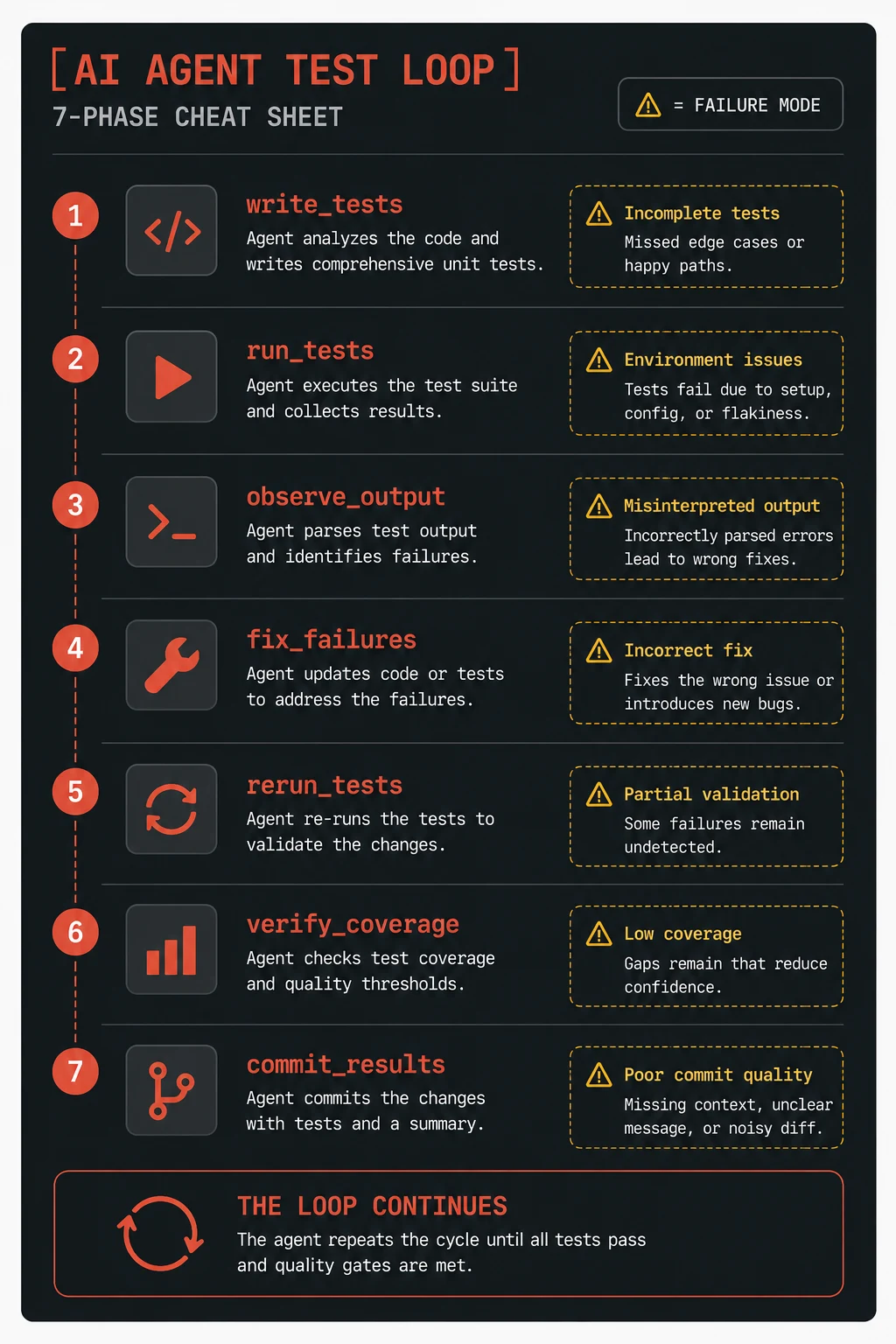
Understanding the individual components helps you evaluate tools and debug workflows when they go wrong.
The planner
The planner is the LLM reasoning step that takes the code analysis output and produces a list of test scenarios before writing any code. It answers: what cases need to be covered? A strong planner considers functional requirements, error paths, boundary conditions, and integration points. The quality of the plan directly determines the quality of the tests.
The code generator
The code generator translates each planned scenario into syntactically correct test code. It knows the testing conventions for the language and framework being used. It respects project-level configuration, like whether the project uses pytest fixtures or a custom base test class.
The executor
The executor runs the test suite in a sandboxed environment and captures results. Sandboxing matters here. The agent should not have access to production databases or live API keys during test execution. A properly configured executor runs tests against mocked or in-memory alternatives only.
The observer
The observer parses the test runner output and classifies each result. It extracts failure messages, tracebacks, and coverage data. It feeds this information back to the planner and generator for the next iteration.
The coverage analyzer
After the tests pass, the coverage analyzer checks which lines of the source code were exercised during the test run. It identifies uncovered branches and reports them. Some agent workflows will generate additional tests specifically targeting uncovered branches until a minimum coverage threshold is reached.
Common mistakes agents make and how to catch them
AI agents writing tests are impressive, but they make consistent, predictable mistakes. Knowing these patterns lets you catch problems in code review instead of production.
Testing the mock, not the function
This is the most common agent mistake. The agent mocks a dependency, configures the mock to return a fixed value, calls the function under test, and then asserts that the return value matches what the mock was configured to return. The test passes because the mock is doing all the work. It does not verify that the function processes the mocked data correctly at all.
Brittle assertion strings
Agents sometimes write assertions that match exact error message strings like assert str(exc.value) == "Order not found for ID: ord_123". If the error message changes, the test breaks even though the behavior is still correct. Better practice is to assert on the exception type and check only a stable substring of the message.
Missing teardown for side effects
If the function under test writes to a file, inserts a database record, or mutates global state, the agent needs to clean that up after the test. Agents sometimes miss this, which causes tests to pass in isolation but fail when run in sequence because of leftover state from a previous test.
Over-reliance on implementation details
Agents sometimes write tests that assert on internal implementation details rather than observable behavior. A test that asserts a specific private method was called with specific internal arguments will break every time you refactor the implementation, even if the external behavior stays the same. Good tests treat functions as black boxes.
Quick reference: AI agent test generation at a glance
| Phase | What the agent does | Common failure mode |
|---|---|---|
| Code reading | Parses AST, traces dependencies, reads docstrings | Missing indirect dependencies that cause test crashes |
| Planning | Enumerates happy path, edge cases, and exception paths | Shallow coverage when docstrings are missing |
| Generation | Writes test functions with mocks and assertions | Brittle assertions on internal implementation details |
| Execution | Runs pytest or Jest, captures stdout/stderr | Sandbox misconfiguration lets real network calls through |
| Observation | Classifies pass/fail, extracts tracebacks | Misclassifying a source code bug as a test bug |
| Iteration | Rewrites failing tests up to the iteration budget | Silent test weakening to make failures go away |
| Coverage analysis | Maps untested branches, generates gap-filling tests | Hitting the coverage number without testing real scenarios |
What AI agents genuinely cannot do (yet)
It is worth being clear about the real limits, because overselling this capability leads to misplaced trust in generated test suites.
AI agents cannot understand business requirements that are not expressed in code or documentation. If your function is supposed to calculate tax rates differently for different jurisdictions, and that rule is in a product spec nobody put in a docstring, the agent will not know to test for it. The agent tests the code as written, not the product as intended.
Agents also struggle with highly stateful, distributed systems where the correct behavior of a function depends on a sequence of events across multiple services. They can mock individual calls, but reasoning about realistic distributed failure scenarios like network partitions, partial writes, and message queue redelivery is outside the reliable range of current agent capabilities.
Performance tests are largely out of scope as well. The agent can generate a test that calls a function and asserts it completes within a time limit, but it cannot reason about what a realistic load looks like or what the meaningful performance thresholds should be for your system.
Further reading
- Anthropic Agents Documentation: Building agentic workflows with Claude
- SWE-bench: Can Language Models Resolve Real-World GitHub Issues? (arXiv)
- pytest Monkeypatching and Mocking: Official Documentation
Start small and verify everything
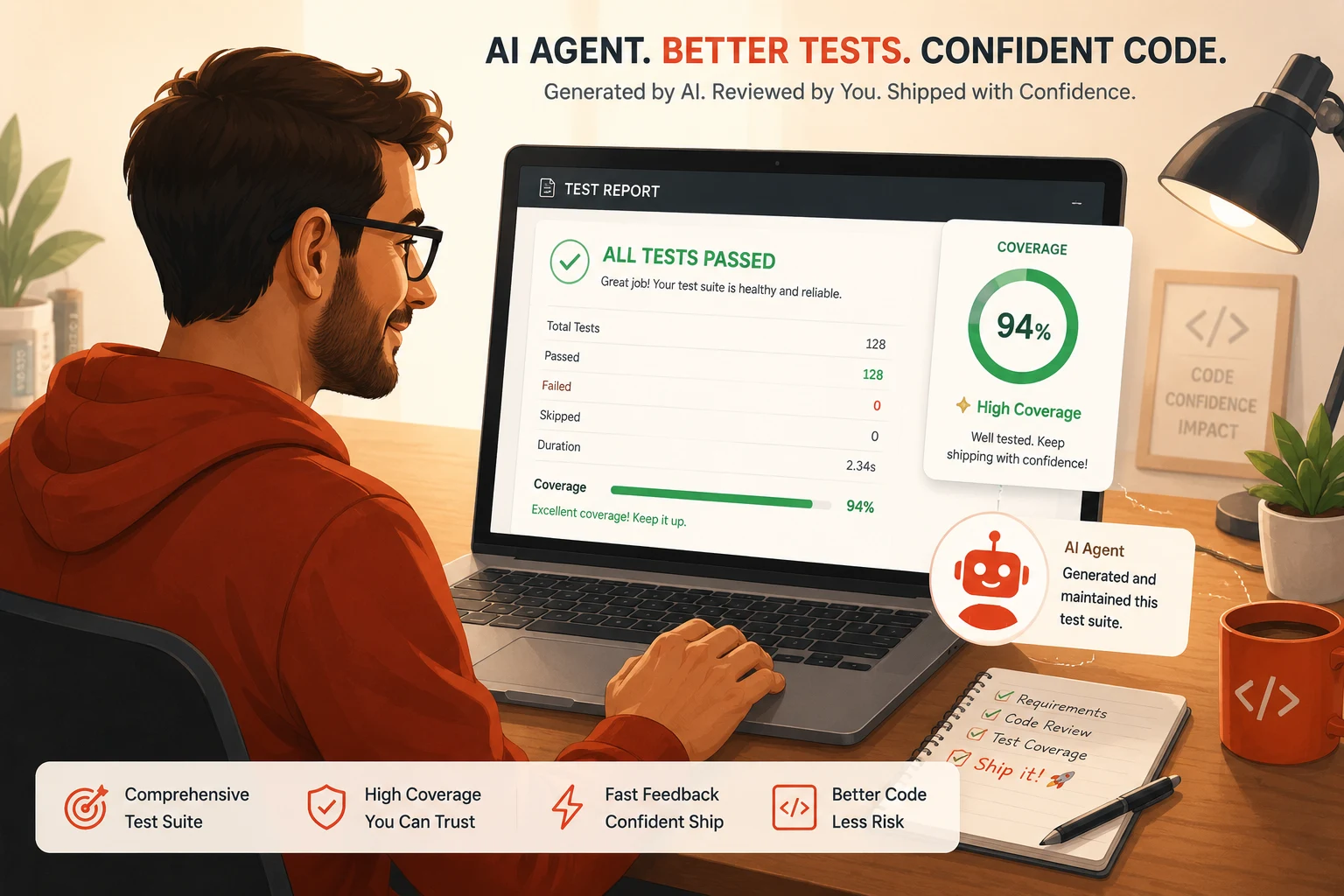
The worst thing you can do with AI-generated tests is to merge them without reading them. The best thing you can do is use them as a first draft: run them, read the assertions, delete the ones testing mock return values instead of real logic, and build from there. You will end up with a test suite that would have taken you hours to write manually, produced in minutes, and reviewed in ten minutes instead of being written from scratch.
AI agents writing unit tests are not a replacement for developer judgment about what matters in a test. They are a replacement for the tedious mechanical work of translating what you already know about edge cases into code. That division of labour is worth learning to use well.