
I kept rebuilding the same integration over and over, and then I found out there was a better way
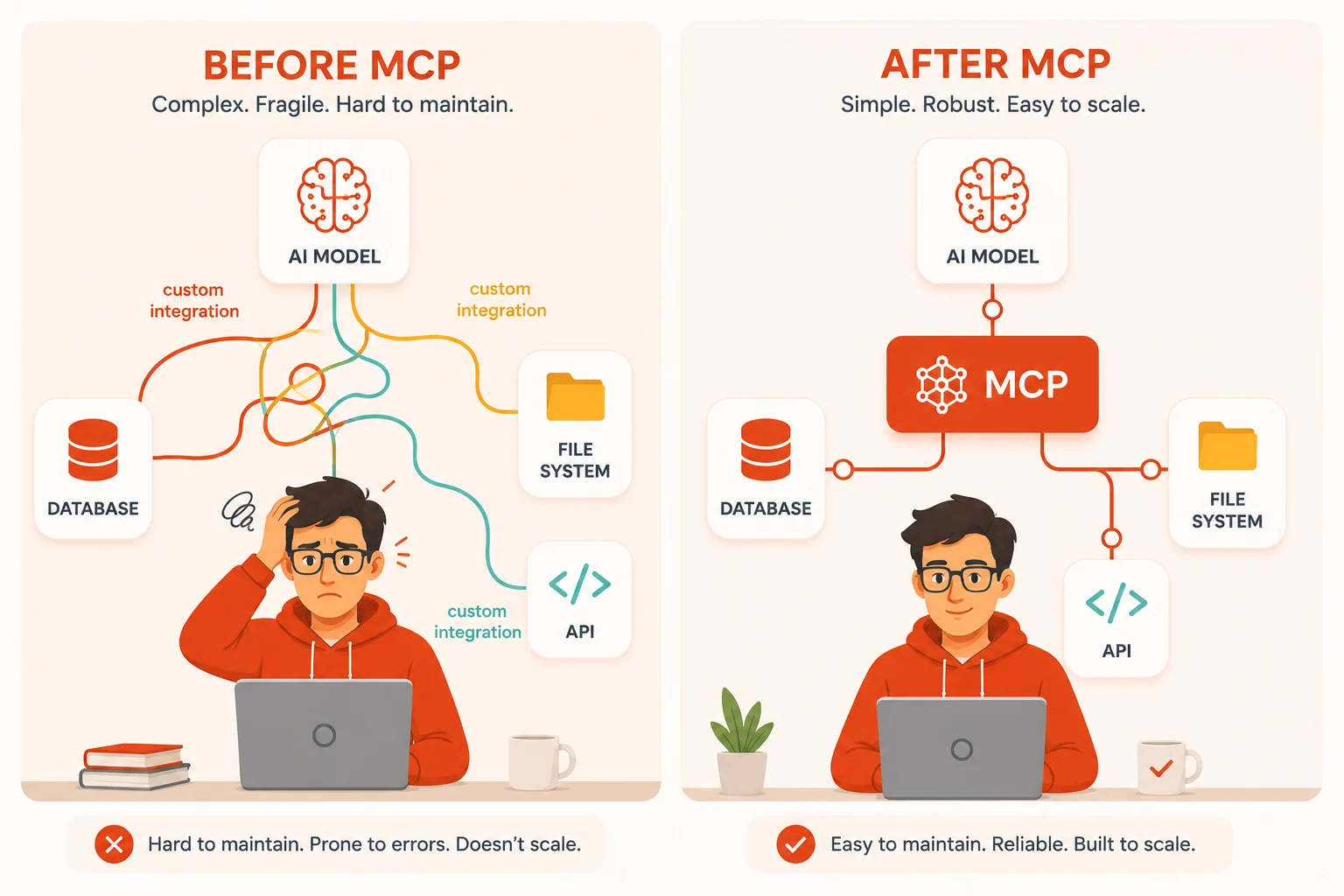
Every AI agent project I built in 2023 had the same hidden problem. I needed the agent to talk to external things. A database here, a file system there, a third-party API somewhere else. And every single time, I had to wire it up from scratch. Custom tool definitions. Custom parsing logic. Custom error handling. It worked, but it never felt right. The code was brittle, repetitive, and completely non-transferable from one project to the next.
Then, in late 2024, Anthropic released something called the Model Context Protocol, and I realized I had been solving the wrong problem. I kept building bespoke pipes when what I actually needed was a standard socket. MCP is exactly that. A universal, open standard that defines how AI applications connect to external tools, data sources, and services without anyone having to invent the connection layer from scratch each time.
If you are building with AI agents today, or planning to, understanding MCP is not optional knowledge anymore. It is becoming the foundation that serious AI integrations are built on. This article explains what it is, how it works under the hood, what you can actually do with it, and where developers most commonly go wrong when they first start using it.
What is the Model Context Protocol? (Model Context Protocol MCP explained)
The Model Context Protocol, or MCP, is an open standard developed by Anthropic that defines a universal way for AI applications to connect to external data sources, tools, and services. It was released in November 2024 and is designed to solve one of the most persistent friction points in AI development: getting a language model to interact with the real world in a consistent, reusable, and secure way.
Think of it this way. Before USB was invented, every device that connected to a computer needed its own proprietary connector, its own drivers, and its own setup process. USB created a universal standard that made any device work with any computer, regardless of who made either one. MCP does the same thing for AI integrations. Instead of every developer building a custom bridge between their AI model and their database, file system, or API, MCP defines a standard protocol that any AI host and any external service can speak fluently.
MCP is open source, model-agnostic, and not proprietary to Anthropic’s products. The specification is publicly available, and the community has already built hundreds of MCP servers for tools ranging from GitHub to Slack to PostgreSQL to Google Drive.
Why MCP exists and what problem it actually solves
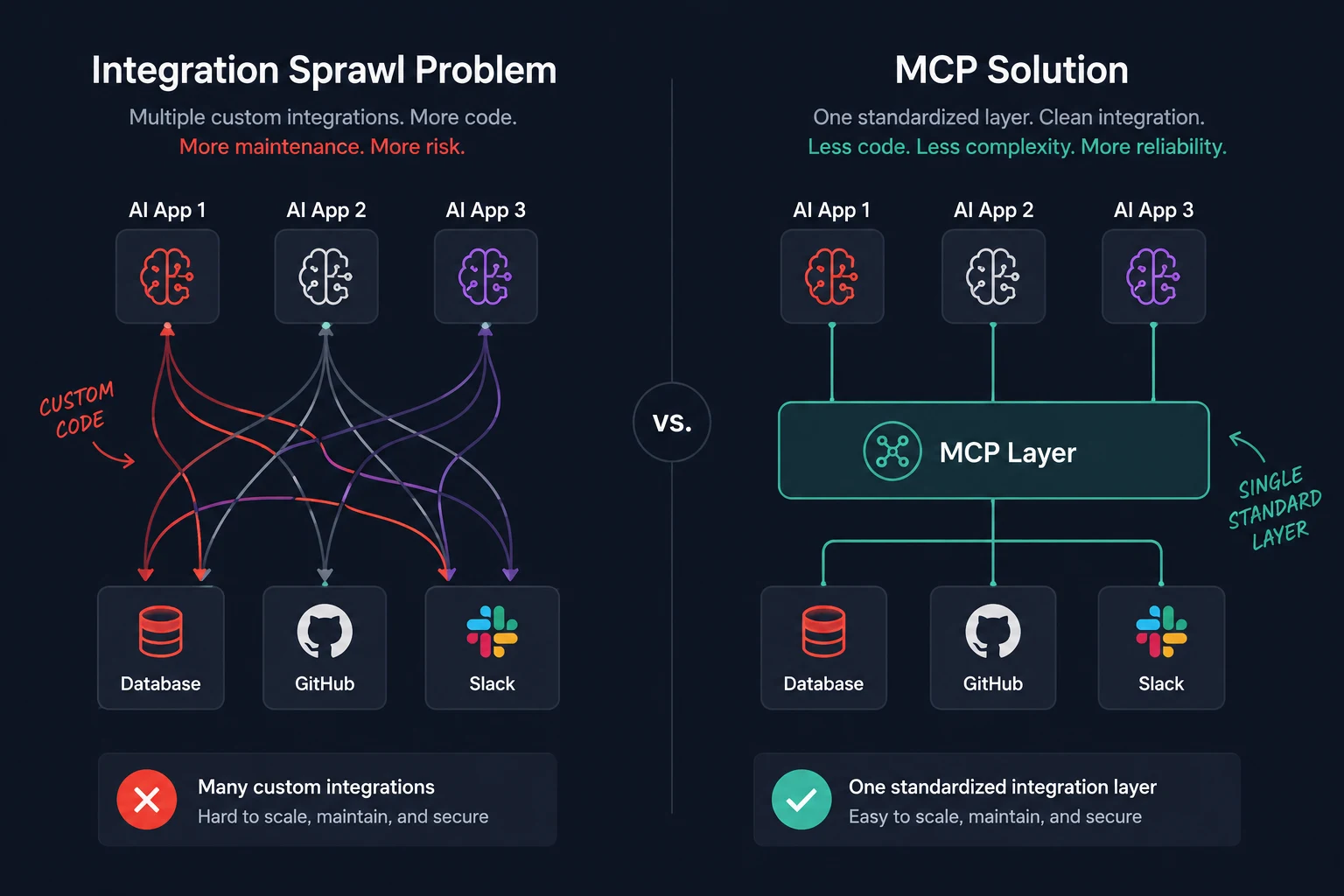
The core problem MCP addresses is what you might call the integration sprawl problem. Every AI agent or application that needs to use external tools requires someone to write the integration layer. That layer needs to define what the tool does, what inputs it accepts, how errors are handled, how authentication works, and how results are formatted for the model to understand.
When every team builds this layer differently, you end up with a fragmented ecosystem where:
- Every integration is a one-off that cannot be reused across projects
- Developers spend an enormous amount of time on plumbing instead of the actual product
- Security and permissions handling vary wildly from one integration to the next
- AI models have no consistent way to understand what capabilities are available to them
- Switching between AI providers requires rewriting all your integrations
MCP solves all of these at once by standardizing the contract between the AI application and the external world. Once something is an MCP server, any MCP-compatible AI application can use it. Once your AI application speaks MCP, it can connect to any MCP server that already exists.
Model Context Protocol MCP explained
How MCP works: the architecture explained
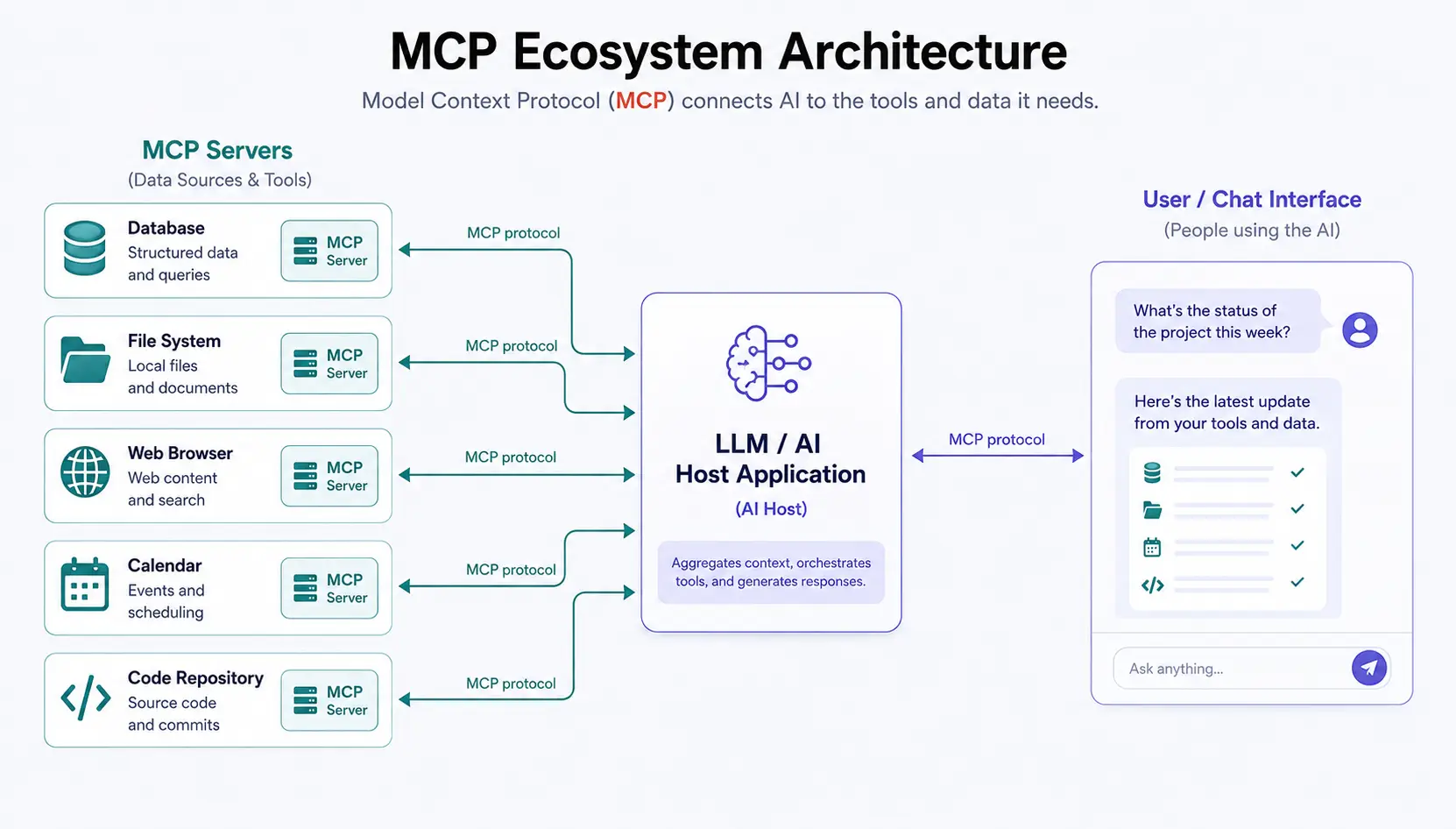
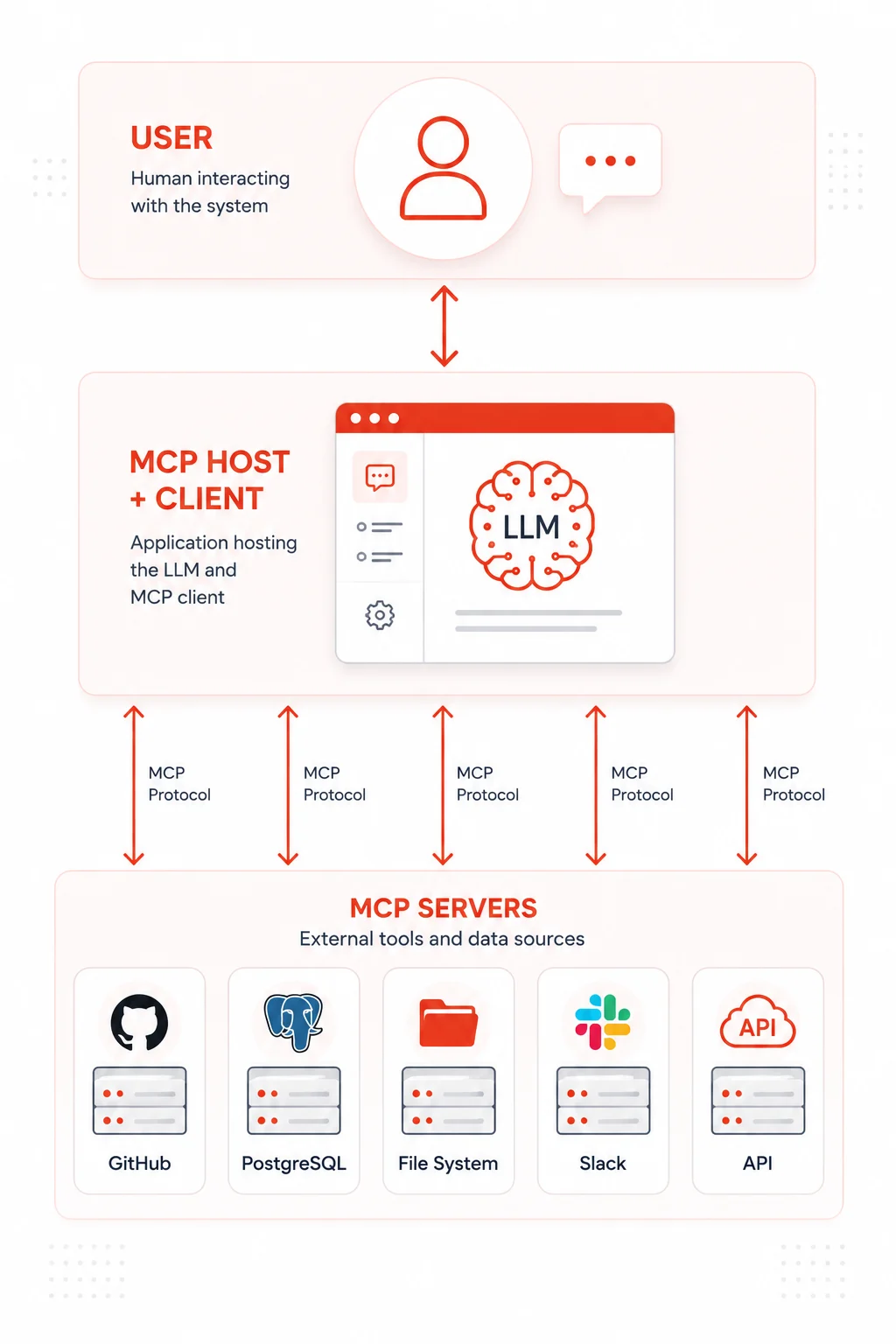
MCP is built on a client-server architecture with three main roles. Understanding these three roles is the key to understanding everything else about how the protocol works.
The MCP host
The host is the AI application that the end user interacts with. This could be Claude Desktop, a custom agent you built, an IDE like Cursor, or any other application that uses an LLM. The host is responsible for managing connections to MCP servers, deciding which servers are available, and passing information between the user, the LLM, and the servers.
The MCP client
The client is the component inside the host that actually speaks the MCP protocol. It maintains a one-to-one connection with each MCP server, handles the communication layer, and translates between what the LLM needs and what the server provides. In most implementations, the host and the client are part of the same application. You do not build them separately. You build a host that has a client built in.
The MCP server
The server is where the actual capabilities live. Each MCP server exposes a specific set of tools, resources, or prompts that the AI application can use. A GitHub MCP server might expose tools for creating issues, reading pull requests, and searching repositories. A PostgreSQL MCP server might expose tools for running queries and reading schema information. Servers can be local processes running on your machine or remote services running in the cloud.
The three things an MCP server can expose
Every MCP server exposes capabilities through one or more of three primitives. These are the building blocks of everything in the protocol.
Tools
Tools are functions that the AI model can call to take an action or retrieve computed information. They are the most commonly used MCP primitives. A tool has a name, a description that the model uses to decide when to call it, and an input schema that defines what arguments it accepts. The model requests a tool call, the server executes it, and the result comes back into the model’s context.
Examples of tools include creating a GitHub issue, sending a Slack message, running a database query, reading a file from disk, or searching the web. Tools are the primary way AI agents interact with the world through MCP.
Resources
Resources are data that the server exposes for the AI to read. Unlike tools, resources are not actions. They are more like files or documents that the model can pull into its context. A resource could be the contents of a specific file, a database record, a configuration document, or any other piece of structured or unstructured data that the server makes available.
Resources have URIs that the host uses to identify and request them. Think of them as bookmarks to data that the model can reference when it needs more context about something.
Prompts
Prompts are reusable templates that the server can provide to the host. They are predefined message structures that help the model interact with the server in the most effective way. A database server might provide a prompt template that structures queries in a way the model knows how to use well. A code review server might provide a prompt that sets up the right context for analyzing a pull request.
Prompts are the least commonly used of the three primitives right now, but they are a powerful way to encode expertise about how to interact with a specific system directly into the server itself.
What an MCP server actually looks like in code
The best way to understand MCP concretely is to look at a simple server implementation. The official SDKs are available for Python and TypeScript. Here is a minimal TypeScript MCP server that exposes one tool:
import { Server } from "@modelcontextprotocol/sdk/server/index.js";
import { StdioServerTransport } from "@modelcontextprotocol/sdk/server/stdio.js";
import {
  CallToolRequestSchema,
  ListToolsRequestSchema,
} from "@modelcontextprotocol/sdk/types.js";

const server = new Server(
  {
    name: "weather-server",
    version: "1.0.0",
  },
  {
    capabilities: {
      tools: {},
    },
  }
);

// Tell the client what tools this server exposes
server.setRequestHandler(ListToolsRequestSchema, async () => {
  return {
    tools: [
      {
        name: "get_weather",
        description:
          "Get the current weather for a city. Use this when the user asks about weather conditions in a specific location.",
        inputSchema: {
          type: "object",
          properties: {
            city: {
              type: "string",
              description: "The name of the city to get weather for",
            },
          },
          required: ["city"],
        },
      },
    ],
  };
});

// Handle when the model actually calls the tool
server.setRequestHandler(CallToolRequestSchema, async (request) => {
  if (request.params.name === "get_weather") {
    const city = request.params.arguments?.city as string;

    // In a real server, you would call a weather API here
    const weatherData = await fetchWeatherFromAPI(city);

    return {
      content: [
        {
          type: "text",
          text: JSON.stringify(weatherData),
        },
      ],
    };
  }

  throw new Error(`Unknown tool: ${request.params.name}`);
});

// Start the server using stdio transport
const transport = new StdioServerTransport();
await server.connect(transport);
That is a complete, working MCP server. Any MCP-compatible host can now connect to it, discover the get_weather tool automatically, and let the AI model call it when appropriate. You write this once, and it works with any host that speaks MCP.
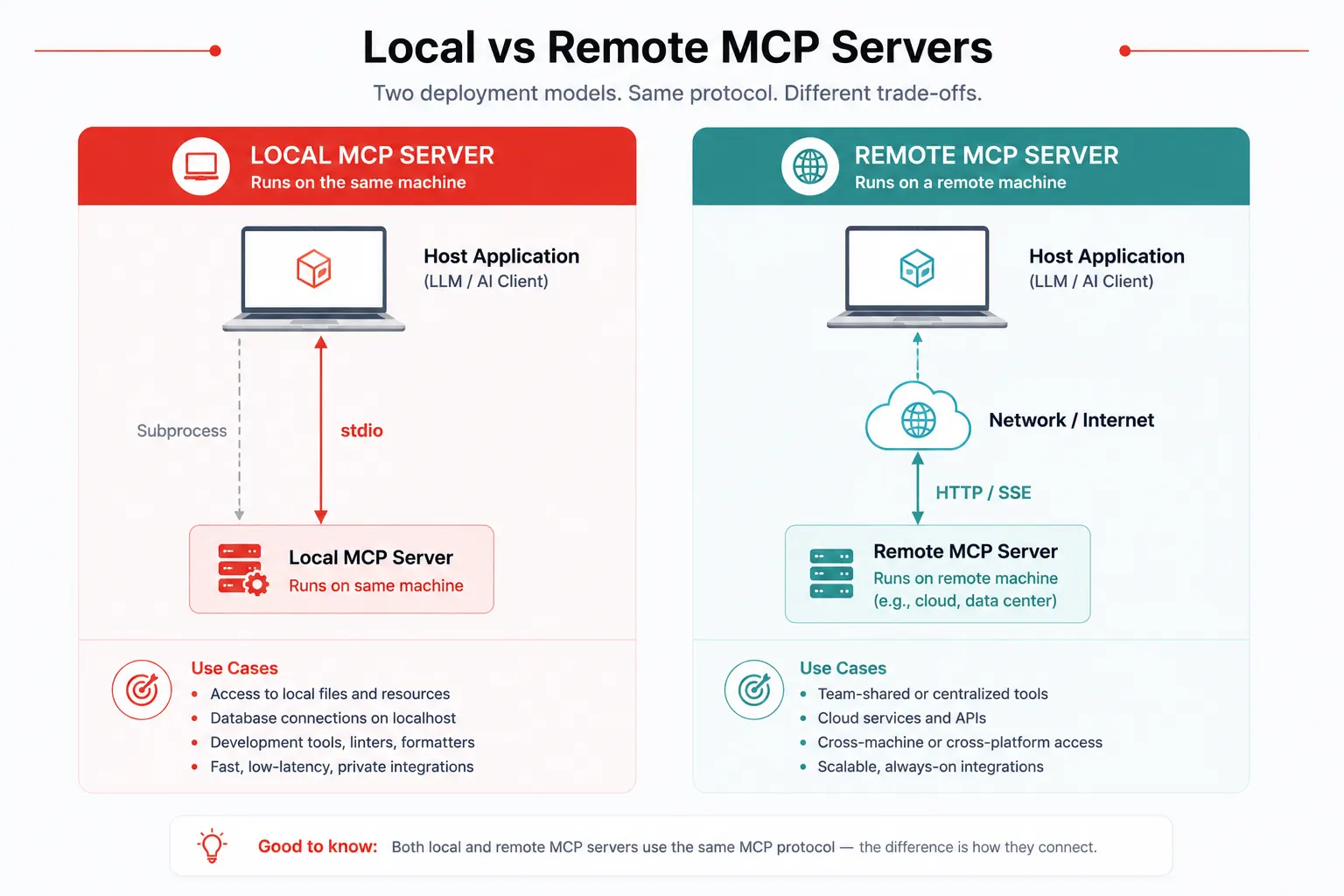
Local servers vs remote servers: what is the difference?
MCP servers come in two deployment flavors, and choosing between them matters depending on what you are building.
Local MCP servers
A local server runs as a process on the same machine as the host application. The host launches the server as a subprocess and communicates with it over stdio (standard input and output). This is the simplest and most common setup for development and for tools that need access to local resources like your file system, local databases, or development environment.
Claude Desktop, for example, launches local MCP servers as subprocesses based on a configuration file you set up. You define which servers to run and where their executables are, and Claude Desktop handles starting them, maintaining the connection, and shutting them down cleanly.
Remote MCP servers
A remote server runs as a network service that the host connects to over HTTP using a transport called Server-Sent Events (SSE) or the newer streamable HTTP transport. Remote servers are the right choice when you need to share a server across multiple users or machines, when the server needs to run in a cloud environment, or when the capabilities it exposes live on a remote system anyway.
Remote servers require authentication and careful security design since they are accessible over the network. The MCP specification includes provisions for OAuth-based authorization flows specifically for this use case.
Model Context Protocol MCP explained
Setting up MCP with Claude Desktop: a practical walkthrough
The fastest way to experience MCP hands-on is to add a server to Claude Desktop. Here is exactly how to do it.
- Open your Claude Desktop configuration file. On macOS, it lives at
~/Library/Application Support/Claude/claude_desktop_config.json. On Windows it is at%APPDATA%\Claude\claude_desktop_config.json - Add a server entry. The configuration file uses a simple JSON format. Here is an example that adds the official filesystem MCP server:
{
  "mcpServers": {
    "filesystem": {
      "command": "npx",
      "args": [
        "-y",
        "@modelcontextprotocol/server-filesystem",
        "/Users/yourname/Documents"
      ]
    }
  }
}- Restart Claude Desktop. The application will launch the configured servers as subprocesses on startup. You will see a small tools icon in the chat interface indicating MCP servers are connected.
- Test it. Ask Claude something that requires the tool. With the filesystem server active, try asking “What files are in my Documents folder?” Claude will automatically call the filesystem server’s tools to answer you.
That is all it takes to connect a real capability to Claude through MCP. No custom code, no API keys for the MCP layer itself, no complex setup.
The MCP ecosystem: what servers already exist
One of the biggest practical advantages of MCP is that you do not have to build most servers yourself. The community has already built a large and growing library of ready-to-use servers.
Anthropic maintains a set of official reference servers covering common use cases. These include a filesystem server, a Git server, a GitHub server, a PostgreSQL server, a Brave Search server, a Google Drive server, a Slack server, and more. All of them are open source and available to use or fork.
Beyond the official servers, the community directory lists hundreds of third-party servers covering everything from Notion to Jira to Figma to AWS to linear project management. Before you build a custom server for any well-known tool, it is worth checking whether one already exists.
You can browse the community list at the Awesome MCP Servers repository on GitHub, which is maintained by the community and updated regularly as new servers are published.
MCP vs function calling: what is the actual difference?
This is one of the most common questions developers ask when they first encounter MCP, and it deserves a direct answer.
Function calling (or tool use, as Anthropic calls it) is the mechanism by which a language model signals that it wants to call a function and receives the result back in context. It is a feature built into the model API itself. You define tools inline in your API request, the model calls them during inference, and your application handles the execution.
MCP is a layer built on top of that mechanism. It standardizes how tools, resources, and prompts are discovered, described, and communicated between applications. When an MCP host connects to an MCP server, the server’s tools are automatically discovered and then presented to the model as function calling definitions. MCP handles the discovery, the schema translation, the connection management, and the lifecycle. Function calling handles the actual model-to-tool invocation at inference time.
A useful way to think about it is this. Function calling is the electrical outlet standard. MCP is the power grid that delivers electricity to all the outlets consistently. You need both for the system to work, but they operate at different layers of the stack.
Common mistakes developers make with MCP
Writing a server for everything from scratch
The first instinct many developers have is to build a custom MCP server for every tool they need. Before writing a single line of server code, check the existing ecosystem. The official reference servers and the community directory cover an enormous range of use cases. Reusing an existing server saves hours of work and gives you a production-tested implementation for free.
Putting too many tools in one server
A server that exposes thirty different tools becomes difficult for the model to reason about correctly. The model reads all the tool descriptions when deciding what to call, and a crowded namespace leads to the wrong tool getting called at the wrong time. Keep servers focused on a single domain. A GitHub server handles GitHub things. A database server handles database things. Smaller, focused servers are easier for the model to use accurately.
Writing vague tool descriptions
The description field in a tool definition is not documentation for humans. It is the instruction the model uses to decide when to call that tool. Vague descriptions like “searches for data” produce inconsistent tool selection behavior. Write descriptions that answer when the tool should be called, what it returns, and when it should not be used. The more specific and decision-guiding the description, the more reliably the model will reach for the right tool.
Ignoring the security implications of local servers
A local MCP server running on a developer’s machine has access to whatever the developer’s machine has access to. That is by design. But it also means that if the AI model is manipulated through a prompt injection attack, it could instruct the server to take actions you did not intend. Always scope your servers to the minimum required permissions. A server that only needs to read files should not also have write access. A server that only queries a database should not be able to modify it.
Treating remote servers like local servers for security
Remote MCP servers accessible over the network require authentication and authorization that local servers do not. Do not expose a remote MCP server without implementing proper OAuth flows, validating tokens on every request, and scoping permissions to exactly what each user or application needs. The MCP specification has detailed guidance on this, and skipping it creates serious security exposure.
MCP quick reference
| Concept | What it is | Key point to remember |
|---|---|---|
| MCP host | The AI application the user interacts with | Manages connections to all MCP servers |
| MCP client | The protocol layer inside the host | Handles one-to-one communication with each server |
| MCP server | Exposes tools, resources, or prompts to the host | Can be local (stdio) or remote (HTTP/SSE) |
| Tools | Functions the model can call to take actions | Most commonly used primitive. Require a name, description, and input schema |
| Resources | Data that the model can read into its context | Identified by URI. Think of them as readable files or documents |
| Prompts | Reusable message templates provided by the server | Encode domain expertise about how to use the server effectively |
| Local server | Runs as a subprocess on the same machine as the host | Uses stdio transport. Simpler setup. Best for development and local tools |
| Remote server | Runs as a network service, the host connects to over HTTP | Requires authentication. Best for shared, cloud-hosted capabilities |
| Transport | The communication channel between the host and the server | Stdio for local servers. Server-Sent Events or streamable HTTP for remote |
Where MCP is heading
MCP launched in November 2024, and the adoption curve since then has been steep. Major AI development platforms, including Claude, Cursor, Zed, Sourcegraph, and others, have added MCP support. The number of community-built servers has grown into the hundreds. Microsoft, Google, and other major technology companies have announced or shipped MCP-compatible integrations.
The trajectory suggests MCP is on its way to becoming the USB standard of AI integrations, exactly what Anthropic designed it to be. As more hosts adopt the protocol, the value of each individual server multiplies. As more servers get built, the value of being an MCP-compatible host multiplies. It is a classic network effects dynamic, and it is already in motion.
For developers building AI applications today, the practical implication is clear. Building your integrations as MCP servers now means they will work with every MCP-compatible host that ships in the future, including ones that do not exist yet. That is a significant long-term return on the time you invest in learning and using the protocol well.
Further reading and resources
- The official MCP documentation and specification: the authoritative reference for everything in the protocol, including the full specification, SDK guides, and architecture details
- Official MCP reference servers on GitHub: the Anthropic-maintained collection of production-ready servers for common tools, including GitHub, PostgreSQL, filesystem, and more
- Awesome MCP Servers community directory: a community-maintained list of hundreds of MCP servers covering tools across every major category
The Model Context Protocol is not a flashy feature. It is infrastructure. And like all good infrastructure, its value only becomes obvious once you have tried building without it. Every developer who has spent a weekend wiring up a custom tool integration for an AI agent, only to find themselves rebuilding the same thing three weeks later for a different project, will understand immediately why a universal standard for this problem is such a big deal.
Start by exploring the existing servers for tools you already use. Get one running in Claude Desktop or your own application. Build a simple custom server for something the community has not covered yet. The learning curve is gentle, and the payoff in saved integration time compounds quickly. Once you build your first MCP server and watch it work seamlessly across multiple hosts without any changes, you will understand why this protocol is quietly becoming one of the most important pieces of the modern AI development stack.