
The first time I tried to connect an AI assistant to our internal database, I spent an entire afternoon writing a custom adapter. Then I needed the same assistant to talk to Slack. Another adapter. Then GitHub. Another one. By the end of the month, I had four brittle, one-off integrations, each with its own auth flow, its own error format, and its own way of breaking the moment the underlying API changed (MCP guide for developers).
That is the exact problem the Model Context Protocol was built to solve. If you have not touched MCP yet, or you have heard the term tossed around without quite understanding what it does, this guide walks through the architecture, the core concepts, how to build your first server, and the security basics every developer needs before shipping one to production.
What is the Model Context Protocol?
The Model Context Protocol, or MCP, is an open specification that standardizes how AI applications connect to external tools and data sources. According to the official documentation, MCP lets AI applications like Claude or ChatGPT connect to data sources such as local files and databases, tools such as search engines and calculators, and workflows such as specialized prompts, giving them access to information and the ability to perform tasks.
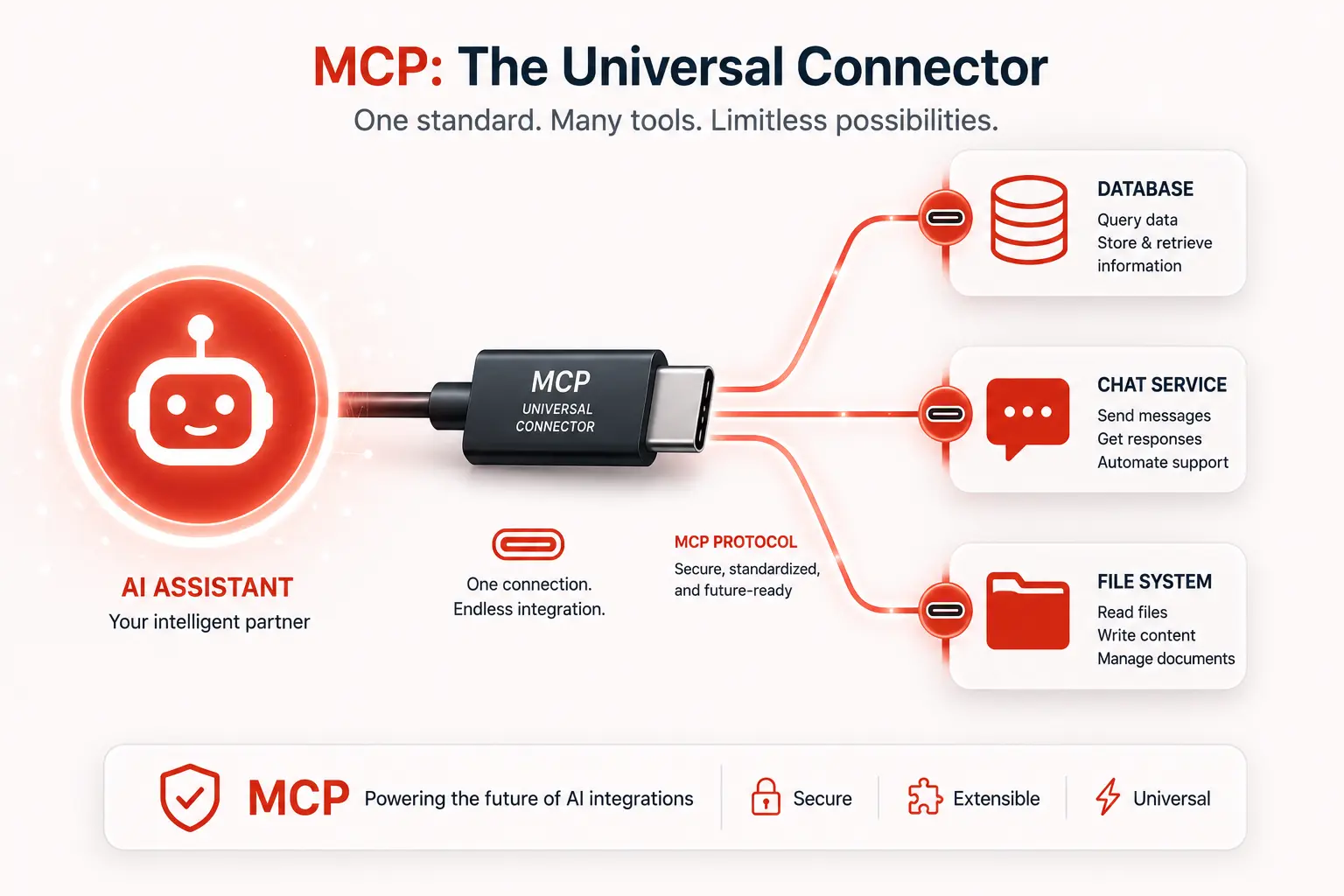
Anthropic released MCP as an open standard in November 2024. The comparison developers reach for most often is USB-C: before that connector existed, every device needed its own cable. MCP plays the same role for AI. Instead of writing a custom adapter for every model and every tool combination, you write one MCP server, and any MCP-compatible client can use it immediately.
The adoption numbers back up how fast that idea spread. As of early 2026, community tracking reported by DEV Community put MCP past 97 million monthly SDK downloads and over 81,000 GitHub stars, with support across Anthropic, OpenAI, Google, Microsoft, and AWS.
Why MCP exists: the integration math problem
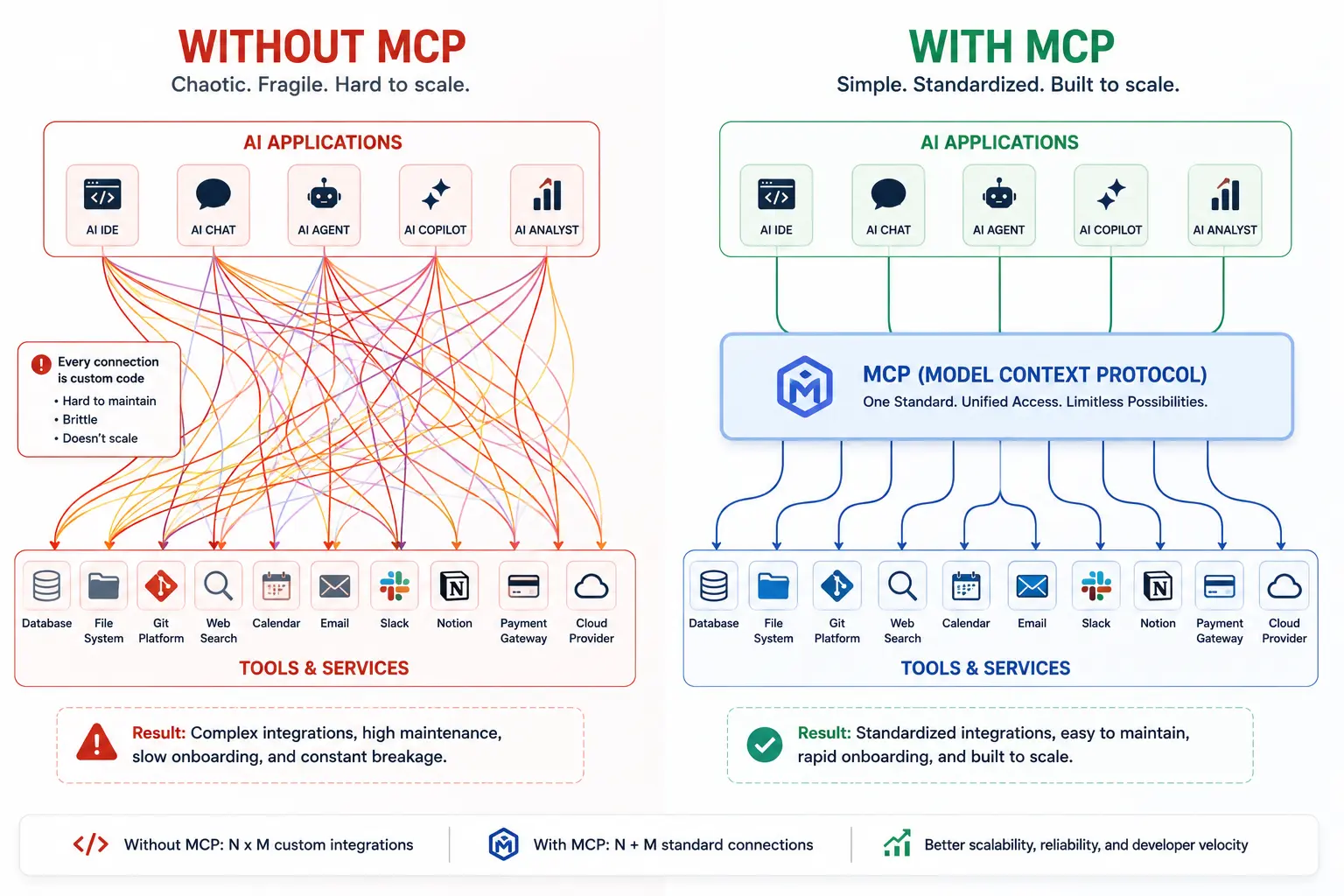
Picture five AI applications and ten tools each one needs to access. Without a shared protocol, that is fifty separate point-to-point integrations, and every new tool or every new model adds more. With a common protocol, each application implements the client side once, and each tool implements the server side once. Five plus ten is fifteen implementations instead of fifty, and the number stops growing multiplicatively.
This is also why teams compare MCP to the Language Server Protocol. If you have used a code editor that talks to any programming language through a shared JSON-RPC contract, you already understand the shape of MCP.
How MCP architecture actually works (MCP guide for developers)
MCP uses a three-part architecture: hosts, clients, and servers.
- Host, the AI application itself. Claude Desktop, Claude Code, Cursor, and VS Code are all hosts.
- Client, a connector inside the host that maintains a one-to-one session with a single server.
- Server, the program exposing tools, data, or prompts. A single host can run multiple clients at once, each wired to a different server, giving the model a unified surface of capabilities regardless of where each tool lives.
Communication runs over JSON-RPC 2.0, and the model never needs to know whether a tool call hits a local SQLite file or a remote cloud API. That detail is exactly what the protocol is designed to hide.
The two transport options
MCP defines two ways for a client and server to talk:
- stdio, local subprocess communication. The right default for desktop apps and local development, since the server runs as a child process of the host.
- Streamable HTTP, the recommended transport for remote, scalable connections, is used once a server needs to run in the cloud or serve more than one client at a time.
The protocol intentionally keeps this list short. The maintainers have stated they are not planning more official transports, choosing to evolve the existing ones instead, which keeps the spec lean for everyone building on top of it.
The three core primitives every MCP server exposes
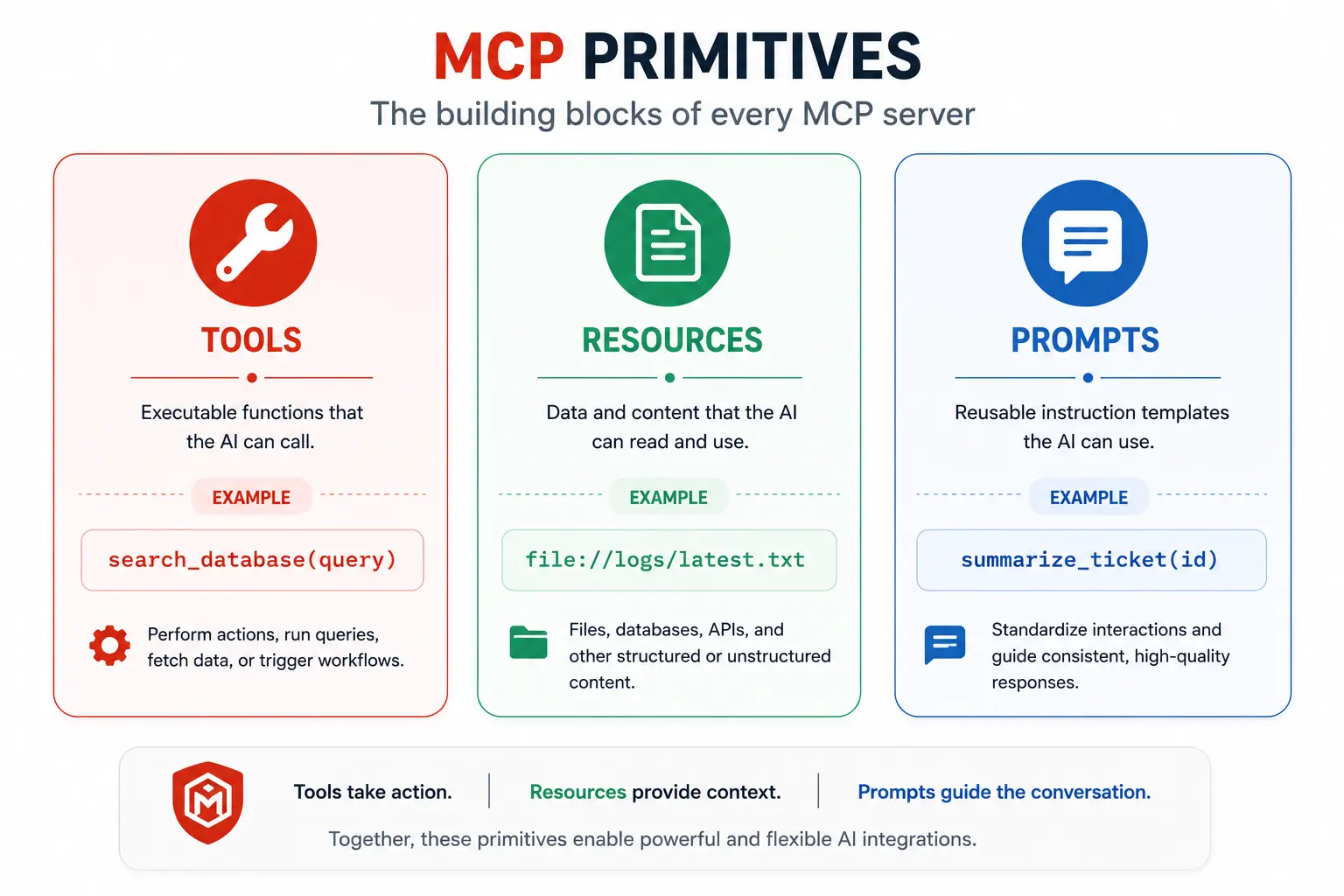
Once you start building, everything in MCP comes down to three building blocks.
Tools
Tools are functions the model can call: searching a database, sending a message, creating a file. Each tool declares a name, a description, and a JSON Schema for its inputs, so the model knows exactly what arguments to pass and what it will get back.
Resources
Resources are data the host can read and pass into the model’s context, similar in spirit to a GET endpoint. A resource might be a file, a database row, or a live system status, and can be subscribed to so a server can push a notification when the data changes instead of forcing the client to poll.
Prompts
Prompts are reusable, parameterized templates a server can offer, letting a host surface a curated workflow such as “summarize this ticket” without the user writing that prompt from scratch each time.
Building your first MCP server: a step-by-step walkthrough
Here is the shortest realistic path from zero to a working server, using the official Python SDK as the example.
- Install the SDK. Run
pip install mcpfor Python, ornpm install @modelcontextprotocol/sdkif you prefer TypeScript. - Define your server and a single tool. Start with one tool that does one thing well, rather than trying to expose your entire API surface on day one.
from mcp.server.fastmcp import FastMCP

mcp = FastMCP("weather-server")

@mcp.tool()
def get_forecast(city: str) -> str:
    """Get the current weather forecast for a city."""
    # Replace with a real API call
    return f"Sunny and 72F in {city}"

if __name__ == "__main__":
    mcp.run()
- Test it with the MCP Inspector. Run
npx @modelcontextprotocol/inspector python my_server.pyTo launch a UI that lists your tools, lets you invoke them manually, and shows the raw JSON-RPC traffic without involving a model at all. This catches schema mistakes before a model ever touches your server. - Connect it to a host. Point Claude Desktop, Claude Code, or another MCP-compatible host at your server’s stdio command or HTTP endpoint, and the tool becomes available in conversation immediately.
- Add structured error handling. Return clear, structured errors instead of raw exceptions, so the model can reason about a failure and decide what to try next.
- Move to Streamable HTTP once you need to scale. stdio is fine for local development, but a server meant to serve multiple users or run in the cloud needs the HTTP transport and a real deployment story.
MCP security: what every developer needs to know before deploying
An MCP server is a real attack surface, not a toy. The core rule worth memorizing is simple: treat every tool input as untrusted, because it is coming from a model, not directly from a human typing into a trusted form.
| Risk | What it means | Mitigation |
|---|---|---|
| Untrusted tool inputs | Arguments come from the model’s interpretation of a prompt, not a vetted human form | Strict JSON Schema validation with additionalProperties set to false |
| Rug pull attacks | A malicious server changes its tool definitions after a host has already approved them | Re-verify tool schemas on every connection, never cache trust indefinitely |
| Token passthrough | Forwarding a user’s auth token directly to a downstream service creates a confused deputy risk | Explicitly forbidden under the spec; issue scoped tokens per service instead |
| Missing user consent | A tool runs a destructive action without the user ever approving it | Hosts must surface a clear consent UI before any tool invocation or data access |
| Unverified annotations | Tool metadata like destructiveHint can be set by the server itself and is not inherently trustworthy | Treat annotations as untrusted unless you trust the server’s source |
For remote, HTTP-based servers, authorization runs on OAuth 2.1 with PKCE and resource indicators. The spec forbids token passthrough, forwarding a caller’s credential straight to a downstream API, because it opens the door to confused deputy attacks where a server acts on a token it was never meant to hold.
It is worth reading the official OWASP Top 10 for LLM Applications alongside MCP-specific guidance, since entries like excessive agency and insecure plugin design map directly onto how MCP tools get exposed and consumed.
How to pause or restrict a Model Context Protocol server’s reach
Giving a model tool access is not all or nothing, and treating it that way is a common early mistake.
- Scope each tool narrowly. A tool named
read_invoiceshould not also be able to delete one. - Gate destructive actions behind explicit confirmation, even when the host’s UI technically allows auto-approval.
- Run servers with the minimum filesystem and network permissions they actually need.
- Log every tool invocation with its arguments, so a runaway agent loop is visible and stoppable.
- Keep an allowlist of which servers a host is permitted to connect to in production.
A practical decision tree for choosing your transport and scope
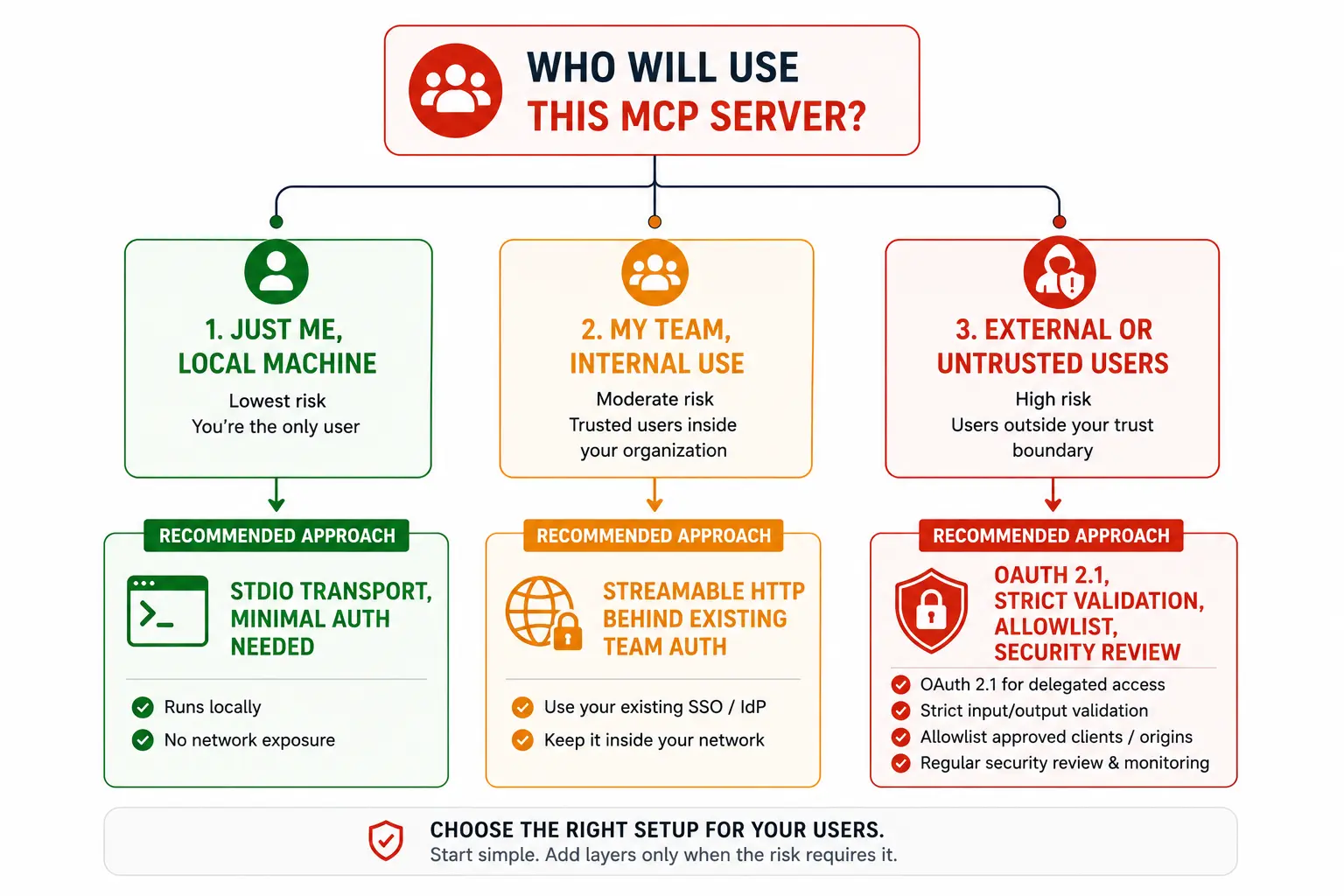
Most teams overthink this decision. A simpler mental model works almost every time: building a tool for yourself on your own machine means stdio is the right call and you are done. Building a tool a small team will share internally means Streamable HTTP behind your existing auth, scoped tightly to that team. Building a tool meant for external users or untrusted environments means full OAuth 2.1, strict input validation, an allowlist, and a security review before anything ships.
MCP vs function calling: what is actually different
Both let a model interact with external systems, but the difference is reusability. Function calling, as implemented in a single API like OpenAI’s functions parameter, is bound to that one API and that one model integration. MCP standardizes the entire contract, the schema format, the transport, and the discovery mechanism, so a server you write once works across every host that speaks the protocol. Function calling is the mechanism inside a single integration. MCP is the standard that makes integrations interchangeable.
Where MCP is headed
The official 2026 roadmap describes a shift away from milestone-based releases toward priority areas driven by Working Groups, with enterprise readiness around audit trails, SSO-integrated auth, and gateway behavior named as a major focus for the year. Anthropic, Block, and OpenAI also moved MCP and the related Agent to the Agent protocol under the Linux Foundation’s Agentic AI Foundation in December 2025, putting the spec under neutral governance rather than a single vendor.
A release candidate published in May 2026 introduced a stateless protocol core, an extensions framework covering server rendered UIs and long running tasks, and tighter OAuth alignment, signaling the protocol is maturing into production grade infrastructure rather than staying an experimental convenience.
Mistakes to avoid when adopting MCP
- Exposing your entire internal API as one giant tool instead of several small, narrowly scoped ones.
- Skipping the MCP Inspector and debugging directly against a live model makes every schema mistake far more expensive to track down.
- Trusting a server’s tool annotations without verifying them, especially destructive action hints.
- Forwarding user tokens straight through to downstream services instead of issuing properly scoped credentials.
- Treating stdio as good enough for a server that ends up serving multiple users in production.
- Building a server and never revisiting its permission scope as the project grows.
Wrapping up
MCP solves a problem every developer working with AI assistants eventually runs into: the exhausting math of building a custom integration for every model and tool pair. Learn the three primitives, pick the right transport for your use case, treat every tool input as untrusted, and you have the core of what you need to build something real.
If you are building anything with an AI assistant that touches real data, real APIs, or real workflows, an MCP server is worth the setup time. Start with one tool, test it in the Inspector, and expand from there. For the authoritative source on every detail covered here, the official MCP documentation and the specification repository on GitHub are the places to keep watching as the protocol continues to evolve.