
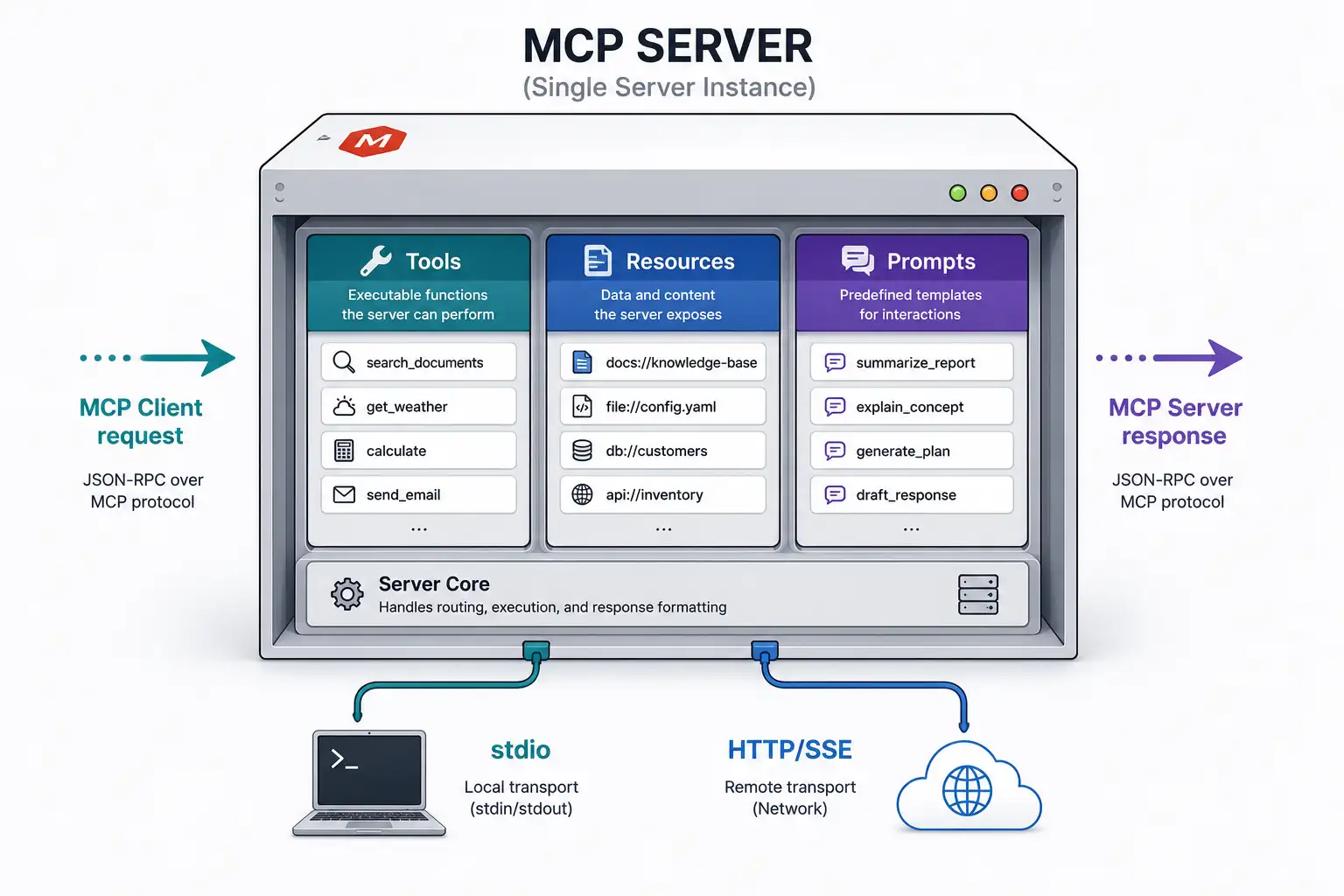
I built my first MCP server by copying an example and had no idea what most of it was actually doing
The first time I got how MCP servers work, I felt like I had pulled off a magic trick. I copied the quickstart example, configured it in Claude Desktop, asked Claude to read a file from my system, and it worked. Claude reached into my file system and pulled back the content I asked for. That felt genuinely remarkable.
Then something broke. A tool stopped responding, and I had absolutely no idea why. I could not debug it because I did not actually understand what was happening between the host and the server. I knew the what but not the how. I knew that requests went in and responses came out, but the mechanics in between were a mystery.
That gap between “it works” and “I understand why it works” is exactly where most MCP developers get stuck. This article closes that gap completely. By the end, you will know exactly how an MCP server receives a request, routes it to the right handler, executes the logic, and sends a response back. You will understand both transport options, how the protocol initialization handshake works, how to structure tool and resource handlers correctly, and what to do when things go wrong.
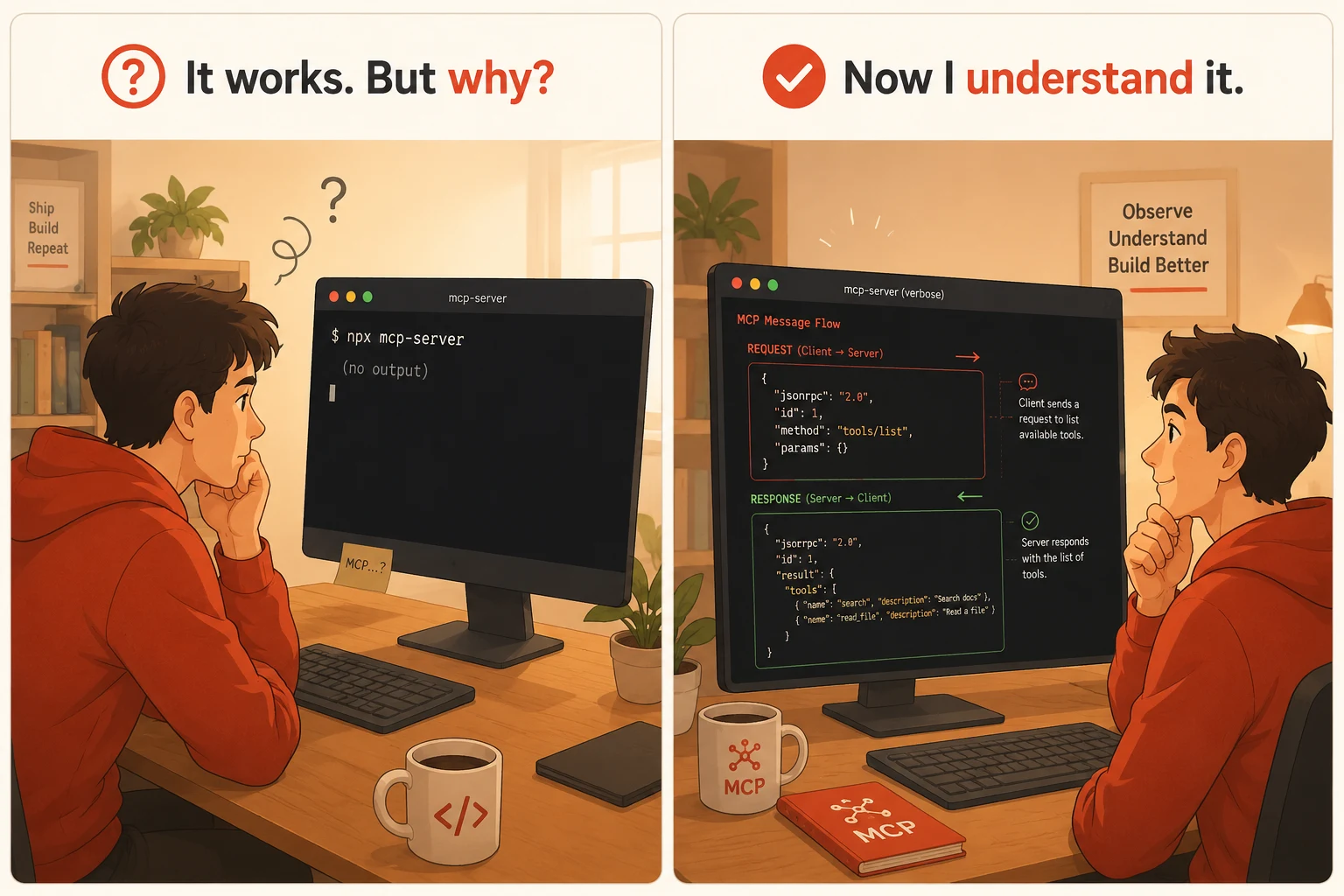
What an MCP server actually is at the protocol level
An MCP server is a process that speaks a specific protocol. At its core, MCP is built on top of JSON-RPC 2.0, a lightweight remote procedure call protocol that uses JSON for encoding messages. Every message that flows between an MCP client and an MCP server is a JSON-RPC message: either a request from the client, a response from the server, or a notification that either side sends without expecting a reply.
The MCP specification layers its own message types and lifecycle on top of JSON-RPC. It defines exactly which methods a server must support, what the request and response shapes look like for each method, and how the initialization handshake that establishes the connection should work. Understanding that MCP is JSON-RPC plus a defined set of methods is the mental model that makes everything else click.
Here is what a raw MCP tool call request looks like at the protocol level before any SDK abstracts it away:
// Raw JSON-RPC request the client sends to call a tool
{
  "jsonrpc": "2.0",
  "id": 1,
  "method": "tools/call",
  "params": {
    "name": "get_weather",
    "arguments": {
      "city": "Bhopal"
    }
  }
}

// Raw JSON-RPC response the server sends back
{
  "jsonrpc": "2.0",
  "id": 1,
  "result": {
    "content": [
      {
        "type": "text",
        "text": "{\"temperature\": 32, \"condition\": \"sunny\", \"humidity\": 45}"
      }
    ],
    "isError": false
  }
}
The SDK you use (TypeScript or Python) handles serializing and deserializing these messages so you never have to write raw JSON-RPC yourself. But knowing this structure exists is what lets you read server logs, understand error messages, and debug protocol-level issues when they appear.
The MCP server lifecycle: from startup to shutdown
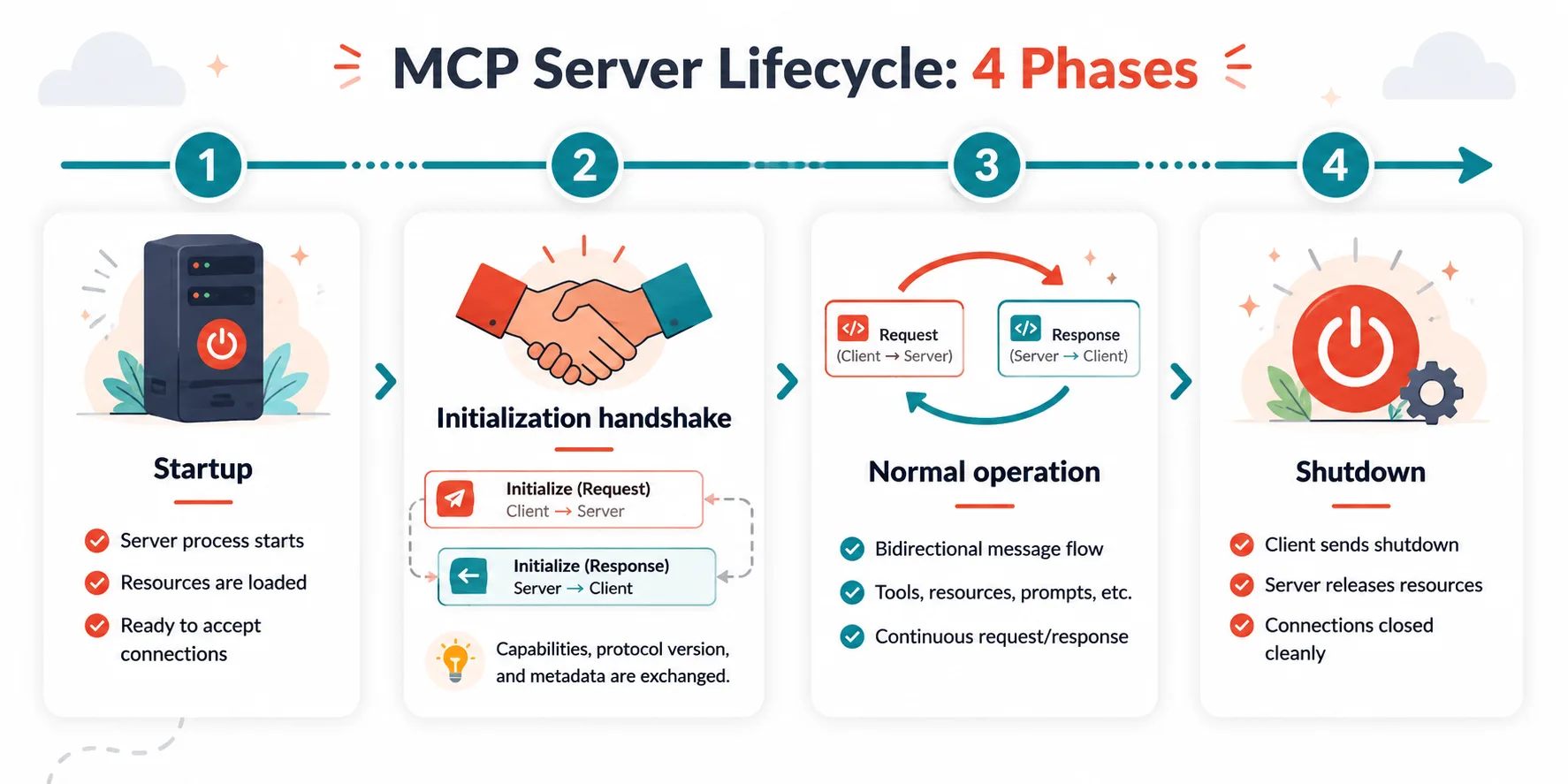
Every MCP server goes through the same lifecycle every time it runs. Understanding this lifecycle tells you when your initialization code runs, when your handlers become available, and what to clean up when the server shuts down.
Phase 1: startup and transport binding
The server process starts. It creates a server object and binds it to a transport. The transport is the communication channel between the server and the client. For local servers it is stdio (standard input and standard output). For remote servers it is HTTP with Server-Sent Events or the newer streamable HTTP transport. The server does not begin processing requests yet. It is waiting for the transport to connect.
Phase 2: initialization handshake
Once the transport connects, the client sends an initialize request. This request tells the server which version of the MCP protocol the client supports and what capabilities the client has. The server responds with its own protocol version, its name and version, and the capabilities it supports. This negotiation ensures both sides agree on what features are available before any real work begins.
// Client sends this to start the handshake
{
  "jsonrpc": "2.0",
  "id": 1,
  "method": "initialize",
  "params": {
    "protocolVersion": "2024-11-05",
    "capabilities": {
      "roots": { "listChanged": true },
      "sampling": {}
    },
    "clientInfo": {
      "name": "Claude Desktop",
      "version": "1.0.0"
    }
  }
}

// Server responds with its own capabilities
{
  "jsonrpc": "2.0",
  "id": 1,
  "result": {
    "protocolVersion": "2024-11-05",
    "capabilities": {
      "tools": { "listChanged": false },
      "resources": { "listChanged": false }
    },
    "serverInfo": {
      "name": "my-weather-server",
      "version": "1.0.0"
    }
  }
}
After the server sends its initialization response, the client sends a initialized notification to confirm it received the response. Only after this confirmation does the server enter the ready state, where it processes normal requests.
Phase 3: normal operation
The server is now running and ready. It listens for incoming JSON-RPC requests on the transport, routes each request to the appropriate handler, executes the handler logic, and sends the response back. This phase continues for the lifetime of the connection.
Phase 4: shutdown
For local stdio servers, shutdown happens when the host process terminates the subprocess or closes the stdio pipe. For remote servers, it happens when the HTTP connection closes. Well-designed servers hook into the shutdown signal to clean up open connections, flush any pending writes, and release resources before the process exits.
Understanding MCP transports in depth
The transport layer is how bytes get from the client to the server and back. MCP supports two transport types and each has a completely different use case. Choosing the wrong one is one of the most common early mistakes developers make.
The stdio transport
The stdio transport uses the process’s standard input and standard output streams as the communication channel. The host application launches the MCP server as a child process. It writes JSON-RPC messages to the server’s stdin and reads responses from the server’s stdout. The server writes responses to stdout and reads requests from stdin.
This sounds almost too simple, and that simplicity is exactly why it works so well for local development. No networking stack, no port management, no authentication, no firewall rules. The operating system’s process management handles everything.
// TypeScript: connecting a server to stdio transport
import { Server } from "@modelcontextprotocol/sdk/server/index.js";
import { StdioServerTransport } from "@modelcontextprotocol/sdk/server/stdio.js";

const server = new Server(
  { name: "my-server", version: "1.0.0" },
  { capabilities: { tools: {} } }
);

// Register your handlers here (shown in detail below)

// Bind to stdio and start listening
const transport = new StdioServerTransport();
await server.connect(transport);
One critical rule with stdio servers: never write anything to stdout except valid MCP protocol messages. Any debugging output, log lines, or print statements written to stdout will corrupt the JSON-RPC message stream and break the connection. Use stderr for all diagnostic output. This is the single most common mistake developers make when first building stdio servers.
// WRONG: this corrupts the stdio message stream
console.log("Server started successfully");

// CORRECT: use stderr for all diagnostics
console.error("Server started successfully");
// or use a file-based logger
logger.info("Server started successfully");
The HTTP with SSE transport
The HTTP transport uses HTTP requests and Server-Sent Events for bidirectional communication. The client opens a long-lived SSE connection to the server’s event endpoint to receive messages pushed from the server. It sends requests to a separate POST endpoint. The server uses the SSE stream to push responses back to the client.
This transport requires a running HTTP server, authentication handling, and careful management of the SSE connection lifecycle. It is the right choice when you need to share the MCP server across multiple users or machines, when the server needs to run in cloud infrastructure, or when the capabilities it exposes require network access anyway.
// TypeScript: connecting a server to SSE transport
import { Server } from "@modelcontextprotocol/sdk/server/index.js";
import { SSEServerTransport } from "@modelcontextprotocol/sdk/server/sse.js";
import express from "express";

const app = express();
const server = new Server(
  { name: "my-remote-server", version: "1.0.0" },
  { capabilities: { tools: {} } }
);

// SSE endpoint: client connects here to receive server messages
app.get("/sse", async (req, res) => {
  const transport = new SSEServerTransport("/messages", res);
  await server.connect(transport);
});

// Message endpoint: client POSTs requests here
app.post("/messages", express.json(), async (req, res) => {
  await transport.handlePostMessage(req, res);
});

app.listen(3000);
Building tool handlers: where the real work lives
Tools are the most commonly used MCP primitive, and building them well is what separates servers that work reliably from servers that produce inconsistent results. A tool handler has two responsibilities: telling the client what the tool does and what it accepts, and executing the actual logic when the tool is called.
The tools/list handler
When an MCP client connects, one of its first requests is tools/list. This asks the server to enumerate all available tools. The server responds with an array of tool definitions, each containing a name, a description, and a JSON Schema for its input arguments.
import {
  ListToolsRequestSchema,
  CallToolRequestSchema
} from "@modelcontextprotocol/sdk/types.js";

// Handle tools/list requests
server.setRequestHandler(ListToolsRequestSchema, async () => {
  return {
    tools: [
      {
        name: "get_weather",
        description:
          "Get the current weather conditions for a specific city. " +
          "Use this when the user asks about current temperature, conditions, " +
          "or weather forecast for any location. " +
          "Do not use this for historical weather data.",
        inputSchema: {
          type: "object",
          properties: {
            city: {
              type: "string",
              description: "The full city name, for example 'Mumbai' or 'New Delhi'"
            },
            units: {
              type: "string",
              enum: ["celsius", "fahrenheit"],
              description: "Temperature unit. Defaults to celsius if not specified.",
              default: "celsius"
            }
          },
          required: ["city"]
        }
      },
      {
        name: "get_forecast",
        description:
          "Get a multi-day weather forecast for a city. " +
          "Use this when the user asks about weather over the next few days " +
          "or wants to plan for upcoming conditions.",
        inputSchema: {
          type: "object",
          properties: {
            city: {
              type: "string",
              description: "The full city name"
            },
            days: {
              type: "integer",
              description: "Number of forecast days, between 1 and 7.",
              minimum: 1,
              maximum: 7,
              default: 3
            }
          },
          required: ["city"]
        }
      }
    ]
  };
});
The tools/call handler
When the model decides to call a tool, the client sends a tools/call request. The server receives the tool name and the validated arguments, routes to the right execution logic, and returns a result.
// Handle tools/call requests
server.setRequestHandler(CallToolRequestSchema, async (request) => {
  const { name, arguments: args } = request.params;

  // Route to the correct tool implementation
  switch (name) {
    case "get_weather": {
      // Validate required arguments
      if (!args?.city || typeof args.city !== "string") {
        return {
          content: [{ type: "text", text: "Error: city argument is required and must be a string" }],
          isError: true
        };
      }

      try {
        const weatherData = await fetchWeather(args.city, args.units ?? "celsius");
        return {
          content: [
            {
              type: "text",
              text: JSON.stringify({
                city: weatherData.city,
                temperature: weatherData.temp,
                condition: weatherData.condition,
                humidity: weatherData.humidity,
                units: args.units ?? "celsius"
              }, null, 2)
            }
          ],
          isError: false
        };
      } catch (error) {
        // Return structured errors, never throw unhandled exceptions
        return {
          content: [
            {
              type: "text",
              text: JSON.stringify({
                error: true,
                error_type: error.constructor.name,
                message: error.message,
                suggestion: "Check that the city name is spelled correctly and try again."
              })
            }
          ],
          isError: true
        };
      }
    }

    case "get_forecast": {
      // Similar pattern for the forecast tool
      const forecast = await fetchForecast(args.city, args.days ?? 3);
      return {
        content: [{ type: "text", text: JSON.stringify(forecast, null, 2) }],
        isError: false
      };
    }

    default:
      return {
        content: [
          {
            type: "text",
            text: `Unknown tool: ${name}. Available tools: get_weather, get_forecast`
          }
        ],
        isError: true
      };
  }
});
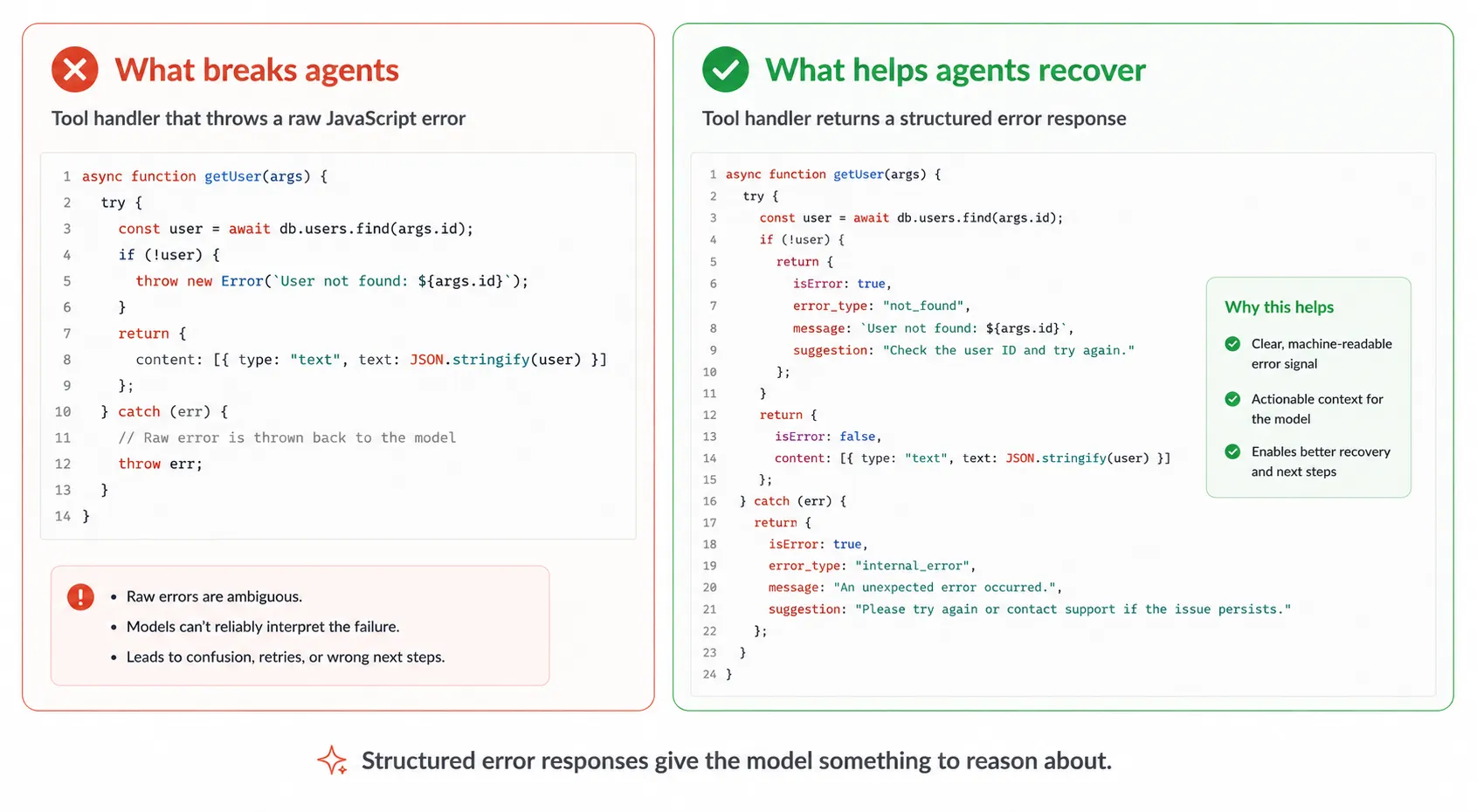
Notice the pattern in every branch: validate inputs explicitly, return structured JSON, and handle errors by returning a isError: true response rather than throwing an exception. When you throw an unhandled exception in a tool handler, the server returns a JSON-RPC error response that gives the model almost no useful information to work with. A structured error response gives the model the context it needs to decide whether to retry, try a different approach, or report the problem to the user.
Building resource handlers
Resources are data that the server makes available for the model to read into its context. They are different from tools in an important way: tools perform actions and return computed results, while resources expose static or semi-static data identified by a URI that the client can fetch on demand.
import {
  ListResourcesRequestSchema,
  ReadResourceRequestSchema
} from "@modelcontextprotocol/sdk/types.js";

// Handle resources/list requests
server.setRequestHandler(ListResourcesRequestSchema, async () => {
  return {
    resources: [
      {
        uri: "config://app/settings",
        name: "Application Settings",
        description: "The current application configuration including environment, feature flags, and service endpoints.",
        mimeType: "application/json"
      },
      {
        uri: "file://docs/api-reference.md",
        name: "API Reference",
        description: "Complete API documentation for this project.",
        mimeType: "text/markdown"
      }
    ]
  };
});

// Handle resources/read requests
server.setRequestHandler(ReadResourceRequestSchema, async (request) => {
  const { uri } = request.params;

  if (uri === "config://app/settings") {
    const config = await loadAppConfig();
    return {
      contents: [
        {
          uri,
          mimeType: "application/json",
          text: JSON.stringify(config, null, 2)
        }
      ]
    };
  }

  if (uri === "file://docs/api-reference.md") {
    const content = await readFile("./docs/api-reference.md", "utf-8");
    return {
      contents: [
        {
          uri,
          mimeType: "text/markdown",
          text: content
        }
      ]
    };
  }

  throw new Error(`Resource not found: ${uri}`);
});
Resources support two content types: text content for anything human-readable (JSON, Markdown, plain text, code), and blob content for binary data like images, PDFs, or other files that need to be base64-encoded. For most use cases, text content is what you need.
Building prompt handlers
Prompts are reusable message templates that the server provides to help the model interact with it effectively. They are the least commonly built MCP primitive, but they are genuinely useful for complex servers where the right interaction pattern is not obvious from the tool descriptions alone.
import {
  ListPromptsRequestSchema,
  GetPromptRequestSchema
} from "@modelcontextprotocol/sdk/types.js";

// Handle prompts/list requests
server.setRequestHandler(ListPromptsRequestSchema, async () => {
  return {
    prompts: [
      {
        name: "analyze_weather_trend",
        description: "Analyze weather trends for a city over a specified period and provide actionable insights.",
        arguments: [
          {
            name: "city",
            description: "The city to analyze",
            required: true
          },
          {
            name: "focus",
            description: "What aspect to focus on: 'travel', 'agriculture', or 'general'",
            required: false
          }
        ]
      }
    ]
  };
});

// Handle prompts/get requests
server.setRequestHandler(GetPromptRequestSchema, async (request) => {
  const { name, arguments: args } = request.params;

  if (name === "analyze_weather_trend") {
    const city = args?.city ?? "the specified city";
    const focus = args?.focus ?? "general";

    return {
      description: "Weather trend analysis prompt",
      messages: [
        {
          role: "user",
          content: {
            type: "text",
            text:
              `Please analyze the weather patterns for ${city}. ` +
              `Use the get_forecast tool to retrieve the upcoming forecast, ` +
              `then provide a ${focus}-focused analysis that includes: ` +
              `the dominant weather pattern, any notable changes expected, ` +
              `and specific recommendations based on the ${focus} context.`
          }
        }
      ]
    };
  }

  throw new Error(`Prompt not found: ${name}`);
});
A complete, working MCP server from start to finish
Now that each component is clear, here is a complete MCP server that brings all three primitives together in a single, production-ready file. This is the pattern you can use as a starting template for any new server you build.
import { Server } from "@modelcontextprotocol/sdk/server/index.js";
import { StdioServerTransport } from "@modelcontextprotocol/sdk/server/stdio.js";
import {
  ListToolsRequestSchema,
  CallToolRequestSchema,
  ListResourcesRequestSchema,
  ReadResourceRequestSchema,
  ListPromptsRequestSchema,
  GetPromptRequestSchema
} from "@modelcontextprotocol/sdk/types.js";

// Create the server instance with capabilities declaration
const server = new Server(
  {
    name: "weather-server",
    version: "1.0.0"
  },
  {
    capabilities: {
      tools: {},
      resources: {},
      prompts: {}
    }
  }
);

// ---- TOOLS ----

server.setRequestHandler(ListToolsRequestSchema, async () => ({
  tools: [
    {
      name: "get_weather",
      description:
        "Get current weather for a city. Use when the user asks about " +
        "current temperature or conditions. Do not use for historical data.",
      inputSchema: {
        type: "object",
        properties: {
          city: { type: "string", description: "City name" }
        },
        required: ["city"]
      }
    }
  ]
}));

server.setRequestHandler(CallToolRequestSchema, async (request) => {
  const { name, arguments: args } = request.params;

  if (name === "get_weather") {
    try {
      const data = await fetchWeather(args.city);
      return {
        content: [{ type: "text", text: JSON.stringify(data, null, 2) }],
        isError: false
      };
    } catch (error) {
      return {
        content: [{
          type: "text",
          text: JSON.stringify({ error: true, message: error.message })
        }],
        isError: true
      };
    }
  }

  return {
    content: [{ type: "text", text: `Unknown tool: ${name}` }],
    isError: true
  };
});

// ---- RESOURCES ----

server.setRequestHandler(ListResourcesRequestSchema, async () => ({
  resources: [
    {
      uri: "weather://supported-cities",
      name: "Supported Cities List",
      description: "Full list of cities supported by this weather server.",
      mimeType: "application/json"
    }
  ]
}));

server.setRequestHandler(ReadResourceRequestSchema, async (request) => {
  if (request.params.uri === "weather://supported-cities") {
    const cities = await getSupportedCities();
    return {
      contents: [{
        uri: request.params.uri,
        mimeType: "application/json",
        text: JSON.stringify(cities, null, 2)
      }]
    };
  }
  throw new Error(`Resource not found: ${request.params.uri}`);
});

// ---- PROMPTS ----

server.setRequestHandler(ListPromptsRequestSchema, async () => ({
  prompts: [
    {
      name: "weather_briefing",
      description: "Generate a morning weather briefing for a city.",
      arguments: [
        { name: "city", description: "The city for the briefing", required: true }
      ]
    }
  ]
}));

server.setRequestHandler(GetPromptRequestSchema, async (request) => {
  if (request.params.name === "weather_briefing") {
    const city = request.params.arguments?.city ?? "your city";
    return {
      description: "Morning weather briefing",
      messages: [{
        role: "user",
        content: {
          type: "text",
          text: `Use the get_weather tool to get current conditions for ${city}, ` +
                `then write a concise, friendly morning weather briefing suitable ` +
                `for a commuter. Include what to wear and whether to bring an umbrella.`
        }
      }]
    };
  }
  throw new Error(`Prompt not found: ${request.params.name}`);
});

// ---- START THE SERVER ----

const transport = new StdioServerTransport();
await server.connect(transport);
console.error("Weather MCP server running on stdio");
Testing your MCP server without a full host application
One of the practical challenges of MCP development is that testing your server usually requires a fully configured host like Claude Desktop. That creates a slow feedback loop. The MCP Inspector solves this problem. It is an official tool from Anthropic that lets you connect to any MCP server, browse its tools and resources, and call them directly from a browser interface.
# Install and run the MCP Inspector
npx @modelcontextprotocol/inspector node path/to/your/server.js

# The Inspector opens at http://localhost:5173
# From there you can:
# - Browse all tools your server exposes
# - Send test tool calls with custom arguments
# - Read resources by URI
# - Inspect the raw JSON-RPC messages for every interaction
Beyond the Inspector, write unit tests for each tool handler in isolation. You do not need the full MCP server running to test whether your get_weather logic returns the right structure for a valid city name or handles a network error correctly. Test the handler functions directly, then use the Inspector for integration testing of the full server.
Common MCP server mistakes and how to fix them
Writing to stdout from a stdio server
This breaks the JSON-RPC message stream and is the single most frequent reason a new stdio server silently stops working. Every console.log in your server code is a potential protocol corruption. Replace all stdout output with stderr or a file-based logger before you test the server with any host application.
Throwing unhandled exceptions from tool handlers
When a tool handler throws an exception, the SDK converts it into a generic JSON-RPC error response that tells the model almost nothing useful. Always catch errors inside your handler and return an isError: true Response with a structured description of what went wrong and what the model could try instead.
Listing capabilities you have not implemented handlers for
If you declare capabilities: { resources: {} } in your server definition but never register a resources/list handler, the client will send a list request, get no response or a method-not-found error, and potentially disconnect. Only declare capabilities you have fully implemented handlers for.
Using the same server instance across multiple client connections
For remote servers handling multiple clients, each client connection needs its own transport instance. Sharing a single server instance across connections without proper isolation leads to state bleeding between clients. The standard pattern is to create a new transport for each incoming connection while sharing the server definition.
Not handling the server shutdown signal
A server that exits without cleanup can leave open database connections, unsaved state, or partial writes behind. Hook into the process termination signal and run cleanup logic before exiting.
// Clean shutdown handling
process.on("SIGINT", async () => {
  console.error("Received SIGINT, shutting down cleanly...");
  await server.close();
  await database.disconnect();
  process.exit(0);
});
MCP server internals quick reference
| Component | What it does | Key thing to get right |
|---|---|---|
| JSON-RPC layer | Encodes and decodes all messages between the client and the server | Handled by the SDK automatically. Understand it for debugging only. |
| Initialization handshake | Establishes protocol version and negotiates capabilities | Only declare capabilities you have fully implemented handlers for |
| stdio transport | Local communication via process stdin and stdout | Never write anything to stdout except valid MCP protocol messages |
| HTTP/SSE transport | Network communication for remote servers | Each client connection needs its own transport instance |
| tools/list handler | Returns all available tool definitions to the client | Description quality determines how reliably the model calls the tool |
| tools/call handler | Executes a tool when the model requests it | Always return structured errors, never throw unhandled exceptions |
| resources/list handler | Returns all available resource URIs to the client | Give each resource a clear URI scheme and a descriptive name |
| resources/read handler | Returns the content of a resource by URI | Return text for human-readable content, blob for binary data |
| prompts/list handler | Returns available prompt templates to the client | Include argument definitions so the client knows what to pass |
| prompts/get handler | Returns a rendered prompt template with provided arguments | Build prompts that guide the model toward the most effective tool use patterns |
| Shutdown handling | Cleans up resources when the server process exits | Hook into SIGINT and SIGTERM to run cleanup before the process.exit |
Further reading and resources
- MCP architecture documentation: the official reference for the protocol architecture, including full message schemas, lifecycle details, and transport specifications
- MCP TypeScript SDK on GitHub: the official SDK with examples, type definitions, and the source code that handles the JSON-RPC layer for you
- MCP Inspector on GitHub: the official testing and debugging tool for MCP servers, letting you inspect raw messages and call tools without a full host application
Once you understand what is happening inside an MCP server, the whole system becomes far less mysterious and far more debuggable. You are not doing anything exotic. You are building a process that speaks JSON-RPC, registers a set of handlers, and responds to well-defined requests from a client that an AI host is managing on your behalf. The SDK abstracts away the protocol details so you can focus on the logic inside each handler.
Get the transport right first. Make sure your stdio server never writes to stdout. Make sure your handlers always return structured responses, even when things go wrong. And use the MCP Inspector to test your server interactively before you wire it into a full host application. Those four habits alone will save you most of the debugging time that new MCP server developers lose in the first week of building.