
Ask ten developers which AI coding tool is best and you’ll get ten confident answers, most of them “the one I happen to use.” That’s not a criticism. The Cursor vs Claude Code vs GitHub Copilot question genuinely depends on how you work, and the three tools have grown into quite different products, even though their feature lists look more alike every month.
So instead of a winner, this comparison gives you the seven differences that actually decide it. If you know where you like to work, how much you want to hand over to the AI, and what your team needs, the right pick usually becomes obvious by difference number four.
A quick note on fairness: all three ship updates constantly. Features mentioned here reflect the products as of late 2026, and pricing in particular has changed several times this year, so treat prices as a rough guide and check the official pages before buying.
The short version
- Cursor is an AI-first code editor. It’s a fork of VS Code with AI built into every corner, famous for its very fast and accurate autocomplete and a strong agent inside the editor.
- Claude Code is Anthropic’s coding agent. It started in the terminal and now also runs in VS Code, JetBrains, a desktop app and the browser. It’s built around handing off larger tasks and letting the agent work through them.
- GitHub Copilot is the plugin that works almost everywhere: VS Code, JetBrains IDEs, Visual Studio, Xcode and more, with deep ties into GitHub itself, including an agent you can assign issues to.
1. Where you work: editor, terminal or plugin
This is the biggest difference and the one people underestimate.
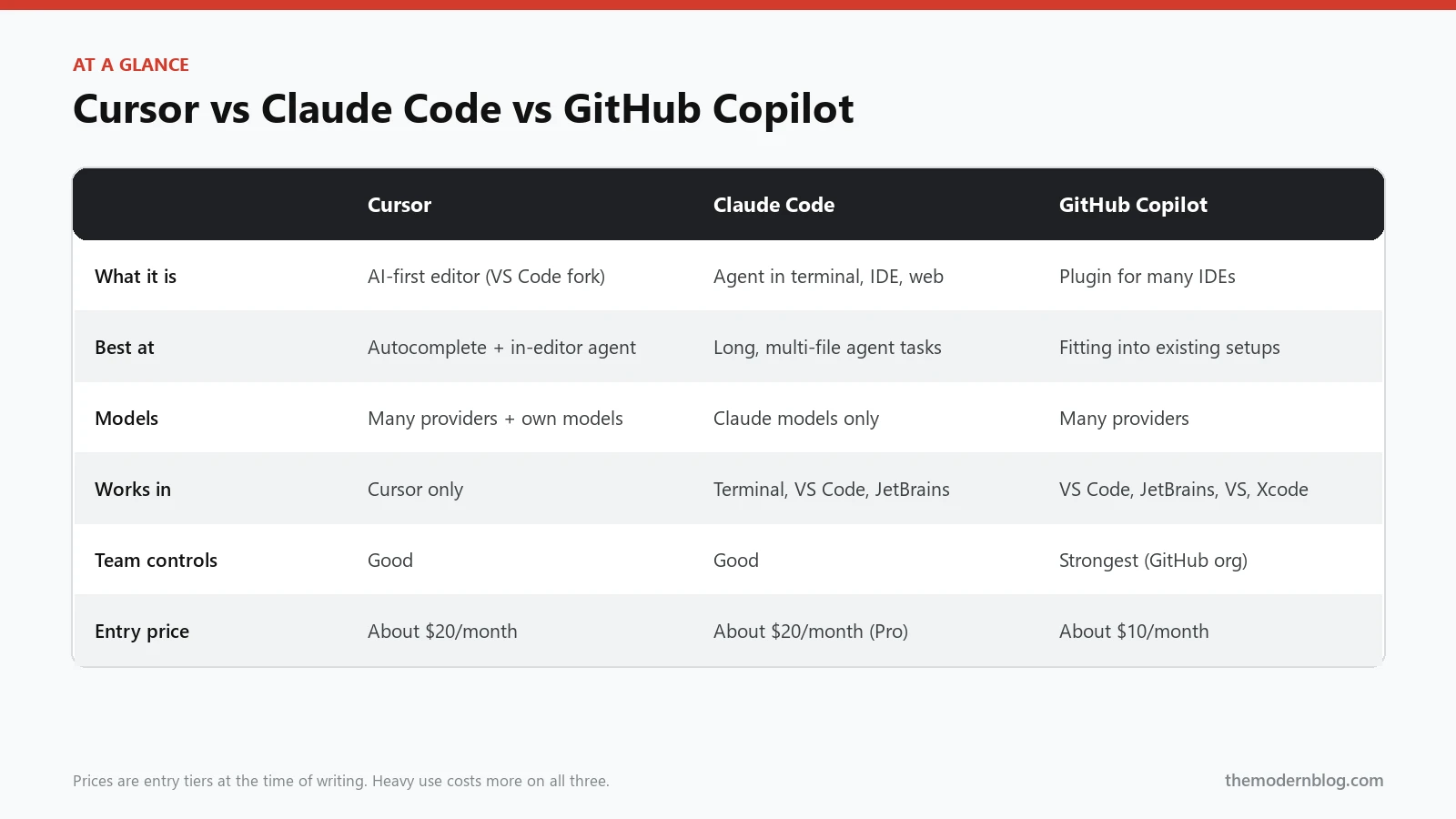
Cursor is a whole editor. If you use VS Code today, switching is painless, since your extensions, themes and keybindings mostly carry over. If you use a JetBrains IDE, Visual Studio or Xcode, Cursor means changing editors, and for a lot of developers that’s a dealbreaker on its own. The upside of owning the editor is integration: AI features are everywhere, from the autocomplete to the terminal to the diff view, and they work together smoothly.
Claude Code went the other way. It began as a command-line tool, so it works with any editor because it doesn’t live in one. You run claude in your project folder, describe what you want, and it reads files, runs commands and edits code. It now has extensions for VS Code and JetBrains that show its changes as diffs in the editor, plus desktop and web versions, but the terminal is still where it feels most at home. If you’re comfortable in a terminal, this is pleasant. If the terminal makes you nervous, the IDE extension is the way in.
GitHub Copilot is a plugin you add to the editor you already have. That’s its superpower. A team where one person uses IntelliJ, another uses VS Code and a third uses Neovim can all use Copilot with the same account and settings. Nobody has to change tools.
2. Autocomplete: Cursor’s strongest card
If most of your AI use is the gray text that appears as you type, the comparison is short. Cursor’s Tab completion is widely considered the best in the business. It predicts multi-line edits, suggests changes a few lines away from your cursor, and is fast enough that accepting suggestions becomes a rhythm.
Copilot’s inline suggestions are where the whole category started, and they’re still very good, especially for common languages and boilerplate. For many developers the difference between Copilot and Cursor autocomplete is noticeable but not life-changing.
Claude Code doesn’t really compete here. It’s an agent, not an autocomplete engine. You can pair it with any editor’s completion (including Copilot’s), and plenty of developers do exactly that.
3. How much autonomy you want
All three tools now cover the whole range from autocomplete to autonomous agents. Their default habits, though, are different, and defaults shape how you end up using a tool day to day.
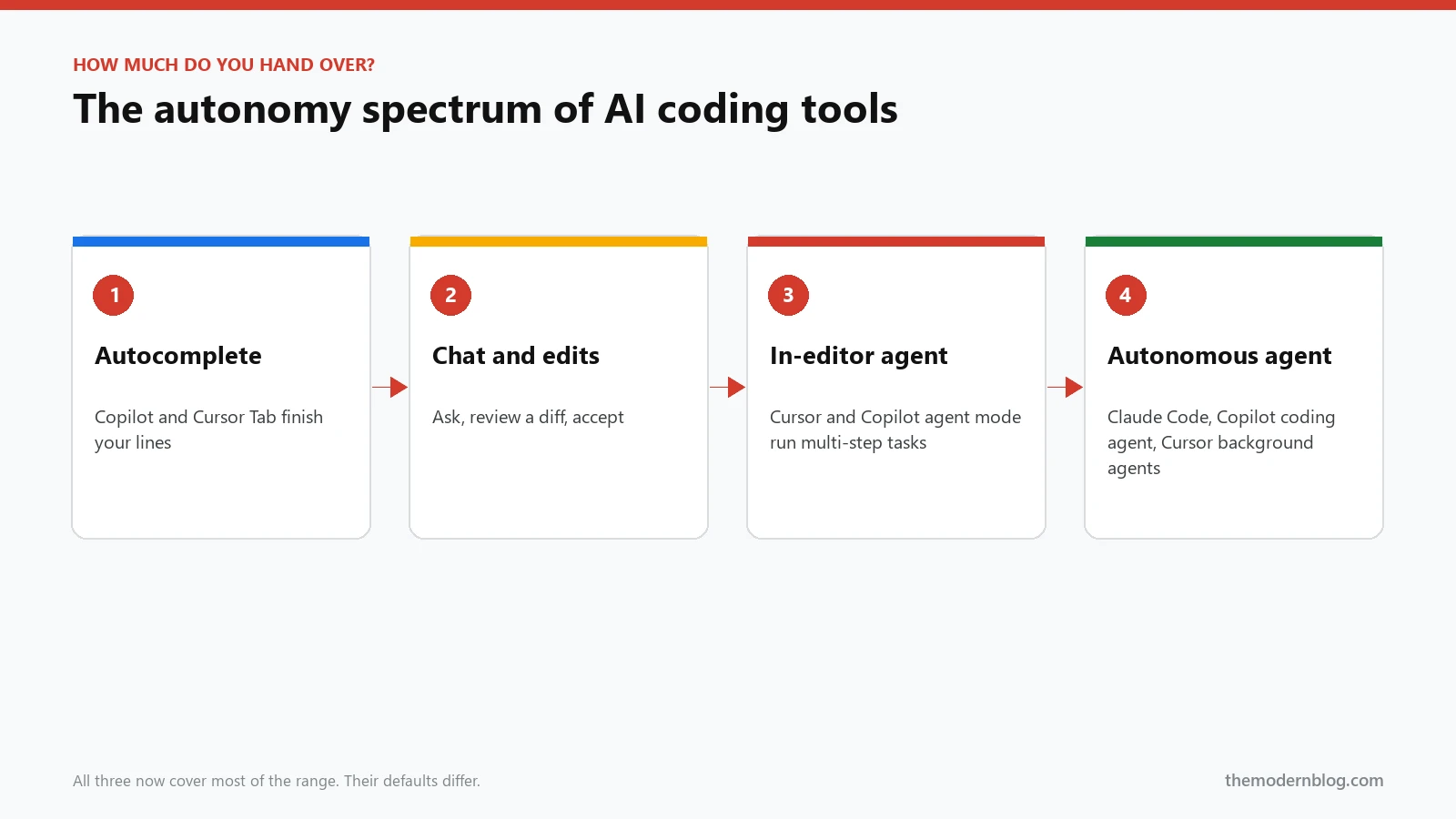
Claude Code is built for handing over a task. You describe the change (“add rate limiting to the public API routes and write tests for it”), and it explores the codebase, makes a plan, edits files across the project, runs the tests and fixes what fails. It’s at its best on larger, multi-file jobs where you’d rather review the result than steer every step. Features like subagents, custom commands, hooks and a CLAUDE.md file for project instructions all push in that direction. We covered it in depth in our Claude Code review.
Cursor sits in the middle by default. Its agent mode is strong and can run multi-step tasks, but the experience is built around watching the changes happen in your editor and nudging as you go. It also offers background agents that work on tasks in the cloud while you do something else, so it can stretch to the autonomous end too. Our Cursor AI agent review goes into the details.
GitHub Copilot spans both ends in a different way. In the editor, it offers chat and an agent mode similar to Cursor’s. On GitHub itself, the Copilot coding agent takes an issue you assign to it, works on it in a cloud environment and opens a pull request for review. That’s a very natural fit for teams who already plan work in GitHub issues.
4. Models: choice vs depth
Cursor and Copilot both let you pick between models from several providers, including Anthropic, OpenAI and Google, and Cursor also has its own in-house models tuned for speed in the editor. If you like switching models for different tasks, or want to try new releases on day one, that flexibility is a real advantage.
Claude Code uses Claude models only. That sounds like a limitation, and in a narrow sense it is. The trade-off is depth: Anthropic builds the agent and the model together, and Claude models have consistently been among the strongest at agentic coding tasks. In practice, the question is whether you care more about choice or about a tool tuned tightly for one family of models.
One practical tip: the same model can behave differently in different tools, because each tool wraps it with its own system prompt, context gathering and tool set. A Claude model inside Cursor is not the same experience as Claude Code, even when the underlying model is identical.
5. Project context and customisation
All three tools work better when they understand your project’s conventions, and all three let you write them down.
- Cursor uses rules files (in a
.cursor/rulesfolder) to tell the AI about your stack, style and patterns, with options for when each rule applies. - Claude Code reads
CLAUDE.mdfiles at the project and user level, and adds skills, slash commands, hooks that run your own scripts at certain points, and plugins. It’s the most programmable of the three. Our guide to AI agent .md files covers how to write these well. - GitHub Copilot supports custom instructions files in the repository (like
.github/copilot-instructions.md) and prompt files, and organisations can set instructions across all their repos.
All three support the Model Context Protocol (MCP), which lets you connect them to tools like your issue tracker, database or docs. If you’re new to it, our list of the best MCP servers for developers is a good starting point.
6. Teams, security and admin controls
For solo developers this barely matters. For companies it can decide everything.
GitHub Copilot has the edge here for organisations already on GitHub. Admins manage seats, policies and allowed models from the same place they manage repositories, there are content exclusion settings to keep certain files away from the AI, and it plugs into GitHub’s existing security features and audit logs. Procurement teams also like buying from a vendor they already have a contract with.
Cursor’s business plans include centralised billing, privacy mode enforced across the team, SSO and admin controls, and many companies run it at scale. Claude Code is available through Anthropic’s team and enterprise plans and through the API, with managed settings that let admins lock down permissions and tools across the organisation. Both are mature options. Copilot simply starts with an advantage if your company already lives in GitHub.
Whichever you choose, treat AI-written code like any other change: reviews, tests and security scanning still apply. Our piece on whether AI generated code is safe covers the checks worth adding.
7. Pricing, and how it behaves under heavy use
On paper, the entry prices are close. At the time of writing, Copilot’s individual paid plan starts around $10 a month, and Cursor’s and Claude’s (Claude Pro includes Claude Code) start around $20. All three have higher tiers for heavy users, going up to $100 or $200 a month, and team plans priced per seat. Current details are on the official pages for Cursor, Claude and GitHub Copilot.
The sticker price doesn’t tell the whole story, because all three now meter usage in some way. Agent tasks use far more model capacity than autocomplete, so a developer running long agent sessions all day will hit plan limits much sooner than one who mostly uses completions. Cursor and Copilot both moved toward usage-based billing during 2026. Claude’s subscription plans share a usage budget between the Claude apps and Claude Code, with higher tiers giving more room. If you’re a heavy agent user, budget for a higher tier on any of the three, and look at how each one handles going over the limit before you commit.
What a typical task looks like in each tool
Feature lists only go so far. To make the differences concrete, here’s how the same everyday job, adding a “export to CSV” button to an admin table, tends to play out in each tool.
In Cursor
You open the table component and start typing. Tab completion suggests the button markup, then the click handler, then jumps you down to where the export function should go and suggests that too. For the parts that span several files (an API route, a helper, a test), you open the agent panel, describe what’s missing, and watch it edit the files in your workspace. You review each diff inline, accept most of it, tweak a variable name, and move on. You were in control the whole time, and the AI made every step faster.
In Claude Code
You describe the whole feature in one message, maybe pointing at the table component and mentioning that exports should respect the current filters. Claude Code reads the relevant files, proposes a plan, then implements the button, the route, the CSV helper and a test. It runs the test suite, notices a failing test it caused, and fixes it. You come back to a finished change and review the full diff, either in the terminal or in your editor through the extension. You steered less and reviewed more.
In GitHub Copilot
There are two natural paths. Inside your editor, it looks a lot like the Cursor flow: suggestions as you type, and agent mode for the multi-file parts. Or, if the task already exists as a GitHub issue, you assign it to Copilot. The coding agent works on it in the background and opens a pull request, which then goes through the same review and CI checks as anyone else’s. For teams that already run on issues and pull requests, that second path feels very natural.
None of these flows is wrong. They suit different people and different kinds of tasks. If you like to feel every keystroke, the Cursor flow will feel right. If you’d rather describe the outcome and review the result, Claude Code or Copilot’s coding agent will.
So, which one should you pick?
Pick Cursor if…
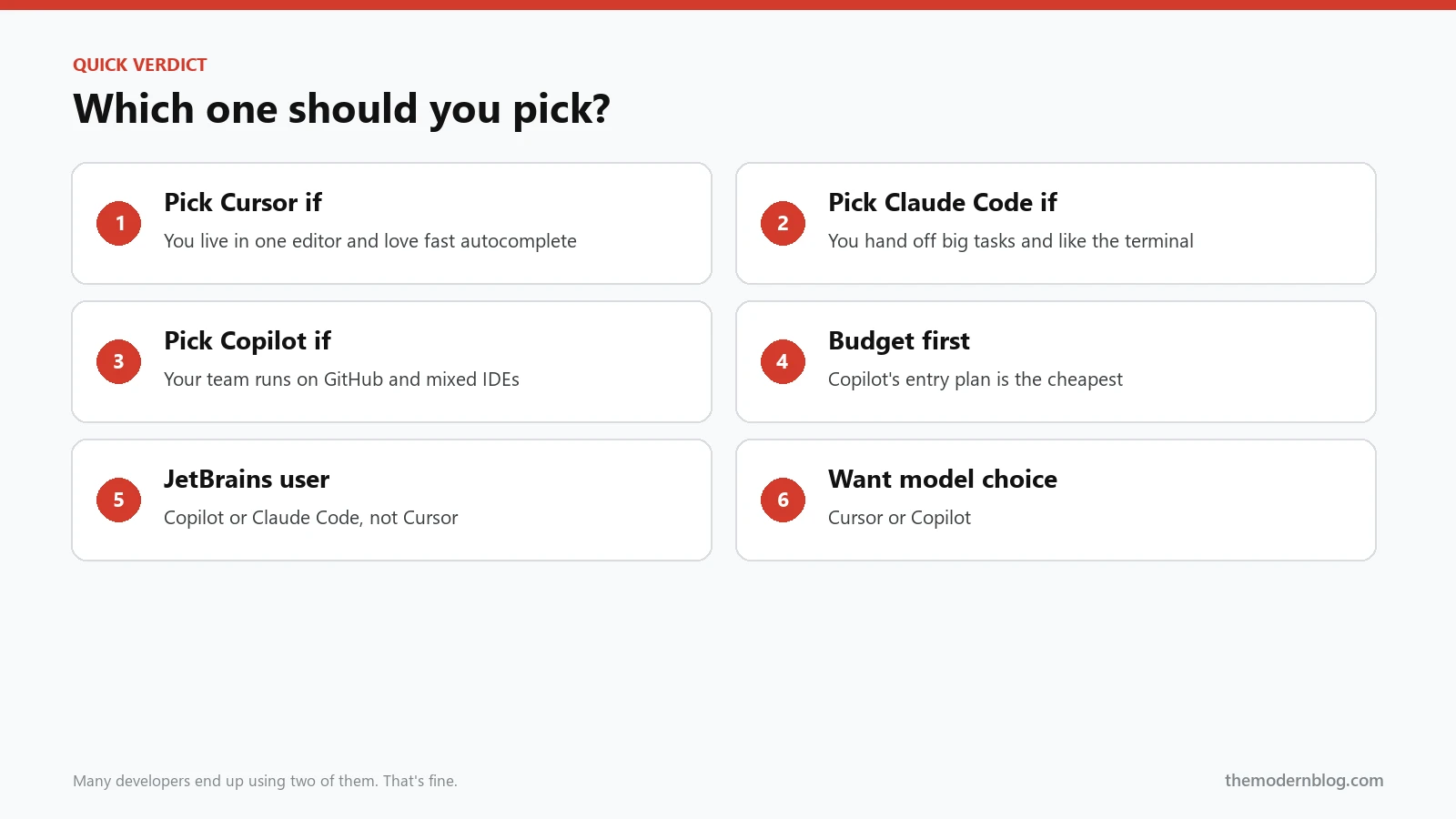
You use VS Code (or are happy to switch), you spend most of your day actively writing code, and you want the best autocomplete available plus a strong agent right in the editor. Cursor rewards people who like to stay hands-on and in flow.
Pick Claude Code if…
You want to delegate bigger chunks of work, you’re comfortable in a terminal (or happy with the IDE extension), and you like tools you can script and customise. It’s also a natural fit for automation, since it can run headless in CI pipelines and scripts. Developers who use JetBrains IDEs and want a strong agent often land here too.
Pick GitHub Copilot if…
Your team uses a mix of editors, your work already runs through GitHub issues and pull requests, and admin controls matter. It’s also the cheapest way in, which makes it a sensible default for teams rolling out AI tools to everyone at once.
Can you use more than one?
Yes, and plenty of developers do. A common setup is Cursor or Copilot for autocomplete and quick edits, plus Claude Code for bigger tasks running in a terminal next to the editor. The tools don’t conflict, because they work on the same files in the same Git repository. The real cost is paying for two subscriptions, so it’s worth trying the combination for a month before committing.
If you’re still undecided, try them on the same real task. Pick a small feature or bug from your actual backlog, give each tool the same description, and compare the results: how much you had to steer, how good the code was, and how long it took you to review. One afternoon of that tells you more than any comparison article, this one included.
If you’re comparing these against older-style assistants, our earlier piece on GitHub Copilot vs modern coding agents explains how the category got here.
Frequently asked questions
Is Claude Code better than Cursor?
For large, multi-file tasks that you want to hand off, many developers prefer Claude Code. For hands-on coding with fast autocomplete inside the editor, Cursor usually feels better. “Better” depends on which kind of work fills most of your day.
Is GitHub Copilot still worth it in 2026?
Yes, especially for teams. It works in almost every editor, it’s the cheapest entry point of the three, it offers multiple models, and the coding agent fits neatly into GitHub workflows. Individual power users sometimes outgrow it, but it remains a solid default.
Can I use Claude models in Cursor and Copilot?
Yes. Both offer Claude models alongside models from other providers. The experience differs from Claude Code because each tool provides its own prompts, context and tools around the model.
Do these tools send my code to the cloud?
Yes, all three send code context to the model provider to generate answers. Each offers privacy settings and business plans with stricter data handling, such as not using your code for training. Read the data policy for the plan you’re on, especially for client work.
Which is best for beginners?
Copilot or Cursor, because they work inside a familiar editor and show suggestions as you type, which makes it easier to learn from what the AI produces. Beginners using any agent should read every change before accepting it.