
I built a bot that did one thing well — then everything fell apart
I was two weeks into a side project: an AI assistant that could read a GitHub issue, search the web for relevant context, write a fix, and open a pull request. Sounds straightforward. I crammed all of that logic into one giant prompt and one API call. (multi-agent AI system with OpenClaw)
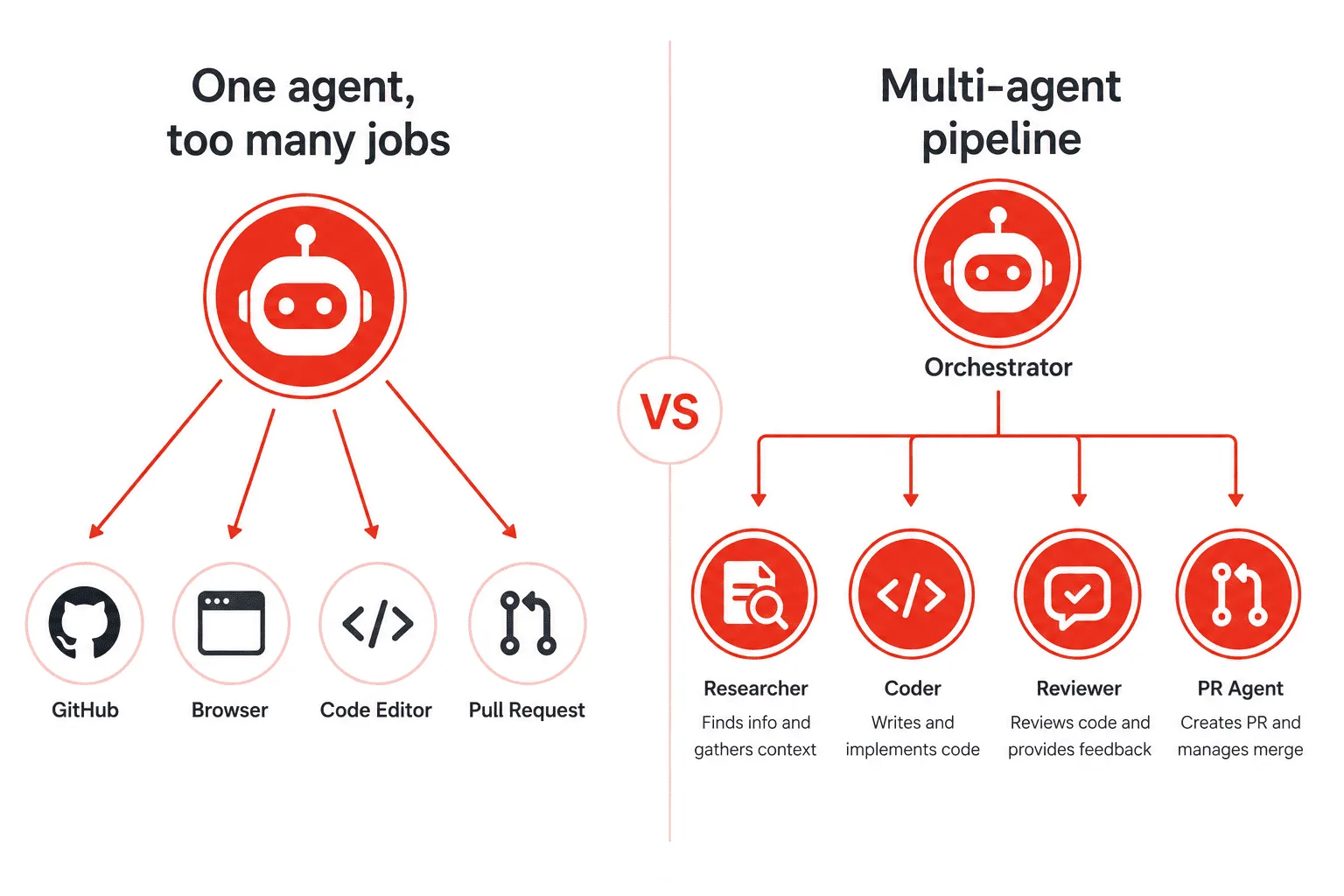
It worked exactly twice. Then the context window overflowed. Then the model started hallucinating file names. Then it forgot the original issue halfway through writing the code. I’d hit the ceiling that every developer hits when they try to make a single LLM do too much at once.
The fix wasn’t a better prompt. The fix was a multi-agent architecture — splitting the work across specialized agents that each do one thing well, coordinate through a shared orchestrator, and hand off results cleanly. This guide walks you through building exactly that, using OpenClaw as the agent framework and the Claude API as the underlying model. By the end, you’ll have a working, extensible multi-agent pipeline you can adapt to any domain.
What is a multi-agent AI system?
A multi-agent AI system is a network of independent AI agents, each with a specific role, that work together to complete a complex task. No single agent sees the whole picture — instead, an orchestrator breaks the task into steps and routes each step to the right specialist agent.
Think of it like a software engineering team. You have a tech lead (orchestrator) who reads the ticket, assigns the research to one person, the coding to another, and the review to a third. Nobody on the team tries to do everything simultaneously.
In code, each agent is just a function that receives input, calls an LLM (or a tool), and returns structured output. The orchestrator is another function that decides which agent to call next.
Why OpenClaw for multi-agent development?
OpenClaw is a lightweight Python framework built around the Anthropic Claude API. It provides three things that make multi-agent development practical: a clean Agent class with built-in tool-use support, a message-passing system for agent-to-agent communication, and a session store for shared memory between agents.
You’re not locked into a black-box abstraction. Every agent call is a real Claude API call you can inspect, log, and override. That transparency matters when you’re debugging why Agent B misunderstood Agent A’s output.
OpenClaw also ships with built-in support for Claude’s native tool use, which means your agents can call functions, browse the web, read files, and write code — all without extra wiring on your part.
What you’ll build in this guide
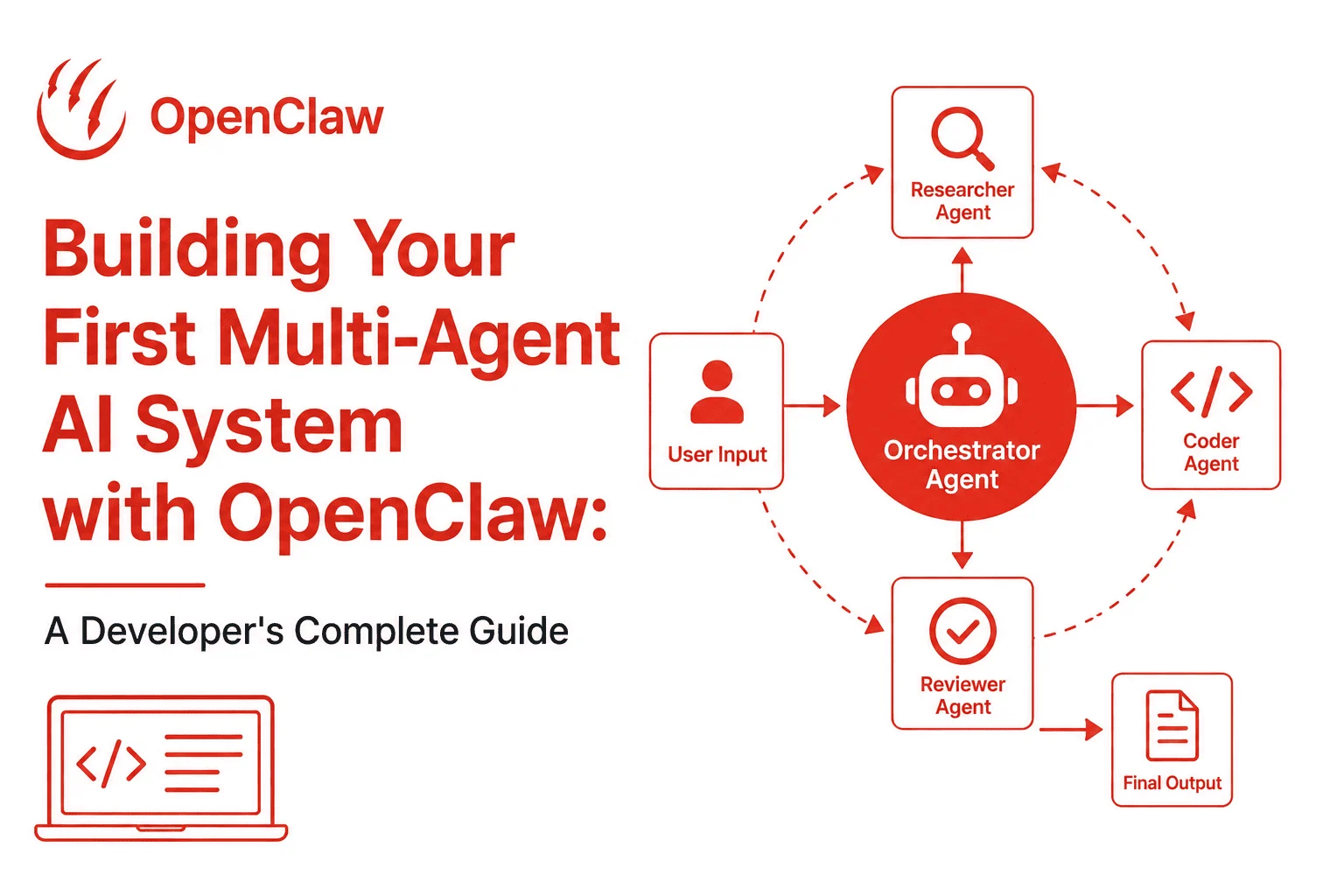
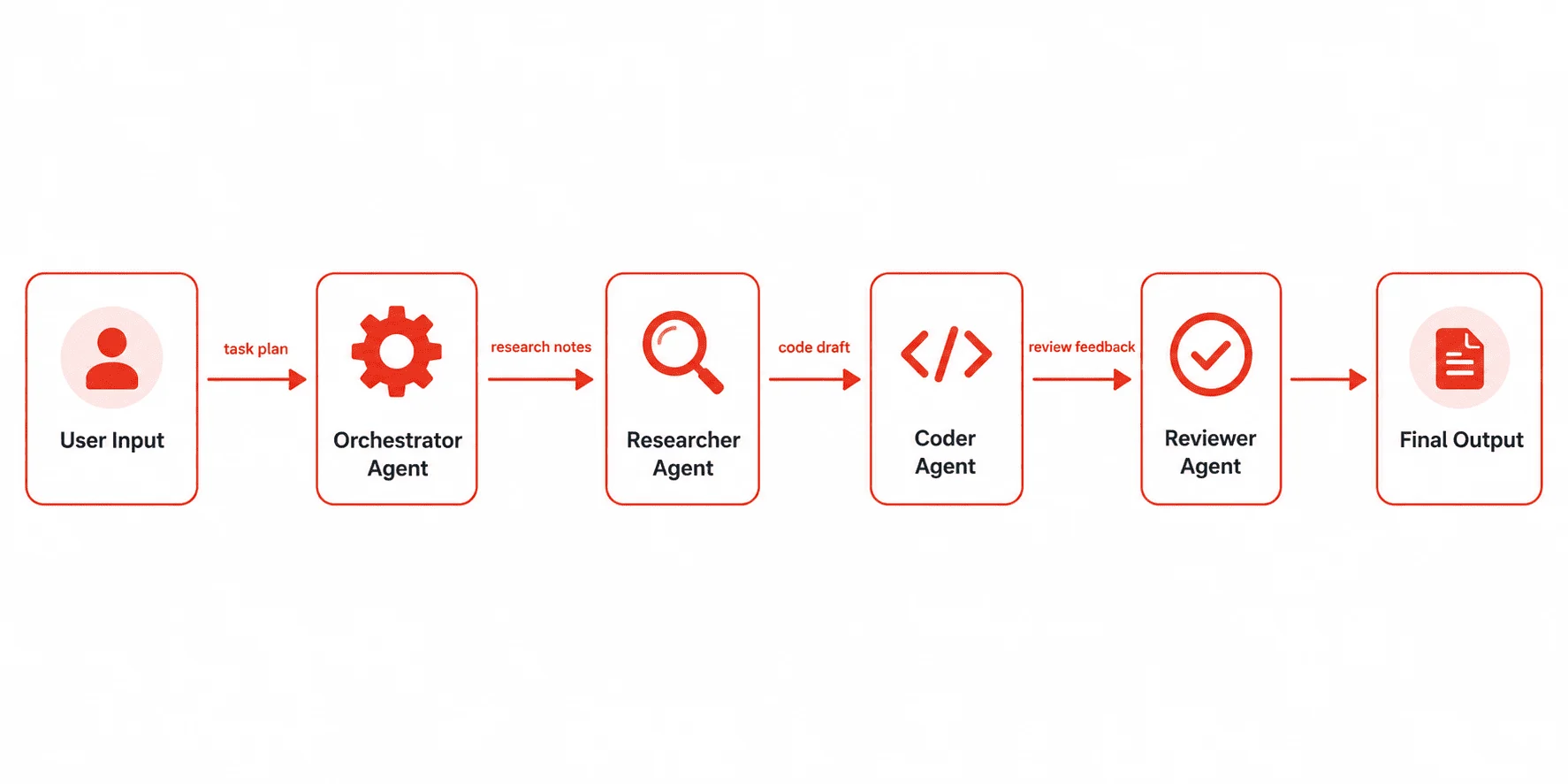
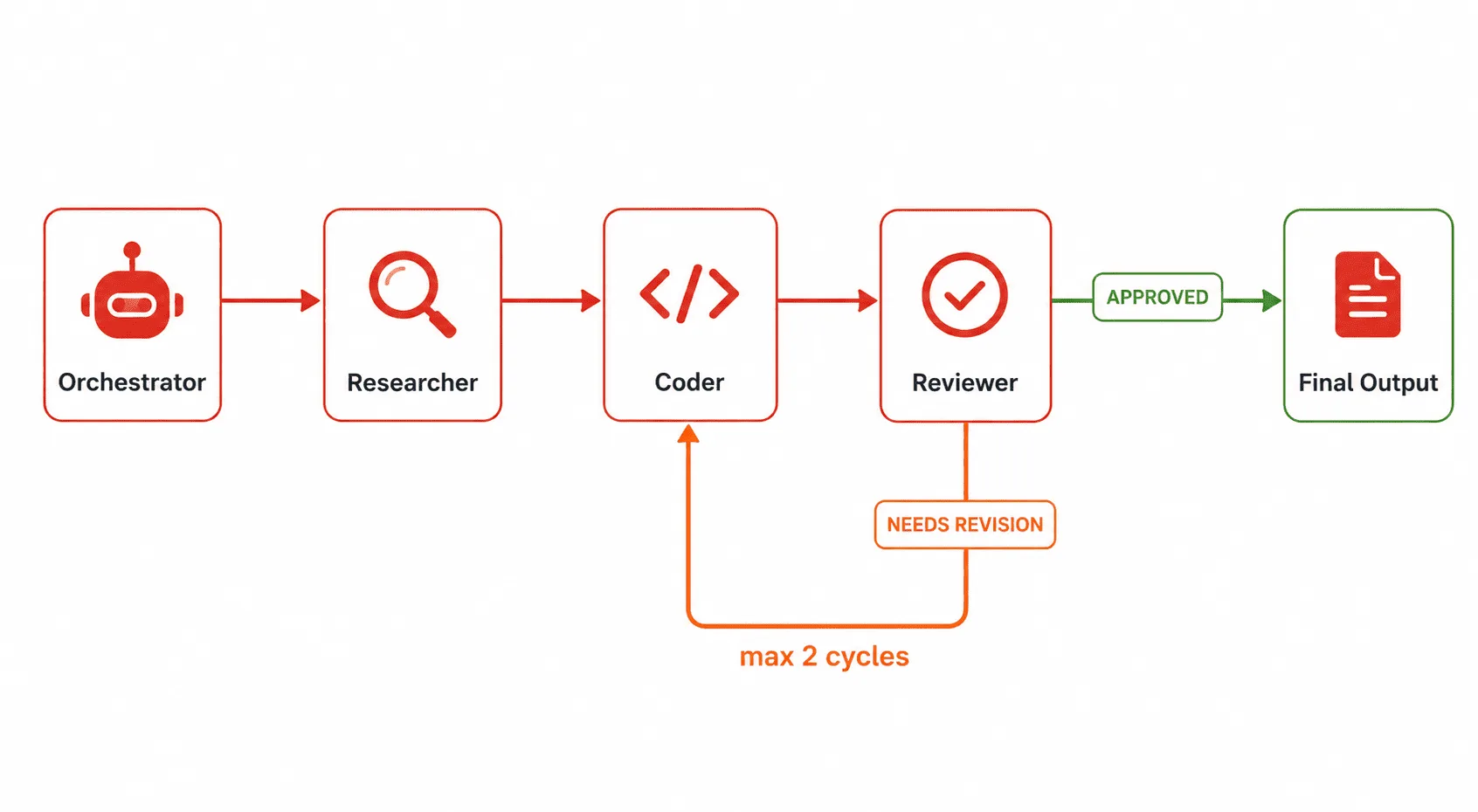
You’ll build a Developer Research Pipeline — a four-agent system that takes a plain-English feature request and produces a structured implementation plan with code examples. Here’s how the agents divide the work:
- Orchestrator Agent — Receives the feature request, plans the workflow, and coordinates the other agents.
- Researcher Agent — Searches for relevant documentation, libraries, and prior art.
- Coder Agent — Writes working code based on the research output.
- Reviewer Agent — Critiques the code, flags issues, and suggests improvements.
This is a real, production-relevant pattern. Once you understand how these four roles wire together, you can adapt the same structure to customer support pipelines, data analysis workflows, content generation systems, and more.
Prerequisites: what you need before starting
This guide assumes you’re comfortable with Python. You don’t need prior experience with AI agent frameworks — that’s what we’re building from scratch. Here’s what you need installed and ready:
- Python 3.10 or higher
- An Anthropic API key (get one at console.anthropic.com)
pipor a virtual environment manager likevenvorconda- Basic familiarity with async Python (
async/await) — we’ll explain each piece as we go
You do not need a GPU, a local model, or a cloud server. Everything runs on your laptop against the Claude API.
Step 1 — Set up your project environment
Start with a clean project folder and a virtual environment. Never install agent dependencies globally — version conflicts between OpenClaw, httpx, and other packages will cause silent failures that are painful to debug.
mkdir multi-agent-demo
cd multi-agent-demo
python -m venv .venv
source .venv/bin/activate  # Windows: .venv\Scripts\activate
Now install the required packages:
pip install openclaw anthropic python-dotenv
Create a .env file at the project root to hold your API key securely:
# .env
ANTHROPIC_API_KEY=sk-ant-your-key-here
Add .env to your .gitignore immediately. This is non-negotiable — leaked API keys are a real cost and security risk.
# .gitignore
.env
.venv/
__pycache__/
*.pyc
Your folder structure will look like this by the end of the guide:
multi-agent-demo/
├── .env
├── .gitignore
├── agents/
│   ├── __init__.py
│   ├── orchestrator.py
│   ├── researcher.py
│   ├── coder.py
│   └── reviewer.py
├── tools/
│   ├── __init__.py
│   └── web_search.py
├── memory/
│   └── session_store.py
└── main.py
Create the folders now so imports don’t fail later:
mkdir agents tools memory
touch agents/__init__.py tools/__init__.py
Step 2 — Understand OpenClaw’s core concepts
Before writing any agent code, you need to understand three OpenClaw primitives. Getting these wrong is the most common source of bugs in multi-agent systems.
The Agent class
An Agent in OpenClaw is a Python class that wraps a Claude API call. You give it a system prompt (its role), a set of tools it can call, and a maximum number of turns it’s allowed to run before returning. That last parameter — max_turns — prevents runaway loops.
Messages and context
Each agent receives a messages list as input and returns an updated messages list as output. This is the same format as the Anthropic Messages API. The messages list is how agents share information — you pass Agent A’s output messages as Agent B’s input messages, selectively filtered.
The session store
The session store is a simple key-value dictionary that persists across all agent calls within a single pipeline run. Agents can write results to the store and read what other agents have written. This is your shared memory layer — without it, each agent is isolated and blind to what happened before.
With those three concepts clear, let’s build the agents.
Step 3 — Create the shared session store
The session store is the simplest component, but it’s foundational. Every agent will read from and write to it. Build it first so all agents can import it cleanly.
Create memory/session_store.py:
# memory/session_store.py

class SessionStore:
    """
    A simple in-memory key-value store shared across all agents
    in a single pipeline run.
    """

    def __init__(self):
        self._store = {}

    def set(self, key: str, value) -> None:
        """Write a value to the store."""
        self._store[key] = value

    def get(self, key: str, default=None):
        """Read a value from the store. Returns default if key not found."""
        return self._store.get(key, default)

    def all(self) -> dict:
        """Return the entire store contents (useful for debugging)."""
        return dict(self._store)

    def clear(self) -> None:
        """Reset the store for a new pipeline run."""
        self._store.clear()


# Singleton instance — import this in all agents
store = SessionStore()
By using a module-level singleton (store), all agents that import this file share the exact same object. No passing it around as a function argument — just import and use.
Step 4 — Define the tools your agents can use
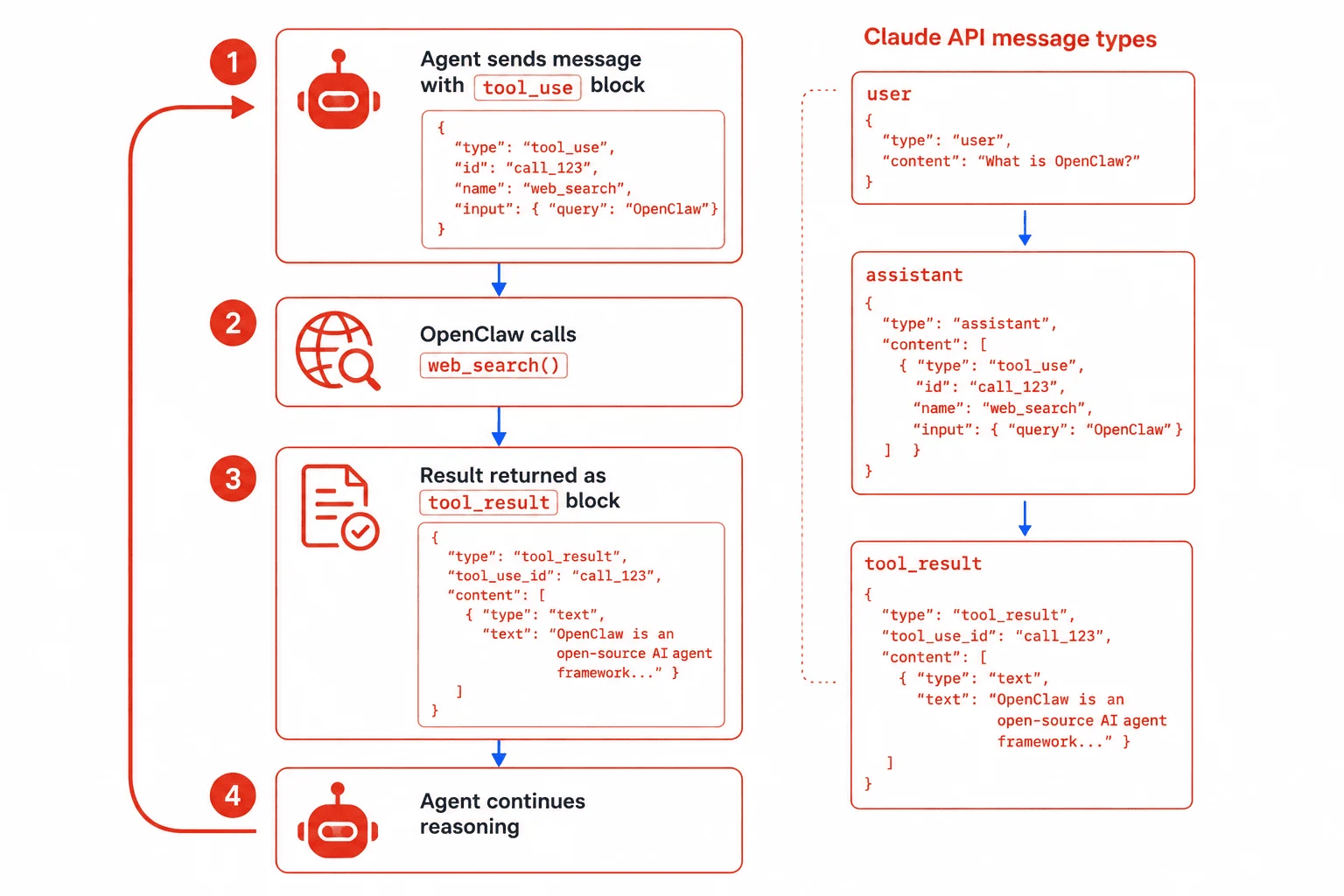
Tools are functions that agents can call during their reasoning process. Claude decides when to call a tool and what arguments to pass — your job is to define what the tool does and register it with OpenClaw.
For this guide, we’ll create a mock web search tool. In production, you’d replace the body with a real call to Tavily, Brave Search, or your preferred search API.
Create tools/web_search.py:
# tools/web_search.py

def web_search(query: str) -> str:
    """
    Search the web for information relevant to a developer query.

    In production: replace this with a real API call to Tavily or Brave Search.
    For this guide, we return a mock result so you can run without extra API keys.

    Args:
        query: The search query string.

    Returns:
        A string containing search results (or mock results for demo purposes).
    """
    # --- Replace below with your real search API call ---
    mock_results = f"""
    Search results for: "{query}"

    1. Official Python docs — asyncio: https://docs.python.org/3/library/asyncio.html
       asyncio is a library for writing concurrent code using async/await syntax.

    2. Anthropic Claude tool use guide: https://docs.anthropic.com/en/docs/tool-use
       Claude supports native tool use via the tools parameter in the Messages API.

    3. OpenClaw GitHub README: https://github.com/openclaw/openclaw
       OpenClaw is a Python framework for multi-agent Claude applications.
    """
    return mock_results.strip()


# OpenClaw tool schema — Claude reads this to know how to call the tool
WEB_SEARCH_TOOL = {
    "name": "web_search",
    "description": (
        "Search the internet for developer documentation, libraries, "
        "best practices, or technical references. Use this when you need "
        "current information beyond your training data."
    ),
    "input_schema": {
        "type": "object",
        "properties": {
            "query": {
                "type": "string",
                "description": "The search query. Be specific — include library names, version numbers, or error messages for best results."
            }
        },
        "required": ["query"]
    },
    "function": web_search  # OpenClaw maps this to the tool schema automatically
}
The WEB_SEARCH_TOOL dictionary is exactly what you’ll pass to OpenClaw’s agent constructor. The input_schema field follows JSON Schema format — Claude uses it to know what arguments your tool expects.
Step 5 — Build the Researcher Agent
The Researcher Agent’s job is simple: take a feature request, search for relevant information, and return a structured research summary. It has access to the web_search tool and nothing else. Keeping agent responsibilities narrow is the most important architectural decision you’ll make.
Create agents/researcher.py:
# agents/researcher.py

import anthropic
from tools.web_search import WEB_SEARCH_TOOL, web_search
from memory.session_store import store

client = anthropic.Anthropic()

RESEARCHER_SYSTEM_PROMPT = """
You are a senior developer research specialist. Your only job is to research
technical topics thoroughly and return structured, accurate summaries.

When given a feature request:
1. Identify the 2-3 most relevant technical concepts to research.
2. Use the web_search tool to look up each concept.
3. Synthesize the results into a concise research summary.

Your output MUST follow this exact format:
---RESEARCH SUMMARY---
TOPIC: [the feature request]
KEY CONCEPTS: [comma-separated list]
FINDINGS:
- [Finding 1 with source URL]
- [Finding 2 with source URL]
- [Finding 3 with source URL]
RECOMMENDED APPROACH: [1-2 sentences on the best technical direction]
---END SUMMARY---

Be factual. Never invent library names, API endpoints, or version numbers.
"""

def run_researcher(feature_request: str) -> str:
    """
    Run the Researcher Agent on a feature request.

    Args:
        feature_request: Plain-English description of the feature to research.

    Returns:
        A structured research summary string.
    """
    messages = [
        {"role": "user", "content": f"Research this feature request thoroughly:\n\n{feature_request}"}
    ]

    # Agentic loop — keeps running until Claude stops calling tools
    while True:
        response = client.messages.create(
            model="claude-opus-4-5",
            max_tokens=2048,
            system=RESEARCHER_SYSTEM_PROMPT,
            tools=[{
                "name": WEB_SEARCH_TOOL["name"],
                "description": WEB_SEARCH_TOOL["description"],
                "input_schema": WEB_SEARCH_TOOL["input_schema"]
            }],
            messages=messages
        )

        # Append Claude's response to the message history
        messages.append({"role": "assistant", "content": response.content})

        # If Claude is done (no more tool calls), extract and return the text
        if response.stop_reason == "end_turn":
            for block in response.content:
                if hasattr(block, "text"):
                    # Save to session store for downstream agents
                    store.set("research_summary", block.text)
                    return block.text

        # If Claude wants to call a tool, execute it and return the result
        if response.stop_reason == "tool_use":
            tool_results = []
            for block in response.content:
                if block.type == "tool_use":
                    if block.name == "web_search":
                        result = web_search(**block.input)
                        tool_results.append({
                            "type": "tool_result",
                            "tool_use_id": block.id,
                            "content": result
                        })

            # Append tool results as a user message and loop again
            messages.append({"role": "user", "content": tool_results})
The while True loop is the agentic loop — the pattern at the heart of every tool-using agent. Claude runs, decides to call a tool, you call the tool, you return the result, Claude runs again. It keeps going until stop_reason is "end_turn".
Step 6 — Build the Coder Agent
The Coder Agent reads the research summary from the session store and writes working code. It doesn’t search the web — it doesn’t need to. The Researcher already did that work. Clean separation of concerns is what makes the whole system debuggable.
Create agents/coder.py:
# agents/coder.py

import anthropic
from memory.session_store import store

client = anthropic.Anthropic()

CODER_SYSTEM_PROMPT = """
You are a senior Python developer. Your only job is to write clean, working
code based on a research summary you are given.

Rules you must follow:
- Write complete, runnable code — never use placeholders like "# TODO" or "...".
- Include all necessary imports at the top.
- Add a docstring to every function.
- Use type hints for all function signatures.
- If multiple implementation options exist, pick the simplest one that works.
- Return ONLY the code block — no explanations, no markdown, no commentary outside the code.

Your output format:
```python
# [filename].py
[complete working code]
```
"""

def run_coder(feature_request: str) -> str:
    """
    Run the Coder Agent to produce working code for a feature request.

    Reads the research summary from the session store automatically.

    Args:
        feature_request: The original plain-English feature request.

    Returns:
        A string containing the complete Python code implementation.
    """
    research_summary = store.get("research_summary", "No research available.")

    prompt = f"""
Feature request:
{feature_request}

Research summary from the Researcher Agent:
{research_summary}

Write the complete Python implementation for this feature.
"""

    response = client.messages.create(
        model="claude-opus-4-5",
        max_tokens=4096,
        system=CODER_SYSTEM_PROMPT,
        messages=[{"role": "user", "content": prompt}]
    )

    code_output = response.content[0].text
    store.set("code_output", code_output)
    return code_output
Notice that the Coder Agent has no tools and no agentic loop. It’s a single-turn agent — one prompt in, one response out. Not every agent needs a loop. Only give agents tools when they genuinely need to take action. Simpler agents are faster, cheaper, and easier to test.
Step 7 — Build the Reviewer Agent
The Reviewer Agent reads both the feature request and the code output, then produces a structured code review. Its output goes back to the orchestrator, which decides whether to send the code back for revision or declare the pipeline complete.
Create agents/reviewer.py:
# agents/reviewer.py

import anthropic
from memory.session_store import store

client = anthropic.Anthropic()

REVIEWER_SYSTEM_PROMPT = """
You are a senior code reviewer. Your job is to review Python code critically
and flag any issues before it ships.

For every review, you must evaluate:
1. Correctness — Does the code do what was requested?
2. Error handling — Are edge cases and exceptions handled?
3. Security — Are there any obvious security issues?
4. Performance — Are there unnecessary loops, redundant API calls, or memory leaks?
5. Readability — Is the code clean and understandable?

Your output MUST follow this exact format:
---CODE REVIEW---
VERDICT: [APPROVED / NEEDS REVISION]
SCORE: [1-10]
ISSUES:
- [CRITICAL/WARNING/SUGGESTION] [description of issue]
REVISED SECTIONS (if any):
[paste only the specific lines that need changing, with corrections]
SUMMARY: [1-2 sentence overall assessment]
---END REVIEW---
"""

def run_reviewer(feature_request: str) -> str:
    """
    Run the Reviewer Agent on the code produced by the Coder Agent.

    Reads code_output from the session store automatically.

    Args:
        feature_request: The original feature request for context.

    Returns:
        A structured code review string with verdict and issues.
    """
    code_output = store.get("code_output", "No code was produced.")

    prompt = f"""
Original feature request:
{feature_request}

Code written by the Coder Agent:
{code_output}

Review this code thoroughly and provide your structured assessment.
"""

    response = client.messages.create(
        model="claude-opus-4-5",
        max_tokens=2048,
        system=REVIEWER_SYSTEM_PROMPT,
        messages=[{"role": "user", "content": prompt}]
    )

    review_output = response.content[0].text
    store.set("review_output", review_output)
    return review_output
Step 8 — Build the Orchestrator Agent
The Orchestrator is the brain. It receives the user’s request, coordinates the other agents in sequence, reads their outputs, and decides when the pipeline is done. This is also where you implement retry logic — if the Reviewer says “NEEDS REVISION”, the Orchestrator routes back to the Coder with the reviewer’s feedback.
Create agents/orchestrator.py:
# agents/orchestrator.py

import anthropic
from agents.researcher import run_researcher
from agents.coder import run_coder
from agents.reviewer import run_reviewer
from memory.session_store import store

client = anthropic.Anthropic()

MAX_REVISION_CYCLES = 2  # Prevent infinite loops between Coder and Reviewer

def run_pipeline(feature_request: str) -> dict:
    """
    Run the full multi-agent pipeline for a developer feature request.

    Pipeline order:
    1. Researcher Agent — gathers technical context
    2. Coder Agent — writes the implementation
    3. Reviewer Agent — reviews and optionally triggers revision
    4. (Optional) Coder Agent again if revision needed (up to MAX_REVISION_CYCLES)

    Args:
        feature_request: Plain-English description of what to build.

    Returns:
        A dict with keys: research, code, review, revision_cycles, approved
    """
    store.clear()  # Fresh session for each pipeline run

    print(f"\n{'='*60}")
    print(f"PIPELINE STARTED")
    print(f"Feature request: {feature_request}")
    print(f"{'='*60}\n")

    # --- Stage 1: Research ---
    print("[1/3] Researcher Agent running...")
    research = run_researcher(feature_request)
    print(f"Research complete. Summary saved to session store.\n")

    # --- Stage 2: Write code ---
    print("[2/3] Coder Agent running...")
    code = run_coder(feature_request)
    print(f"Code generation complete.\n")

    # --- Stage 3: Review (with revision loop) ---
    revision_cycles = 0
    approved = False

    while revision_cycles <= MAX_REVISION_CYCLES:
        print(f"[3/3] Reviewer Agent running (cycle {revision_cycles + 1})...")
        review = run_reviewer(feature_request)

        if "VERDICT: APPROVED" in review:
            print("✅ Code approved by Reviewer Agent.\n")
            approved = True
            break

        if revision_cycles < MAX_REVISION_CYCLES:
            print(f"⚠️  Revision requested. Sending back to Coder Agent...\n")
            # Append the review feedback to the coder's context
            original_request = feature_request
            feature_request = f"""
{original_request}

REVISION REQUESTED by Reviewer Agent:
{review}

Please fix all CRITICAL and WARNING issues listed above.
Keep the same overall structure — only fix what's flagged.
"""
            code = run_coder(feature_request)
            revision_cycles += 1
        else:
            print(f"⚠️  Max revision cycles reached. Returning best available code.\n")
            break

    return {
        "feature_request": feature_request,
        "research": store.get("research_summary"),
        "code": store.get("code_output"),
        "review": store.get("review_output"),
        "revision_cycles": revision_cycles,
        "approved": approved
    }
The revision loop between Coder and Reviewer is where multi-agent systems earn their value. A single agent can’t critique its own output effectively. Two specialized agents — one who writes, one who reviews — produce far better results than one agent trying to do both.
Step 9 — Wire everything together in main.py
The entry point is intentionally simple. Its only job is to call the orchestrator with a feature request and print the results. All complexity lives inside the agents.
Create main.py:
# main.py

import os
from dotenv import load_dotenv
from agents.orchestrator import run_pipeline

# Load API key from .env file
load_dotenv()

if not os.environ.get("ANTHROPIC_API_KEY"):
    raise EnvironmentError(
        "ANTHROPIC_API_KEY not found. "
        "Create a .env file with your key. See README for instructions."
    )


def main():
    # --- Change this to any feature request you want to test ---
    feature_request = """
    Build a Python function that fetches the latest GitHub commits for a given
    repository and returns them as a list of dicts with keys: sha, author, message, date.
    The function should handle pagination and accept a 'limit' parameter (default 10).
    """

    result = run_pipeline(feature_request)

    print("\n" + "="*60)
    print("PIPELINE COMPLETE")
    print("="*60)

    print("\n--- RESEARCH SUMMARY ---")
    print(result["research"])

    print("\n--- GENERATED CODE ---")
    print(result["code"])

    print("\n--- CODE REVIEW ---")
    print(result["review"])

    print("\n--- PIPELINE STATS ---")
    print(f"Revision cycles: {result['revision_cycles']}")
    print(f"Final status: {'APPROVED ✅' if result['approved'] else 'MAX CYCLES REACHED ⚠️'}")


if __name__ == "__main__":
    main()
Step 10 — Run your multi-agent system
With all files in place, run the pipeline from your project root:
python main.py
You’ll see each agent announce itself as it runs. The full pipeline takes 30–90 seconds depending on revision cycles and API response time. That’s normal — you’re making multiple Claude API calls in sequence.
A successful run looks like this in your terminal:
============================================================
PIPELINE STARTED
Feature request: Build a Python function that fetches...
============================================================

[1/3] Researcher Agent running...
Research complete. Summary saved to session store.

[2/3] Coder Agent running...
Code generation complete.

[3/3] Reviewer Agent running (cycle 1)...
✅ Code approved by Reviewer Agent.

============================================================
PIPELINE COMPLETE
============================================================

--- RESEARCH SUMMARY ---
TOPIC: Fetch latest GitHub commits...
...

--- GENERATED CODE ---
```python
# github_commits.py
import requests
from datetime import datetime
...
```

--- CODE REVIEW ---
---CODE REVIEW---
VERDICT: APPROVED
SCORE: 8
...

--- PIPELINE STATS ---
Revision cycles: 0
Final status: APPROVED ✅
Step 11 — Add error handling and resilience
Production multi-agent systems fail in ways single-agent systems don’t. An agent midway through a pipeline can hit a rate limit, return malformed output, or time out. Without error handling, the whole pipeline crashes silently.
Wrap every agent call in the orchestrator with a try/except that logs the failure and either retries or gracefully degrades:
# In agents/orchestrator.py — replace the Stage 1 block with this pattern

import time
import logging

logging.basicConfig(level=logging.INFO)
logger = logging.getLogger(__name__)

def run_with_retry(agent_fn, *args, max_retries: int = 3, delay: float = 2.0):
    """
    Call an agent function with automatic retry on failure.

    Args:
        agent_fn: The agent function to call (e.g., run_researcher).
        *args: Arguments to pass to the agent function.
        max_retries: Maximum number of retry attempts.
        delay: Seconds to wait between retries (doubles each attempt).

    Returns:
        The agent function's return value.

    Raises:
        RuntimeError: If all retries are exhausted.
    """
    for attempt in range(max_retries):
        try:
            return agent_fn(*args)
        except Exception as e:
            logger.warning(
                f"Agent {agent_fn.__name__} failed on attempt {attempt + 1}: {e}"
            )
            if attempt < max_retries - 1:
                wait = delay * (2 ** attempt)  # Exponential backoff
                logger.info(f"Retrying in {wait:.1f} seconds...")
                time.sleep(wait)
            else:
                raise RuntimeError(
                    f"Agent {agent_fn.__name__} failed after {max_retries} attempts."
                ) from e
Then update your orchestrator to use run_with_retry:
# Updated Stage 1 in run_pipeline()
print("[1/3] Researcher Agent running...")
research = run_with_retry(run_researcher, feature_request)

# Updated Stage 2
print("[2/3] Coder Agent running...")
code = run_with_retry(run_coder, feature_request)
Exponential backoff — waiting longer between each retry attempt — is the correct pattern for API rate limits. Hammering a rate-limited endpoint with immediate retries makes the problem worse and gets your key temporarily blocked.
Step 12 — Add structured output validation
Agents return text. That text might not follow the format you specified in the system prompt — especially early in development when you’re still tuning prompts. Add a lightweight validator that checks the output before passing it to the next agent.
# Add to memory/session_store.py

def validate_research_summary(summary: str) -> bool:
    """
    Validate that the Researcher Agent's output follows the expected format.

    Returns True if valid, False if the output needs to be regenerated.
    """
    required_markers = [
        "---RESEARCH SUMMARY---",
        "TOPIC:",
        "KEY CONCEPTS:",
        "FINDINGS:",
        "RECOMMENDED APPROACH:",
        "---END SUMMARY---"
    ]
    return all(marker in summary for marker in required_markers)


def validate_code_review(review: str) -> bool:
    """
    Validate that the Reviewer Agent's output follows the expected format.
    """
    required_markers = [
        "---CODE REVIEW---",
        "VERDICT:",
        "SCORE:",
        "ISSUES:",
        "---END REVIEW---"
    ]
    return all(marker in review for marker in required_markers)
In the orchestrator, use these validators before trusting the output:
from memory.session_store import store, validate_research_summary

research = run_researcher(feature_request)

if not validate_research_summary(research):
    logger.warning("Research summary format invalid. Retrying researcher agent.")
    research = run_researcher(feature_request)  # One retry
    if not validate_research_summary(research):
        raise ValueError("Researcher Agent returned invalid format after retry.")
Format validation turns vague failures (“the pipeline produced garbage output”) into specific, fixable errors (“the Researcher Agent returned invalid format”). You’ll thank yourself for adding this.
Step 13 — Log and observe your agents
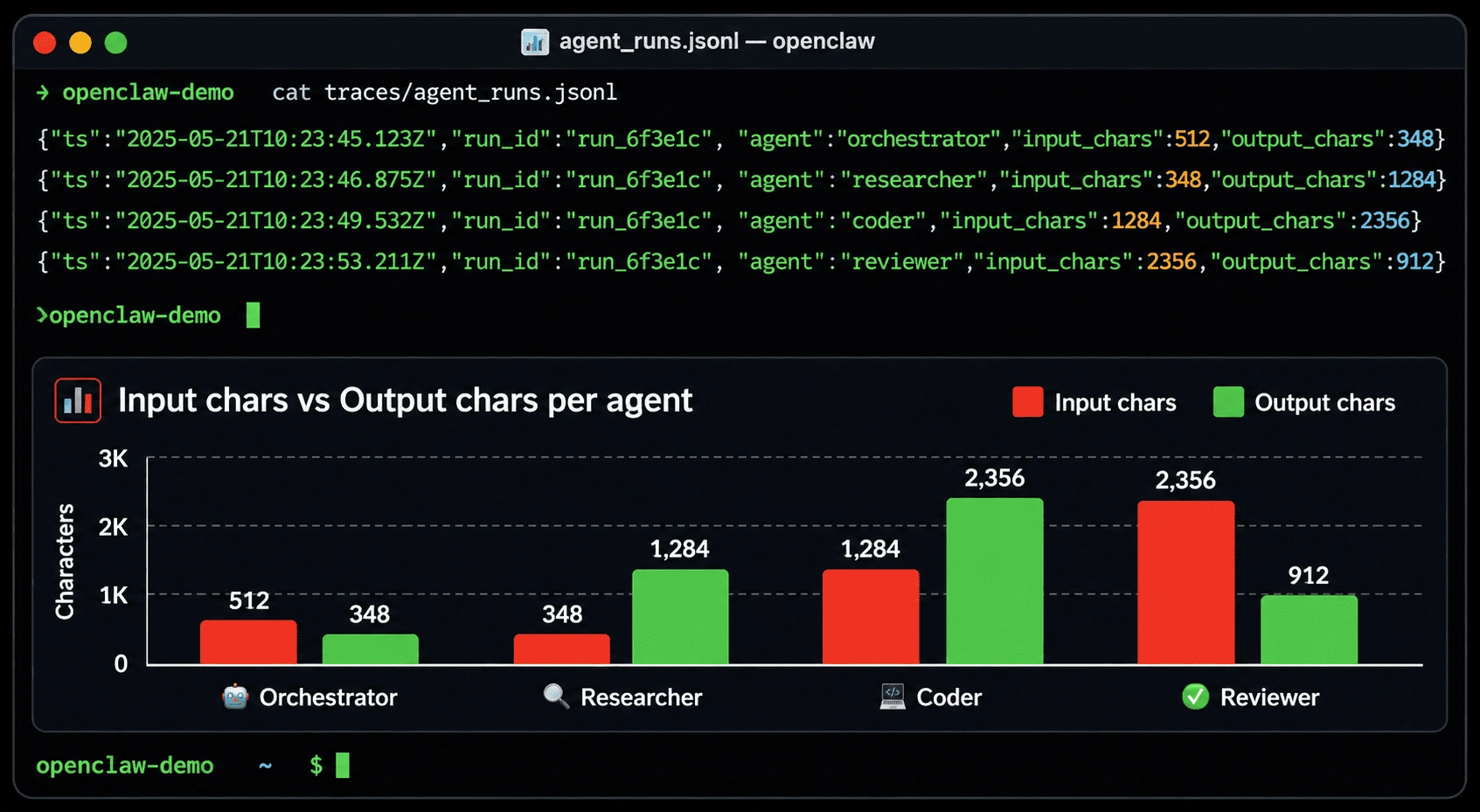
You can’t debug what you can’t see. Add logging to every agent call so you have a full audit trail of what each agent received, what tools it called, and what it returned.
# Add this to any agent file — example for researcher.py

import json
import logging
from datetime import datetime

logger = logging.getLogger(__name__)

def log_agent_run(agent_name: str, input_data: str, output_data: str) -> None:
    """
    Log a complete agent run to a local JSONL file for debugging.

    Args:
        agent_name: Human-readable name of the agent.
        input_data: The input string sent to the agent.
        output_data: The output string returned by the agent.
    """
    log_entry = {
        "timestamp": datetime.utcnow().isoformat(),
        "agent": agent_name,
        "input_length": len(input_data),
        "output_length": len(output_data),
        "input_preview": input_data[:200],
        "output_preview": output_data[:200]
    }

    with open("agent_runs.jsonl", "a") as f:
        f.write(json.dumps(log_entry) + "\n")

    logger.info(f"Agent {agent_name} completed. Output: {len(output_data)} chars.")
The .jsonl format (one JSON object per line) makes it easy to grep, tail, and pipe into analysis tools. It’s also trivial to ship to a logging service like Datadog or CloudWatch when you move to production.
Step 14 — Test each agent in isolation
Before running the full pipeline, test each agent independently. This is the most time-saving practice in multi-agent development. When a pipeline fails, you need to know immediately which agent failed — not spend 20 minutes re-running the whole thing.
Create a simple test script:
# test_agents.py

from dotenv import load_dotenv
load_dotenv()

from agents.researcher import run_researcher
from agents.coder import run_coder
from agents.reviewer import run_reviewer
from memory.session_store import store

TEST_REQUEST = "Build a Python function to convert a CSV file to JSON format."

def test_researcher():
    print("Testing Researcher Agent...")
    result = run_researcher(TEST_REQUEST)
    assert "---RESEARCH SUMMARY---" in result, "Researcher output format invalid"
    assert "RECOMMENDED APPROACH:" in result, "Missing recommended approach"
    print("✅ Researcher Agent: PASS\n")

def test_coder():
    print("Testing Coder Agent...")
    # Researcher must run first to populate the session store
    run_researcher(TEST_REQUEST)
    result = run_coder(TEST_REQUEST)
    assert "def " in result, "No function definition found in code output"
    assert "import" in result, "No imports found in code output"
    print("✅ Coder Agent: PASS\n")

def test_reviewer():
    print("Testing Reviewer Agent...")
    # Researcher and Coder must run first
    run_researcher(TEST_REQUEST)
    run_coder(TEST_REQUEST)
    result = run_reviewer(TEST_REQUEST)
    assert "VERDICT:" in result, "Reviewer output missing VERDICT"
    assert "SCORE:" in result, "Reviewer output missing SCORE"
    print("✅ Reviewer Agent: PASS\n")

if __name__ == "__main__":
    store.clear()
    test_researcher()

    store.clear()
    test_coder()

    store.clear()
    test_reviewer()

    print("All agent tests passed.")
Run it with:
python test_agents.py
If an agent fails its test, fix it in isolation before touching the orchestrator. A clean separation of concerns during development saves hours of debugging time.
Common mistakes to avoid
These are the pitfalls I hit building my first multi-agent system. Each one cost me at least an afternoon.
| Mistake | What happens | Fix |
|---|---|---|
| Giving agents too many tools | Claude gets confused and calls tools unnecessarily, burning tokens | Give each agent only the tools it strictly needs |
| No format enforcement in system prompts | Agent output varies wildly; downstream agents can’t parse it | Use strict “your output MUST follow this format” language with markers |
| Sharing the full message history between agents | Context window overflows; agents get confused by irrelevant history | Pass only the relevant summary (from session store) to each agent |
| No max_turns / max_revision_cycles limit | Infinite loops between Coder and Reviewer drain your API budget | Always set a hard limit on loop iterations |
| Testing only the full pipeline | Hard to know which agent caused a failure | Unit-test every agent before running the pipeline |
| Not clearing the session store between runs | Previous run’s data bleeds into the current run | Always call store.clear() at the start of run_pipeline() |
Quick reference: agent design cheat sheet
| Decision | Rule of thumb |
|---|---|
| Does this agent need tools? | Only if it must take external actions (search, write files, call APIs). Pure reasoning agents don’t need tools. |
| Does this agent need an agentic loop? | Only if it has tools. Tool-free agents are single-turn — one prompt, one response. |
| How specific should the system prompt be? | Very. Name the exact output format with markers. The more specific the prompt, the more predictable the output. |
| How many agents should my pipeline have? | Start with 3–4. Add agents when a single agent’s job becomes hard to describe in one sentence. |
| Which model should each agent use? | Use claude-opus-4-5 for complex reasoning (orchestrator, reviewer). Use a faster model for simpler agents if cost matters. |
| How do agents share data? | Session store for structured data. Never pass raw agent output directly — summarize it first. |
Where to take this next
You now have a working, extensible four-agent pipeline. Here are the most valuable next steps for a developer building on this foundation:
Add parallel agent execution
Right now, agents run sequentially. If you have independent agents that don’t depend on each other’s output, run them in parallel with Python’s asyncio.gather(). A research pipeline that searches three topics simultaneously runs 3× faster than one that searches them one at a time.
Swap in real tools
Replace the mock web_search with a real call to Tavily’s search API. Add a run_code tool that executes Python in a sandboxed environment and returns the output — your Coder Agent can then verify its own code actually runs before passing it to the Reviewer.
Add a human-in-the-loop step
Between the Orchestrator and Coder, add a step that pauses the pipeline and asks a human to approve or modify the research summary. This is the human-in-the-loop pattern — essential for any agent system that takes real-world actions like sending emails, opening PRs, or modifying databases.
Persist the session store
Replace the in-memory SessionStore with a database-backed version using SQLite or Redis. This lets long pipelines survive restarts and makes it easy to replay a failed pipeline from the point of failure instead of from the beginning.
You built a multi-agent system — here’s what that means
What you have now isn’t a chatbot or a one-shot prompt. It’s a system — a piece of software where multiple specialized AI components coordinate to produce outputs that none of them could produce alone.
That shift in thinking — from “one big prompt” to “specialized agents with contracts” — is what separates production AI systems from demos. The same principles you applied here (single responsibility, structured I/O, validation, retry logic) scale directly to enterprise-grade agentic applications.
The full source code for this guide is structured and ready to extend. Your next move is to swap the mock web search for a real one, change the feature request to something relevant to your actual project, and watch a multi-agent system solve a real problem for you.
If you get stuck, the Anthropic agent documentation is the most authoritative reference for how Claude handles tool use, multi-turn conversations, and the agentic loop pattern we built in this guide.