
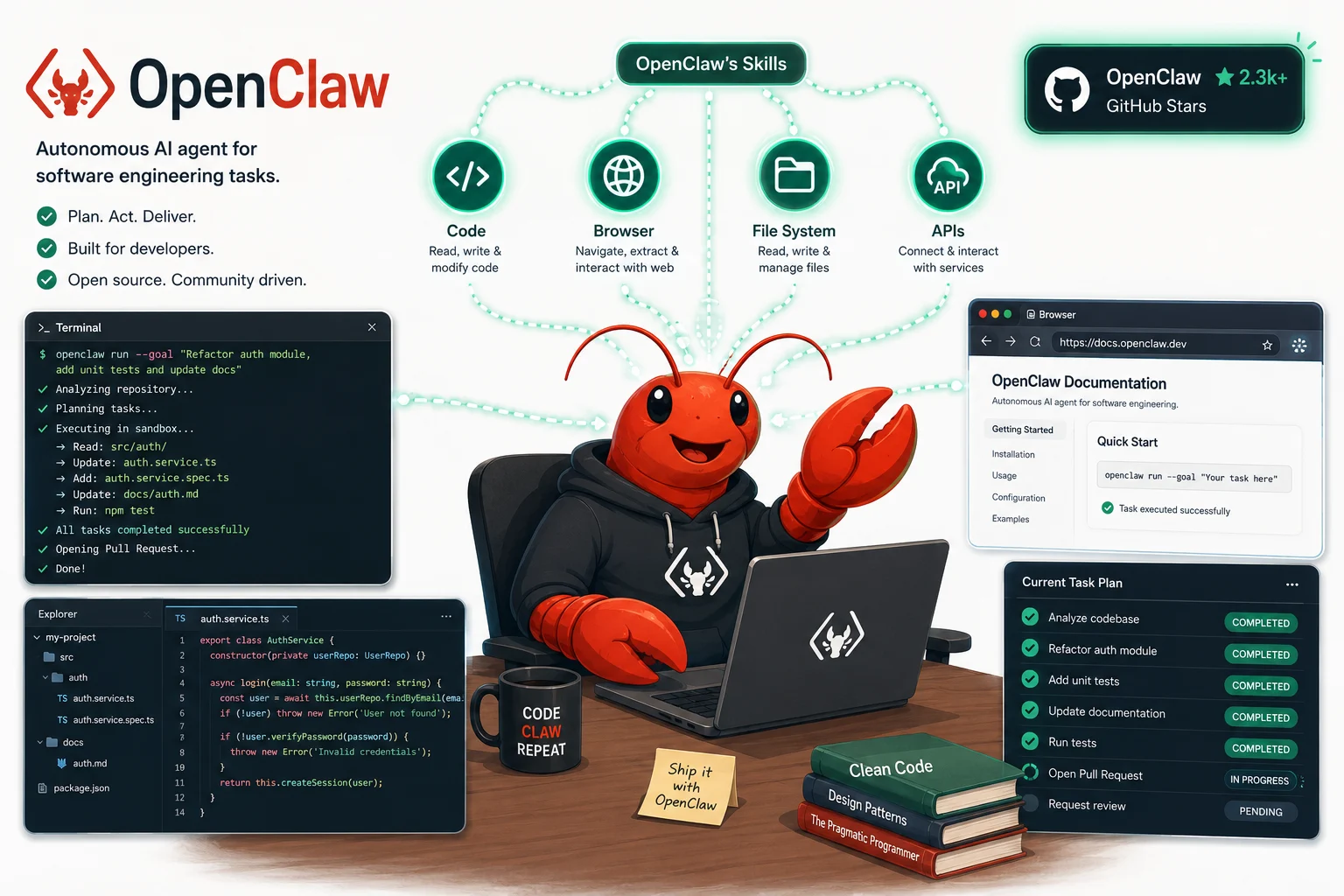
I found out about OpenClaw because it hit 250,000 GitHub stars in sixty days
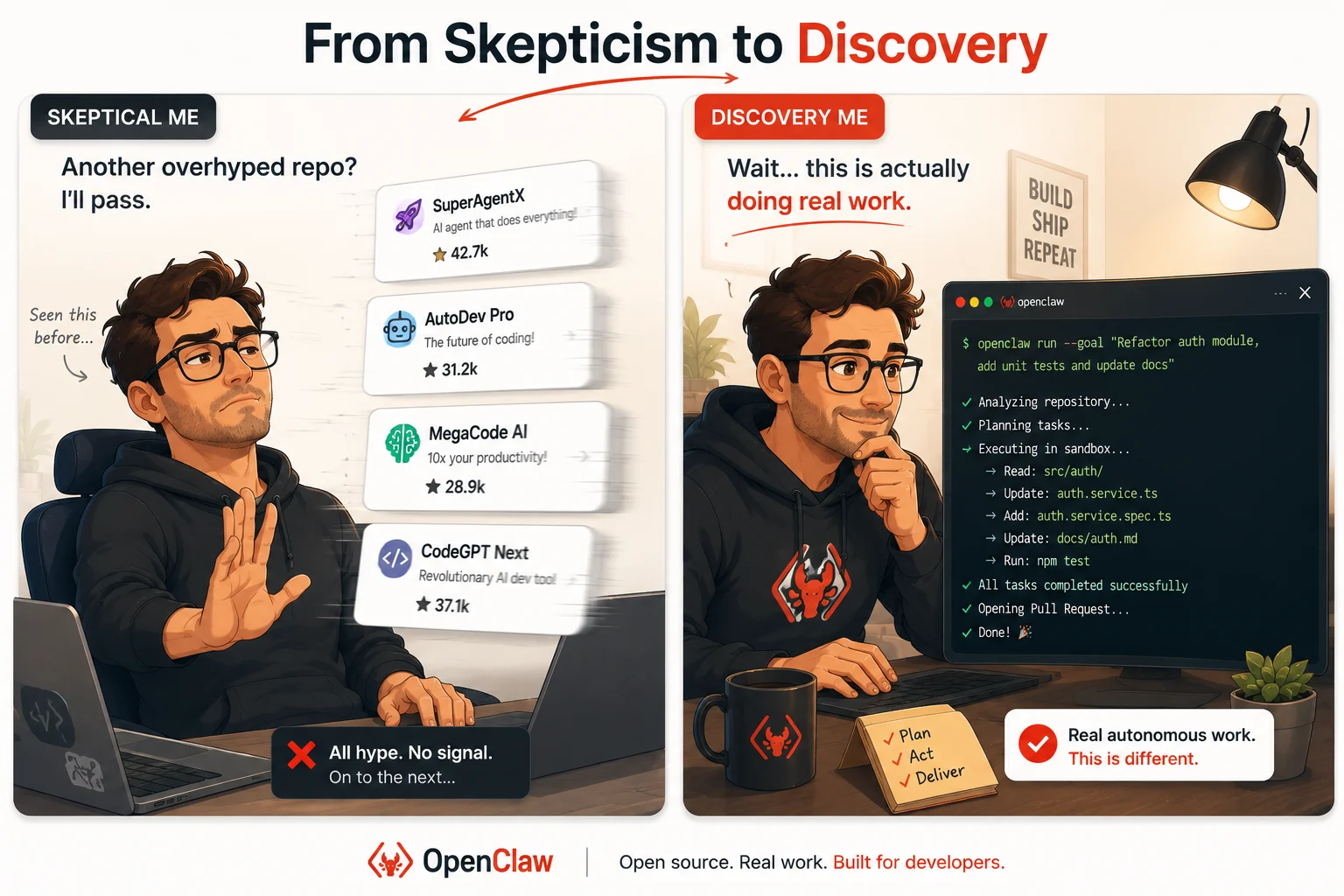
There is a certain kind of GitHub repository that gets signal-boosted by an algorithm and dies six weeks later. Lots of stars, thin substance, abandoned issues. I have bookmarked and forgotten dozens of them. So when OpenClaw showed up in my feed in early 2026 (OpenClaw review) with a star count that had genuinely surpassed React’s ten-year record in about sixty days, my first instinct was skepticism. Something that grows that fast is usually either genuinely important or a well-executed hype cycle.
I spent several weeks actually using it across different kinds of work, including coding tasks, codebase exploration, and automated workflows, before writing this. What I found is more nuanced than either the breathless coverage or the cynical dismissals suggest. OpenClaw is a legitimately capable open-source autonomous agent framework with real coding strengths, an impressive community ecosystem, and some security considerations that developers absolutely need to understand before running it anywhere that matters.
This review covers what OpenClaw actually is, how its coding capabilities work in practice, how to set it up, how it compares to Claude Code and OpenAI Codex, and what honest limitations you should factor into your decision to use it.
What OpenClaw actually is
OpenClaw is a free, open-source autonomous AI agent framework released under the MIT license. It was originally launched in November 2025 under the name Warelay, briefly renamed to Clawdbot and then Moltbot before settling on OpenClaw in January 2026. The project was created by Austrian agentic engineer Peter Steinberger, who joined OpenAI in February 2026 while keeping OpenClaw independent under the OpenClaw Foundation.
The clearest way to understand OpenClaw is this: it is a local-first agent runtime that connects a language model of your choice to your computer’s actual capabilities. You connect it to an LLM such as Claude, GPT-4, GPT-5, DeepSeek, or a local model via Ollama, and it can then interact with your computer through a plugin system called skills. Those skills let it control web browsers, manage files, call APIs, read and write data, execute terminal commands, and chain multi-step workflows together autonomously.
It is important to be clear about what OpenClaw is and what it is not. OpenClaw is a general-purpose autonomous agent framework, not a dedicated coding agent in the mold of Claude Code or OpenAI Codex. Its coding capabilities are real and significant, but they exist within a broader framework designed for any autonomous task from email management to smart home control to code debugging. Understanding this distinction shapes which use cases it handles well and which it handles less well than dedicated coding agents.
The numbers that made everyone pay attention
OpenClaw crossed 250,000 GitHub stars faster than any AI framework in history, surpassing the ten-year record previously held by React. By March 2026, it had grown to over 335,000 stars. NVIDIA built NemoClaw on top of the framework, announced at GTC 2026. China’s government restricted state-run enterprises from running OpenClaw on office computers, which is paradoxically a signal of how seriously it is being taken as infrastructure rather than a novelty. JustPaid, a fintech company, ran seven OpenClaw agents in production continuously and shipped ten features in a single month.
These numbers matter not just as social proof but as indicators of ecosystem health. Star counts at this scale mean more contributors, more skills being built, faster bug fixes, and more documentation being written by people who have actually run it in production. That ecosystem depth is part of what makes OpenClaw worth evaluating seriously, even if the underlying framework has rough edges.
How OpenClaw’s architecture works
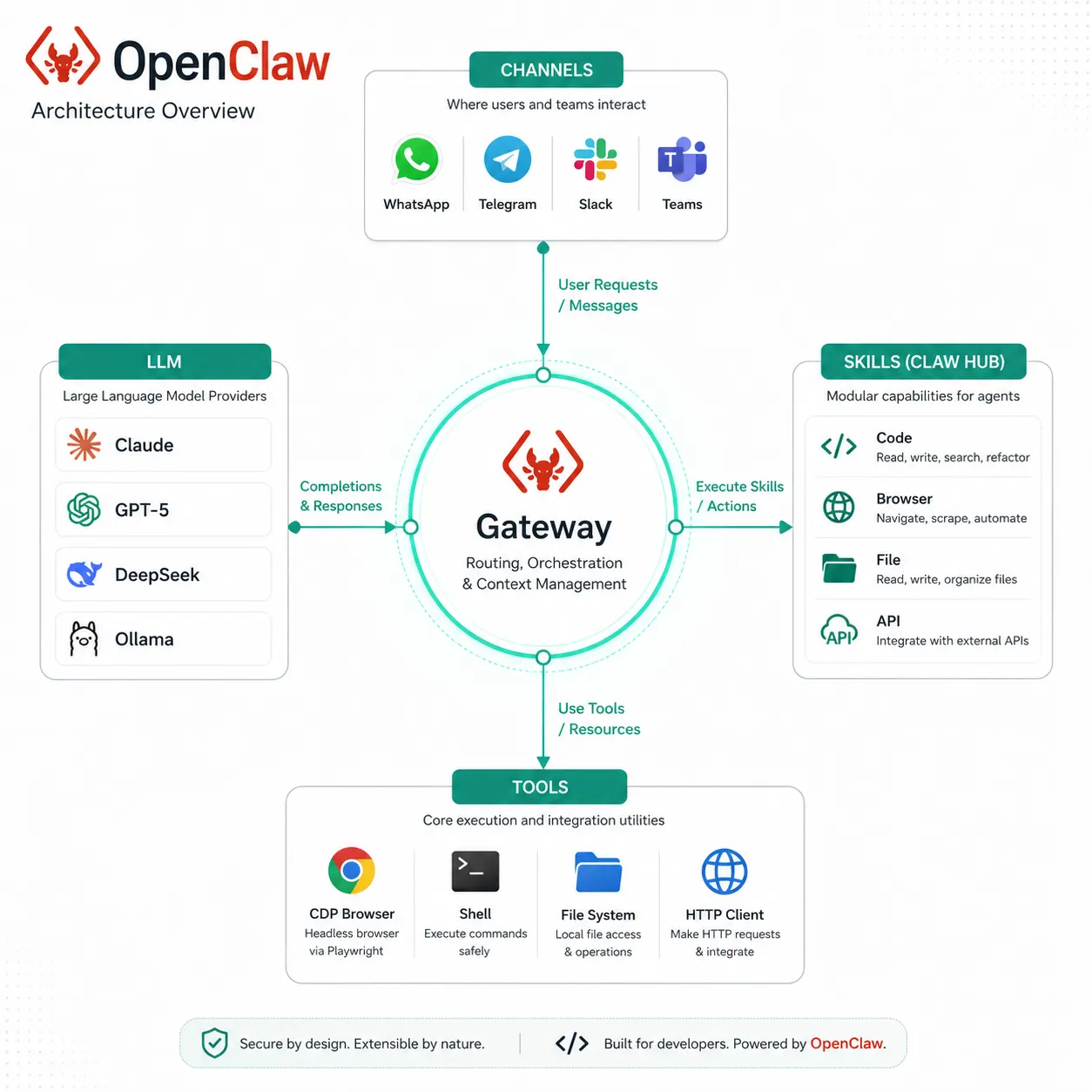
Understanding the architecture makes everything about configuring and troubleshooting OpenClaw much clearer. The framework is built on four foundational components that work together to give the agent its autonomous capabilities.
The Gateway
The Gateway is the always-on control plane. It is a local server that binds to port 18789 by default and handles the WebChat interface, the Control UI, session management, channel routing, and tool dispatch. Every request from every communication channel passes through the Gateway before reaching the LLM or the skills layer. It is the hub of the entire system, and it is also where the most significant security vulnerability lives, which is covered in detail later.
Channels
Channels are how you interact with your OpenClaw agent. OpenClaw natively integrates with over 50 messaging platforms including WhatsApp, Telegram, Slack, and Microsoft Teams. This is one of the more distinctive aspects of the framework. Most coding agents expect you to interact through a terminal or an IDE. OpenClaw lets you send a task from WhatsApp on your phone and receive results back in the same conversation. For developers who want to delegate tasks while away from their desk, this interaction model is genuinely different from anything Claude Code or Codex offers.
Skills
Skills are modular add-ons that extend the agent’s capabilities. They are managed through ClawHub, the community skills marketplace, and each skill is defined by a SKILL.md file that describes what it does and how the agent should use it. OpenClaw ships with over 100 prebuilt skills covering categories including code generation, code debugging, browser automation, file management, API integration, and data processing. The community releases new skills continuously. You install skills from the terminal with a single command:
# Install a skill from ClawHub
openclaw skills install web-search
openclaw skills install code-debugger
openclaw skills install github-pr

# List installed skills
openclaw skills list

# View details of a specific skill
openclaw skills info code-debugger
Tools
Tools are built-in system-level capabilities that skills can call on. These include browser automation via Chrome DevTools Protocol, shell execution for running terminal commands, file system management for reading and writing files, and API client functionality for making HTTP requests. Tools are the layer below skills. Skills define the task logic. Tools provide the system access that makes those tasks possible.
OpenClaw’s coding capabilities in honest detail
Because this article focuses specifically on OpenClaw as a coding tool, here is an honest assessment of what it does well for development work and where it is weaker than purpose-built coding agents.
What OpenClaw handles well for coding
Code debugging with browser automation context. One of OpenClaw’s genuinely differentiated capabilities for developers is the combination of code debugging with browser control. If you are debugging a frontend issue that manifests in the browser, OpenClaw can look at the running page, inspect console errors, read the source, modify the code, and retest in a single autonomous loop. No dedicated coding agent currently combines these capabilities as seamlessly.
Codebase exploration and question answering. With the file system tool and a frontier model as the LLM, OpenClaw handles questions about large codebases well. It can navigate a repository, read the relevant files, and give informed answers about how something works without you needing to pre-select which files to show it. This is genuinely useful for onboarding to unfamiliar projects.
Automated pull request creation via the GitHub skill. The GitHub PR skill connects OpenClaw to your repositories, allowing it to read issues, write code changes, commit to a branch, and open a pull request, all from a conversational instruction. The workflow is similar to Codex’s GitHub integration but runs locally through your own credentials rather than through OpenAI’s cloud infrastructure.
Multi-step coding workflows with external integrations. OpenClaw’s skill chaining allows coding tasks to be embedded in larger workflows. You can build a workflow that reads a task from Linear, writes the code, runs the tests, pushes the branch, and posts an update back to Linear when done. Purpose-built coding agents do not natively cover this kind of cross-tool workflow orchestration.
Where OpenClaw is weaker than dedicated coding agents
No built-in sandboxed code execution. OpenClaw runs code on your local machine with direct file system access. Claude Code and Codex both operate with execution environments that are either isolated from production systems or run in cloud sandboxes. With OpenClaw, the agent is modifying your actual files and running commands in your actual environment. This means mistakes are less contained. A misunderstood instruction can affect your working directory directly.
No native test-and-fix loop. Dedicated coding agents like Claude Code and Codex run the test suite after making changes, observe the failures, and fix them before surfacing output. OpenClaw can do this if you set up a workflow that explicitly calls the test runner, captures output, and feeds it back to the agent, but it requires you to build that loop yourself. It is not the default behavior.
Code quality depends entirely on your LLM choice. OpenClaw is model-agnostic, which is a real advantage. But it also means the quality of its coding output varies significantly depending on which LLM you connect. With a frontier model like GPT-5 or Claude Sonnet, the coding output is competitive. With a smaller local model via Ollama, it is considerably less reliable for complex tasks. Dedicated coding agents are always running on frontier models optimized specifically for software engineering.
# Example OpenClaw coding workflow configuration
# This SKILL.md defines a code debugging skill

## Skill: code-debugger
## Description: Debug failing code by reading error output, identifying the root cause,
## and applying a fix. Run tests after fixing to verify the solution.

## Steps:
1. Read the error or failing test output provided by the user
2. Use the file tool to read the relevant source files
3. Reason about the root cause of the failure
4. Write the fix using the file tool
5. Run the test command using the shell tool
6. If tests pass, summarize what was changed and why
7. If tests still fail, repeat from step 3 with the new information
Setting up OpenClaw: from zero to first coding task
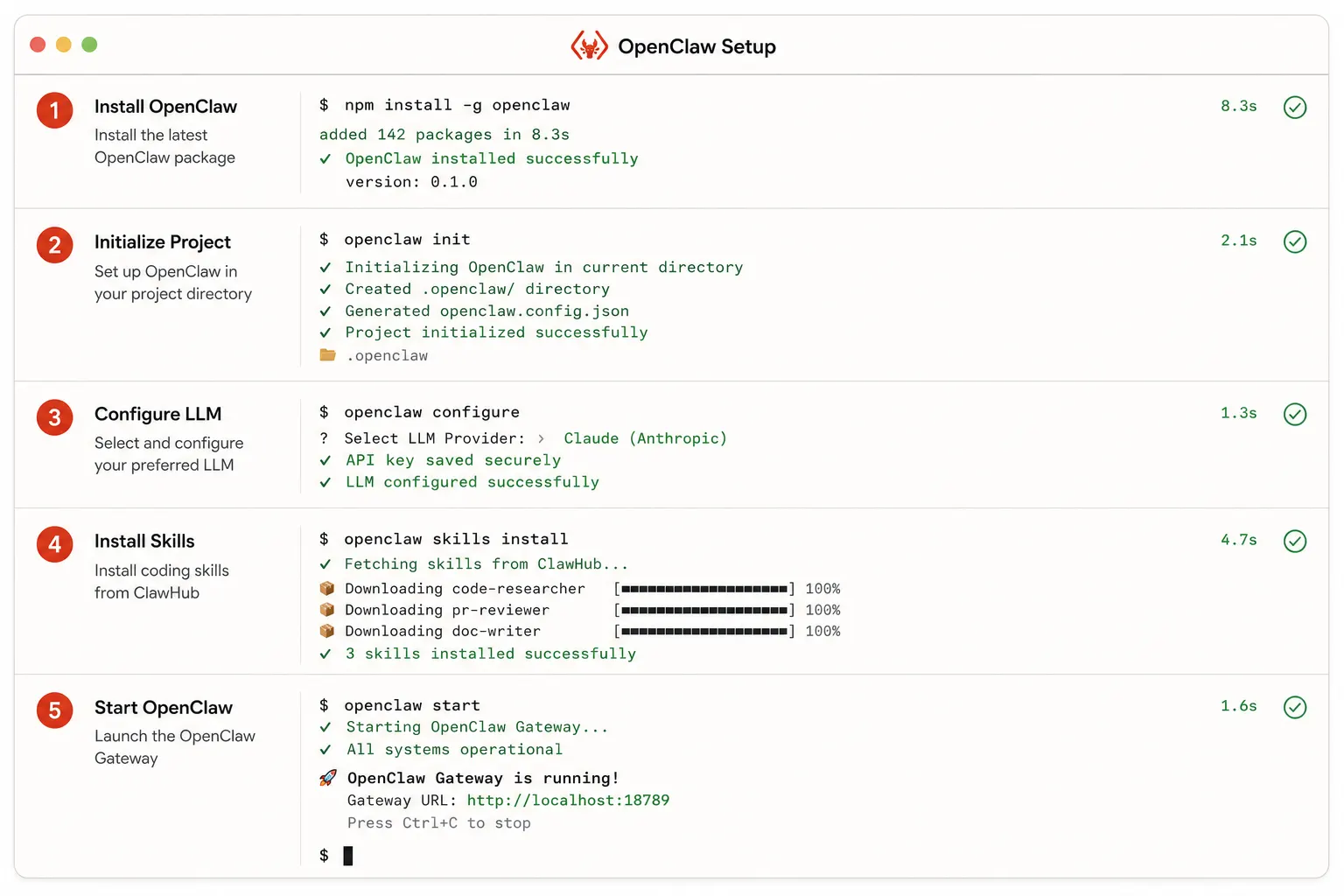
The setup experience is one of OpenClaw’s genuine strengths compared to more complex frameworks. The project prides itself on a fast onboarding path, with community benchmarks showing an average setup time of under 35 minutes, including environment preparation, installation, authentication, and channel configuration.
# Install OpenClaw via npm
npm install -g @openclaw/cli

# Initialize a new OpenClaw instance
openclaw init

# Connect your LLM provider (example with Claude)
openclaw config set llm.provider anthropic
openclaw config set llm.model claude-sonnet-4-6
openclaw config set llm.apiKey YOUR_API_KEY

# Or connect to a local model via Ollama
openclaw config set llm.provider ollama
openclaw config set llm.model llama3

# Install coding skills from ClawHub
openclaw skills install code-debugger
openclaw skills install github-pr
openclaw skills install code-refactor
openclaw skills install test-runner

# Start the agent gateway
openclaw start

# The Control UI is now available at http://localhost:18789
Once the Gateway is running, you interact with the agent through whichever channel you configured. For coding workflows, the web chat interface at localhost:18789 or a Telegram integration is the most practical. You can send a coding task in plain English, and the agent will route it through the appropriate installed skills.
One configuration step that significantly improves coding output quality is setting up a project-specific context file. Similar in concept to OpenAI Codex’s AGENTS.md, you can create a SKILL.md file in your repository that tells the agent about your project’s conventions, test commands, and structure:
# Project context for OpenClaw (save as .openclaw/context.md in your repo root)

## Project: Customer API Service
## Stack: Node.js, TypeScript, Express, PostgreSQL
## Test command: npm run test
## Lint command: npm run lint

## Conventions
- All async functions use async/await. No raw promises or callbacks.
- Errors are handled by throwing a typed ApiError class (src/errors/ApiError.ts)
- New routes go in src/routes/ and must be registered in src/routes/index.ts
- Database queries belong in src/repositories/ only, never in route handlers

## What to avoid
- Do not modify db/migrations/
- Do not change existing API response shapes without updating tests
Security: the part of this review you cannot skip
OpenClaw’s security situation deserves its own section because it is genuinely important and often underemphasized in coverage that focuses on the exciting parts of the framework.
The WebSocket vulnerability
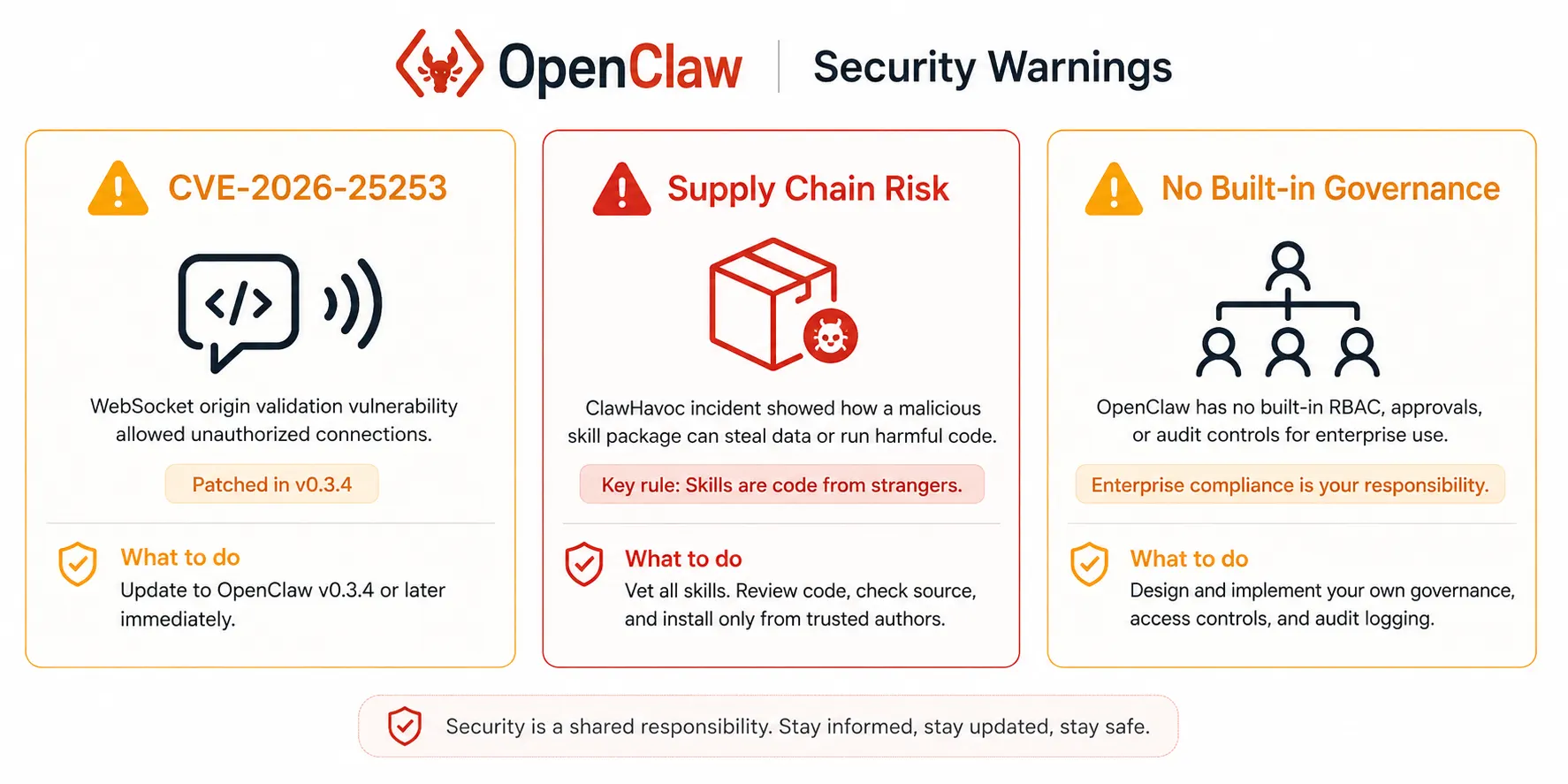
In January 2026, security researchers disclosed CVE-2026-25253, a cross-site WebSocket hijacking vulnerability rated CVSS 8.8. The vulnerability meant that any website could steal an auth token and achieve remote code execution on the host machine through a single malicious link. One click and an attacker had full access to whatever the OpenClaw Gateway could access. The vulnerability was patched in version 2026.1.29, but security firm Censys found over 21,000 OpenClaw instances exposed to the public internet at the time of disclosure, many running over plain HTTP. This is not ancient history. If you are running an older version or have exposed the Gateway port publicly, check that first before anything else.
The skills supply chain problem
Skills are code from strangers, and there is no sandbox. This is the most important sentence in this section. When you install a skill from ClawHub, you are installing and executing code written by community contributors. In February 2026, the ClawHavoc supply chain attack resulted in 341 malicious skills being uploaded to ClawHub, compromising over 9,000 installations with credential-stealing malware. A Cisco security team audit also found a skill that had been gamed to the top of the repository and contained hidden malicious behavior.
This is not a reason to avoid OpenClaw, but it is a reason to treat skill installation with the same care you would treat running any third-party code with elevated system access:
- Only install skills from the official OpenClaw Foundation or from publishers you have independently verified
- Read the SKILL.md and any associated source code before installing anything with file system or shell access
- Never install skills that your use case does not require
- Keep your OpenClaw installation updated to receive security patches promptly
- Never expose the Gateway port publicly without authentication and TLS in front of it
No built-in governance for enterprise use
OpenClaw agents can do whatever their installed skills allow. There is no native system for approval workflows, decision boundaries, or compliance logging. For personal workflows and development environments, that is completely fine. For anything touching customer data, financial systems, or regulated environments, you are responsible for building that governance layer yourself or choosing a tool that provides it. OpenClaw’s open-source community is helpful, but community support does not come with an SLA or an on-call team when something goes wrong at two in the morning.
How OpenClaw compares to dedicated coding agents
| Feature | OpenClaw | Claude Code | OpenAI Codex |
|---|---|---|---|
| Cost | Free (you pay for LLM API calls) | Included in Claude plans from $20/month | Included in ChatGPT plans from $20/month |
| Open source | Yes, MIT license | No | CLI is open source; cloud agent is not |
| LLM choice | Any provider, including local models via Ollama | Anthropic Claude models only | OpenAI GPT-5 family models only |
| Execution environment | Local machine with direct file system access | Local machine via terminal | Cloud sandbox (isolated from local machine) |
| Built-in test and fix loop | Requires manual workflow configuration | Yes, automatic | Yes, automatic |
| Parallel tasks | Yes, via multiple agent instances | No, sequential | Yes, native parallel sandboxes |
| Interaction channels | 50+, including WhatsApp, Telegram, Slack | Terminal only | Web, desktop app, VS Code, CLI |
| Browser automation | Yes, via Chrome DevTools Protocol | No | Limited (research preview features) |
| Skills and plugin ecosystem | ClawHub with 100+ community skills | No plugin system | MCP support for tool extension |
| Security model | Application-layer (higher risk, no sandbox) | Local with shell access (moderate risk) | Cloud-isolated sandbox (lowest risk) |
| Enterprise governance | None built-in, build your own | Limited | Enterprise tier available |
| Best for | Self-hosted, model-agnostic, multi-channel workflows | Deep local codebase work, self-correcting refactors | Parallel asynchronous cloud-based task delegation |
Who OpenClaw is actually built for
Independent developers and open-source contributors who want a free, self-hosted agent they fully control get the most natural fit with OpenClaw. There is no subscription fee beyond your LLM API costs, no cloud infrastructure you depend on, and no vendor lock-in. You own the entire stack. If OpenAI or Anthropic changes pricing or access policies tomorrow, your OpenClaw workflow is unaffected because you are supplying the model yourself.
Developers who want to use local models for code work get a unique advantage from OpenClaw that no dedicated coding agent offers. If you are working with sensitive codebases where sending code to a third-party cloud is not acceptable, you can connect OpenClaw to a Llama or Mistral model running entirely on your own hardware via Ollama. The output quality is lower than that of frontier models, but the data never leaves your machine.
Builders who want multi-channel agent workflows find OpenClaw’s channel system genuinely useful. Being able to submit a coding task from Telegram while travelling and receive the result in the same conversation thread is a different interaction model from any terminal-based tool. For developers who want their agent accessible from anywhere without opening a laptop, this matters.
Developers comfortable with open-source infrastructure who are willing to manage their own installation, handle updates promptly for security patches, curate which skills they install, and build governance on top of the framework will find OpenClaw highly rewarding. Developers who want a managed product with an SLA will find the self-hosted model exhausting.
Real use case: using OpenClaw for a coding task
To give you a concrete sense of what working with OpenClaw actually feels like, here is a representative coding workflow using the GitHub PR and code-refactor skills.
Starting from a Telegram conversation after setting up the GitHub skill with repository access:
You (via Telegram):
"Read the open issues in github.com/myorg/api-service labeled 'good first issue'
and pick the simplest one. Fix it, write a test for the fix, and open a pull request."

OpenClaw:
"Reading open issues from myorg/api-service...
Found 3 issues labeled 'good first issue':
- #142: TypeError when email field is null in /api/users/update
- #156: Missing rate limit headers in API responses
- #163: Docs typo in README

Starting with #142 as the most contained fix.
Reading src/routes/users.ts...
Found: email field is accessed without null check on line 87.
Applying fix...
Writing test for null email case in tests/routes/users.test.ts...
Running npm run test...
All 47 tests pass including 2 new tests for the null email case.
Opening pull request...
PR #189 opened: 'fix: handle null email in user update endpoint (#142)'
Link: github.com/myorg/api-service/pull/189"
That interaction required no terminal access, no IDE, and produced a verifiable output with a link to review. For straightforward, well-specified tasks like this one, the experience is genuinely smooth.
Common mistakes when using OpenClaw for coding work
Exposing the Gateway port publicly without authentication
The default configuration is for local development. The moment you deploy OpenClaw on a server or VPS and expose port 18789 without putting an authenticated reverse proxy in front of it, you have created a significant attack surface. Always run a reverse proxy like nginx or Caddy in front of the Gateway with HTTPS and authentication enabled before exposing OpenClaw to any network beyond localhost.
Installing skills without reading the source
The ClawHavoc incident demonstrated that the skills marketplace is not perfectly curated. Every skill you install gets access to whatever tools it declares. Before installing any skill that touches files, shell execution, or credentials, read the SKILL.md and any referenced source code. This takes five minutes and is worth it every time.
Using a weak local model for complex coding tasks
OpenClaw’s model-agnostic design is a strength. Using a small local model for tasks that require frontier reasoning is a mistake. Code refactoring across multiple files, debugging complex logic errors, and writing tests for nuanced edge cases all require the reasoning quality of a frontier model. Use a local model for simple lookups and information retrieval if you want to manage costs. Use a frontier model for anything that requires real code quality.
Skipping the project context file
OpenClaw, without a project context file, will write generic, convention-agnostic code. The context file .openclaw/context.md is the equivalent of a good AGENTS.md for Codex or a strong system prompt for Claude Code. Without it, the agent does not know your stack, your conventions, your test commands, or what to avoid. With it, the output quality improves substantially on the first task.
Treating it like a managed product
OpenClaw is a framework, not a service. When something breaks, you debug it yourself. When a new security patch drops, you apply it yourself. When a skill causes unexpected behavior, you investigate it yourself. This is a deliberate trade-off that comes with full control and zero cost, but it is a real operational responsibility. If your team does not have someone willing to own that maintenance, a managed product is a more honest choice.
OpenClaw quick reference
| Topic | Key facts |
|---|---|
| Initial release | November 24, 2025, as Warelay. Renamed to OpenClaw on January 30, 2026. |
| Creator | Peter Steinberger. Joined OpenAI in February 2026 while keeping OpenClaw independent. |
| License | MIT. Fully open source. |
| GitHub stars | Over 335,000 by March 2026. Fastest AI framework to reach 250K in history. |
| LLM support | Any provider: Claude, GPT-5, DeepSeek, Gemini, local models via Ollama. |
| Skills marketplace | ClawHub. 100+ prebuilt skills. Community-contributed and growing. |
| Channel integrations | 50+, including WhatsApp, Telegram, Slack, Microsoft Teams, and web chat. |
| Key security patch | CVE-2026-25253 fixed in v2026.1.29. Always run the latest version. |
| Gateway port | 18789 by default. Never expose publicly without an authenticated HTTPS proxy. |
| Cost | Free. You pay only for LLM API calls at standard provider rates. |
| Best coding use cases | Browser-plus-code debugging, GitHub PR workflows, multi-step cross-tool pipelines. |
| Not ideal for | Enterprise compliance, teams needing managed SLA, and developers without time for self-hosted maintenance. |
Further reading and resources
- OpenClaw official website: the primary resource for current documentation, installation guides, release notes, and the roadmap maintained by the OpenClaw Foundation
- OpenClaw on GitHub: the source repository, open issues, community discussions, and the security advisories page where vulnerabilities and patches are disclosed
- Patrick Hughes’ production test review of OpenClaw: an independent technical review that ran real workloads, including RAG, tool-calling, and multi-step chains to evaluate where OpenClaw earns its reputation and where it falls short
OpenClaw is not the right tool for every developer, but it is a genuinely capable and genuinely free option that fills a real gap in the current landscape. If you want to own your AI agent infrastructure completely, choose your own LLM, connect it to 50 different channels, and build workflows that cross the boundaries no managed tool will cross for you. OpenClaw earns the attention it has received.
Use it with the same care you would give to any powerful open-source tool that runs with elevated system access. Keep it updated. Read the skills before installing them. Keep the Gateway off the public internet without authentication in front of it. Build a solid project context file before your first coding task. Do those things, and OpenClaw is a remarkably capable free alternative to tools that cost considerably more. Skip them, and the star count will not protect you from the consequences.