
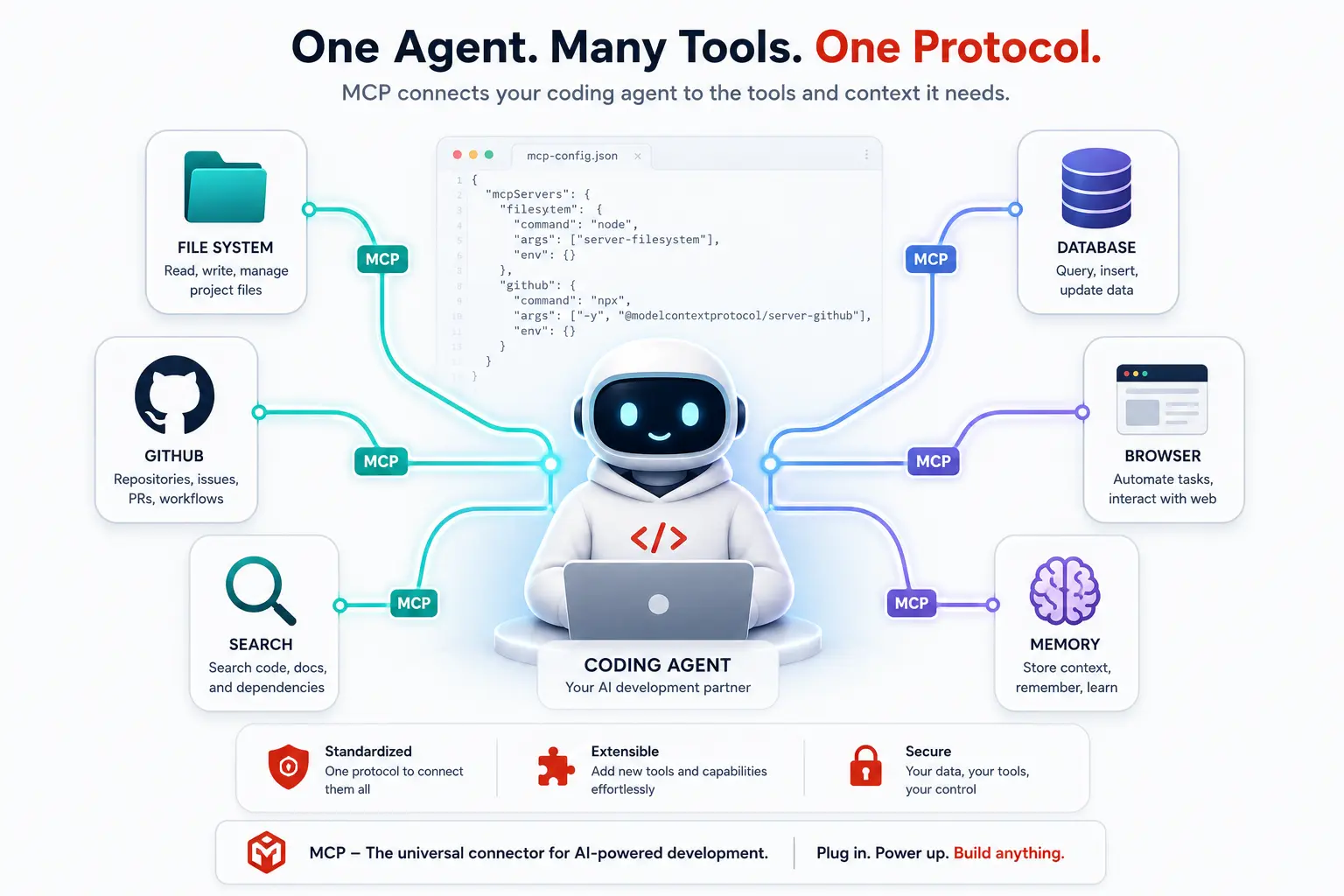
I installed fourteen MCP servers in one afternoon, and my agent got slower, not smarter
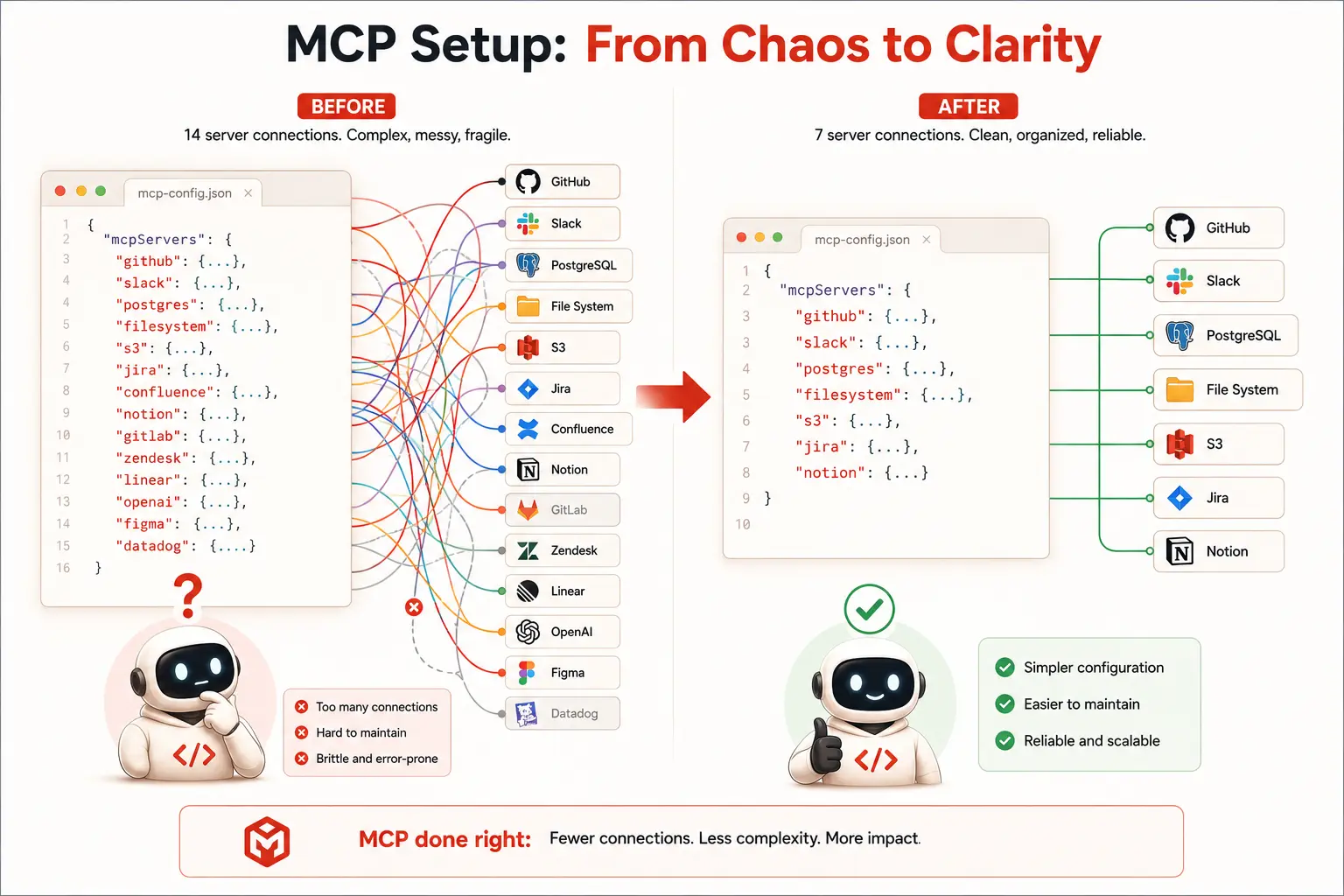
When MCP servers started showing up everywhere, I did what most developers do with a new toy. I found a curated list, copied every install command, and pasted fourteen server entries into my Claude Code config in one sitting. I felt productive. My agent now had access to GitHub, a database, web search, Slack, a calendar tool, a half-maintained Notion connector, and a handful of things I genuinely cannot remember choosing (best MCP servers for developers 2026).
The next morning, I asked it to fix a failing test. It took eleven seconds just to start responding. Then it called the wrong tool twice before finding the right one, because three of my fourteen servers exposed similarly named functions that confused its tool selection. I had built myself a slower, more confused assistant and called it an upgrade.
That mistake taught me the only rule that actually matters when choosing MCP servers in 2026: a server earns its place by solving a real, recurring problem in your daily workflow, not by existing. With over 14,000 MCP servers now listed across public directories, most of them weekend projects that break the first time you rely on them, the question is no longer whether MCP is worth using. It clearly is. The question is which servers are worth the context budget, the maintenance, and the cognitive overhead of one more tool your agent has to choose correctly between.
This guide is the shortlist I wish I had built on day one. Seven MCP servers that have earned a permanent place in a real coding workflow, tested across Claude Code and Cursor, with install commands, honest verdicts, and the specific situations where each one actually changes how you work.
What actually makes an MCP server worth installing
Before the list, it helps to define the filter, because this is what separates a useful MCP setup from the kind that slowed my agent down. A worthwhile MCP server has three properties in common, and any server missing more than one of them is probably not worth your slot. The Complete MCP Guide for Developers.
It exposes a small, well-defined set of tools rather than dozens of overlapping functions. It solves a problem that shows up in your actual daily workflow, not a hypothetical one you might use once a quarter. And it is actively maintained, meaning recent commits, responsive issue handling, and a community large enough that breakage gets noticed and fixed quickly.
There is also a real cost to keep in mind. Independent benchmarking from Scalekit found that calling a tool through MCP costs roughly 10 to 32 times more tokens than the equivalent operation through a direct CLI call, because every MCP tool call carries its full schema definition alongside the request. This is not an argument against MCP. It is context for deciding when MCP is the right layer and when a direct CLI command inside your agent’s existing shell access is simply faster and cheaper. High-frequency, predictable operations like running your test suite or linting a file often belong in a CLI step. Exploratory operations where the agent needs to reason about what to do next, like investigating a failing test or searching documentation, are exactly where MCP earns its token cost.
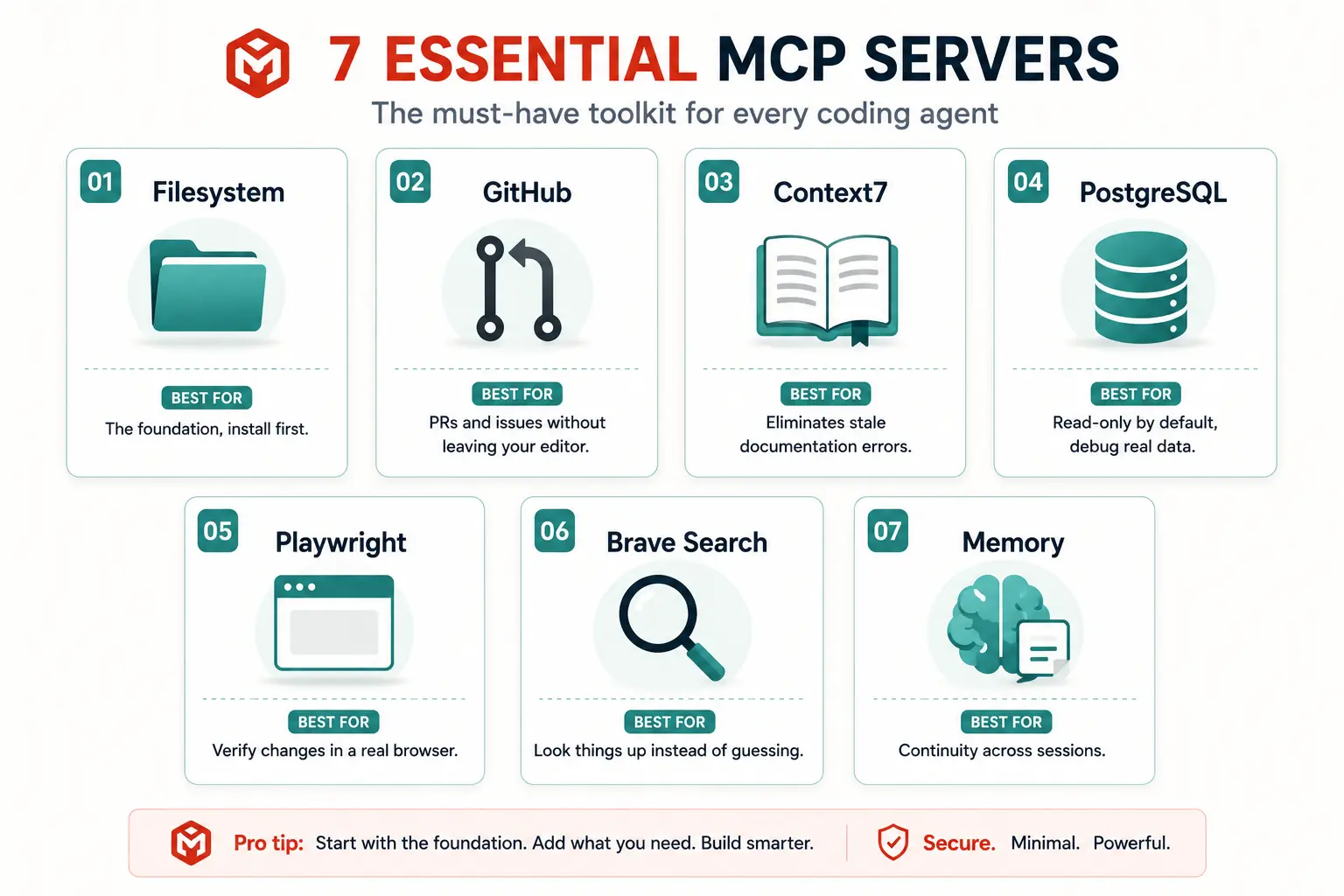
With that filter in place, here are the seven servers worth your attention in 2026.
1. Filesystem MCP Server
The official Anthropic filesystem server is the foundation almost everyone starts with, and for good reason. It gives your agent read and write access to directories on your machine with configurable path restrictions, which means you decide exactly what the agent can see and touch rather than handing it your entire home directory.
Without filesystem access, every “look at this file” interaction turns into you copying and pasting content into the chat window manually. With it, the agent navigates your codebase on its own, reads the files it actually needs based on what it is investigating, and writes changes directly. It is the single biggest unlock for treating an AI coding tool as something that works with your project rather than something you feed snippets to.
One caveat worth knowing: Claude Code already has built in file access through its native tools, so the filesystem MCP server is most valuable when you need to expose filesystem operations to other MCP compatible clients, or when you want finer grained access control than what a tool’s built in file handling provides by default.
{
  "mcpServers": {
    "filesystem": {
      "command": "npx",
      "args": ["-y", "@modelcontextprotocol/server-filesystem", "/path/to/your/project"]
    }
  }
}
Verdict: Install this first if you are setting up MCP from scratch. Restrict the path to your actual project directory rather than your whole machine. It is not optional infrastructure. It is the floor everything else builds on.
2. GitHub MCP Server
If filesystem access lets your agent work with your local code, the GitHub MCP server lets it work with your project’s collaborative surface. It can search code across repositories, read and comment on issues, open and review pull requests, and inspect commit history, all without you leaving your editor or terminal to switch over to a browser tab.
This is the server that turns a coding session into something closer to delegation. You can ask your agent to read an open issue labelled for a quick fix, implement the change, and open a pull request referencing that issue, and the entire loop happens through natural language instructions rather than you manually clicking through GitHub’s interface at every step. For any team that lives inside GitHub for code review and issue tracking, which is most teams, this server consistently ranks as one of the most used in the entire MCP ecosystem.
{
  "mcpServers": {
    "github": {
      "command": "npx",
      "args": ["-y", "@modelcontextprotocol/server-github"],
      "env": {
        "GITHUB_PERSONAL_ACCESS_TOKEN": "your_token_here"
      }
    }
  }
}
Verdict: A must-have for any team using GitHub as their primary collaboration surface. Use a scoped, read-heavy token if you want to limit what the agent can do without your explicit review, and grant write access only once you trust the workflow.
3. Context7
Context7 solves a problem that quietly undermines a huge amount of AI-generated code: stale training data. A language model trained on a snapshot of the internet has no idea that the library you are using shipped a breaking change three months ago, or that the method it confidently suggests was deprecated in the latest major version. Context7 pulls current, version-accurate documentation directly into your agent’s context at the moment it needs it, rather than relying on what the model memorized during training.
Developers running Context7 in production workflows describe it as the single biggest improvement to AI coding accuracy they have seen from any individual MCP server, specifically because it eliminates an entire category of hallucinated APIs and deprecated method calls before they ever reach your codebase. Given how often AI coding tools confidently invent methods that do not exist in the version you are actually running, a server that grounds the agent in real, current documentation pays for itself almost immediately.
{
  "mcpServers": {
    "context7": {
      "command": "npx",
      "args": ["-y", "@upstash/context7-mcp"]
    }
  }
}
Verdict: One of the three servers worth installing on day one alongside Filesystem and GitHub. If your agent regularly suggests methods that do not exist in your dependency’s current version, this is the fix.
4. PostgreSQL MCP Server
For any team working with data-heavy features, the PostgreSQL server connects your agent directly to your database, letting it run queries, inspect schemas, list tables and columns, and analyze actual data rather than working from a stale schema description you typed into a prompt three weeks ago.
The real value shows up during debugging. Instead of manually running a query, copying the result, and pasting it back into your chat window to explain what you are seeing, you can simply ask the agent to look at the relevant table directly. It writes the query, runs it, reads the result, and reasons about it in the same step. This turns “write me a query” from a one-shot guess based on incomplete information into something the agent can iterate on with real feedback from your actual database structure.
The official reference implementation defaults to read-only access for safety, which is the right default for most workflows. You can opt into write access for specific use cases like generating and applying migrations, but that should be a deliberate choice, not the starting configuration.
{
  "mcpServers": {
    "postgres": {
      "command": "npx",
      "args": ["-y", "@modelcontextprotocol/server-postgres", "postgresql://localhost/yourdb"]
    }
  }
}
Verdict: The best database MCP server for most teams, and read-only by default, is exactly the right posture. Watch your context budget on databases with very large schemas, since dumping every table and column into context on every query adds up quickly.
5. Playwright MCP Server
This is the server that changed end-to-end testing for AI coding agents, and it is worth understanding exactly why. Microsoft’s official Playwright MCP server gives your agent the ability to open a real browser, navigate to a page, click elements, fill forms, take screenshots, and verify that a feature actually works in the rendered UI, not just that the code compiles and the unit tests pass.
Combine this with a running dev server and the workflow changes meaningfully. The agent implements a frontend change, opens the browser, navigates to the affected page, interacts with it the way a real user would, and visually confirms the change works before declaring the task complete. That closed verification loop, where the agent checks its own work against a real running application rather than just trusting that the code looks correct, catches an entire class of bugs that would otherwise only surface when a human tester or an end user finds them.
The server uses accessibility snapshots rather than raw screenshots to understand page structure, which means it reasons about the page the way assistive technology does, reading element roles, labels, and states directly rather than trying to interpret pixels. This makes its understanding of a page significantly more reliable than a vision-based approach trying to parse a screenshot.
{
  "mcpServers": {
    "playwright": {
      "command": "npx",
      "args": ["-y", "@playwright/mcp"]
    }
  }
}
Verdict: Essential for any frontend work. The closed loop of implement, verify in a real browser, then report success is a genuine step up from agents that simply trust their own generated code without checking it.
6. Brave Search MCP Server
Every coding session eventually hits a moment where the agent needs information beyond what it already knows: a recent blog post explaining an edge case, a Stack Overflow thread describing a specific error, or documentation for a library update that happened after the model’s training cutoff. The Brave Search server gives your agent the ability to run real web searches and get back structured results, including titles, URLs, and content snippets, rather than guessing based on outdated internal knowledge.
This matters more than it sounds like on paper. An agent that can verify a claim, look up a current error message, or pull the latest version of a configuration example produces noticeably more accurate output than one working entirely from memorized training data. The free tier is generous enough to cover personal and small team use without hitting limits during normal development work.
{
  "mcpServers": {
    "brave-search": {
      "command": "npx",
      "args": ["-y", "@modelcontextprotocol/server-brave-search"],
      "env": {
        "BRAVE_API_KEY": "your_api_key_here"
      }
    }
  }
}
Verdict: The best general-purpose search server for a developer who wants their agent to look things up rather than guess. An API key is required, but the free tier comfortably covers individual use.
7. Memory MCP Server
Every MCP server so far gives your agent access to something external. The Memory server gives it something different: continuity. Language models are stateless by default, which means every new session starts from zero regardless of how much context you built up in a previous conversation. The Memory server lets your agent store and retrieve persistent notes about your project across sessions, so it does not need you to re-explain your architecture, your conventions, or a decision you made together last week every single time you open a new chat.
For long-running projects, this is the difference between an agent that treats your codebase like a stranger every morning and one that genuinely accumulates understanding over time. Teams running multiple coordinated agents on the same project find Memory particularly valuable for maintaining continuity about architectural decisions, ongoing debugging investigations, and project-specific conventions that would otherwise need to be repeated in every system prompt.
{
  "mcpServers": {
    "memory": {
      "command": "npx",
      "args": ["-y", "@modelcontextprotocol/server-memory"]
    }
  }
}
Verdict: The one server on this list with no real substitute. If you work on the same codebase across multiple sessions and find yourself re-explaining the same context repeatedly, this solves it directly.
How do these seven work together in a real workflow
The individual server descriptions only tell half the story. The real value shows up in how they chain together inside a single instruction. A realistic example: “Read the open issue about the slow dashboard query, find the relevant database table, write and test a fix, verify it loads correctly in the browser, then open a pull request.” That one sentence touches GitHub for the issue, Postgres for the schema investigation, Filesystem for the code change, Playwright for the visual verification, and GitHub again for the pull request, all without you manually switching between five different tools yourself.
This composition is genuinely the interesting part of where MCP has landed in 2026. The novelty was never any single server in isolation. It is agents that can chain filesystem, git, database, and browser operations into one coherent task, the same way a developer naturally moves between an editor, a terminal, a database client, and a browser tab while working through a real problem.
How to choose which of the remaining ten thousand servers are worth adding
Once you have these seven in place, you will inevitably run across servers built for your specific stack: Supabase if that is your backend, Sentry if that is your error monitoring, Slack if that is where your team communicates, Figma if you regularly translate designs into code. The decision framework stays the same regardless of category.
Ask whether the problem it solves shows up weekly, not whether it sounds impressive in a demo. Check the GitHub repository for recent commit activity and how quickly issues get resolved, since an abandoned server breaks the moment the underlying API it wraps changes. Confirm it exposes a small number of clearly named tools rather than dozens of overlapping functions that confuse your agent’s tool selection the way my fourteen server experiment did. And keep an honest count of how many servers you have active at once. Five to six active servers is a reasonable ceiling for most workflows. Each one spawns its own subprocess and adds to your agent’s startup time and the schema overhead on every tool call.
A note on security before you install anything new
MCP servers run as independent processes with real access to whatever you grant them, which means the same caution you apply to any third-party code with system access applies here. The OX Security team disclosed a systemic remote code execution risk pattern affecting multiple MCP server implementations in 2026, and several new CVEs have surfaced as the ecosystem has scaled. Use read-only tokens wherever an option exists, particularly for GitHub and database servers. Never expose your home directory to the Filesystem server when a scoped project directory will do the job. Stick to official servers from Anthropic or well-known maintainers with active communities for anything touching credentials, your file system broadly, or write access to production systems, and treat unfamiliar community servers from small or new repositories with the same skepticism you would apply to an unfamiliar npm package.
MCP servers comparison table
| Server | Category | Best for | Install priority |
|---|---|---|---|
| Filesystem | Local file access | Letting the agent read and write your actual project | Install first |
| GitHub | Collaboration surface | Issues, pull requests, and code review without leaving your editor | Install first |
| Context7 | Documentation grounding | Eliminating stale, hallucinated API suggestions | Install first |
| PostgreSQL | Database access | Debugging data issues and writing migrations against real schemas | Add when working with data |
| Playwright | Browser automation | Visually verifying that frontend changes actually work | Add for frontend work |
| Brave Search | Web search | Looking up current information instead of guessing | Add as a general utility |
| Memory | Persistent context | Maintaining continuity on long-running projects across sessions | Add for ongoing projects |
Further reading and resources
- Official MCP servers repository on GitHub: the Anthropic-maintained collection of reference server implementations, including Filesystem, GitHub, Postgres, and Memory, with full setup instructions and configuration examples
- Model Context Protocol official documentation: the authoritative specification and developer guide for MCP, now governed by the Agentic AI Foundation under the Linux Foundation
- Playwright MCP server on GitHub: Microsoft’s official browser automation server, with documentation on its accessibility snapshot approach and full tool reference
The fourteen-server afternoon taught me something that no curated list could have: more tools do not make an agent more capable. They make it slower and more confused unless each one earns its place by solving a real problem you actually run into. Seven well-chosen servers, each doing one thing clearly, will outperform fourteen overlapping ones every time.
Start with Filesystem, GitHub, and Context7. That combination alone covers the large majority of daily coding work. Add Postgres if you touch data regularly, Playwright if you build frontend features, Brave Search as a general utility, and Memory once you find yourself repeating the same context across sessions. Resist the urge to install everything that looks interesting in a directory listing. The agent that knows exactly which five tools to reach for will beat the one drowning in fourteen, every single time.