
Picture a small SaaS with an AI support assistant bolted on. A few hundred conversations a day, nothing dramatic, and yet the API bill keeps creeping up. The usual culprit is that every single request carries the entire product manual, say 20,000 tokens of it, and the company pays full price for that manual thousands of times a day.
Prompt caching fixes exactly that. Move a couple of lines around in the prompt, mark what should be cached, and the input side of a bill like that can drop by roughly 80%. No model change, no quality loss, no new infrastructure. The math is further down.
That’s why I think prompt caching is the most underused cost lever in AI development right now. It’s simple, every major provider supports it in some form, and most teams either don’t know about it or have it switched on but structured so badly that the cache never hits. This guide covers how it works, how it differs between Claude, OpenAI and Gemini, and how to check that you’re actually getting the discount.
What is prompt caching?
Every time you call an LLM API, the model has to process your whole prompt before it can generate a single word of the answer. For a long prompt, that processing is a big part of the work, and it’s what you pay for as input tokens.
But think about what most prompts look like. The system prompt is identical on every request. The tool definitions are identical. The product docs or the codebase context are identical. Only the last bit, the user’s new question, changes. Prompt caching lets the provider save the processed version of that repeated beginning (the prefix) and reuse it on the next request instead of computing it again.
Reusing it is cheaper for the provider, and they pass a good chunk of that saving on to you. On Anthropic’s API, for example, reading from the cache costs 10% of the normal input price. That’s where the “up to 90%” in the title comes from: the cached part of your prompt gets 90% cheaper. You also get faster responses, because the model skips work it already did. Anthropic’s own prompt caching documentation reports big latency reductions on long prompts, since the model skips work it has already done.
How prompt caching works (the one rule that matters)
There’s one rule to remember, and almost every caching mistake comes from breaking it: the cache only matches an exact prefix.
The provider compares your new prompt to what’s in the cache, token by token, from the start. Everything up to the first difference can be reused. Everything after the first difference is processed at full price. So if you put today’s date at the top of your system prompt, the first token that differs is near the very start, and nothing after it can be reused. You’ve effectively disabled the cache while still paying for it.
The practical consequence is a structure rule: order your prompt from the most stable content to the least stable.
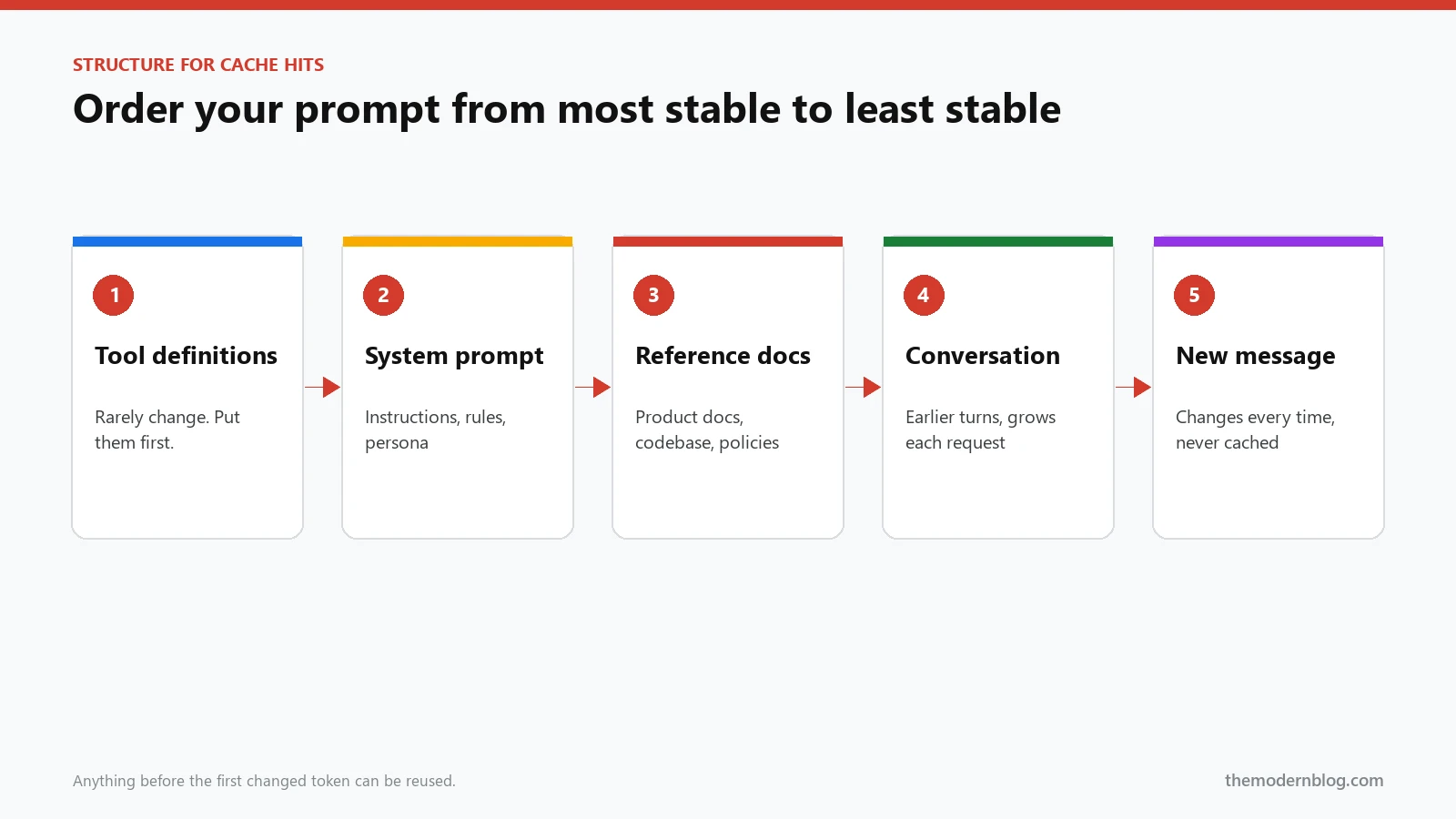
- Tool definitions (they change only when you ship code).
- The system prompt: instructions, rules, tone.
- Big reference material: documentation, a codebase summary, a policy manual, few-shot examples.
- The conversation so far.
- The new user message.
Anything dynamic, like the current date, the user’s name or a request ID, goes as late as possible. If you need the date in the system prompt, consider putting it in the user message instead, or round it to the day so it only changes once every 24 hours.
Prompt caching on Claude, OpenAI and Gemini
The idea is the same across providers. The details, and the pricing, are not.
Claude (Anthropic API)
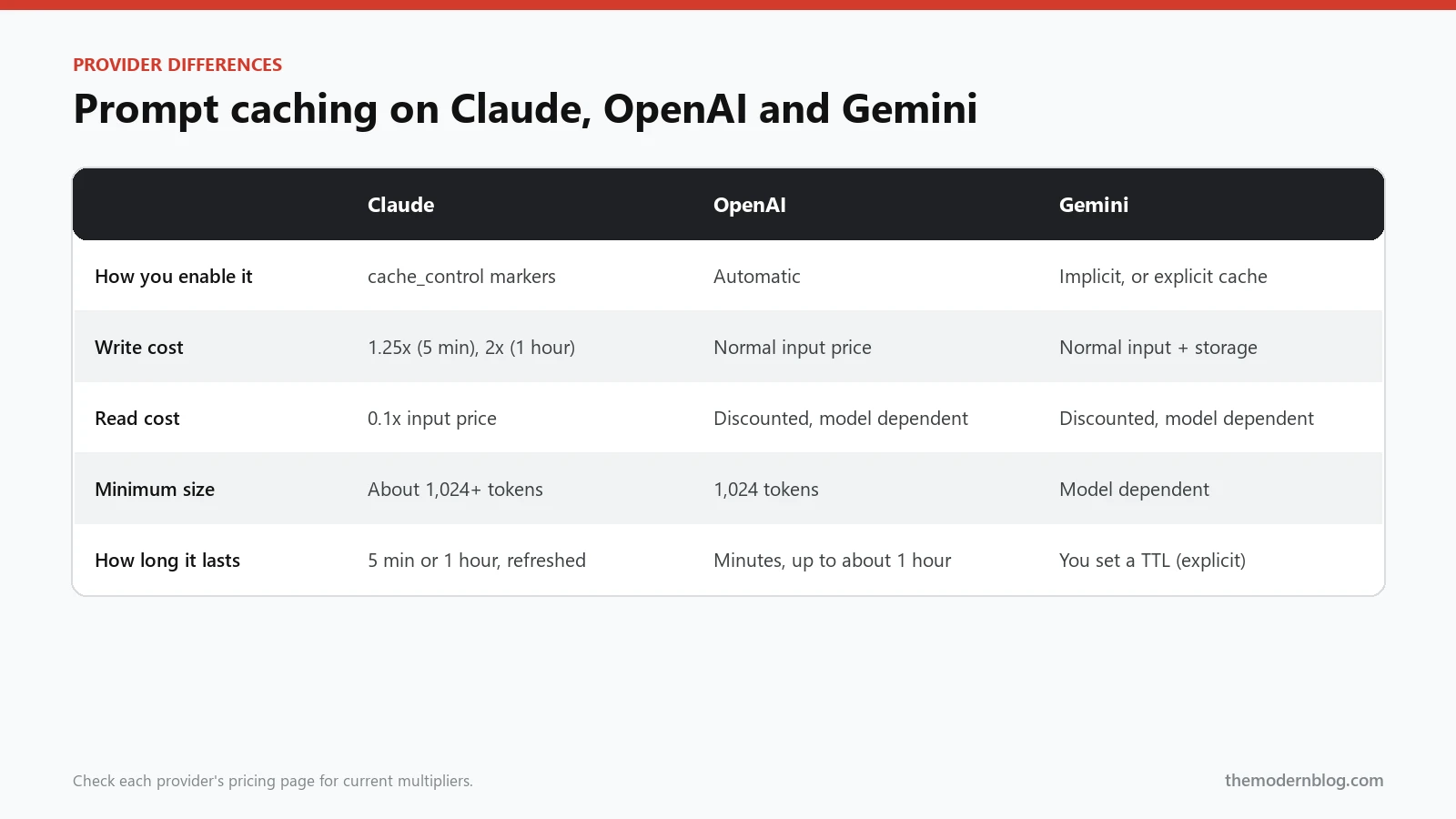
Anthropic makes caching explicit. You mark where the cacheable prefix ends by adding a cache_control block to a piece of content, and everything up to and including that block gets cached. You can set up to four of these breakpoints in a single request, which is handy when you have, say, stable tools, a semi-stable document and a growing conversation.
Pricing works with multipliers on the normal input price. A cache write costs 1.25x the base input price with the default five-minute lifetime, or 2x if you ask for the one-hour lifetime. A cache read costs 0.1x. The five-minute timer resets every time the cache is used, so a busy endpoint keeps its cache warm all day. There’s a minimum size (on most models it’s around 1,024 tokens, higher on some smaller models), so caching a 300-token system prompt does nothing.
Here’s what it looks like in Python:
import anthropic

client = anthropic.Anthropic()

response = client.messages.create(
    model="claude-sonnet-5-5",
    max_tokens=1024,
    system=[
        {"type": "text", "text": "You are the support assistant for Acme Inc."},
        {
            "type": "text",
            "text": PRODUCT_MANUAL,  # ~20,000 tokens that never change
            "cache_control": {"type": "ephemeral"},
        },
    ],
    messages=[{"role": "user", "content": user_question}],
)

print(response.usage.cache_creation_input_tokens)  # tokens written to cache
print(response.usage.cache_read_input_tokens)      # tokens read from cache
For the one-hour lifetime you add "ttl": "1h" inside cache_control. It’s worth it when requests come in less often than every five minutes but you still reuse the same prefix many times an hour, for example an internal tool used in bursts.
OpenAI
OpenAI does prompt caching automatically. Any prompt of 1,024 tokens or more is eligible, and the cached part is matched in 128-token chunks. You don’t mark anything and there’s no extra charge for writing to the cache. Cached input tokens are simply billed at a discount, and the size of that discount depends on the model, so check the OpenAI prompt caching guide and the pricing page for the models you use. On recent models the cached price is a small fraction of the normal input price.
Automatic sounds like you can ignore it. You can’t, because the exact prefix rule still applies. If your prompt structure is wrong, you’ll see zero cached tokens and never notice. OpenAI also supports a prompt_cache_key parameter that helps route requests with the same prefix to the same cache, which improves hit rates when you have lots of traffic.
from openai import OpenAI

client = OpenAI()

resp = client.chat.completions.create(
    model="gpt-5",
    messages=[
        {"role": "system", "content": SYSTEM_PROMPT + PRODUCT_MANUAL},
        {"role": "user", "content": user_question},
    ],
    prompt_cache_key="support-bot-v3",
)

print(resp.usage.prompt_tokens_details.cached_tokens)
Gemini
Google offers two flavours. Implicit caching is automatic on recent Gemini models and works much like OpenAI’s: if consecutive requests share a long prefix, you get a discount on the cached part. Explicit caching (called context caching in the Gemini API docs) lets you upload a large piece of content once, give it a time to live, and reference it by name in later requests. With explicit caching you also pay a storage fee per hour that the cache exists, so it makes the most sense for large content that you query heavily over a known period, like a long video or a big document set.
Prompt caching cost math: a worked example
Let’s put real numbers on that support bot. To keep the arithmetic simple I’ll use an example rate of $3 per million input tokens and Claude-style multipliers (1.25x to write, 0.1x to read). Swap in your model’s actual price; the percentages work out the same.
The setup:
- 1,000 requests a day.
- A 20,000-token prefix (system prompt plus product manual) on every request.
- About 500 tokens of new content per request (the question and a bit of history).
- Traffic is spread through the day, so the cache expires now and then. Let’s say it has to be rewritten 50 times a day.
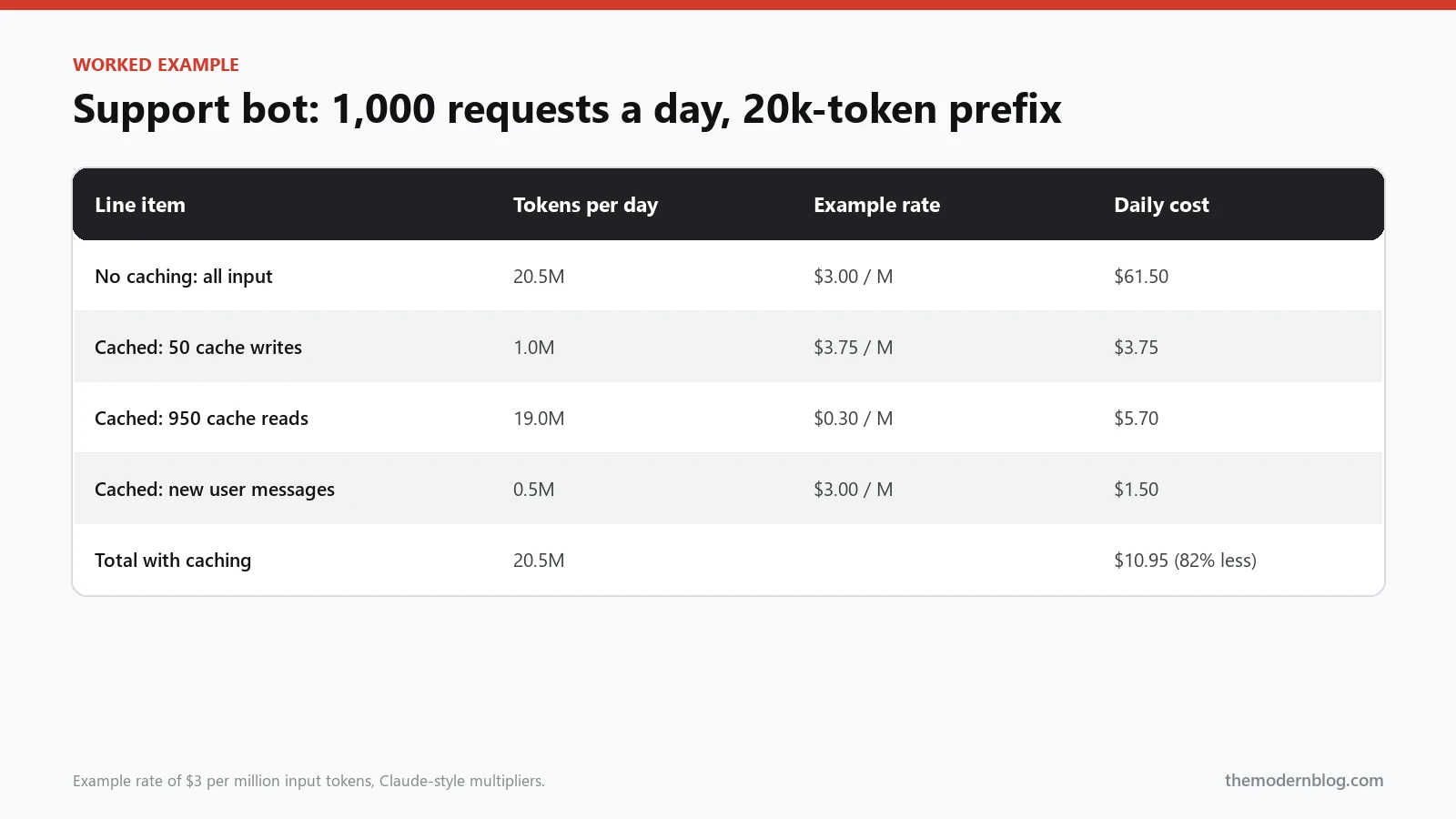
Without caching, every request pays for 20,500 input tokens: 20.5 million tokens a day, or $61.50 a day at the example rate. That’s about $1,845 a month on input alone.
With caching, the picture changes:
- 50 cache writes x 20,000 tokens = 1 million tokens at $3.75 per million = $3.75.
- 950 cache reads x 20,000 tokens = 19 million tokens at $0.30 per million = $5.70.
- The new 500 tokens per request are never cached: 0.5 million tokens at $3 = $1.50.
Total: $10.95 a day, about $330 a month. That’s 82% less for exactly the same requests and exactly the same answers. Output tokens aren’t affected by caching, so they stay the same either way, which is why I keep talking about the input bill specifically.
The break-even point is low, too. On Claude-style pricing a single cache write costs 25% extra, and a single read saves 90%. So if a prefix gets reused even once within its lifetime, you’re already ahead.
When prompt caching helps the most
Caching pays off when you have a large prefix and you reuse it often. These are the setups where I’d turn it on first:
- Chatbots and assistants with long system prompts, policies or product docs.
- Multi-turn conversations, where every new turn resends all the previous turns. Caching the conversation as it grows means each turn only pays full price for the newest messages.
- AI coding agents, which resend big chunks of code and long tool definitions on every step of a loop. This is a big reason coding agents built on Claude stay affordable at all.
- Document Q&A, where many questions are asked about the same contract, report or codebase.
- Few-shot prompts with lots of examples.
It helps much less, or not at all, when prompts are short (under the minimum), when every prompt is different (like one-off summaries of different articles), or when requests are so rare that the cache always expires before the next one arrives.
7 prompt caching mistakes that quietly kill your hit rate
These are the problems I see most often when someone says “we turned on caching and nothing changed.”
- Timestamps at the top. A date, time or request ID early in the system prompt breaks the prefix on every call. Move it to the end.
- Non-deterministic serialisation. If you build tool definitions or JSON context from a dictionary whose key order can change, the bytes differ between requests even when the content is the same. Sort your keys.
- Personalisation in the system prompt. “You are helping Sarah from Acme” makes every user’s prefix unique. Put user-specific details after the shared content.
- Changing tool lists per request. Adding or removing a tool depending on the page the user is on changes the very first part of the prompt. Keep the tool list stable and let the model ignore what it doesn’t need.
- Prefix too short. If the cacheable part is below the provider’s minimum, nothing gets cached. Check the usage numbers instead of assuming.
- Breakpoint in the wrong place (Claude). Putting
cache_controlon the user message that changes every time means you write a new cache on every request and never read it. You pay the 25% surcharge for nothing. - Low traffic with a five-minute lifetime. If requests arrive every ten minutes, the cache is always cold. Use the longer lifetime where available, or accept that caching won’t help this endpoint.
How to measure your cache hit rate
Don’t trust that caching works. Measure it. Every provider returns cache information in the response’s usage data:
- Claude:
cache_creation_input_tokensandcache_read_input_tokens. - OpenAI:
usage.prompt_tokens_details.cached_tokens. - Gemini:
cached_content_token_countin the usage metadata.
Log these numbers for every request, then calculate a simple hit rate: cached tokens divided by total input tokens. For a chatbot with a big stable prefix, I’d expect that number to sit well above 80% once traffic is steady. If it’s near zero, one of the seven mistakes above is almost certainly the cause.
It also helps to watch the cost per request over time. When someone on the team “just adds the date to the system prompt” (it happens), you’ll see it in the graph the next day instead of on next month’s invoice.
Caching a growing conversation
Multi-turn chat is where people most often leave money on the table, so it’s worth a closer look. In a conversation, every new request resends the whole history: system prompt, turn one, turn two, and so on, plus the new message. By turn ten, the history can easily be several times longer than the system prompt itself.
The trick is to move the cache point forward as the conversation grows. On Claude, you put a cache_control marker on the last message of the history in each request. On the next turn, everything up to that marker is read from the cache, the new turn is processed at full price, and a new marker is placed at the end again. Each turn then pays full price only for what was added since the previous turn. OpenAI and Gemini’s automatic caching do something similar on their own, as long as you append new messages to the end and never edit or reorder older ones.
That last part trips up a lot of apps. Some chat frameworks “clean up” the history by trimming whitespace, rewriting old tool results or summarising earlier turns on every request. Each of those changes breaks the prefix at the point of the edit. If you need to summarise history to save space, do it occasionally (say, once every 20 turns) instead of on every request, so the cache has time to pay off between summaries.
A quick checklist before you ship
Before you call your caching setup done, run through these:
- Is the stable content (tools, system prompt, documents) at the very start of the prompt?
- Are dates, IDs and user details moved after the stable content?
- Is the stable prefix longer than the provider’s minimum?
- Is your JSON and tool serialisation deterministic?
- On Claude, is the breakpoint at the end of the stable part, not on the changing message?
- Do you log cached tokens per request and watch the hit rate?
- Does the cache lifetime match how often the endpoint is called?
If all seven are a yes, you’re getting most of what prompt caching can give you.
Prompt caching and other cost levers
Prompt caching stacks nicely with other ways to lower LLM API costs. Batch APIs from both Anthropic and OpenAI give a 50% discount for requests that can wait a while for an answer, and cache discounts can apply on top of that. Choosing a smaller model for simple steps, trimming conversation history and capping output length all help too. I’ll cover those in more depth separately, but if you only change one thing this week, make it your prompt order.
If you’re building agents, caching matters even more, since an agent can call the model dozens of times for a single task. Our guide to AI agent architecture explains why agent loops resend so much context, and how AI agent memory works covers ways to keep that context from growing out of control.
Frequently asked questions
Does prompt caching change the model’s answers?
No. The cache stores the processed version of the exact same prompt, so the model sees the same input either way. Answers are as good (and as random) as without caching.
Is cached data shared with other customers?
No. Providers keep caches separate per organisation. Another company can’t read from your cache, even if their prompt happened to start with the same text.
Does prompt caching reduce output token costs?
No, only input. Output is generated fresh for each request. For chat apps with long prompts and short answers, though, input is usually the larger part of the bill, so the overall saving is still big.
Should I always enable prompt caching?
On OpenAI and Gemini’s implicit caching, it’s already on, so the real question is whether your prompt structure lets it work. On Claude, mark a breakpoint wherever you have a stable prefix above the minimum size that gets reused within the cache lifetime. For prompts that are short or never repeat, leave it off.