
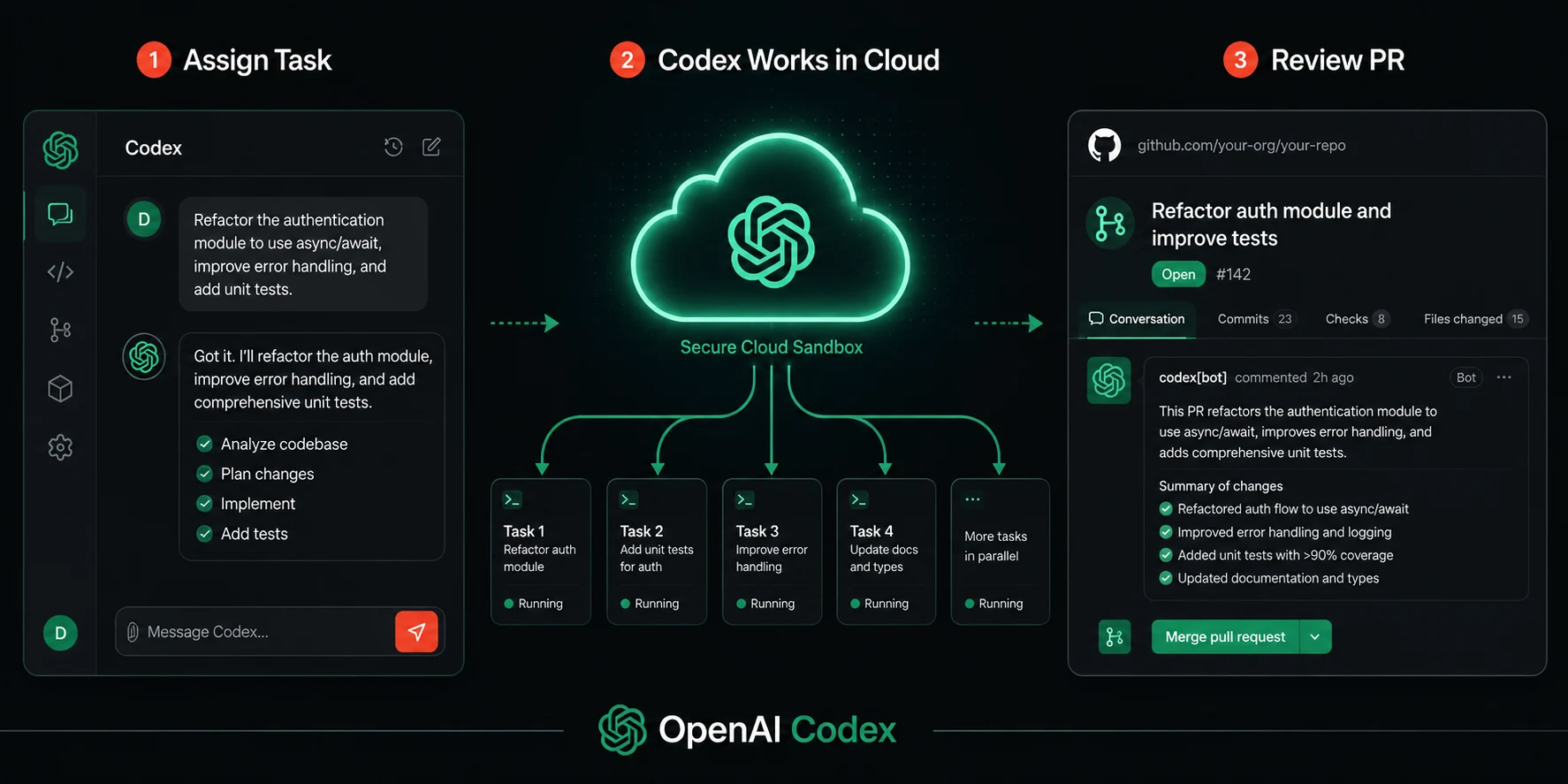
I gave Codex a task I expected to take me two hours, and came back to a pull request
I had been skeptical of Codex for months after it launched. I had seen enough AI coding demos that looked impressive in controlled conditions and fell apart the moment you pointed them at a real codebase with real complexity. So when a colleague told me Codex had completely rewritten a test suite for a mid-sized API service while she handled other work, I nodded politely and quietly assumed she had gotten lucky with a simple task.
Then I tried it myself. I connected a Node.js repository, described a task I had been putting off for two weeks (adding consistent structured logging across seventeen route handlers), and walked away. Forty minutes later, there was a draft pull request waiting for my review. It had read the existing logging patterns in the codebase, applied them consistently, updated the relevant tests, and left clear notes on two edge cases it was not sure how to handle. It was not perfect, but it was substantially better than what I would have produced in the same time while also being distracted by three other things.
That experience pushed me to go deep on understanding what OpenAI Codex as an agent actually is (OpenAI Codex agent guide), how it works, where it genuinely earns its place in a development workflow, and where it still falls short. This guide covers all of that honestly. No marketing spin. Just a thorough review from someone who has used it on real work.
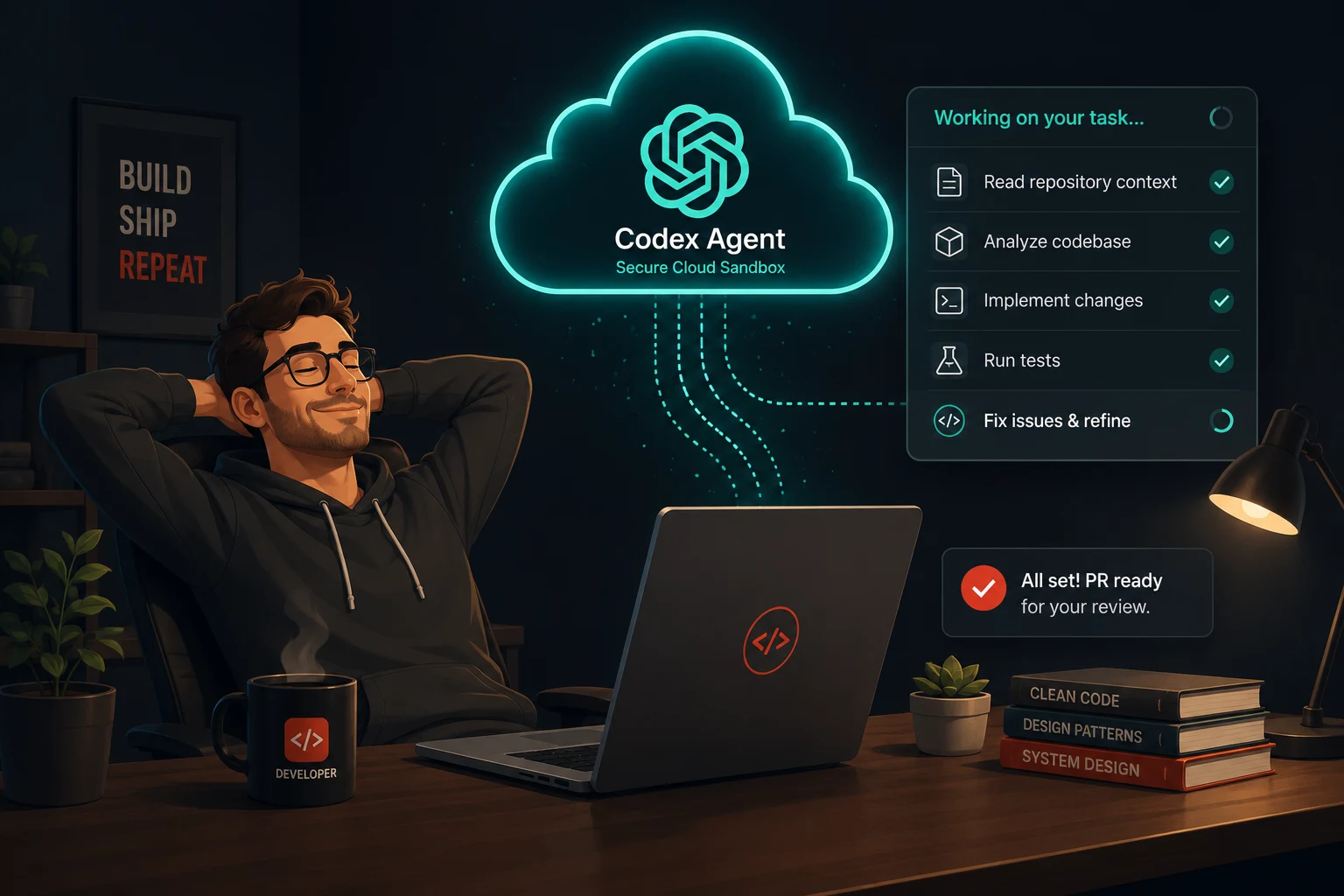
What OpenAI Codex actually is in 2025 and 2026
There is an important distinction to make before anything else. The name Codex has referred to two completely different products at different points in time.
The original Codex, released in 2021, was a code-specific language model that powered early GitHub Copilot completions. That model was deprecated in March 2023 when OpenAI moved its coding capabilities into the GPT-4 family.
The Codex discussed in this guide is an entirely different product. OpenAI launched a research preview of the new Codex in May 2025 as a cloud-based software engineering agent powered by Codex-1, a version of OpenAI’s o3 reasoning model optimized specifically for software engineering. It can write features, answer questions about codebases, fix bugs, and propose code changes for review, with each task running in its own isolated cloud sandbox environment preloaded with the developer’s repository.
Unlike traditional code assistants that operate as autocomplete tools, Codex functions as a collaborative partner that can independently take on tasks. Developers can delegate various coding responsibilities, including writing features, answering questions about codebases, fixing bugs, and proposing pull requests for review.
The model powering Codex has evolved rapidly since launch. OpenAI released GPT-5-Codex as a version of GPT-5 further optimized for agentic coding. It was trained on complex real-world engineering tasks such as building full projects from scratch, adding features and tests, debugging, performing large-scale refactors, and conducting code reviews. GPT-5.2-Codex, released in December 2025, introduced context compaction for long-horizon work, stronger performance on large code changes like refactors and migrations, improved Windows support, and stronger cybersecurity capabilities. GPT-5.3-Codex arrived in February 2026, followed by GPT-5.3-Codex-Spark, a lower-latency variant for real-time interactive coding that ran about 15 times faster than earlier Codex versions, initially available as a research preview for ChatGPT Pro users.
How Codex works: the architecture behind the agent
Understanding what is actually happening when you submit a task to Codex makes you significantly better at using it effectively. The architecture has a few moving parts that are worth knowing.
Cloud sandboxes
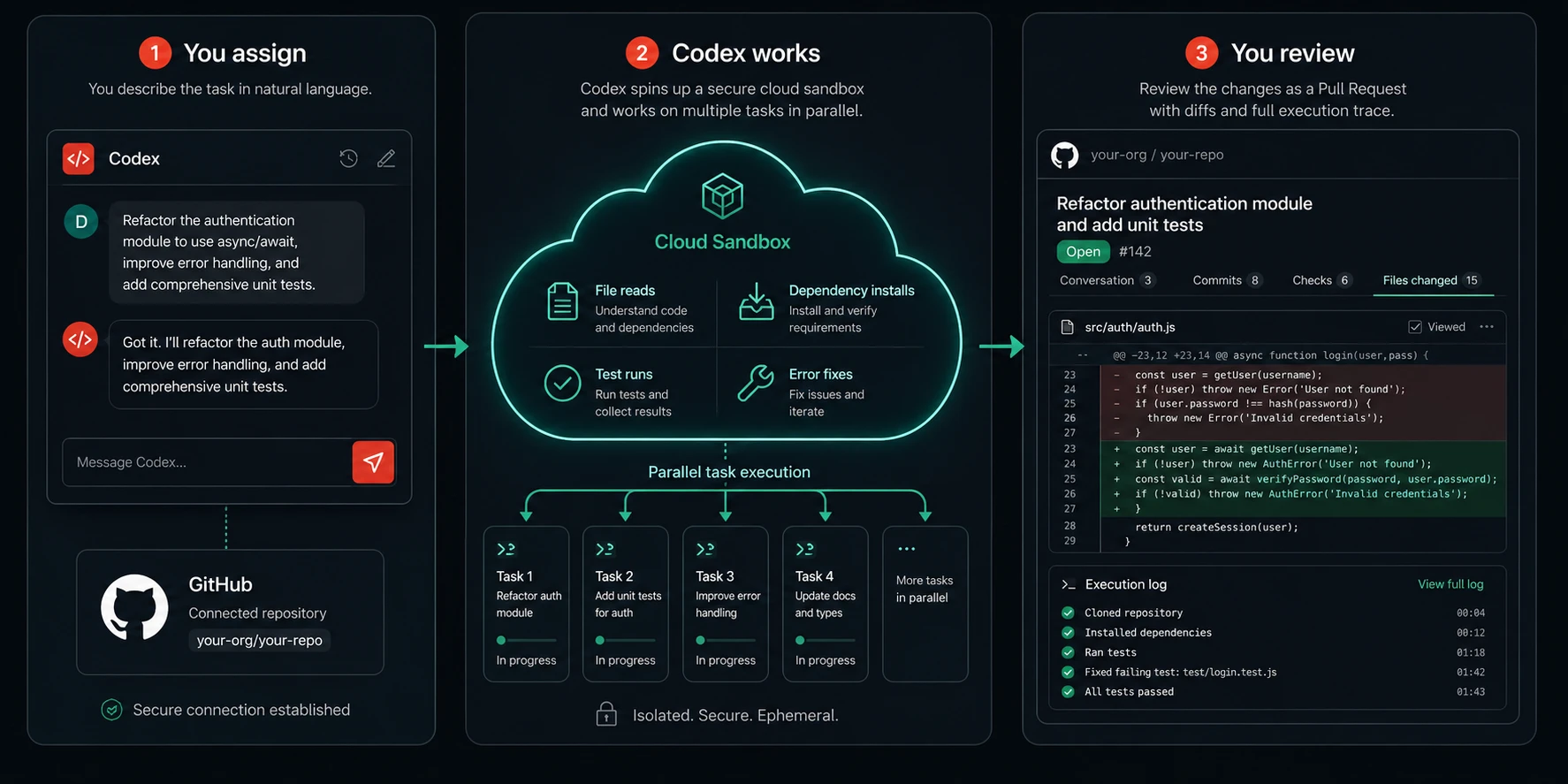
Each task Codex runs gets its own cloud sandbox environment preloaded with the developer’s repository. This means Codex is not working in your local environment. It is working in an isolated copy of your codebase in OpenAI’s cloud infrastructure. It can install dependencies, run tests, execute scripts, and modify files within that sandbox without touching anything on your machine or in your live environment.
OpenAI has implemented robust security measures in Codex. The agent operates entirely within a secure, isolated container in the cloud, with internet access disabled during task execution. This limits the agent’s interaction solely to the code explicitly provided via GitHub repositories and pre-installed dependencies.
Parallel task execution
One of Codex’s most distinctive features is the ability to run multiple tasks simultaneously. Since the launch in April 2025, the way developers work with agents has fundamentally changed. Models are now capable of handling complex, long-running tasks end to end, and developers are now orchestrating multiple agents across projects: delegating work, running tasks in parallel, and trusting agents to take on substantial projects that can span hours, days, or even weeks.
With built-in worktrees and cloud environments, agents work in parallel across projects, completing weeks of work in days. This is not a marketing claim. It reflects a genuine architectural capability: you can queue several tasks simultaneously, and each one runs in its own isolated environment. A bug fix, a feature addition, and a test coverage expansion can all be in progress at the same time.
Verifiable output with citations
Codex provides verifiable evidence of its actions through citations of terminal logs and test outputs, allowing developers to trace each step taken during task completion. Developers can then review the results, request further revisions, open a GitHub pull request, or directly integrate the changes into their local environment.
This matters enormously for trust. Most AI coding tools give you output and ask you to evaluate it. Codex gives you output plus the execution trace that produced it. You can see which tests it ran, what the output was, what it changed and why. That transparency is what makes it possible to review a Codex-generated change with reasonable confidence rather than treating it as a black box.
The surfaces you can use Codex from
Codex is not a single interface. It is available across several surfaces, and the right one for you depends entirely on how you prefer to work.
ChatGPT web app
The original and most accessible entry point. You interact with Codex through a conversational interface inside ChatGPT, connect your GitHub repositories, and assign tasks through chat. This is the easiest way to get started and requires no local setup. It works in any browser.
The Codex desktop app
OpenAI released a dedicated Codex desktop app intended to help users manage multiple coding agents over longer periods and use code to gather or analyze information. The core challenge it addresses has shifted from what agents can do to how people can direct, supervise, and collaborate with them at scale, since existing IDEs and terminal-based tools are not built to support this way of working. The desktop app is available for Windows and macOS and provides a dedicated command center for managing parallel agent sessions, reviewing diffs, and tracking task status across multiple projects at once.
Codex CLI
The open-source Codex CLI brought agent-style coding directly into local environments, enabling developers to run Codex over real repositories, iteratively review changes, and apply edits to files with human oversight. This made long-horizon coding tasks practical in day-to-day workflows. The CLI is available via npm as @openai/codex and has accumulated over 88,000 GitHub stars, which signals genuine adoption beyond casual experimentation.
IDE extension
Codex is available as a VS Code extension with close to ten million installs. The extension brings Codex’s capabilities into the editor workflow, allowing you to submit tasks, review diffs, and apply changes without leaving VS Code.
API access
For developers building applications or automating workflows, Codex is accessible through the OpenAI Responses API. You can also run Codex as an MCP server and connect it from other MCP clients, for example, an agent built with the OpenAI Agents SDK. Starting Codex as an MCP server allows other agent frameworks to orchestrate Codex sessions programmatically. This opens up sophisticated workflows where Codex acts as a subagent within a larger system.
AGENTS.md: how to customize Codex for your repository
One of the most practically important features of Codex is the ability to guide its behavior at the repository level through a file called AGENTS.md. Understanding this file is the difference between a Codex experience that feels frustratingly generic and one that genuinely understands your project.
Codex can be guided by AGENTS.md files placed within your repository. These are text files, similar to README.md, where you can inform Codex how to navigate your codebase, which commands to run for testing, and how best to adhere to your project’s standard practices. Like human developers, Codex agents perform best when provided with configured dev environments, reliable testing setups, and clear documentation.
A well-written AGENTS.md might look like this:
# AGENTS.md: Development Guide for Codex

## Project overview
This is a Node.js REST API using Express, TypeScript, and PostgreSQL.
The main entry point is src/server.ts. All routes are in src/routes/.
Database access goes through the repository layer at src/repositories/.

## Testing
Always run tests before submitting any change:
  npm run test

If you add a new route handler, add a corresponding integration test in tests/routes/.
If you add a repository function, add a unit test in tests/repositories/.

## Code conventions
- Use async/await throughout. No callbacks or raw promise chains.
- All database errors must be caught and returned as structured ApiError objects.
- Variable names use camelCase. File names use kebab-case.
- No console.log in production code. Use the logger at src/utils/logger.ts.

## What to avoid
- Do not modify the database migration files in db/migrations/.
- Do not change the API response shapes in existing endpoints without updating tests.
- Do not install new dependencies without noting them in your PR description.

## Pull request format
Title: [type]: short description (e.g., feat: add rate limiting to auth routes)
Description: What changed, why, and what tests cover it.
The return on investment from a well-crafted AGENTS.md is substantial. Codex reads it at the start of every task and uses it to understand your conventions, your testing requirements, and what it should avoid. GPT-5-Codex is more steerable and adheres better to AGENTS.md instructions than earlier models, producing higher-quality code without requiring long style instructions in every prompt.
Benchmark performance: what the SWE-bench numbers actually mean
Codex’s benchmark performance has been widely cited, and it is worth understanding what those numbers actually represent before drawing conclusions from them.
GPT-5-Codex hits 85.5% autonomous task completion on SWE-bench Verified, versus 54% for GitHub Copilot and 74% for Cursor. SWE-bench Verified is a benchmark consisting of real GitHub issues from popular open-source repositories. The agent is given the issue description and must produce a code change that makes the failing tests pass, without access to the test suite itself.
What this means in practice: Codex performs strongly on the kind of well-defined, test-verifiable software engineering tasks that SWE-bench tests. This is genuinely predictive of real-world performance on similar work: bug fixes with clear reproduction steps, feature additions with defined acceptance criteria, and refactors where the correctness is verifiable by running a test suite.
What it does not tell you: how Codex performs on ambiguous tasks, architectural decisions, tasks with no test coverage to verify against, or work that requires deep domain knowledge specific to your business. Benchmark scores are a useful signal, not a complete picture.
Pricing: what you actually pay and what you actually get
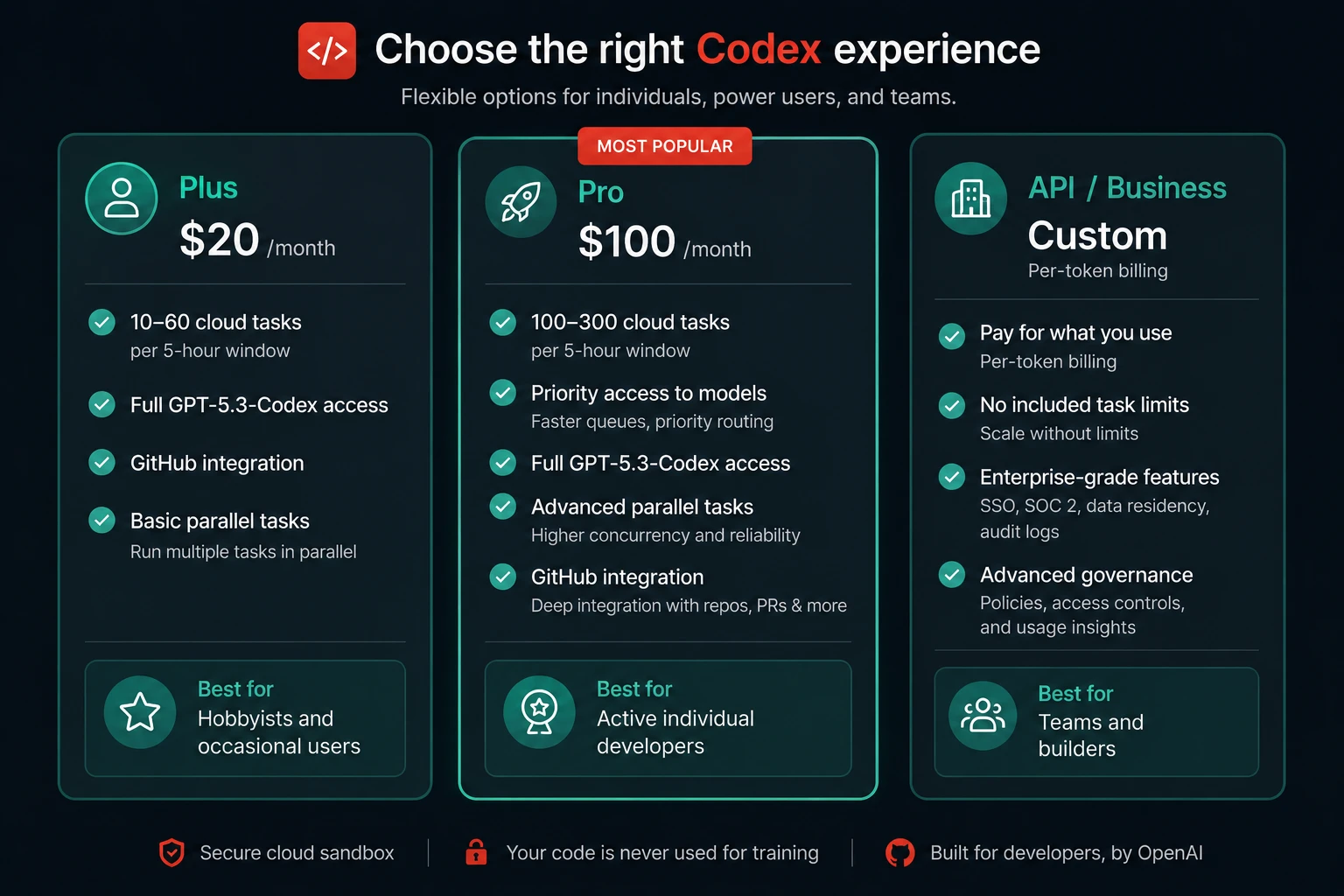
Codex is included in ChatGPT Plus at $20 per month, Pro at $200 per month, Business at $30 per user per month, and Enterprise plans. There is no standalone Codex subscription. If you exceed plan limits, you can purchase additional credits.
The $20 per month Plus plan provides approximately 10 to 60 cloud tasks per 5-hour window with full access to the latest Codex models. The $100 per month Pro tier is the sweet spot for active developers who regularly hit Plus limits. OpenAI’s own published estimate puts typical real-world spending at $100 to $200 per developer per month for power users.
The API billing path works differently. API pricing depends on the model. GPT-4.1-mini Codex is the cheapest tier, GPT-4.1 Codex is mid-tier, and GPT-5 Codex is the premium option. OpenAI charges per one million tokens, with input and output priced separately. You can switch the CLI to API key mode to use per-token billing instead of drawing from your ChatGPT plan limits.
The practical implication: for a developer using Codex several times a day on moderately complex tasks, the Plus plan at $20 per month is a reasonable starting point. For developers running Codex on large refactors, parallel tasks, or heavy agentic workflows, the $100 per month tier is where the math starts to make more sense than buying additional credits on top of Plus.
What Codex does genuinely well
Parallel task execution on multiple projects
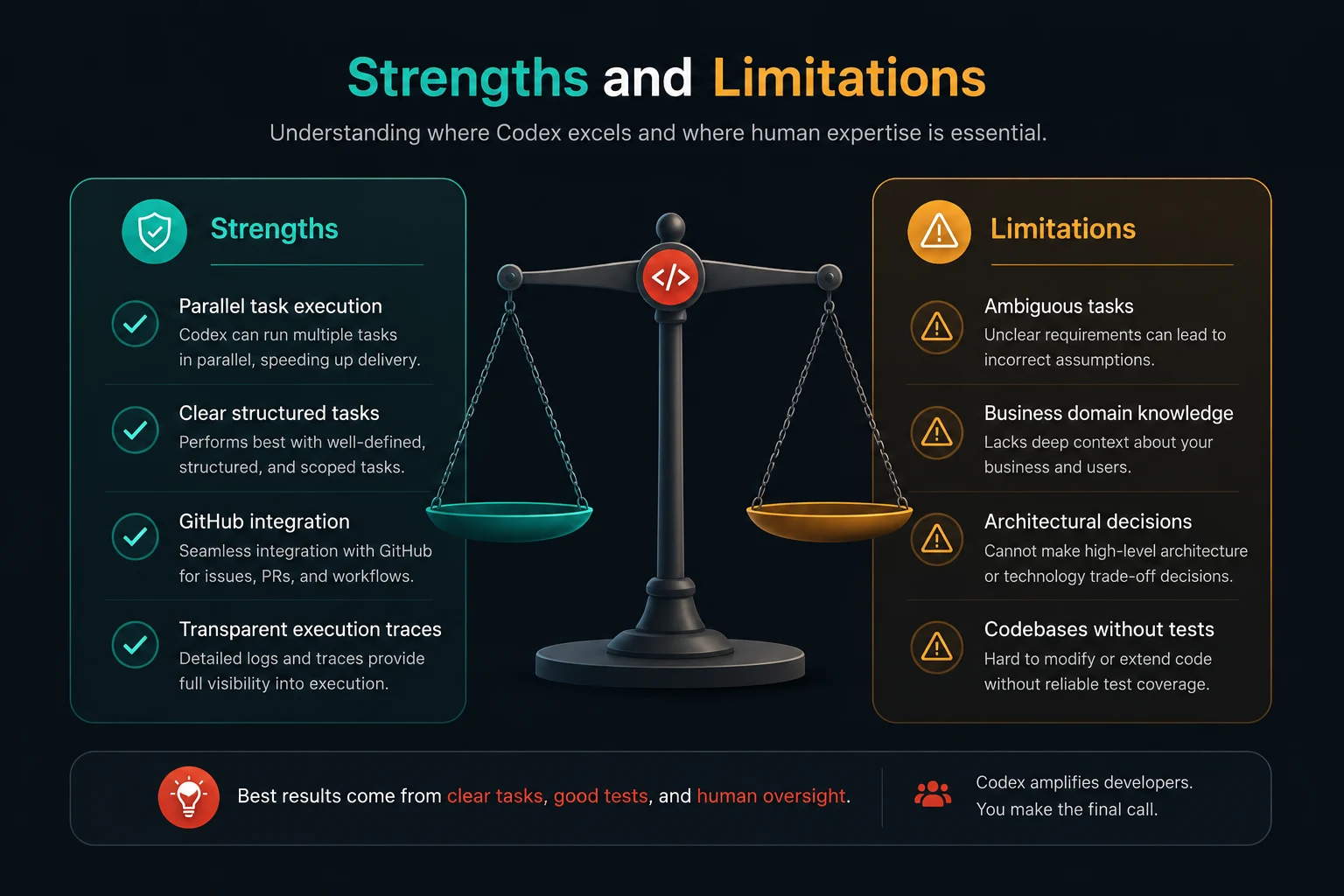
This is Codex’s most distinctive capability and the one that changes developer workflow most fundamentally. You can delegate a bug fix, a feature implementation, and a documentation update simultaneously, and each runs in an independent sandbox. While a single-threaded agent like Claude Code works through one task at a time sequentially, Codex can have multiple agents in flight at once. For developers managing several concurrent workstreams, the throughput difference is real.
Well-defined engineering tasks with clear acceptance criteria
Tasks like “fix the failing test in the payments module,” “add input validation to all POST endpoints,” and “convert all setTimeout calls in the background worker to setInterval with proper cleanup” are exactly what Codex was trained for. These tasks have a clear starting state, a clear ending state, and a way to verify correctness. Codex handles them with a reliability that outperforms what most developers can sustain when doing repetitive implementation work.
Deep GitHub integration
The connection between Codex and GitHub is seamless. Tasks can be triggered directly from issues, output goes directly to draft pull requests, and the terminal logs and test output cited in the PR description give reviewers the evidence they need to evaluate the change confidently. For teams already living inside GitHub’s workflow, Codex slots in without requiring a workflow change.
Transparent execution traces
Every Codex task produces a full record of what the agent did: which files it read, which commands it ran, what the test output was, and what decisions it made along the way. This transparency is a significant practical advantage over tools that produce output without any audit trail. When something is wrong in a Codex-generated change, you can trace the error back to the step that caused it.
MCP integration and orchestration
Support for AGENTS.md and MCP made Codex easier to adapt to your repository, extend with third-party tools and context, and even orchestrate Codex via the Agents SDK by running the CLI as an MCP server. This means Codex can be a node in a larger multi-agent system, not just a standalone tool. Sophisticated engineering teams are building workflows where Codex handles implementation while other agents handle planning, code review, or documentation.
Where Codex has real limitations
Ambiguous or poorly specified tasks
Codex performs best when the task is specific, testable, and has clear success criteria. Requests like “improve the code quality in the user module” or “make this service more robust” produce inconsistent and sometimes counterproductive results. The agent needs to know what done looks like. If you cannot define what a correct result looks like, Codex will make assumptions that may not match your intent. The burden of task specification is higher with Codex than with an interactive assistant, where you can course-correct in real time.
Tasks requiring deep business domain knowledge
Codex understands your code structure and your technical patterns. It does not understand your business rules, your compliance requirements, or the implicit conventions that exist only in your team’s shared understanding. A refactor that is technically correct but semantically wrong because it changed behavior that depended on a business rule Codex could not know is a real failure mode. For any task that touches business logic rather than technical structure, human review is not optional.
Architectural decisions
Codex is an excellent implementer. It is a poor architect. Asking it to decide how to structure a new service, how to split a monolith, or how to design an API is asking it to do something that requires weighing trade-offs your AGENTS.md cannot fully encode. Use Codex to implement decisions you have already made, not to make the decisions themselves.
Codebases without test coverage
Codex’s self-correction loop depends on tests. When it makes a change and runs the test suite, it uses test failures to identify and fix problems before surfacing the output. In a codebase with poor test coverage, this verification loop is blind. Codex can make changes that seem fine in isolation and break things at runtime that no test was covering. If your codebase lacks tests, writing them before using Codex for significant changes is not optional advice. It is a prerequisite for getting reliable output.
Internet access limitations
By default, Codex operates in a sandboxed environment without internet access. This means it cannot fetch the documentation it needs at runtime, cannot look up the latest API for a library, and cannot check whether a dependency it wants to install actually exists. For most tasks, this is not a problem, but it becomes one when the task involves integrating with an API or library that the model’s training data does not cover well.
How Codex compares to the other major coding agents
| Feature | OpenAI Codex | Claude Code | Cursor agent mode |
|---|---|---|---|
| Execution environment | Cloud sandbox (remote) | Local machine via terminal | Local machine via IDE |
| Parallel task support | Yes, native and central to the design | No, sequential by default | No, one task at a time |
| Runs tests automatically | Yes, with a self-correction loop | Yes, with a self-correction loop | No, you run them manually |
| GitHub PR integration | Native, output goes directly to draft PR | Via terminal git commands | Via editor git integration |
| Works while you do other things | Yes, fully asynchronous | Partially, needs terminal monitoring | No, requires an active IDE session |
| Repository customization | AGENTS.md file in the repo | System prompt and context files | Cursor rules and workspace config |
| MCP support | Yes, can run as an MCP server | Yes, as the MCP client and server | Yes, as an MCP client |
| SWE-bench Verified score | 85.5% (GPT-5-Codex) | Competitive, varies by model | 74% cited in community benchmarks |
| Best for | Asynchronous parallel delegation across projects | Deep local codebase work, self-correcting refactors | Multi-file edits with visual diff preview |
Getting started: your first Codex task
The fastest path from zero to the first result is through the ChatGPT web interface. Here is the exact sequence that gets you to a working task with the best chance of a useful output.
- Connect your GitHub repository. In ChatGPT, navigate to the Codex section and connect your GitHub account. Select the repository you want Codex to work on. Codex will be able to read the codebase and push draft pull requests back to it.
- Create an AGENTS.md file. Before submitting any task, add an AGENTS.md file to the root of your repository. At minimum, tell Codex: what the project is, what commands to run tests, and any conventions it must follow. Even a basic AGENTS.md improves output quality significantly over having none at all.
- Write a specific, testable task description. Your first task should be small, well-defined, and verifiable. Something like: “Add input validation to the POST /users endpoint in src/routes/users.ts. Validate that the email is a valid email format and the name is a non-empty string. Return a 400 response with a descriptive error message if validation fails. Add a test for each validation case in tests/routes/users.test.ts.”
- Submit the task and do something else. Codex works asynchronously. Submit the task and go back to whatever else you were working on. You will be notified when it is done.
- Review the output carefully. Read the full diff before merging. Check the terminal logs and test output citations. Verify that the changes match your intent, not just that they pass the tests. Treat the output exactly as you would treat a pull request from a capable developer who does not know your business context.
Common mistakes developers make with Codex
Submitting vague task descriptions
The quality of Codex’s output is directly proportional to the quality of your task description. Describing an outcome rather than a vague direction is the single most impactful improvement most developers can make. “Fix the authentication” becomes “Fix the token expiry check in src/middleware/auth.ts. It currently compares exp to Date.now() in milliseconds, but exp is in seconds. Add a test that verifies tokens expire correctly.”
Skipping the AGENTS.md file
Developers who skip AGENTS.md get a Codex that knows your code structure but not your conventions. It might write perfectly functional code that uses a different logging approach than the rest of your codebase, or tests that use a different assertion style, or imports that are organized differently from every other file. None of those things breaks anything, but they create a code review tax on every Codex output. A good AGENTS.md eliminates most of that tax.
Not having test coverage before delegating
Codex’s self-correction depends on tests. Delegating significant changes to a codebase with no tests means you are getting Codex output with no verification loop. Use Codex to write tests first on an untested codebase, then use it for changes once the test suite exists to verify them.
Merging without reviewing the diff
Codex runs tests and cites its output. That does not mean the change is correct, idiomatic, or aligned with what you actually needed. The execution trace shows what Codex did. Only a human review of the diff tells you whether what it did was right. Every Codex-generated change should go through the same review process as any other pull request before it is merged.
Using Codex for work that needs interactive iteration
Codex is designed for delegation, not conversation. If you are exploring a problem, trying different approaches, and refining as you go, an interactive tool like Claude Code or Cursor with inline chat is a better fit. Codex works best when you know what you want and can describe it fully upfront. Using it as a conversational assistant produces frustration because the asynchronous model is working against what that workflow requires.
Who Codex is actually built for
After several months of using Codex across different kinds of work, here is my honest assessment of who genuinely benefits most from it.
Developers managing multiple concurrent projects get the most out of Codex’s parallel execution. If you are context-switching between several codebases or running a small team where you are both building and reviewing, the ability to queue multiple tasks and review the results in a batch is a genuine workflow improvement.
Teams with mature test suites get the most reliable Codex output. The self-correction loop that makes Codex trustworthy depends entirely on having tests to run. Teams that have invested in test coverage find that Codex’s output quality is substantially more consistent than teams whose codebases have sparse coverage.
Developers doing repetitive implementation work across a known pattern, like adding validation to endpoints, standardizing error handling, upgrading deprecated API usage, and writing tests for existing functions, find that Codex handles this category of work better than almost any other tool available.
Product managers and non-engineers making lightweight code contributions are an emerging and genuinely interesting use case. Superhuman leverages Codex for small but repetitive tasks, enabling product managers to contribute lightweight code changes without pulling in an engineer. This shifts Codex from a developer productivity tool into something closer to a capability enabler for the whole product team.
Codex quick reference
| Topic | Key facts |
|---|---|
| Launch date | Research preview May 2025. General availability of ChatGPT Plus in June 2025. |
| Current model | GPT-5.3-Codex and GPT-5.3-Codex-Spark (low-latency variant) as of early 2026 |
| Access surfaces | ChatGPT web app, Codex desktop app (Windows and macOS), VS Code extension, CLI, API |
| Pricing entry point | Included in ChatGPT Plus at $20 per month. No standalone Codex plan. |
| Power user pricing | $100 per month Pro tier. API per-token billing available for builders. |
| SWE-bench Verified | 85.5% autonomous task completion on GPT-5-Codex |
| Parallel tasks | Yes. Multiple tasks run simultaneously in independent cloud sandboxes. |
| GitHub integration | Native. Connects to repositories, creates draft PRs with execution trace citations. |
| Repository customization | AGENTS.md file in the repository root. Read at the start of every task. |
| MCP support | Yes. Codex CLI can run as an MCP server for orchestration by other agents. |
| Internet access | Disabled by default during task execution. Can be enabled for specific use cases. |
| Best use case | Asynchronous parallel delegation of well-defined, test-verifiable engineering tasks |
Further reading and resources
- OpenAI’s official Codex announcement: the original research preview launch post with the complete description of Codex’s architecture, capabilities, and design philosophy from the team that built it
- AGENTS.md guide on OpenAI’s developer documentation: the authoritative reference for writing AGENTS.md files, with examples of effective instructions and guidance on how Codex reads and prioritizes different sections
- Using Codex with the Agents SDK: how to run Codex as an MCP server and orchestrate it from other agent frameworks, with code examples for both the CLI and the SDK integration
OpenAI Codex as an agent in 2025 and 2026 is not the same thing as the Codex many developers remember from the GitHub Copilot era. It is a genuinely new kind of tool: asynchronous, parallel, cloud-native, and designed for delegation rather than conversation. The developers who get the most out of it are the ones who treat it like a capable engineer they can assign work to, not like a chatbot they need to manage turn by turn.
Write a good AGENTS.md. Build test coverage before you delegate significant changes. Describe tasks with specific outcomes rather than vague directions. Review every diff before merging. Follow those four practices, and Codex delivers on what it promises. Ignore them, and you will spend more time cleaning up Codex’s output than you would have spent writing the code yourself. The tool is powerful. Whether it makes you more productive depends almost entirely on how you use it.