
I gave Gemini the largest codebase I had, and it did not flinch
My team maintains a Next.js frontend and a Python FastAPI backend that together total around 85,000 lines of code. When I evaluate AI coding tools, that codebase is the test that separates the tools worth using from the ones that look good in demos and fall apart on real projects. Most tools handle small, isolated files beautifully. The moment you ask them to reason across the full system (Gemini coding agent review), understanding how a frontend component connects to an API endpoint that calls a database layer that has a specific error handling pattern, most of them lose the thread.
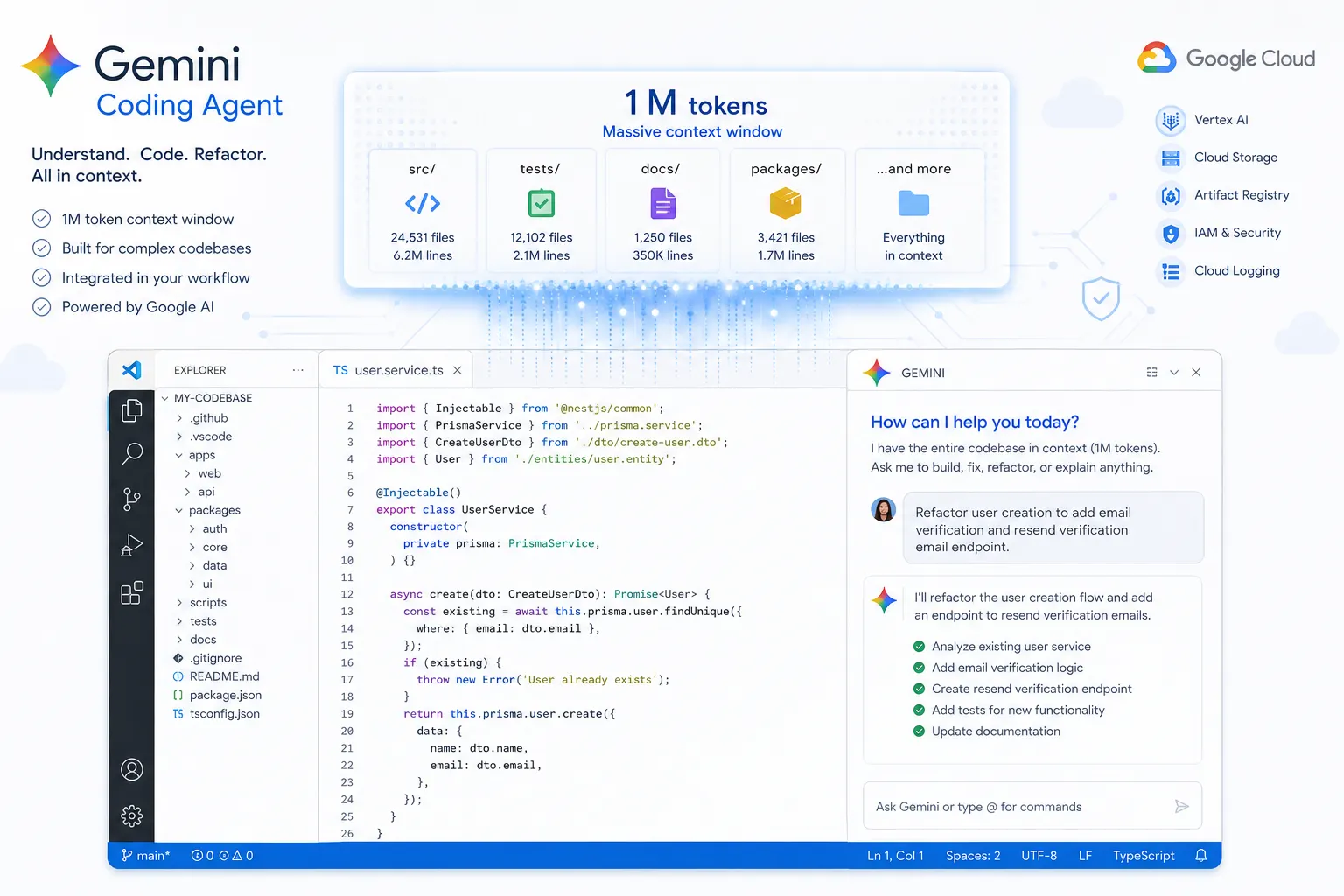
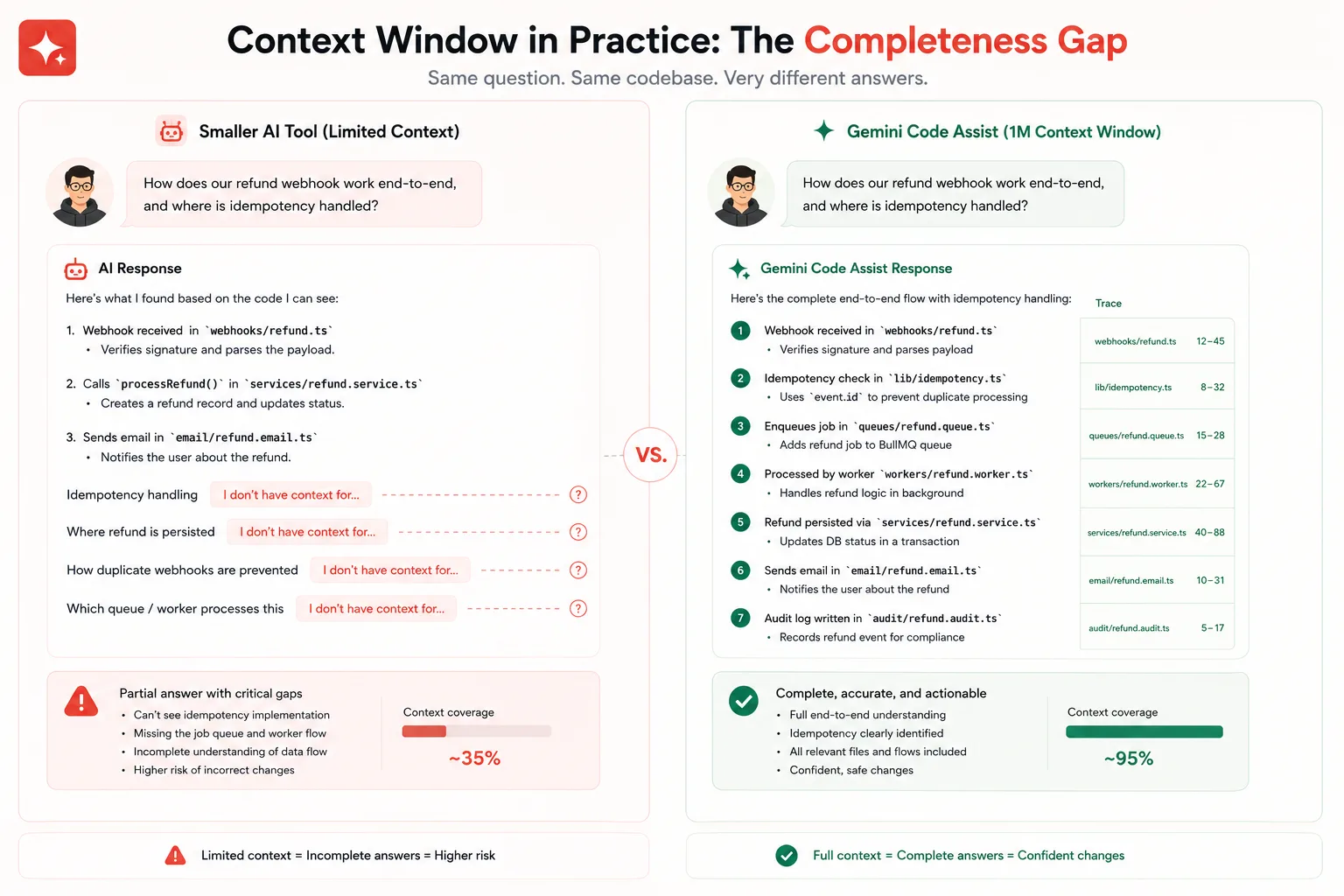
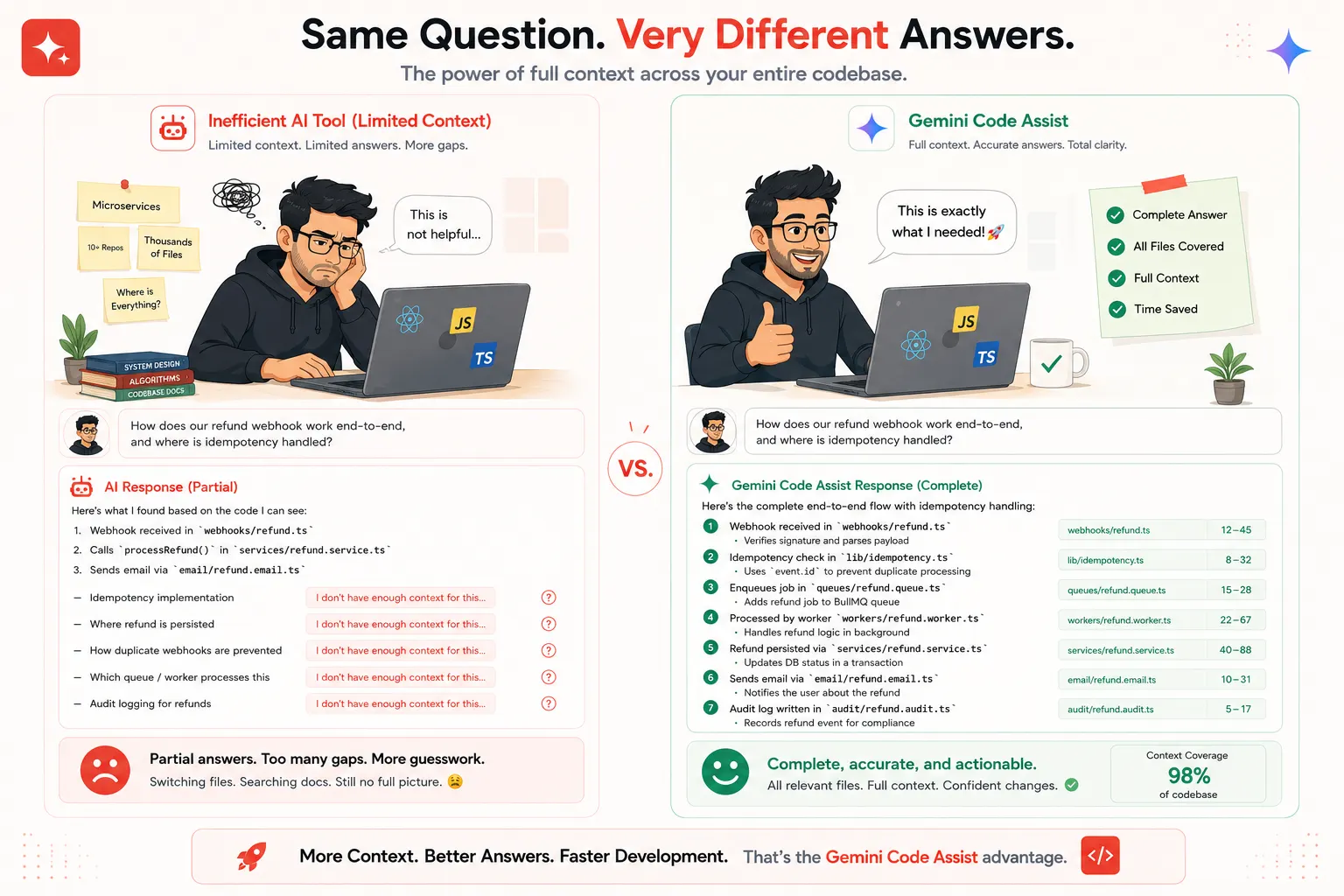
When I loaded that project into Gemini Code Assist and asked it to trace through a specific user action from the React component all the way to the PostgreSQL query it triggers, it gave me a complete, accurate answer that referenced files I had not mentioned. That answer was only possible because of the 1M token context window that Gemini brings to code work. It did not lose the thread. It held the whole system in memory and reasoned across it.
That impressed me enough to spend serious time evaluating the rest of the product. This review covers everything: what Gemini’s coding agent products actually are, what agent mode does and does not do, how the 1M context window changes your workflow in practice, where the tool genuinely falls short, and whether the free tier is as good as it sounds. All of it, honestly, without the promotional framing that surrounds every Google product launch.
What Gemini’s coding products actually are in 2026
There are two distinct Google coding tools developers encounter, and confusing them leads to frustration. They are complementary products that operate at different points in your workflow.
Gemini Code Assist
Gemini Code Assist is Google’s AI-powered coding assistant built on the Gemini 2.5 family of models and available as an extension for VS Code and all major JetBrains IDEs, including IntelliJ IDEA, PyCharm, WebStorm, and GoLand. It provides inline code completions as you type, a chat panel for asking questions about your code, code transformation tools for refactoring, automated test generation, AI-powered pull request reviews on GitHub, and, since July 2025, an agent mode for autonomous multi-step coding tasks within the IDE.
Originally launched as a Google Cloud-centric tool, Gemini Code Assist has evolved significantly since early 2025 into a full-featured AI coding platform that competes directly with GitHub Copilot, Amazon Q Developer, and Claude Code. It has a free individual tier with genuinely useful limits and paid tiers for higher usage and enterprise features.
Gemini CLI
Gemini CLI is a separate, fully free terminal-based coding agent from Google. It connects to Gemini 2.5 Pro, offers up to 1,000 requests per day on the free API tier, and operates from the command line in a way similar to Claude Code or the Codex CLI. Gemini CLI is for terminal-based agentic workflows where you want autonomous execution in a local environment. Gemini Code Assist is for IDE-integrated completions and chat. They are complementary products, not the same product under two names.
This review focuses primarily on Gemini Code Assist and its agent mode, since that is where most developers encounter Gemini as a coding agent. The Gemini CLI comparison is covered in the comparison section.
The 1M token context window: what it actually changes
The 1M token context window is Gemini Code Assist’s most discussed feature, and it is worth spending real time on what that number means in practice rather than treating it as a marketing figure.
Most AI coding tools work with context windows of 32K to 200K tokens. That range is enough to hold several hundred lines of code plus a conversation history. It is adequate for single-file work and small multi-file tasks. It becomes a real constraint the moment you are working on a project where understanding a piece of code requires knowing about things defined in files you did not think to open.
A 1M token context window can hold approximately 750,000 words, which is enough to ingest most mid-sized production codebases in their entirety. In practical terms, this means Gemini Code Assist can reason about how a function in your utility layer affects a component in your frontend without you needing to manually identify and load the relevant files. It can understand your naming conventions from reading the codebase, not from you explaining them. It can trace a data flow from the database to the API to the frontend in one answer.
Independent testing across a Python FastAPI service, a Next.js dashboard, and a Go CLI tool found that multi-file context awareness improved noticeably compared to late 2025 baselines, though it still falls short of Cursor Composer or Windsurf Cascade for coordinated edits spanning five or more files simultaneously. The context window gives Gemini a superior understanding. Translating that understanding into coordinated multi-file edits is still an area where purpose-built agents with explicit file-writing loops have an advantage.
Agent mode: what it does and how it works
Agent mode launched in July 2025 and represents Gemini Code Assist’s shift from an assistant to an agent. Understanding exactly what agent mode does and what it does not do saves developers significant frustration when they first start using it.
What agent mode actually does
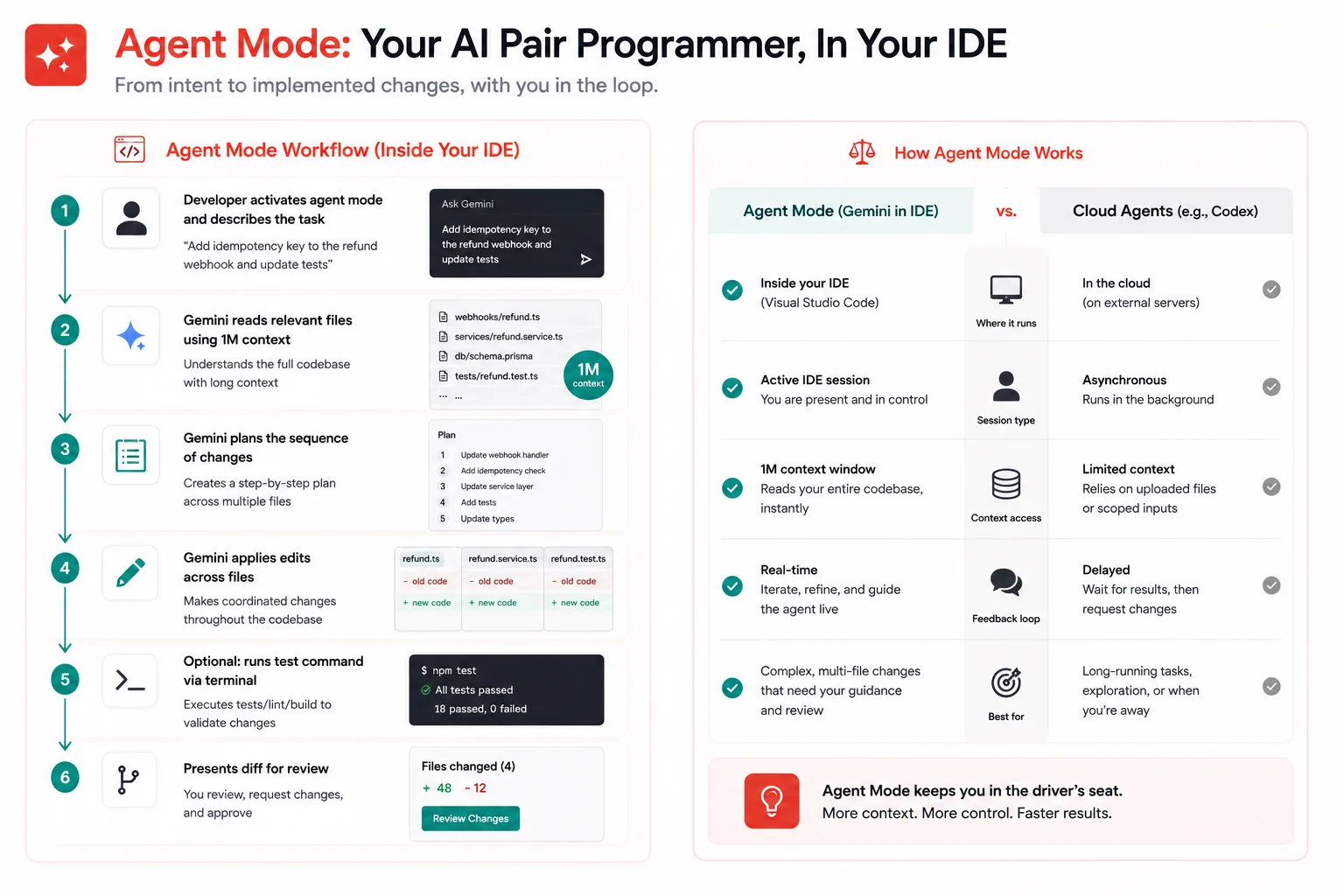
Agent mode allows Gemini Code Assist to perform multi-step autonomous tasks within your IDE environment. When activated, it can read multiple files in your project, plan a sequence of changes, apply edits across files, run terminal commands if configured to do so, and iterate on output based on errors or test results. It uses the same 1M token context window, which means it enters each multi-step task with the ability to reason across your full codebase.
From October 2025, agent mode replaced the previous tools system entirely. Using the @ symbol to invoke specific tools no longer works. All external service connections now go through Model Context Protocol (MCP) servers, which Gemini Code Assist supports natively. This means any MCP server you would configure for another MCP-compatible tool can be connected to Gemini Code Assist’s agent mode.
// Example MCP configuration for Gemini Code Assist agent mode
// In .vscode/settings.json or your IDE settings

{
  "geminicodeassist.agentMode.mcpServers": {
    "github": {
      "command": "npx",
      "args": ["-y", "@modelcontextprotocol/server-github"],
      "env": {
        "GITHUB_TOKEN": "${env:GITHUB_TOKEN}"
      }
    },
    "postgresql": {
      "command": "npx",
      "args": ["-y", "@modelcontextprotocol/server-postgres",
               "${env:DATABASE_URL}"]
    }
  }
}
What agent mode does not do (yet)
Agent mode operates within your IDE session. It is not asynchronous. Unlike OpenAI Codex, which runs tasks in cloud sandboxes while you do other things, Gemini Code Assist’s agent mode requires an active IDE session and works through tasks sequentially while the IDE is open. You cannot submit a task, close VS Code, and come back to a completed pull request. The agent is working in your active environment, not in a background cloud process.
Agent mode also does not have a built-in automatic test-run-and-fix loop in the same way that Claude Code or Codex do. It can be configured to run terminal commands, including test commands, but it requires you to set up that flow explicitly through MCP or terminal access rather than having it as a default behavior. For developers who want test-driven autonomous verification baked into every code change, this requires more setup than dedicated coding agents provide out of the box.
The free tier: Is it actually as good as it sounds?
Gemini Code Assist’s free tier is one of the most discussed aspects of the product and deserves an honest assessment rather than either a dismissal or uncritical celebration.
The free individual tier offers 6,000 code completions and 240 chat requests per day, no credit card required. GitHub Copilot’s free tier offers 2,000 completions per month. That means Gemini Code Assist’s free tier provides roughly 90 times more completions than the comparable GitHub Copilot free option. For individual developers, this is not a marginal difference. It means most developers can use Gemini Code Assist for real daily work on the free tier without hitting limits.
The free tier also includes agent mode access, which is not the case with all competing tools. Getting autonomous multi-step coding capability for free, with daily limits high enough to cover a full workday, is a genuine value proposition that no other major AI coding tool currently matches at that price point.
Where the free tier shows its limits is in heavy agentic use. Agent mode tasks consume more requests per session than simple completions because they involve multiple model calls for planning, reading files, and applying edits. Developers running several agent mode sessions per day will find the daily limits more constraining than the headline numbers suggest for that specific usage pattern. For completions and chat during regular coding, the free tier is genuinely sufficient for most individual developers.
Pricing breakdown across all tiers
Understanding the full pricing picture before choosing a tier saves surprises later.
| Tier | Price | Code completions | Chat requests | Key additions |
|---|---|---|---|---|
| Free (Individual) | $0/month | 6,000/day | 240/day | Agent mode, MCP support, VS Code and JetBrains |
| Google AI Pro | $19.99/month | Higher limits | Higher limits | Priority model access, longer context sessions |
| Google AI Ultra | $249.99/month | Highest limits | Highest limits | Gemini Ultra model access, maximum throughput |
| Enterprise | $45/user/month (annual) | Enterprise limits | Enterprise limits | Private codebase indexing, compliance certifications, custom model tuning, IP indemnification |
For the enterprise context, the $45 per user per month rate is notably higher than GitHub Copilot Enterprise at $39 per user per month and significantly higher than Amazon Q Developer Pro at $19 per user per month. The enterprise premium is justified primarily by the private codebase indexing, custom model tuning, and Google Cloud integration depth. For teams not building primarily on Google Cloud infrastructure, the cost comparison deserves honest scrutiny before committing.
Where Gemini Code Assist genuinely excels
The 1M context window advantage on large codebases
Already covered in detail above, but worth restating as a genuine strength: for developers working on large production codebases where context limits cause competing tools to lose the thread, Gemini Code Assist’s ability to hold significantly more of the codebase in a single session produces meaningfully better answers and suggestions. This is not a theoretical advantage. Developers at companies like Cline report that Gemini handles complex, long-horizon coding tasks requiring deep context understanding across entire codebases more effectively than previous Gemini versions and competitively with other frontier tools.
Google Cloud integration for GCP teams
If your team builds on Google Cloud Platform, Gemini Code Assist’s native GCP integration is a genuine differentiator. It understands GCP services natively, can help write Cloud Functions, configure Terraform for GCP resources, and debug Cloud Run deployments with full contextual awareness of the platform. No competing tool provides this level of native integration with GCP-specific APIs, deployment patterns, and service configurations. For GCP-heavy teams, this is a compelling reason to use Gemini Code Assist regardless of how the general comparison goes.
GitHub pull request reviews
Gemini Code Assist on GitHub provides automated AI-powered reviews of pull requests directly in your GitHub repositories. The enterprise version enables consolidated control across multiple repositories and supports both GitHub Enterprise Cloud and GitHub Enterprise Server. For teams that want passive AI code review integrated into their pull request workflow without requiring developers to manually invoke a tool, this is a well-implemented feature that works reliably without configuration overhead.
Inline completion speed
Independent benchmarks from April 2026 testing across real production projects measured Gemini Code Assist’s inline completion latency at 80 to 180 milliseconds, compared to 120 to 250 milliseconds for GitHub Copilot on identical files. For developers who find latency in code completion disruptive to flow, Gemini Code Assist’s faster response times are noticeable in daily use. The acceptance rate of around 32 percent was slightly below Copilot Pro’s 38 percent on the same files, meaning the suggestions are faster but marginally less often exactly what developers wanted.
Multi-IDE support without trade-offs
Gemini Code Assist provides consistent functionality across VS Code and the full JetBrains suite without meaningful capability differences between IDEs. Developers who move between VS Code and IntelliJ IDEA, or teams with mixed IDE preferences, get the same feature set regardless of which editor they use. This is not universally true of competing tools, some of which have stronger implementations in VS Code than in JetBrains or vice versa.
Where Gemini Code Assist genuinely falls short
Multi-file coordinated edits lag behind purpose-built agents
The 1M context window gives Gemini Code Assist exceptional understanding of large codebases. Turning that understanding into coordinated simultaneous edits across five or more files is where it still falls behind Cursor Composer and Windsurf Cascade. The understanding is there. The execution layer for applying complex multi-file changes as a coordinated unit is less reliable than tools built specifically around that workflow. For developers whose primary need is agentic multi-file refactoring, this is the most significant practical limitation to know before choosing the tool.
Agent mode requires an active IDE session
As noted in the agent mode section, Gemini Code Assist’s agent mode is synchronous and requires an active IDE session. You cannot delegate a task and walk away the way you can with OpenAI Codex’s cloud sandboxes. For developers who want to queue several substantial tasks and come back to completed pull requests, Gemini Code Assist’s agent model does not currently support that workflow. The asynchronous delegation model that Codex pioneered has become a genuine competitive advantage for task-intensive workflows.
Thinking loop hangs on complex prompts
Real user reviews from Gartner Peer Insights consistently mention a specific failure mode: on moderately complex prompts, Gemini Code Assist sometimes gets stuck in a thinking loop where it appears to be working but produces no output for an extended period, then either repeats a previous answer or requires the session to be restarted. This is not a constant problem, but it is frequent enough across independent reviews to be a real workflow disruption. Forcing a chat restart loses context and breaks flow in a way that competing tools’ failure modes typically do not.
Enterprise pricing is harder to justify for non-GCP teams
The enterprise tier at $45 per user per month makes clear financial sense for teams building heavily on Google Cloud because the GCP integration depth provides unique value no competing tool matches. For teams on AWS or Azure with no particular Google Cloud commitment, the enterprise cost is harder to justify compared to GitHub Copilot Enterprise at $39 or Amazon Q Developer Pro at $19. The pricing reflects Google Cloud’s strategic interests more than neutral competitive positioning, and teams should evaluate it through that lens.
Local model support is not available
Unlike OpenClaw, which can connect to any LLM, including local models via Ollama, Gemini Code Assist exclusively uses Google’s Gemini model family. Developers working in environments where sending code to external APIs is restricted by security policy have no local-execution option within the Gemini Code Assist product. Gemini CLI has more flexibility here, but still requires API connectivity.
How Gemini Code Assist compares to the main alternatives
| Feature | Gemini Code Assist | GitHub Copilot | Claude Code | OpenAI Codex |
|---|---|---|---|---|
| Free tier | 6,000 completions/day, no card required | 2,000 completions/month | No free tier | Included in ChatGPT free (limited) |
| Context window | 1M tokens (largest available) | Up to 64K tokens | 200K tokens | 200K tokens |
| Agent mode | Yes, IDE-based, synchronous | Copilot Workspace (experimental) | Yes, terminal, synchronous | Yes, cloud sandbox, asynchronous |
| Parallel tasks | No | No | No | Yes, native parallel sandboxes |
| Runs and verifies tests | With the MCP setup, not by default | No | Yes, automatically | Yes, automatically |
| MCP support | Yes, as of October 2025 | Limited | Yes, full | Yes, can run as an MCP server |
| GitHub PR reviews | Yes, native GitHub integration | Yes, via Copilot for PRs | No | No |
| Google Cloud integration | Deep and native | None | None | None |
| Individual paid tier | $19.99/month | $10/month | $20/month (Claude plan) | $20/month (ChatGPT Plus) |
| Enterprise tier | $45/user/month | $39/user/month | Anthropic plan required | $30/user/month (ChatGPT Business) |
| Best for | Large codebase reasoning, GCP teams, free-tier users | Established workflows, broad ecosystem | Self-correcting local codebase work | Parallel async cloud task delegation |
Who Gemini Code Assist is genuinely built for
Individual developers on a budget get a better free tier from Gemini Code Assist than any competing tool currently offers. 6,000 completions per day and 240 chat requests per day, with no credit card required and agent mode included, is a genuinely strong offering that covers most individual developers’ daily usage without any payment. If cost is a primary constraint, Gemini Code Assist is the clearest recommendation in the market.
Teams building on Google Cloud Platform get unique value from the native GCP integration that no competing tool replicates. Understanding Cloud Functions, Terraform GCP configurations, and Cloud Run deployments with full contextual awareness of the platform is a real workflow advantage for GCP teams that compounds across every developer on the team.
Developers working on large codebases where context limits cause competing tools to produce answers that miss distant dependencies, get the most out of the 1M token context window. If you regularly work on projects above 50,000 lines of code and find that AI suggestions often miss connections between distant parts of the system, the context window difference is noticeable and meaningful in practice.
Teams with JetBrains IDE preferences find Gemini Code Assist a more consistent experience than some competing tools that are clearly optimized primarily for VS Code. The consistent feature parity across all JetBrains IDEs matters for mixed-IDE teams and Java or Kotlin developers who primarily live in IntelliJ IDEA.
Gemini Code Assist is probably not the best first choice for developers whose primary need is asynchronous task delegation across multiple simultaneous projects, complex multi-file coordinated refactoring where they want the agent to apply changes autonomously and verify them, or teams with strict no-external-API policies for code.
Getting started with Gemini Code Assist in VS Code
The setup path from zero to the first coding session takes under five minutes for most developers.
- Install the extension. Open VS Code, go to Extensions, and search for “Gemini Code Assist.” Install the official Google extension. The same process applies for any JetBrains IDE through the JetBrains Marketplace.
- Sign in with a Google account. The extension will prompt you to sign in. The free tier is attached to your Google account with no credit card required.
- Open a project. Open any code file. You will immediately see inline completions appearing as you type. The chat panel is accessible through the sidebar icon or via the keyboard shortcut.
- Enable agent mode. In the Gemini Code Assist chat panel, you can switch to agent mode. In agent mode, you can describe multi-step tasks and Gemini will plan and execute them across your codebase.
- Configure MCP servers if needed. If you want Gemini’s agent mode to connect to external tools like GitHub, databases, or documentation systems, configure MCP servers in your IDE settings as shown in the configuration example above.
One practical step worth taking before heavy use is loading your codebase context explicitly at the start of an agent mode session. While the 1M context window can hold a large codebase, Gemini Code Assist does not automatically index your entire project the way a dedicated code search tool does. Explicitly opening the most relevant files and telling the agent what the project structure looks like at the start of a complex session produces noticeably better results than assuming the context window picks everything up automatically.
Common mistakes developers make with Gemini Code Assist
Expecting agent mode to run asynchronously
Developers who have used OpenAI Codex often come to Gemini Code Assist expecting to submit a task and close the IDE. Gemini Code Assist’s agent mode does not work that way. It requires an active IDE session throughout the task. Setting that expectation correctly before starting a long agent session prevents frustration when the completion requires you to remain at your desk.
Not loading relevant files before complex agent sessions
The 1M context window is large, but Gemini Code Assist does not automatically load your entire project. Starting an agent mode session for a complex task without explicitly opening the files most relevant to that task produces answers based on a subset of the context you actually have available. Open the key files first, then activate agent mode.
Ignoring the thinking loop problem
The thinking loop hangs on complex prompts is a real and documented issue. If Gemini Code Assist appears stuck on a prompt for more than 30 seconds with no visible progress, starting a new chat session rather than waiting is almost always faster than letting it run. This is a workaround, not a solution, but knowing it saves real time until Google addresses the underlying issue.
Using the enterprise tier for non-GCP teams without verifying value
The enterprise tier at $45 per user per month is premium-priced compared to competitors. Before committing at the enterprise level, evaluate how much of the enterprise value your team actually uses. Private codebase indexing and custom model tuning are meaningful advantages. If your team is not using those features, GitHub Copilot Enterprise at $39 per user per month or Amazon Q Developer Pro at $19 per user per month may be a better value without meaningful capability trade-offs for your specific use case.
Treating the free tier as a trial
Some developers use the free tier briefly, decide the limits are sufficient, and then upgrade unnecessarily under the assumption that paid tiers provide better coding quality. For most individual developers, the free tier completions and chat limits are sufficient for real daily use. The paid tiers increase throughput and add access to higher-capability models. They do not fundamentally change the nature of what the tool does. Evaluate whether you are actually hitting the free limits before paying.
Gemini Code Assist quick reference
| Topic | Key facts |
|---|---|
| Underlying model | Gemini 2.5 family. Gemini 3 series models available for higher tiers as of 2026. |
| Context window | 1M tokens. Largest context window among mainstream AI coding assistants. |
| IDE support | VS Code, IntelliJ IDEA, PyCharm, WebStorm, GoLand, Rider, Android Studio. |
| Free tier | 6,000 completions/day, 240 chat requests/day, agent mode included, no credit card. |
| Individual paid tier | Google AI Pro at $19.99/month. Google AI Ultra at $249.99/month. |
| Enterprise tier | $45/user/month (annual). Includes private codebase indexing and compliance certifications. |
| Agent mode | Launched July 2025. Synchronous, IDE-based, requires an active session. |
| MCP support | Yes, as of October 2025. Replaced the previous tools system entirely. |
| GitHub integration | Automated PR reviews on GitHub, GitHub Enterprise Cloud, and Server. |
| Completion latency | 80 to 180ms per independent benchmark. Faster than GitHub Copilot in comparable testing. |
| Best use case | Large codebase reasoning, GCP teams, free-tier individual developers, and JetBrains users. |
| Main limitation | No asynchronous task delegation. Multi-file coordinated edits lag behind Cursor Composer. |
Further reading and resources
- Gemini Code Assist official documentation: the authoritative Google developer reference for setup guides, agent mode configuration, MCP server setup, and release notes updated through May 2026
- Gemini Code Assist release notes: the full chronological history of every capability update, deprecation, and new feature, including the agent mode launch in July 2025 and MCP migration in October 2025
- Gartner Peer Insights reviews for Gemini Code Assist: independently verified reviews from developers and development teams who have used the product in real production environments, including the honest assessments of the thinking loop issue and the enterprise tier value questions
Gemini Code Assist in 2026 is a more serious product than it was even a year ago, and it earns genuine consideration rather than reflexive dismissal as “the Google one.” The 1M token context window is a real advantage for large codebase work, not a benchmark stat. The free tier is genuinely the most generous in the market. The GCP integration is unique and valuable for the teams it serves. The GitHub PR review feature works well and requires almost no setup.
The limitations are also real. The agent mode is synchronous and IDE-bound in ways that Codex has moved past. Multi-file coordinated editing lags behind Cursor for the developers who need that specifically. The thinking loop issue needs resolution. And the enterprise pricing deserves a genuine value analysis for any team not building primarily on Google Cloud.
Used by the right developer for the right workload, Gemini Code Assist punches above its price point, especially at the free tier. Understanding which workloads it handles best is what makes the difference between using it as a genuine productivity tool and running into its limits in ways you did not expect.