
Autonomous AI assistants are no longer a futuristic concept — they are changing how professionals work right now. Picture this: you sit down at 9 a.m. with a full inbox, three overdue reports, a 2 p.m. client call you haven’t prepped for, and a deliverable that needs research you haven’t started. Four hours later, everything is done. Not because you worked faster — because an autonomous AI assistant did most of it while you slept.
That scenario stopped being hypothetical in 2026. The difference between AI tools that chat and AI tools that act has never been clearer. Autonomous AI assistants — ones that plan, execute, and deliver outcomes without you babysitting every step — are now real, available, and genuinely useful.
But Autonomous AI Assistant has become one of the most over-used phrases in tech marketing. Every chatbot with a scheduling widget claims to be one. So this guide cuts through the noise. We’ve evaluated the autonomous AI assistants actually doing real work in 2026: the ones that handle multi-step workflows, connect to real apps, remember what you care about, and get things done when you’re not watching.
Below are the 7 best autonomous AI assistants for 10x productivity — with honest breakdowns of what each one actually does, who it’s for, and what it will cost you.
⚡ Quick definition: An autonomous AI assistant takes a goal, plans the steps to reach it, and uses tools (apps, files, the web) to carry those steps out — typically without you confirming every action. Autonomous AI assistants are fundamentally different from chatbots, which generate text responses but leave all execution entirely to you.
Autonomous AI Assistants Compared: The 7 Best Tools at a Glance (2026)
| Tool | Best For | Starting Price | Autonomous? |
|---|---|---|---|
| ChatGPT (OpenAI) | General-purpose tasks, writing, analysis | Free / $20/mo | ✅ Agent Mode + Workspace Agents |
| Claude (Anthropic) | Document reasoning, coding, long-context work | Free / $20/mo | ✅ Cowork, Scheduled Tasks, Computer Use |
| Perplexity AI | Real-time research with citations | Free / $20/mo | ✅ Perplexity Computer (agentic research) |
| Zapier Agents | Cross-app workflow automation | Free tier / from $19.99/mo | ✅ Fully autonomous across 8,000+ apps |
| Notion AI | Knowledge management inside your workspace | $10/mo add-on | ⚡ Contextual within Notion |
| Motion | Calendar & task scheduling | $19/mo individual | ✅ Autonomous time-blocking & rescheduling |
| Lindy | Personal AI workflows (email, calendar, CRM) | Free tier / from $49.99/mo | ✅ Triggered autonomous actions across apps |
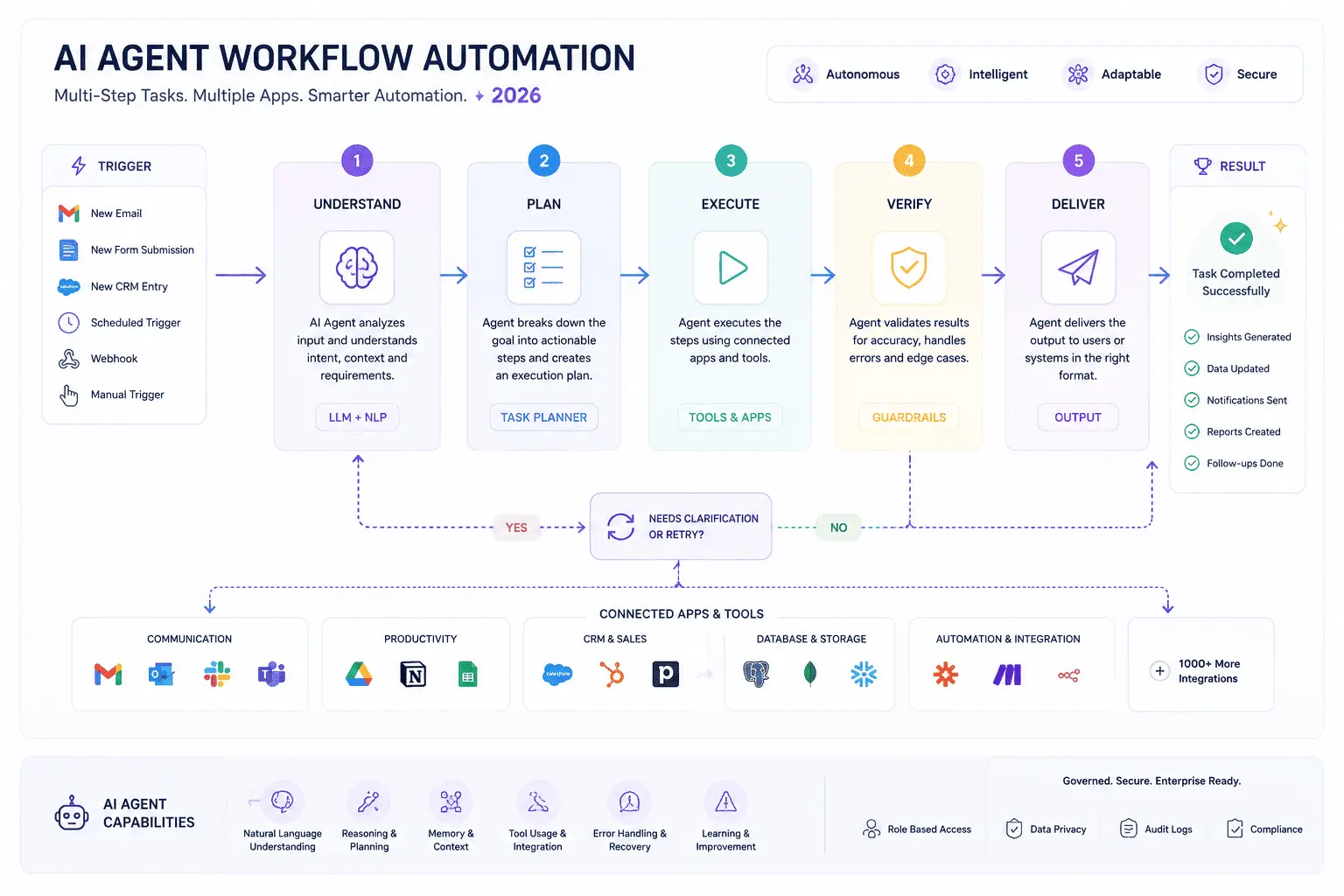
Autonomous AI agents execute multi-step tasks across apps without manual prompting at each stage.
#1 Best All-Rounder
ChatGPT — The Most Capable General-Purpose Agent
What It Does
ChatGPT is the most widely used AI assistant in the world — and in 2026, it moved decisively from chat tool to autonomous agent. Agent Mode spins up a virtual computer that ChatGPT controls, letting it browse the web, read documents, write and execute code, and complete multi-step tasks without you confirming every action. The results can be genuinely remarkable: one reviewer watched it autonomously navigate complex websites and generate a detailed 20-page SEO audit without human intervention.
For teams, Workspace Agents (launched April 2026) are the bigger deal. Teams can build shared agents connected to Slack, Gmail, Google Drive, SharePoint, Salesforce, and Notion, then deploy them organization-wide. A Software Review Agent handles employee tool requests end-to-end. A Weekly Metrics Reporter pulls data every Friday, creates charts, and shares the report. A Lead Outreach Agent researches prospects, scores them, drafts emails, and updates your CRM — all without a human in the loop.
Standout Features
- Agent Mode: Full computer-use autonomy for complex research and task execution
- Workspace Agents: Shared, governed agents for organizational workflows (Business/Enterprise)
- Custom GPTs: Build specialized assistants for specific tasks without coding
- Deep Research: Multi-step research agent that synthesizes across sources
- Memory: Remembers preferences and context across sessions
- Canvas: Side-by-side editing for documents and code
Who It’s For
Teams and professionals who need a capable general-purpose AI and are comfortable staying within the OpenAI ecosystem. If your primary need is writing, research, brainstorming, and analysis — ChatGPT covers 80% of it. For always-on cross-app automation, pair it with Zapier.
💡 Pro Tip: Use Workspace Agents for repeatable team processes (weekly reports, lead scoring, support triage) and Agent Mode for one-off complex research tasks. The two use cases are complementary, not interchangeable.
#2 Best for Document-Heavy Work
Claude (Anthropic) — The Thoughtful Autonomous Workhorse
What It Does
Claude has built a reputation as the AI assistant that follows complex instructions completely, sounds less generic, and handles more context than almost anything else available. Its 1 million token context window means it can read an entire codebase, a lengthy legal document, or a year’s worth of meeting notes in a single pass — and reason over all of it coherently.
In 2026, Claude went fully agentic. Claude Cowork, launched January 2026, is a desktop agent for knowledge workers: you give it access to a folder, and it reads files, executes multi-step workflows, and produces deliverables autonomously — no coding required. One tech journalist tested it by sending a task from her phone and watching Claude take over her laptop, pulling data from files, searching emails, and generating reports completely on its own. Scheduled Tasks handle recurring workflows like inbox triage, weekly reporting, and code reviews without manual prompting. And Computer Use lets Claude operate directly on your machine — opening apps, navigating browsers, and editing spreadsheets.
Standout Features
- Claude Cowork: Desktop agent for autonomous document and file workflows
- Scheduled Tasks: Recurring autonomous workflows without prompting
- Computer Use: Direct control of your machine for hands-on tasks
- Claude Code: Agentic coding in the terminal — generates, edits, and executes code autonomously
- 1M token context: Best in class for long-document reasoning
- Projects: Persistent context across conversations within a defined scope
Who It’s For
Professionals who work with long, complex documents and need reliable nuanced analysis. Developers who want an autonomous coding partner. Operations teams and analysts who manage recurring deliverables. Anyone who finds ChatGPT’s outputs feel generic — Claude tends to produce more careful, less formulaic work.
💡 Pro Tip: Use Claude Cowork for document-heavy recurring tasks (report compilation, contract review, research briefs) and pair with Zapier MCP to extend its reach across your broader app stack.
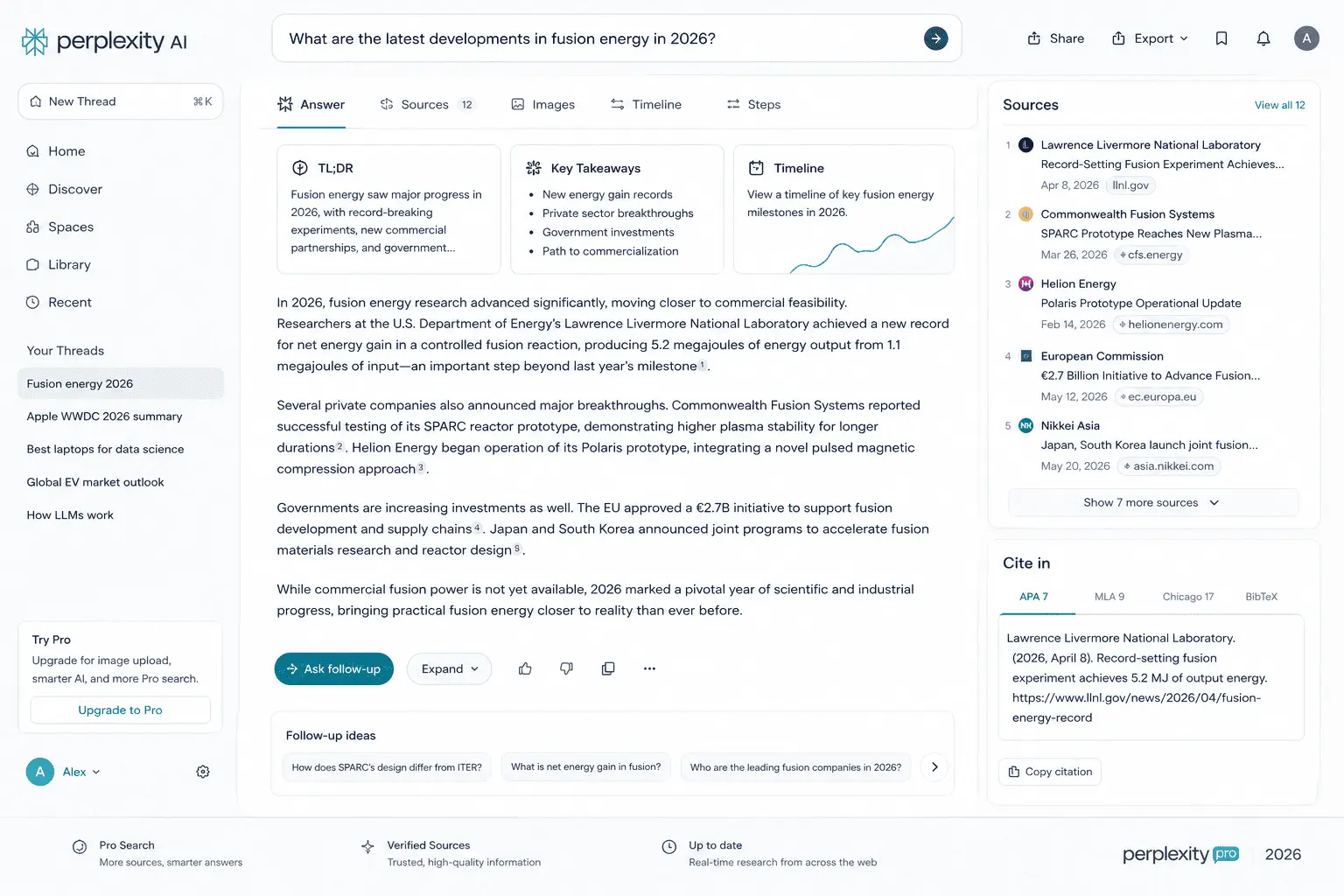
Perplexity AI returns every answer with inline citations — the killer feature that separates it from every other AI research tool.
#3 Best for Research
Perplexity AI — The Autonomous Research Engine
What It Does
Perplexity changed how research works. While every other AI assistant occasionally hallucinates with confidence, Perplexity returns inline citations with every answer — and those citations link directly to the original source, not an aggregator. In a live test, Perplexity found accurate pricing data for 9 out of 10 competitors with direct links to each pricing page. ChatGPT got 7 right but fabricated one entirely.
The agentic layer is Perplexity Computer, included with the Pro subscription. It gives Perplexity direct access to your local files via a companion app (macOS), runs in a cloud sandbox, and can be set up on an always-on machine to act as a 24/7 autonomous research assistant. One use case reviewers consistently highlight: give it a folder of academic papers and ask it to cross-reference them against the latest public research online, identify gaps, and produce a literature review — saved back to your desktop automatically. For complex, multi-step research, it is currently the best autonomous option available.
Standout Features
- Inline citations: Every claim is verifiable — no more guessing if the AI made it up
- Perplexity Computer: Agentic local + web research with desktop file access
- Deep Research: Multi-step research agent powered by Anthropic’s Opus 4.6
- Real-time web search: No knowledge cutoff — always current information
- Focus modes: Academic, Writing, Math, Video, Social
- Scheduled tasks: Automated recurring research workflows
Who It’s For
Researchers, analysts, journalists, consultants, and anyone who cannot afford to cite incorrect information. If research accuracy with verifiable sources is your top priority, Perplexity is the clear choice — nothing else matches its depth and transparency.
💡 Pro Tip: For competitive analysis, set up Perplexity Computer on a dedicated always-on machine. Schedule it to pull competitor pricing, product updates, and news every morning and deliver a briefing before you start your day.
#4 Best for Cross-App Automation
Zapier Agents — Your Autonomous Workflow Orchestrator
What It Does
If Claude and ChatGPT are autonomous AI assistants you talk to, Zapier Agents are autonomous AI teammates that live inside your tech stack. They connect to over 8,000 applications — Gmail, Slack, Salesforce, HubSpot, Notion, Asana, Google Sheets, and thousands more — and execute multi-step workflows automatically based on triggers you define.
Unlike other automation tools that execute rigid if-then rules, Zapier Agents use AI to handle nuance and variation. An agent triaging your inbox doesn’t just filter by keyword — it understands context, drafts replies in your tone, escalates urgent items, and logs interactions to your CRM. You can organize agents into pods and share them with teammates, turning what starts as a personal productivity tool into a repeatable team capability.
Standout Features
- 8,000+ app integrations: The broadest connection library of any AI agent platform
- Multi-step autonomous workflows: Agents that plan and execute, not just trigger
- Chrome extension: Trigger agents from anywhere on the web
- Agent pods: Share agents with your team for repeatable workflows
- Zapier MCP: Connects Claude, ChatGPT, or Perplexity to all 8,000+ apps
- Tables: Built-in database for agents to read from and write to
Who It’s For
Business operations, marketing, RevOps, and support teams who need cross-app automation without relying on engineering. Zapier Agents shine when the task crosses multiple systems — a workflow that reads an email, creates a CRM record, sends a Slack notification, and updates a spreadsheet is exactly what they’re built for.
💡 Pro Tip: Use Zapier MCP to give Claude or ChatGPT access to your entire app stack. Instead of managing which AI connects to which app, Zapier becomes the universal bridge and your AI assistant becomes truly cross-platform.
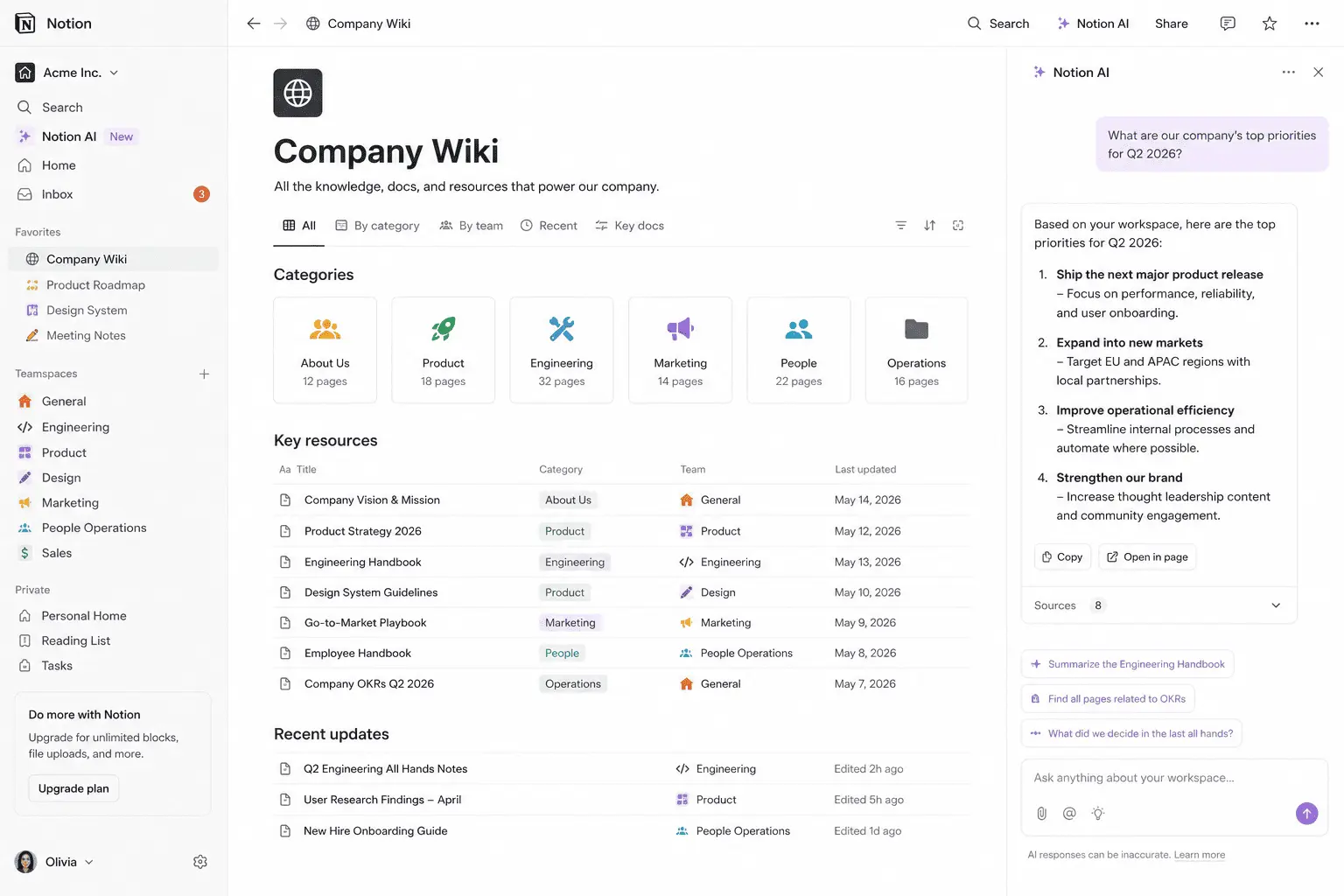
Notion AI doesn’t work in a vacuum — it has full context of your own pages, databases, and documents, making it uniquely powerful for knowledge workers.
#5 Best Embedded Workspace AI
Notion AI — Intelligence Woven Into Your Workspace
What It Does
Notion AI doesn’t try to be a standalone AI product. It’s intelligence woven into the workspace where knowledge workers already do their thinking — and that contextual advantage is its entire value proposition.
Unlike ChatGPT, which operates in a vacuum, Notion AI can reference your existing pages, project briefs, style guides, and meeting notes when helping you write, summarize, or answer questions. Ask it “What did we decide about the pricing model in last month’s meeting notes?” and it searches across your actual workspace content and returns the answer. No copying and pasting. No context-switching to a different tab. The AI is already inside the document you’re working on.
Standout Features
- Workspace-aware Q&A: Queries your own pages, databases, and documents
- In-context writing assistance: References your style guides and existing content
- Meeting notes summarization: Converts raw notes into structured action items
- Auto-fill databases: Populates properties using AI based on page content
- AI writer: Drafts content with full workspace context
Who It’s For
Teams and individuals already using Notion as their primary workspace. If your knowledge lives in Notion — and for many teams it does — the AI add-on pays for itself almost immediately. If you don’t already use Notion, building the habit alongside the AI layer is a bigger investment.
💡 Pro Tip: The killer use case is onboarding. Ask Notion AI to generate a tailored onboarding checklist for a new hire based on your existing team wiki and role descriptions. It reads everything and produces something actually specific to your organization.
#6 Best for Calendar Autonomy
Motion — The AI That Owns Your Schedule
What It Does
Most AI assistants tell you what to do. Motion does it. It ingests all your tasks across connected tools — Notion, ClickUp, Asana, Todoist, and others — and autonomously builds a time-blocked schedule that respects your deadlines, energy levels, focus windows, and existing meetings. When a meeting runs long or a new urgent task lands, Motion reschedules everything automatically. You don’t adjust. It adjusts.
Workers lose up to two hours per day to poor scheduling and context-switching. Motion eliminates most of that overhead by turning the daily planning process into something the AI handles. It doesn’t stack tasks back-to-back — it paces your day with breaks, splits long sessions, and schedules creative work when your calendar says you’re typically most effective.
Standout Features
- Autonomous time-blocking: Builds and continuously rebuilds your schedule
- Cross-tool task sync: Pulls from Notion, ClickUp, Asana, Todoist, and more
- AI Planner: Energy-aware scheduling that paces your day
- Frames: Templates for different work modes (deep work, meetings, creative)
- Meeting recorder: Notes, transcription, and auto-generated tasks from calls
- AI Docs: Documentation integrated with your project context
Who It’s For
Anyone whose primary productivity problem is time management rather than task execution. If you spend more than 20 minutes a day reorganizing your schedule, prioritizing your task list, or deciding what to work on next, Motion reclaims that time immediately.
💡 Pro Tip: Set up Frames for different work modes — deep work in the morning, administrative tasks after lunch, creative work on Tuesday afternoons. Motion will protect these blocks and schedule your tasks accordingly, without you having to think about it each week.
#7 Best No-Code Agent Builder
Lindy — Build Custom AI Agents Without Writing Code
What It Does
Lindy is a no-code platform for building custom AI agents that automate your specific business workflows — without writing a line of code. Where Zapier Agents excel at connecting apps, Lindy specializes in building agents that feel more like a personal assistant: they learn your preferences, communicate in your voice, and handle nuanced decisions that pure rule-based automation can’t.
The most popular Lindy use case is email management. A Lindy agent reads your inbox, categorizes messages, drafts replies in your tone, flags what needs your attention, and routes everything else to the appropriate person or system. It runs in the background continuously — you open your inbox to find it half-managed. Need a dedicated sales agent, a support agent, and an ops agent with different identities and tool access? Build all three. Lindy’s multi-agent architecture handles each separately.
Standout Features
- No-code agent builder: Build custom agents through natural language instructions
- Email triage: Autonomous inbox management that drafts replies in your voice
- Lead qualification: Researches inbound leads and routes qualified ones to your CRM
- Meeting scheduling: Handles back-and-forth scheduling autonomously
- Multi-agent support: Multiple specialized agents, each with their own identity and tool access
- Pre-built templates: Dozens of ready-to-deploy agent workflows
Who It’s For
Founders, sales teams, executives, and operations professionals who want to automate personal workflows without depending on an engineer. Lindy works best when you have clear, repeatable workflows that currently consume significant human time — inbox management, lead routing, meeting coordination, customer follow-up.
💡 Pro Tip: Start with Lindy’s email triage template. It’s the fastest path to visible productivity gains — most users report saving 45–90 minutes daily on inbox management within the first week. Once you see how agents work in practice, building custom workflows for your other repeatable tasks becomes intuitive.
The right AI assistant depends on where work slows down most — scheduling, research, cross-app automation, or document-heavy tasks.
How to Choose the Right Autonomous AI Assistant for Your Workflow
There is no single best autonomous AI assistant — there is only the best one for your specific workflow. Here is a straightforward decision framework:
- Need a general-purpose thinking and execution partner? → ChatGPT covers 80% of what most professionals need.
- Work with long documents, complex code, or need deep reasoning? → Claude is the strongest choice for nuanced, context-heavy work.
- Research accuracy and verifiable sources are critical? → Perplexity is the unmatched option.
- Need cross-app automation at scale? → Zapier Agents with 8,000+ integrations is built for this.
- Knowledge management is your primary challenge? → Notion AI, if your team already lives in Notion.
- Calendar chaos and scheduling are your biggest pain points? → Motion eliminates both problems autonomously.
- Want to automate personal workflows without coding? → Lindy is the easiest entry point for custom agent building.
💡 Most productive professionals in 2026 use 2–3 autonomous AI assistants, not one. A common high-performance stack: Claude for deep reasoning and document work → Zapier Agents to automate repetitive cross-app tasks → Motion to keep the calendar sane. Total cost: around $55–60/month per person, with most teams reporting 10+ hours saved per week per user.
What Makes a Truly Autonomous AI Assistant (vs. a Fancy Chatbot)
The market for autonomous AI assistants is full of tools that claim autonomy but deliver glorified autocomplete. Here are the three signals that separate a genuinely autonomous AI assistant from marketing hype:
- Persistent memory. A truly autonomous assistant remembers context across sessions. If it starts fresh every conversation, you’re rebuilding context manually every time — that’s not assistance, that’s overhead. In 2026, persistent memory has moved from a differentiating feature to a baseline expectation among serious tools.
- Cross-app action. Autonomy requires the ability to act in the systems where your work actually lives — your calendar, your inbox, your CRM, your file storage. An assistant that only operates inside its own interface is still an island. The tools that create compounding productivity gains are the ones that can reach everywhere.
- Proactive behavior. The most powerful assistants don’t wait for you to ask. They monitor triggers — a new email, a calendar change, a deadline approaching — and act on them without prompting. This is the clearest signal you’re working with an agent, not a chatbot.
What’s Next: The Future of Autonomous AI Assistants in 2026 and Beyond
The shift from “AI that tells you what to do” to “AI that does it for you” is the defining trend in productivity software for the rest of 2026. As autonomous AI assistants evolve rapidly, several developments are worth watching:
Multi-agent coordination is moving mainstream. Rather than one AI assistant handling everything, the emerging model is multiple specialized agents working together — a research agent hands off to an analysis agent, which hands off to a drafting agent, which routes the output to the right person via a communication agent. Tools like Zapier, Lindy, and Claude are all building toward this architecture.
Local and privacy-first agents are gaining ground. As autonomous assistants get access to more sensitive data, privacy-respecting deployment models — local inference, self-hosted options, hybrid cloud/local architectures — are moving from developer niche to mainstream selling point, per Stanford HAI’s 2026 AI Index.
Agentic AI protocols (MCP, A2A, NLWeb, ACP, UCP) are becoming the infrastructure layer that lets autonomous assistants connect to the web, to commerce systems, and to each other in standardized ways. As these protocols mature, the friction of connecting AI agents to the tools and data they need will drop dramatically.
The personal AI assistant market is valued at $4.84 billion in 2026 and projected to reach $19.63 billion by 2030, growing at a 41.9% compound annual rate. The organizations and individuals who build the habit of working with autonomous AI now will have a significant structural advantage as that capability compounds.
🚀 The Bottom Line: Autonomous AI assistants in 2026 are not productivity accessories — they are infrastructure. The question is no longer whether to use autonomous AI assistants. It is which ones fit your stack, how to deploy them effectively, and how to use the time they free up to do the work only you can do.
Pricing and feature information reflects publicly available data as of May 2026. Pricing may change; verify current plans at each tool’s official website before purchasing. This article contains no sponsored placements.