
Our QA team spent more hours fixing tests than writing them, until we stopped doing that
For two years, our team ran a Selenium suite that everyone privately resented. Every UI change, even a harmless class name rename, broke a dozen tests. Our QA engineers spent more time updating locators and rewriting brittle selectors than they spent finding actual bugs. We had decent coverage on paper. In practice, half the team treated a red build as “probably just the tests being flaky again” and moved on, which is exactly the kind of culture that lets real bugs slip through (AI-powered software testing tools 2026).
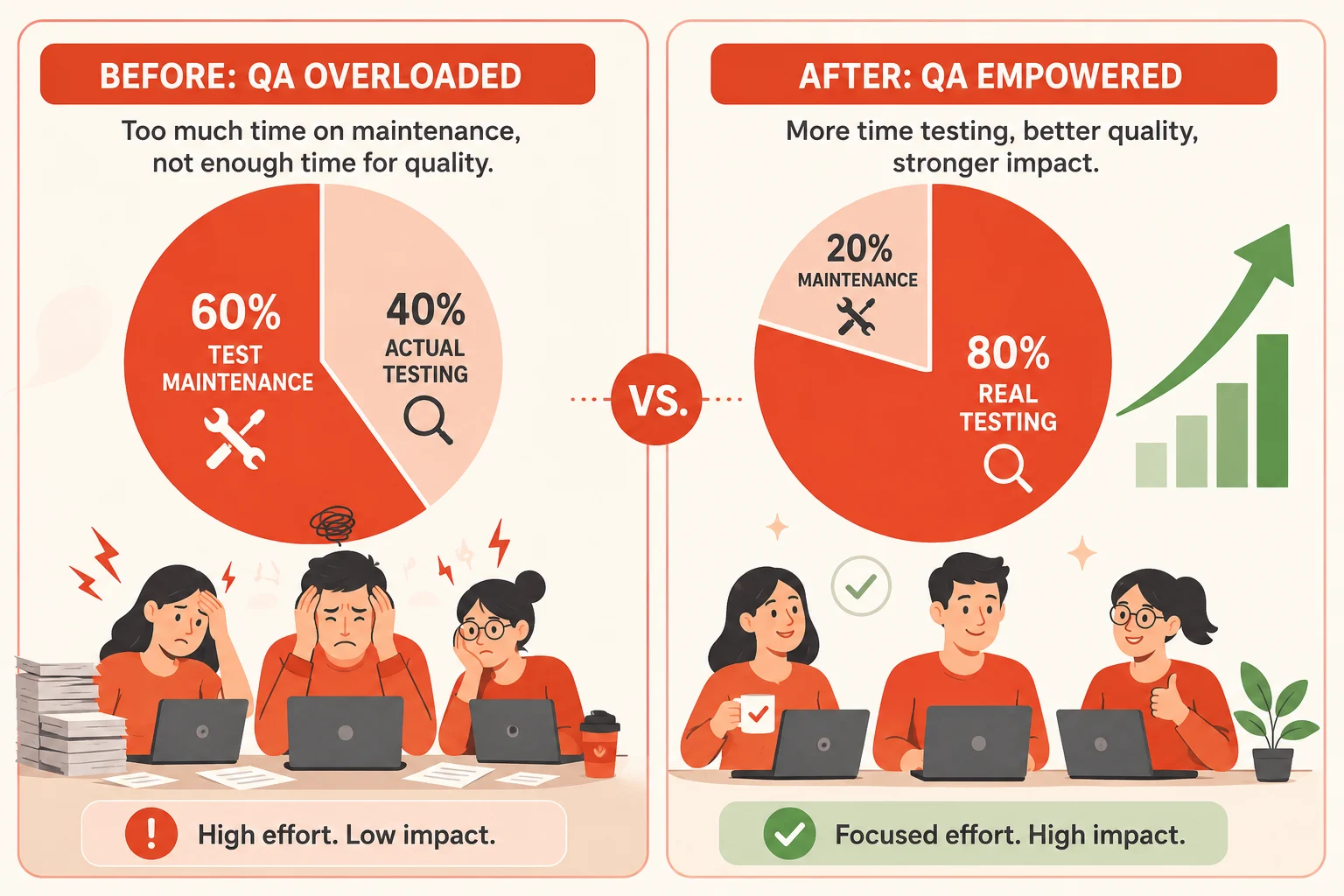
The turning point was not a single dramatic failure. It was a slow realization that we were spending roughly sixty percent of our QA capacity on maintenance, not on testing. When we finally looked at what AI-powered testing tools could actually do in 2026, the difference was not subtle. Self-healing locators that survived a redesign. Visual regression checks that caught a broken layout before a human noticed. Natural language test authoring that lets a product manager write a test case without touching code.
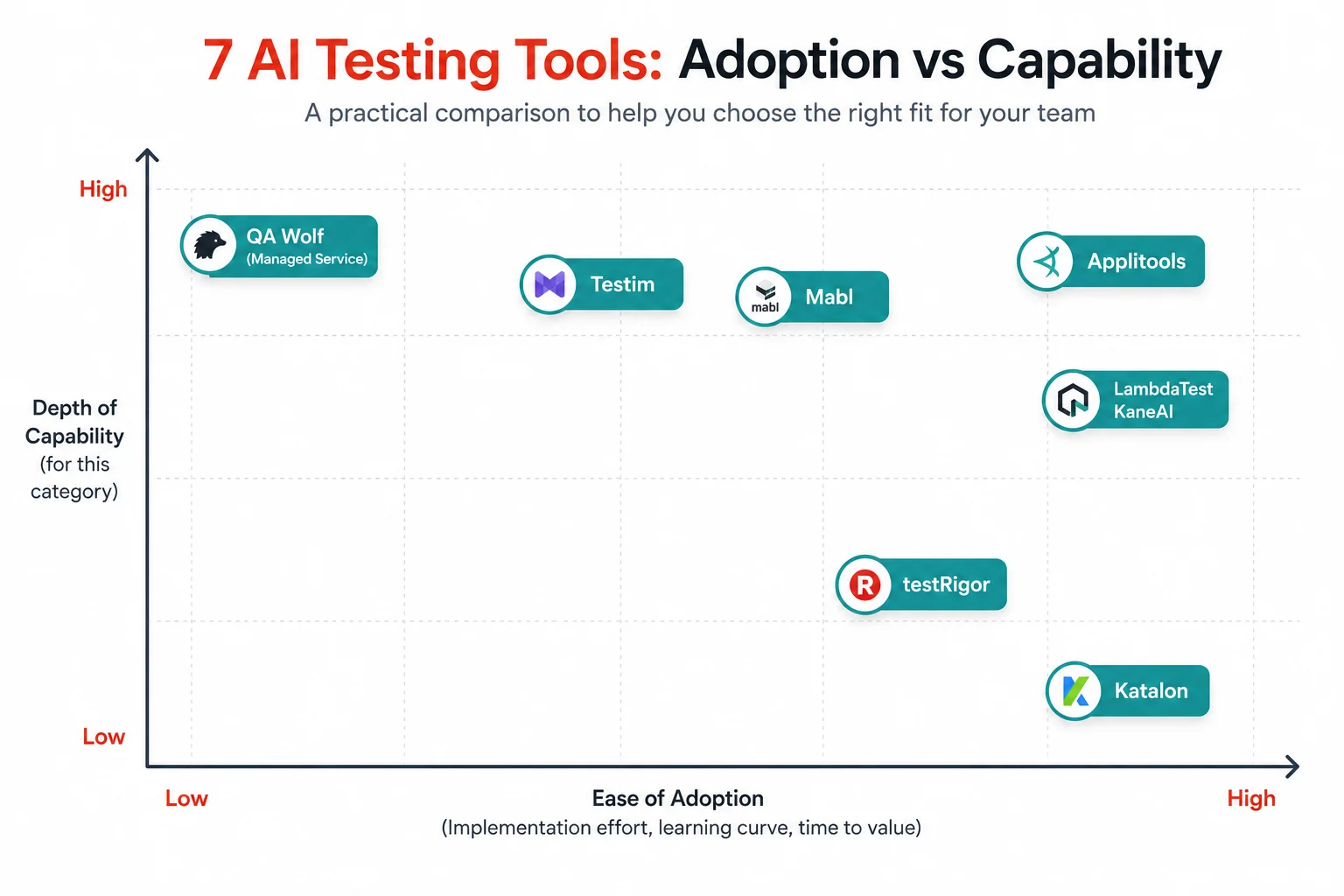
This guide covers seven of the most genuinely useful AI-powered software testing tools in 2026, with honest pros, cons, pricing, and a clear picture of who each tool is actually built for. At the end, a full comparison table puts all seven side by side so you can shortlist with confidence before booking a single demo.
What “AI-powered” actually means in testing right now
The phrase “AI-powered” gets attached to almost every testing tool on the market, and most of that labelling is marketing rather than substance. Before looking at specific tools, it helps to understand the categories that genuinely use AI in a way that changes outcomes, because the right category depends entirely on what is actually slowing your team down.
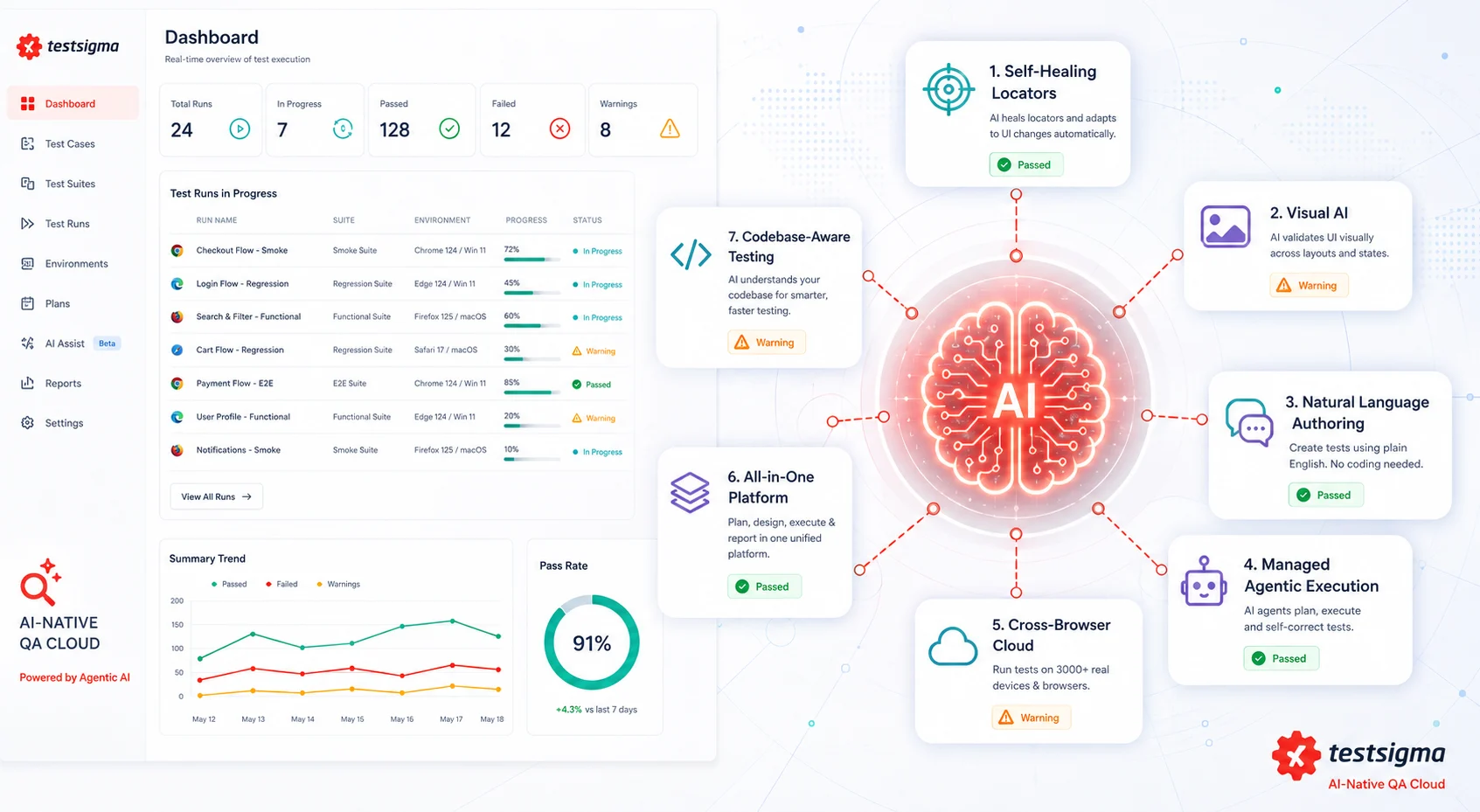
Gartner published its first Magic Quadrant for AI Augmented Software Testing Tools in October 2025, and Forrester renamed its testing category to Autonomous Testing Platforms around the same time. Both analyst firms independently concluded that traditional scripted automation has plateaued at roughly 25 percent coverage for most organizations, and that AI is the mechanism breaking through that ceiling. The test automation market itself is valued at 24.25 billion dollars in 2026 and is projected to reach 84.22 billion dollars by 2034.
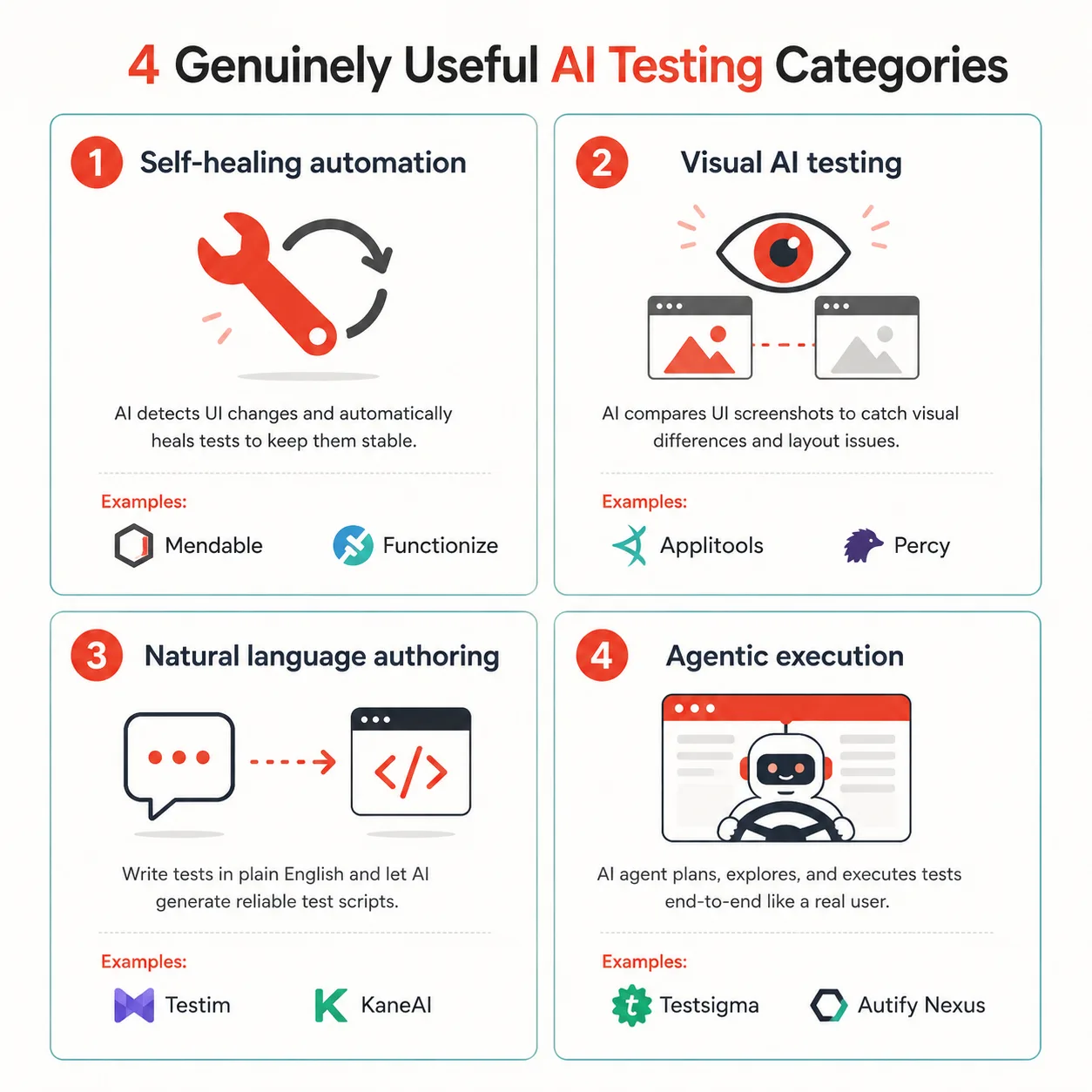
The genuinely useful AI categories fall into a few buckets. Self-healing test automation uses machine learning to keep existing automated tests stable when the UI changes, reducing the locator maintenance that ate our team’s time. Visual AI testing compares screenshots using models trained to ignore acceptable changes like anti-aliasing or animation frames while flagging real visual drift. Natural language authoring lets non-technical testers write test cases in plain English that get converted into runnable automation. Agentic execution, the newest category, lets an AI agent read a human-written test plan and drive a real browser end-to-end without a maintained script at all.
Most teams end up combining tools from more than one of these categories rather than relying on a single platform for everything. The seven tools below cover all of these categories so you can see where each one actually fits.
1. Mabl
Mabl built its platform around AI from the start rather than retrofitting machine learning onto an older automation engine. Its Trainer feature lets QA engineers, developers, and product owners collaborate on creating scriptless tests with variables, assertions, loops, and conditional logic, while its newer Agentic Tester reads a curated test plan and drives a browser autonomously, putting Mabl firmly in the agentic execution category that emerged in 2026.
Pros:
- AI native from the ground up, not a bolted-on layer over an older framework
- Strong collaboration features that let non-engineers contribute to test creation
- Agentic Tester reduces reliance on maintained scripts for end-to-end coverage
- Self-healing locators claimed at 80 to 99 percent accuracy, in line with other leaders in the category
- Integrates cleanly into CI/CD pipelines for continuous testing
Cons:
- Pricing sits at the higher end for small teams
- The Agentic Tester is newer and benefits from a curated test plan rather than working well from nothing
- Less native mobile device coverage compared to dedicated mobile cloud platforms
Pricing: Mabl offers a free trial, with paid plans starting around 450 dollars per month and scaling to custom enterprise pricing for organizations using the Agentic Tester across multiple teams.
Best for: Mid-market to enterprise teams that want a polished, low-code platform covering the full testing lifecycle, with room to grow into agentic execution as that category matures.
2. Testim (Tricentis)
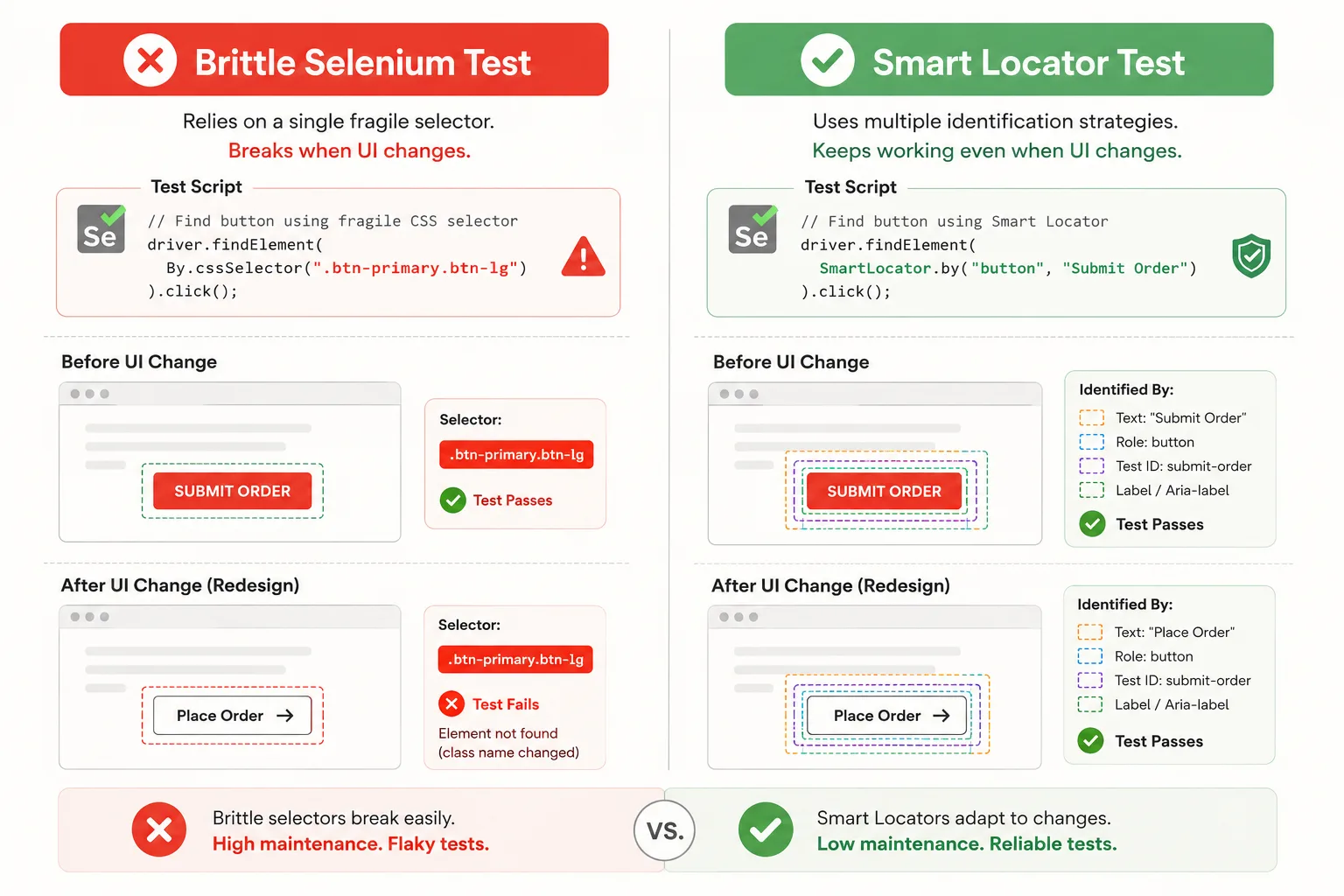
Testim was acquired by Tricentis in 2022 for 200 million dollars and now operates as a separately branded product within the Tricentis suite alongside Tosca and qTest. Its core differentiator is Smart Locators, an AI-driven element identification system that evaluates multiple locator strategies during test execution to reduce breakage as interfaces evolve. Tests are built through a visual recorder and editor and can be extended with custom code when needed.
Pros:
- Smart Locators meaningfully reduce the flaky test problem that plagues traditional Selenium suites
- Strong Salesforce testing edition for enterprise teams running Salesforce-heavy workflows
- Backed by Tricentis, meaning long-term support and integration with their broader enterprise suite
- Agentic Test Automation now builds complete tests from natural language descriptions
Cons:
- Coverage planning, failure triage, and ongoing suite maintenance still fall on your team as automation expands
- Pricing is opaque until you talk to sales, which slows down evaluation
- Best value is realized at scale, so smaller teams may find the cost hard to justify
Pricing: Testim does not publish self-serve pricing. Enterprise contracts typically run between 30,000 and 100,000 dollars per year, depending on seat count and which Tricentis modules are licensed alongside it.
Best for: Large organizations, especially those already running Tricentis Tosca or qTest, or any enterprise team with significant Salesforce testing needs and a compliance-driven QA process.
3. Applitools
Applitools is widely regarded as the leading AI-powered visual testing platform, and unlike the other tools in this list, it is not trying to replace your functional test suite. Its proprietary Visual AI technology compares screenshots using models trained to mimic how the human eye perceives change, flagging genuine visual regressions while ignoring acceptable variation like anti-aliasing, shadows, or animation frame differences. Done well, this approach drops false positive rates by 40 to 60 percent compared to pixel-perfect matching.
Pros:
- Best in class visual regression detection that complements any functional testing tool you already use
- Dramatically reduces false positives compared to traditional pixel diffing
- Integrates with Selenium, Cypress, Playwright, Appium, and most major frameworks via SDKs
- Catches visual bugs that functional tests structurally cannot, like a button rendering off-screen on a specific viewport
Cons:
- Not a complete testing platform on its own. It is a specialist tool meant to sit alongside functional automation
- Visual baseline management requires some discipline, especially for frequently redesigned interfaces
- Teams new to visual testing face a learning curve in deciding what counts as an acceptable change
Pricing: Applitools uses tiered SaaS pricing based on the volume of visual checkpoints run per month, with a free tier suitable for small projects and open source use, and custom enterprise pricing for high-volume visual testing across multiple applications.
Best for: Any team running functional automation that wants to add visual regression coverage without replacing their existing framework. Particularly valuable for e-commerce and content-heavy sites where layout integrity directly affects revenue.
4. Katalon
Katalon positions itself as an all-in-one platform covering web, mobile, API, and desktop testing from a single tool, which makes it a strong fit for teams that do not want to stitch together multiple specialist products. Its AI features, branded StudioAssist, bring natural language test generation and AI-assisted debugging into both its low-code and pro-code workflows, making it accessible to mixed skill teams.
Pros:
- True all-in-one coverage across web, mobile, API, and desktop reduces tool sprawl
- StudioAssist lowers the barrier for less technical testers while still supporting pro code workflows for engineers
- Strong fit for teams with mixed skill levels who need one platform that serves everyone
- Established product with a large existing user base and extensive documentation
Cons:
- Being good at everything means it is rarely the best at any single thing, compared to specialists like Applitools for visual testing
- The breadth of features can feel overwhelming during initial onboarding
- Enterprise tier pricing is necessary to unlock the most advanced AI and TestOps features
Pricing: Katalon offers a free Community edition for individual use. Paid Runtime Engine and TestOps subscriptions are priced per seat, with Enterprise and Ultimate tiers required for the full StudioAssist AI feature set and advanced reporting.
Best for: Mixed teams spanning manual testers, automation engineers, and developers who want a single platform covering multiple testing types without managing several separate tools.
5. QA Wolf
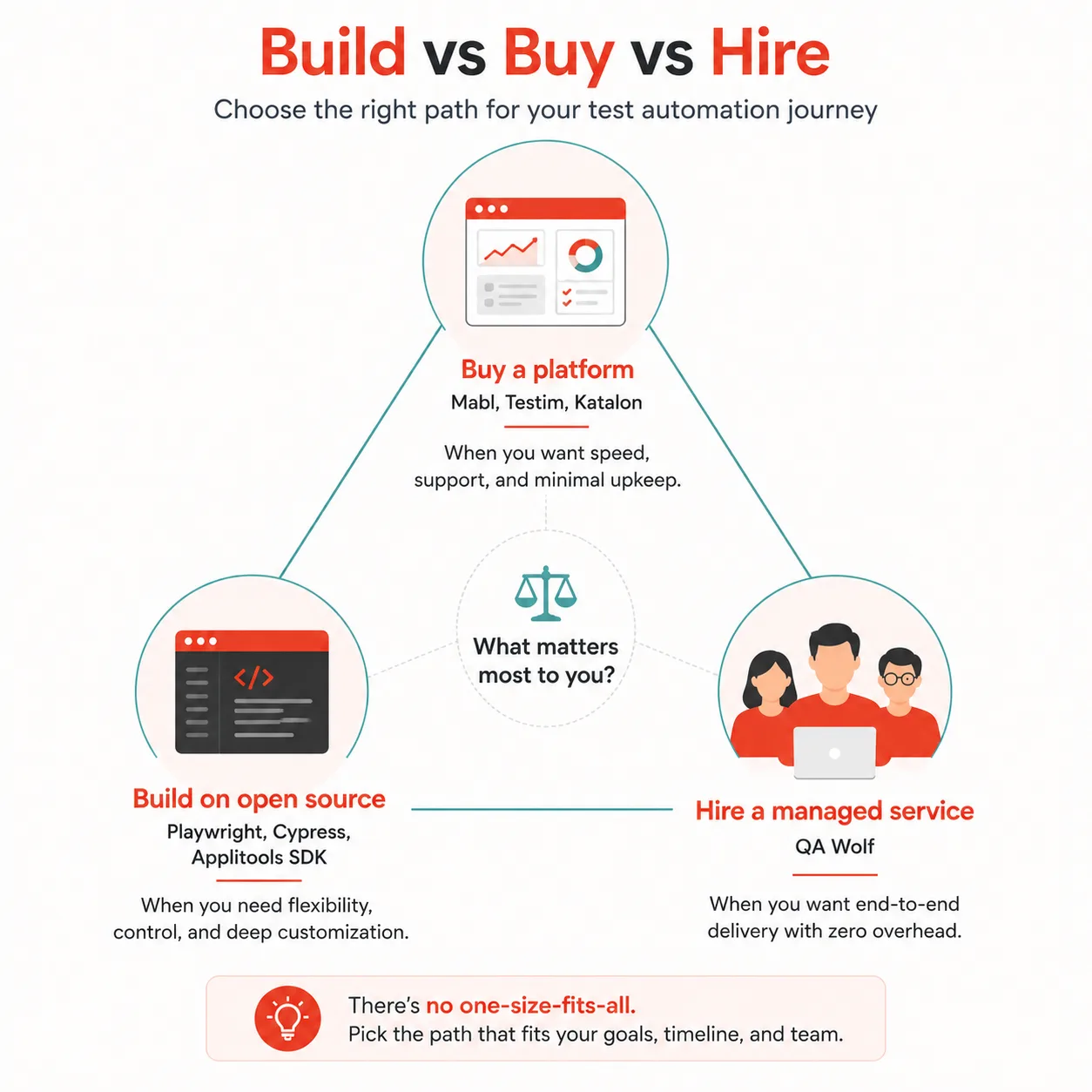
QA Wolf takes a fundamentally different approach from every other tool on this list. Rather than giving your team a platform to operate, QA Wolf is a managed service where human engineers, supported by AI tooling, write and maintain your end-to-end test suite on your behalf. The output is deterministic Playwright code that your team owns, but the ongoing maintenance burden sits with QA Wolf’s team rather than yours.
Pros:
- You buy results, not tools. Coverage gets built and maintained without consuming your own engineering capacity
- Output is real Playwright code your team owns and can inspect, unlike fully proprietary execution environments
- Extremely fast path to broad coverage for teams that are behind on testing and need to catch up quickly
- Removes the operational burden of running and maintaining a testing platform internally
Cons:
- You trade control for convenience. Coverage priorities are negotiated with an external team rather than set unilaterally
- Cost scales with test volume and can become significant for applications with large surface areas
- Less suitable for teams that want to build in-house automation expertise as part of the engagement
Pricing: QA Wolf uses custom enterprise pricing, typically ranging from 20,000 to 60,000 dollars per year based on test volume and the size of the application under test.
Best for: Teams with a concrete deadline, such as a product launch in eight weeks or a compliance audit in sixty days, who need broad test coverage fast and would rather pay for outcomes than build and operate a testing platform themselves.
6. LambdaTest KaneAI (TestMu AI)
LambdaTest, now operating under the TestMu AI brand, combines its long-standing cross-browser and cross-device cloud infrastructure with KaneAI, a GenAI native testing agent. KaneAI allows testers to author, manage, and debug end-to-end tests using natural language, with the resulting tests then executed across LambdaTest’s grid of more than 3,000 real browser and OS combinations and real mobile devices.
Pros:
- Combines natural language test authoring with genuinely massive cross-browser and cross-device infrastructure in one product
- KaneAI’s debugging assistance helps testers understand why a test failed, not just that it failed
- Strong choice for teams whose biggest pain point is device and browser fragmentation, rather than test authoring alone
- Active development pace, with KaneAI receiving frequent capability updates through 2026
Cons:
- The combination of cloud infrastructure billing and AI agent features can make cost forecasting less straightforward than flat per-seat pricing
- KaneAI is newer than LambdaTest’s core cloud platform, so some advanced agentic features are still maturing
- Teams that do not need extensive cross-device coverage may find simpler tools more cost-effective
Pricing: LambdaTest’s core cloud testing plans follow standard per-seat SaaS pricing with multiple tiers based on parallel test execution limits, with KaneAI features included in higher tiers and custom enterprise pricing available for large-scale device cloud usage.
Best for: Teams whose applications need to work reliably across a huge matrix of browsers, operating systems, and real mobile devices, and who want natural language test authoring built into the same platform that runs those tests at scale.
7. testRigor
testRigor’s entire premise is that anyone who can describe a user action in plain English should be able to write an automated test, regardless of technical background. Test steps are written as natural language sentences, such as describing a click on a button by the text it displays, and testRigor’s AI converts that description into a stable, executable test that does not depend on fragile selectors at all.
Pros:
- Genuinely accessible to non-technical testers, product managers, and business analysts, not just QA engineers
- Tests described by visible text and user intent tend to survive UI changes better than selector-based tests by design
- Free tier is genuinely usable for small projects, not just a crippled trial
- Covers web, mobile, API, and desktop testing from the same natural language interface
Cons:
- Highly complex interactions with intricate custom UI components can be harder to describe precisely in plain English than in code
- Teams with strong existing investment in Selenium or Playwright code may find migrating tests time-consuming
- Premium tier pricing per user adds up quickly for larger QA teams
Pricing: testRigor offers a free tier that is genuinely usable for individuals and small projects, with premium plans starting around 208 dollars per month per user for teams that need higher execution volume and collaboration features.
Best for: Teams with non-technical testers, product managers, or business analysts who need to contribute to test coverage directly, and any team that wants test stability to come from describing user intent rather than maintaining selectors.
How the seven tools compare side by side
| Tool | Primary AI category | Best for | Starting price | Standout strength |
|---|---|---|---|---|
| Mabl | Self-healing plus agentic execution | Mid-market to enterprise full lifecycle platform | Around $450/month scales to a custom enterprise | AI native platform with Agentic Tester |
| Testim (Tricentis) | Self-healing automation | Large enterprises, Salesforce-heavy teams | Custom enterprise, typically $30K to $100K+/year | Smart Locators reduce flaky test breakage |
| Applitools | Visual AI testing | Any team adding visual regression coverage | Free tier available, tiered SaaS to custom enterprise | 40 to 60% fewer false positives than pixel diffing |
| Katalon | Self-healing plus natural language authoring | Mixed skill teams need one all-in-one platform | Free Community edition, paid per-seat tiers | Web, mobile, API, and desktop in a single tool |
| QA Wolf | Managed agentic execution | Teams needing fast coverage without operating a platform | Custom enterprise, typically $20K to $60K/year | You receive maintained Playwright coverage, not a tool |
| LambdaTest KaneAI | Natural language authoring plus device cloud | Teams needing massive cross-browser/device coverage | Per-seat SaaS tiers, custom enterprise for device cloud | 3,000+ browser/OS combinations plus AI test agent |
| testRigor | Natural language authoring | Non-technical testers and mixed business/QA teams | Free tier, premium around $208/month per user | Tests written in plain English by anyone on the team |
How to choose the right tool for your team
The honest starting point is identifying what is actually costing your team the most time right now, not what looks most impressive in a demo. A few clear patterns make the decision much easier.
If flaky tests from UI changes are your biggest source of wasted engineering hours, start with self-healing automation. Testim and Mabl both lead here, with Mabl edging ahead if you also want to grow into agentic execution over time, and Testim being the stronger choice if you are already inside the Tricentis ecosystem or run significant Salesforce testing.
If your team has solid functional coverage but visual bugs keep reaching production, Applitools is close to a no-brainer addition. It does not replace anything you already have. It sits alongside your existing Selenium, Cypress, or Playwright suite and catches an entire class of bugs that functional assertions structurally cannot detect.
If your bottleneck is that only a handful of people on your team can actually write or maintain tests, natural language authoring changes that dynamic directly. testRigor is the most accessible option for teams that want product managers and business analysts contributing real coverage. Katalon’s StudioAssist is a strong middle ground if you also need pro code flexibility for your automation engineers within the same platform.
If cross-browser and cross-device fragmentation is the core problem, particularly for consumer-facing applications that need to work across thousands of devices and OS combinations, LambdaTest KaneAI combines the natural language authoring benefit with infrastructure depth that the other tools in this list do not attempt to match.
And if your team is simply behind on coverage with a deadline that cannot move, QA Wolf is the option that buys you time without asking your engineers to spend the next quarter building and maintaining a testing platform from scratch.
Common mistakes teams make when adopting AI testing tools
Buying a platform to solve a problem, a plugin would fix
If visual regressions are your main pain point, you do not need to replace your entire test framework with an all-in-one platform. Adding Applitools to your existing Selenium or Playwright suite solves the specific problem directly, faster and at lower cost than a platform migration.
Trusting self-healing without verifying what healed
Self-healing locators that claim 80 to 99 percent accuracy are genuinely useful, but a healed locator that now points at the wrong button is worse than a test that simply failed and told you something changed. Periodically review what your self-healing tool actually healed, especially after major redesigns, rather than assuming a green build means nothing changed.
Underestimating the maintenance that remains
AI reduces maintenance significantly. It does not eliminate it. Coverage planning, failure triage, and deciding what new functionality needs new tests still require human judgment, regardless of which tool you choose. Teams that expect AI testing tools to run themselves end up surprised when a platform still needs an owner.
Choosing based on the demo instead of your actual application
Every AI testing tool looks impressive on a clean demo application built specifically to showcase its strengths. Before committing, run a pilot against your actual application, including its messiest, most custom UI components. The tools that look identical in a vendor demo often differ sharply once they meet real complexity.
Ignoring the category mismatch between tools and platforms
Applitools and similar specialist tools complement a platform. They do not replace one. Mabl, Katalon, Testim, and QA Wolf are platforms that run the full testing lifecycle. Trying to use a specialist tool as your entire testing strategy, or trying to bolt a platform onto a workflow that just needed a specialist tool, both create friction that shows up months later.
Quick reference: AI testing tools at a glance
| If your biggest problem is… | Start with |
|---|---|
| Flaky tests breaking on every UI change | Testim or Mabl (self-healing automation) |
| Visual bugs are reaching production despite passing tests | Applitools (visual AI, complements existing suite) |
| Only engineers can write or maintain tests | testRigor or Katalon StudioAssist (natural language authoring) |
| App needs to work across thousands of device combinations | LambdaTest KaneAI (device cloud plus AI agent) |
| Behind on coverage with a fixed deadline | QA Wolf (managed agentic execution) |
| Need one platform for web, mobile, API, and desktop | Katalon (all-in-one platform) |
| Want to grow into agentic, AI native testing over time | Mabl (AI native with Agentic Tester) |
Further reading and resources
- Gartner Peer Insights for AI Augmented Software Testing Tools: independently verified reviews from real QA teams across the platforms covered in this guide, alongside Gartner’s formal market definition for this category
- Applitools official site and Visual AI documentation: detailed technical explanation of how Visual AI distinguishes real regressions from acceptable rendering differences, with integration guides for major test frameworks
- Mabl official documentation: setup guides, Trainer walkthroughs, and details on the Agentic Tester for teams evaluating an AI native testing platform
- Devin AI Review 2026: Is It Worth It? Honest Verdict After Real Testing: That experience is why Devin AI exists. And it is also why this review is complicated, because that is not the whole story.
The shift our team made was not about finding a single tool that did everything. It was about recognizing that self-healing automation, visual AI, natural language authoring, and managed agentic execution each solve a different specific problem, and picking the combination that matched what was actually slowing us down.
Start by being honest about where your team’s QA hours actually go. If you genuinely do not know, that itself is worth figuring out before evaluating any tool on this list. Once you know whether your pain is flakiness, visual regressions, accessibility to non-technical testers, device fragmentation, or simply a coverage gap you cannot close fast enough, the right tool from this list becomes obvious rather than a guess. That clarity, more than any feature list, is what turns an AI testing tool from a line item into something your team actually relies on.