
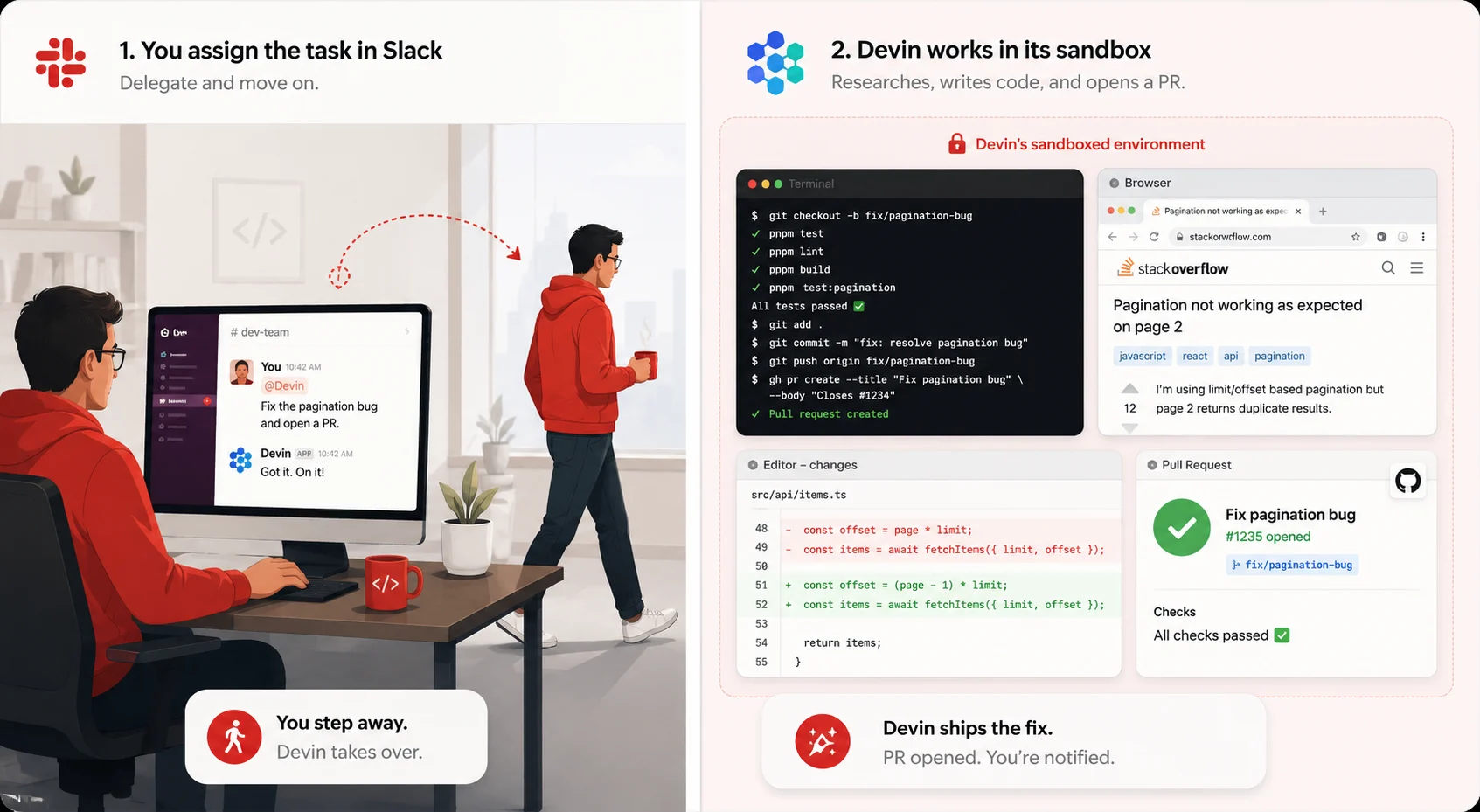
I assigned Devin a task and went to make lunch
I had a bug report sitting in my queue for three days.
It was not a hard bug. It was a tedious one. Duplicate results in a product listing API caused by a missing OFFSET clause combined with incorrect cursor-based pagination logic. I understood the issue completely. I just had not had a ninety-minute block of focused time to sit down and fix it, write the tests, and open a clean PR (Devin AI review).
I pasted the bug description into Devin via Slack, said “fix this and open a PR,” and went to make lunch.
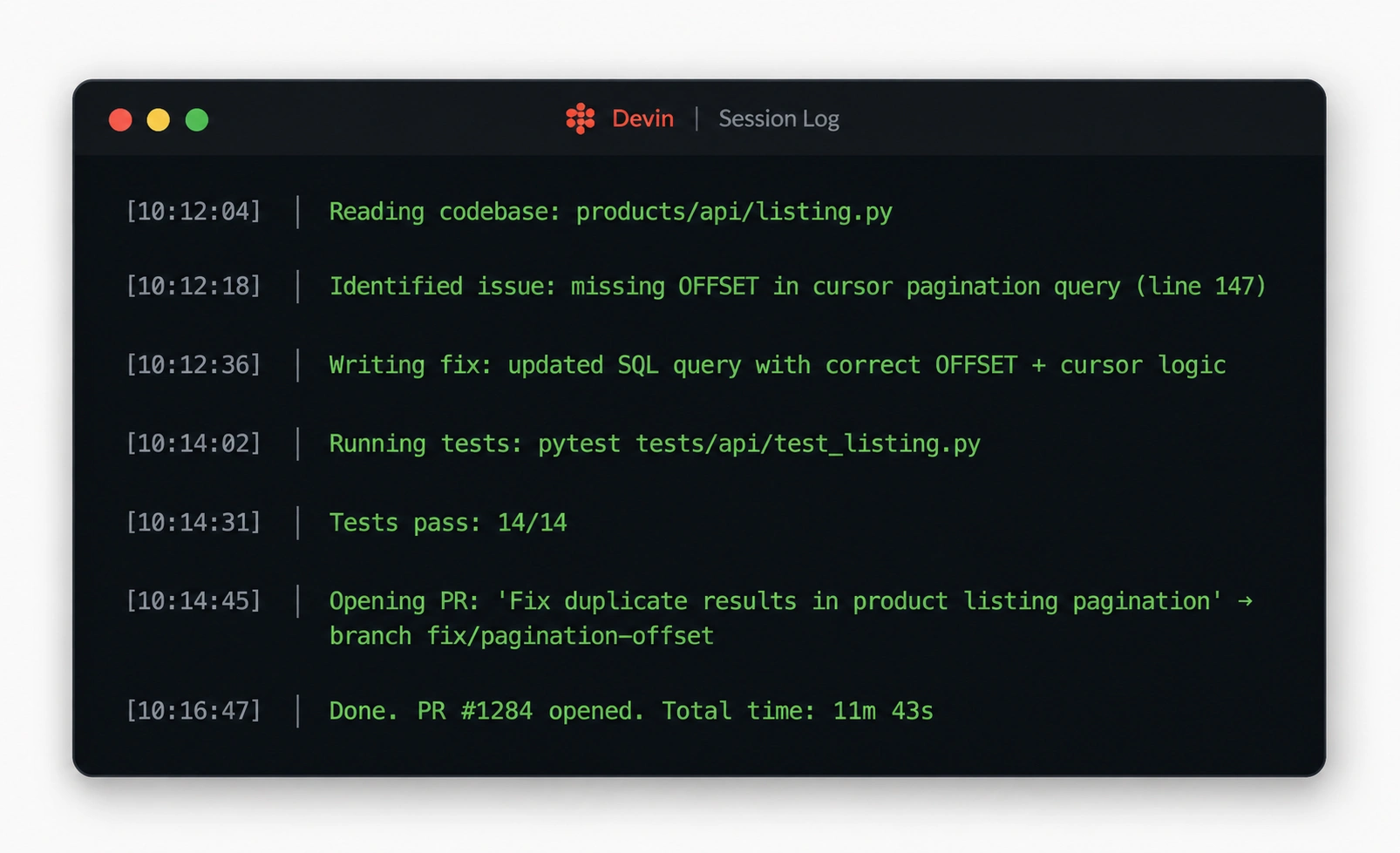
Twelve minutes later, I had a notification. Devin had identified the issue, fixed the SQL query, updated the API endpoint, added a test for the pagination edge case, and opened a clean pull request. No intervention from me. No check-ins. No “I need clarification on X.” It just did the job.
That experience is why Devin AI exists. And it is also why this review is complicated, because that is not the whole story.
What Devin AI is
Devin is an autonomous AI software engineer built by Cognition AI.
It is not a code autocomplete tool. It is not an AI assistant that sits in your editor and suggests lines. Devin is a fully autonomous software engineer who receives a task, opens their own terminal and browser, writes and runs code, reads error messages, searches for solutions, and iterates until the job is done, without asking for help at every step.
The clearest way to understand what makes Devin different is the driver analogy. Copilot and Cursor are copilots. They suggest code inside your editor while you drive. Devin is the driver. Give it a GitHub issue, a feature request, or a bug report, and it will read the codebase, form a plan, write the fix, run the tests, handle the failures, and open a pull request. You review the PR. You do not sit next to it while it works.
Cognition AI launched Devin in March 2024 as what it called the world’s first AI software engineer. Two years later, the product has real enterprise customers, real revenue, and a very real price tag. Whether it is worth that price tag depends entirely on what tasks you hand it.
The latest Devin news: $26 billion and growing fast
The context around Devin changed significantly in late May 2026, and it matters for evaluating the tool.
Cognition AI raised more than $1 billion at a $26 billion valuation on May 27, 2026. Revenue grew from $37 million to $492 million in twelve months, with Goldman Sachs, Mercedes-Benz, and the US government among its customers.
Enterprise usage of Devin has grown more than tenfold since the beginning of 2026. The company counts Goldman Sachs, Mercedes-Benz, Dell Technologies, Santander, the US Army, and the US Navy among its customers.
One enterprise result stands out in particular. Mercedes-Benz reportedly reduced an eight-month legacy modernization project to just eight days using the platform.
The company is also eating its own cooking at an unusual scale. More than 89 percent of Cognition’s own internal code is now written by Devin.
The funding round also came with a notable product development: Cognition’s acquisition of Windsurf, the AI code editing vendor, has increased its appeal to enterprise developers. Windsurf’s proprietary SWE-1.6 model is now one of the most widely used across Cognition’s entire product suite.
These are real signals that Devin is working at scale for some organizations. They do not tell you whether it will work at scale for yours.
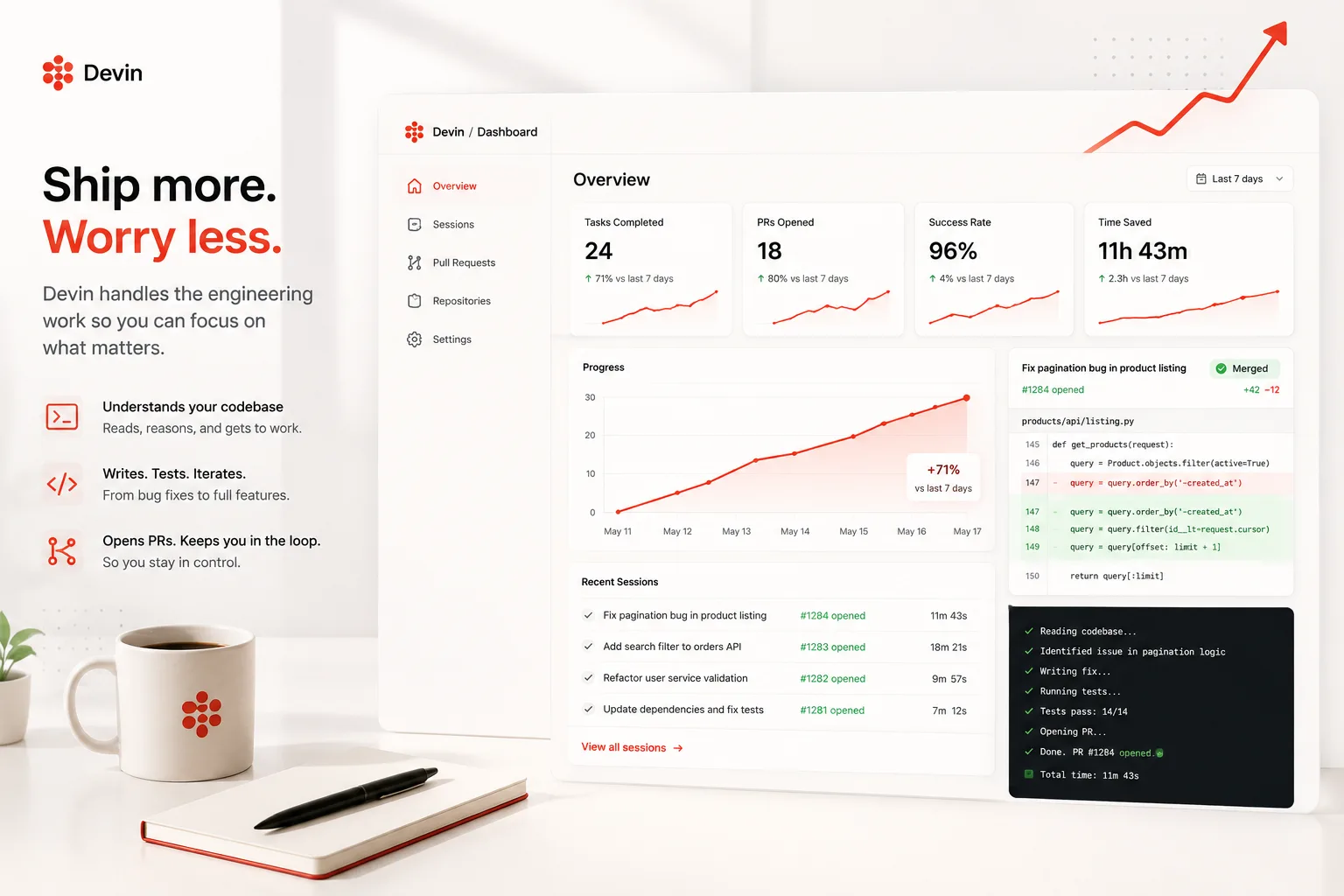
How Devin works: the sandbox architecture
Devin operates inside a completely isolated sandboxed environment that provisions itself.
Inside that sandbox, Devin has a shell, a code editor, and a web browser. It can clone your repository, run commands, search the web for documentation, read error output, and iterate. It is not using your machine or your environment. It is working in its own VM.
You interact with Devin primarily through Slack or its web interface. You describe the task, attach the relevant issue or context, and Devin plans its approach before it writes a single line of code. Devin can break down vague requirements into a detailed action plan, write code, execute it, read errors and fix them, then deploy the final application.
The Devin 2.0 update, released in April 2025, added three features that significantly improved usability in practice.
Interactive Planning lets you review and edit Devin’s plan before it starts executing. For complex tasks, this is the difference between delegating well and delegating blindly. You can catch misunderstandings at the plan stage rather than at the PR review stage.
Devin Search allows Devin to search your repository in natural language. Instead of navigating the codebase from scratch, it can find relevant files, functions, and patterns through semantic queries. This significantly reduces the time Devin spends orienting itself on large codebases.
Devin Wiki generates and maintains architectural documentation automatically as Devin works. The context it builds about your codebase persists across sessions, which means the second task Devin handles on a given repository goes faster than the first.
Pricing: The ACU model was explained clearly
Devin’s pricing structure is genuinely unusual and deserves careful explanation before you commit to it.
The billing unit is called an ACU, or Agent Compute Unit. One ACU equals approximately fifteen minutes of Devin’s active work, at a cost of $2.25 per ACU on the Core plan.
There are three plans currently available.
The Core plan starts from $20 per month on a pay-as-you-go basis, billed at $2.25 per ACU. This is best for individuals or teams with variable workloads who do not want a committed monthly seat.
The Team plan is $500 per month and includes 250 ACUs per month, which is approximately 111 hours of autonomous work. It adds Slack and GitHub integrations, a shared workspace, and team management. Additional ACUs beyond the 250 included are billed at $2 per ACU.
The Enterprise plan is custom pricing and includes unlimited ACUs, dedicated infrastructure, SSO, compliance documentation, SLAs, and custom integrations.
The gap between the $20 Core plan and the $500 Team plan surprises a lot of developers, and understanding why it matters requires thinking about ACU consumption in practice.
A moderately complex task like refactoring a module might consume five to twenty ACUs, which costs $11 to $45. If you have fifty such tasks per month, the actual cost could be $500 to $2,250, far exceeding the $20 base fee. The $20 plan is a genuine entry point, not a meaningful working budget for active engineering use.
It is recommended to use Devin’s budget cap feature to control unexpected spending. Set per-session ACU limits before you start delegating tasks at volume.
Real-world test results: the honest numbers
Devin’s marketing materials reference its SWE-bench score as the core proof of capability. Understanding what that number means in practice is important.
Devin AI’s original SWE-bench score was 13.86 percent end-to-end issue resolution, a 7x improvement over previous state-of-the-art models at the time of launch. As of early 2026, models from Anthropic, OpenAI, and Google have surpassed this score on the same benchmark. Devin 2.0 has improved, but Cognition has not published updated SWE-bench figures.
Independent real-world testing gives a more nuanced picture than the benchmark number.
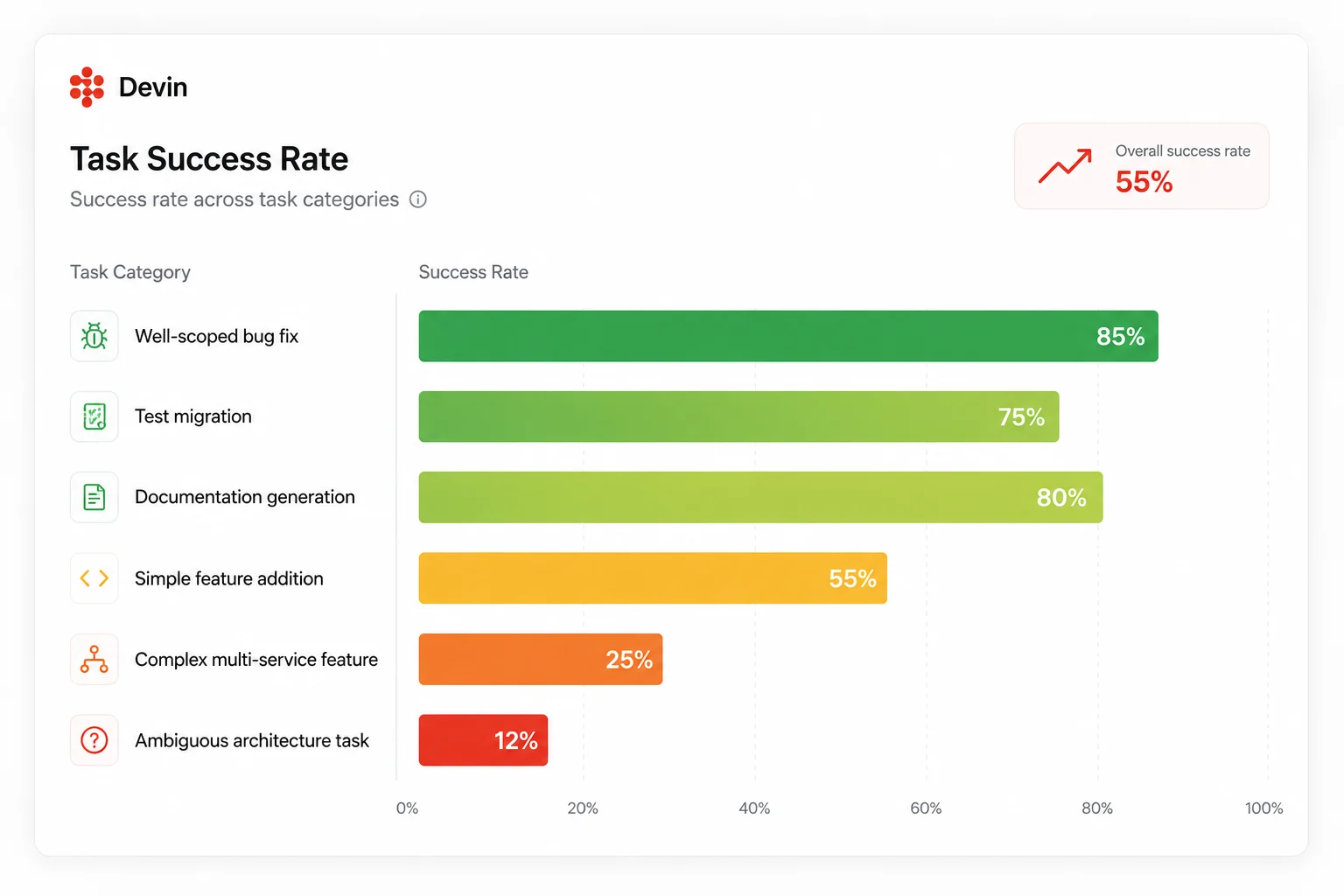
Independent evaluations and community reports consistently suggest Devin successfully completes approximately 14 to 15 percent of complex real-world tasks autonomously without correction. For simpler, well-scoped tasks, including straightforward feature additions, test generation, and documentation, the success rate is meaningfully higher.
In real-world testing of well-defined tasks, Devin’s success rate reaches 30 to 50 percent. For novel or ambiguous tasks, the rate drops to 15 to 30 percent.
The wide range is the honest answer. What Devin handles perfectly and what it fails on depends heavily on how you write the task, how well-defined the acceptance criteria are, and how familiar they are with your codebase.
What Devin does well: it’s his genuine strengths
Testing Devin across a range of real engineering tasks reveals a consistent pattern. There are clear task types where it performs at or above senior engineer level, and clear task types where it reliably disappoints.
Well-scoped bug fixes with clear reproduction steps
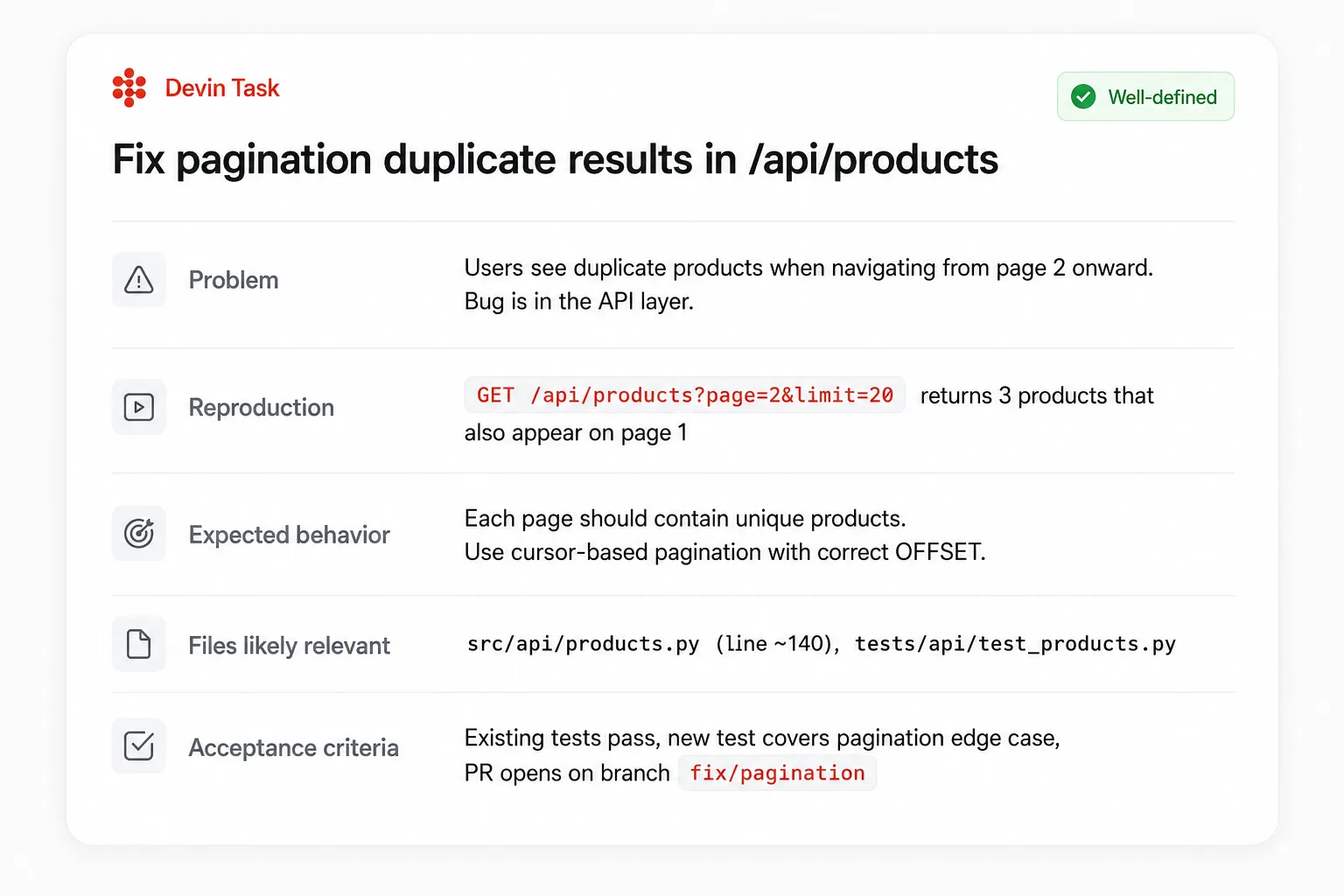
On a bug described as “users report duplicate results when navigating between pages in the product listing, the bug is in the API layer,” Devin identified the issue, fixed the SQL query, updated the API endpoint, added a test for the pagination edge case, and submitted a clean PR. Total time: 12 minutes. No intervention needed. This is Devin’s sweet spot: a clear bug, a clear repro, and a bounded scope.
Give Devin a well-formed GitHub issue with reproduction steps and expected behavior and its hit rate on this category is genuinely impressive.
Migrations and repetitive refactoring
Tasks that require applying the same transformation consistently across dozens or hundreds of files are where Devin earns its cost back most reliably.
Assign Devin: “Migrate our API tests from Jest to Vitest. Update all imports, configuration files, and fix any compatibility issues. Run the full test suite and ensure everything passes.” Then go make coffee. This category of task is tedious, time-consuming, and exactly within Devin’s consistent execution range.
Dependency upgrades with breaking changes, ORM migrations with consistent field transformations, and linting rule rollouts across a large codebase all belong in this category.
Background research and documentation generation
Devin can research a technical approach, document what it finds, and surface a recommendation without any direct code output. Teams use this for technology evaluation spikes, third-party API research, and generating the first draft of technical specifications for larger features.
Asynchronous work while you sleep
The operational advantage that separates Devin from every IDE-based tool is its ability to run unattended on Anthropic’s infrastructure.
For teams willing to invest in the learning curve, Devin enables workflow transformations. PR reviews happen while you sleep. Migrations execute in parallel with other work. Feature implementations get delegated with confidence.
A task assigned at 6 PM can deliver a reviewed PR by 9 AM the next morning. No developer hours consumed. No context switching during the workday.
What Devin fails at: the honest limitations
The flip side of Devin’s strength on bounded tasks is its weakness on everything else.
Vague or ambiguous requirements
A task description like “improve the onboarding flow” or “clean up the authentication module” produces unfocused, often contradictory output. Devin interprets ambiguity optimistically and starts working, which means by the time you review the PR, you discover it solved a different problem than you intended.
Devin performs best on well-defined tasks with clear acceptance criteria. Vague requests produce unfocused results. The return on investment in writing a precise task description is unusually high with Devin.
Complex multi-service features requiring architectural judgment
Devin struggles when a task requires evaluating multiple valid architectural approaches and choosing the right one for your specific system’s constraints and history.
If you need to build something that touches frontend, backend, and infrastructure simultaneously, Claude Code’s agent teams coordinate multiple agents working on the same codebase. Devin’s cloud agents work in isolation. Multi-service features with cross-cutting concerns often need the kind of contextual judgment that Devin cannot provide reliably.
Partial implementations of UI-heavy tasks
On a task to “add a dark mode toggle to the settings page that persists across sessions,” Devin created a working dark mode toggle with a React context, CSS variables, and localStorage persistence. However, it missed several components that needed theme updates: the sidebar, modal overlays, and code blocks.
Devin does not know what it does not know. It delivers what it understood the task to be, not what the task actually required. Human review is non-negotiable on every Devin PR.
Quick urgent patches
For a production incident requiring an urgent patch, Devin is overkill. The setup time does not justify it for urgent fixes. When something is on fire, you want an AI assistant in your editor that helps you fix it in five minutes. You do not want to delegate to an async agent.
Context transfer from your IDE
GitHub Copilot and Cursor both have deep IDE integrations: diff views, inline suggestions, keyboard shortcuts, and context from your open files. Devin operates separately, which means context transfer requires explicit instruction rather than automatic IDE context. This gap is narrowing with each update, but remains real.
Devin vs the alternatives: where each tool actually wins
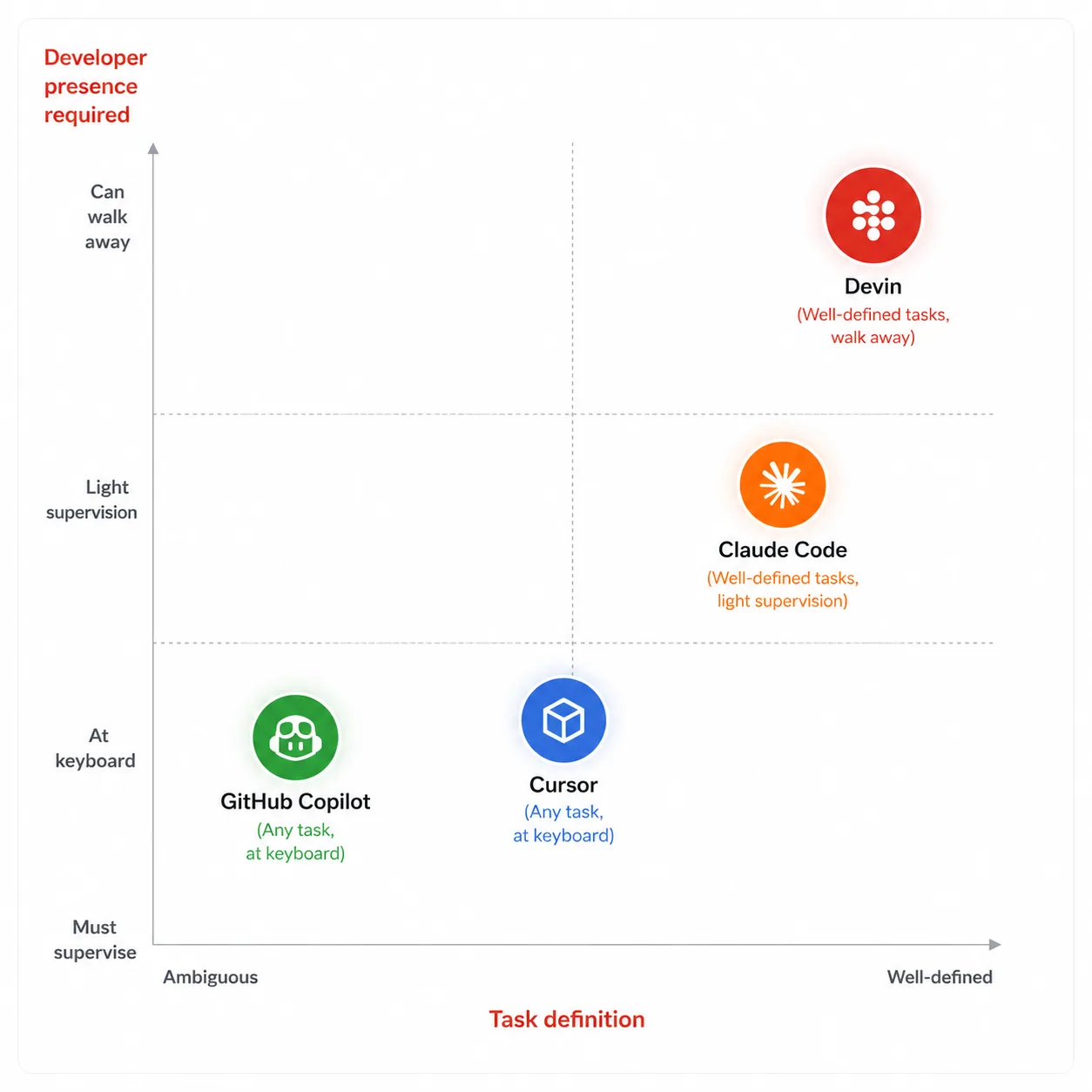
The most useful framing for Devin is not “which tool is best” but “which tool wins for which category of task.” In 2026, the most productive engineering teams use multiple tools.
Stop treating these as competitors. They are complements at different autonomy tiers. Best practice in 2026 is to be fluent in all three, then pick per task.
Here is how the four main tools map to different work types.
Claude Code, powered by Opus 4.8, holds the highest SWE-bench Verified score at 80.8 percent as of 2026. It is the best choice for complex refactorings and tasks that touch frontend, backend, and infrastructure simultaneously, because only Claude Code coordinates multiple agents working on the same codebase.
Cursor is the best general-purpose AI coding tool for most developers. Its IDE experience and model flexibility make it the daily driver for interactive coding work where you are at the keyboard.
Devin is best for fully delegated tasks where you want to hand off work entirely. Best for backlog burndown, dependency upgrades, and well-scoped tickets you would rather delegate than execute.
Head-to-head comparison table
| Feature | Devin AI | Claude Code | Cursor | GitHub Copilot |
|---|---|---|---|---|
| Operating model | Fully autonomous, async | Terminal agent, interactive + async | AI-native IDE, interactive | IDE assistant + agent mode |
| Works without a developer present | Yes (core strength) | Yes (Routines + scheduled tasks) | Partial (cloud agents) | Partial (GitHub Actions) |
| SWE-bench Verified score | 13.86% (Devin 1.0, not updated) | 80.8% (Claude Opus 4.8) | Strong (model-dependent) | Moderate |
| Complex multi-service tasks | Weak (isolated execution) | Strong (multi-agent coordination) | Moderate | Weak |
| Repetitive backlog tasks | Strong (best in category) | Strong | Moderate | Moderate |
| IDE integration | None (Slack + web UI) | Terminal + VS Code extension | Full (VS Code fork) | Full (VS Code, JetBrains, Xcode) |
| Entry price | $20/month + $2.25/ACU | Included with Claude Pro ($20/month) | $20/month | $10/month |
| Real cost for active daily use | $200-$500+/month | $20-$100/month | $20/month flat | $10-$39/month |
| Slack integration | Yes (native) | Yes (via Routines) | No | No |
| Autonomous PR opening | Yes (core workflow) | Yes | Yes (agent mode) | Yes (agent mode) |
| Best for | Delegated backlog, migrations, async tasks | Complex features, multi-file refactors, and code review | Daily interactive coding, real-time editing | Teams already in the GitHub ecosystem |
Is Devin AI worth it? The real verdict by team type
This is the question the article title promises an answer to. Here it is, broken down honestly by who is asking.
Individual developers and freelancers
The Core plan at $20 per month is a real entry point, but the ACU costs add up fast once you start using it meaningfully. For individual developers, the Core plan suits those with variable workloads who do not want a committed monthly seat. Use it for the occasional complex migration or tedious backlog item. Do not treat it as your primary coding tool.
Cursor at $20 per month flat or Claude Code included with a Claude Pro subscription will deliver more value per dollar for day-to-day work. Devin earns its place as a complement for specific task types, not as a replacement for your main tool.
Small teams (2-10 engineers)
The Team plan at $500 per month is a meaningful budget commitment for a small team. The question to answer before signing up is: do we have a consistent backlog of well-defined, delegatable tasks?
If the answer is yes, the math works. Devin is worth $500 per month for teams with a large backlog of well-defined tasks that can keep them consistently busy. If the team’s work is primarily interactive feature development with frequent context-switching, the $500 per month will not return its value.
Engineering teams at growth-stage companies
This is Devin’s current sweet spot based on its customer data. Teams with large legacy codebases needing modernization, significant test coverage debt, or ongoing dependency maintenance work consistently get strong ROI.
The key is workflow investment. Teams that get the most from Devin have invested in writing precise task descriptions, using Interactive Planning for complex work, and establishing clear human review gates on every Devin-opened PR. It requires a genuine workflow change, not just a new subscription.
Enterprise teams at large organizations
The enterprise customers in Devin’s current base, Goldman Sachs, Mercedes-Benz, and the US government, suggest that at scale with dedicated implementation support, Devin delivers results that justify the investment.
The Mercedes-Benz case is the most concrete data point available. Mercedes-Benz reportedly reduced an eight-month legacy modernization project to just eight days using the platform. That ratio is not typical, but it illustrates what is possible on well-defined, large-scale migration work when Devin’s strengths align with the task requirements.
Developers who mostly write interactive, exploratory code
If your day is primarily design-as-you-go feature development where requirements evolve as you build, Devin is the wrong tool entirely. For daily coding work where you are at the keyboard, Cursor is the better fit. Devin’s async model and isolation from your IDE context make it an obstacle rather than an accelerant for this workflow.
The self-review problem: can AI reliably review AI-generated code?
As Devin is used to generating more code, a structural question emerges that deserves honest discussion.
Devin-generated code goes into the same repository that Devin will later read to complete the next task. Over time, if Devin writes 89 percent of your codebase as Cognition claims it does for its own code, the agent is increasingly working in a codebase it built.
This is not inherently problematic, but it requires intentional review practices to prevent pattern propagation. A mistake Devin makes in one module will look like a convention to Devin when he reads that module for context on a future task. Human review is not just a quality gate. It is the mechanism that prevents autonomous agent errors from compounding.
Every Devin PR needs a human reviewer who understands the business context of what the code is supposed to do, not just whether the code passes tests.
How to get started with Devin without wasting ACUs
The first two weeks with Devin determine whether teams become advocates or churn subscribers. These are the practices that produce the former outcome.
Start with the Core plan at $20 per month. Do not jump to the Team plan until you have completed at least ten tasks and have a clear sense of your average ACU consumption per task type.
Set per-session ACU limits before every task. Start at ten ACUs for simple tasks and twenty for complex ones. This forces Devin to work efficiently and gives you a natural checkpoint if a task is consuming far more compute than expected.
Use Interactive Planning on every task that involves more than one file or more than one system. Review the plan before Devin starts executing. Catching a misunderstanding at the plan stage costs nothing. Catching it at PR review costs an ACU budget and your time.
The recommended starting approach: begin with the $20 per month Core plan, focus on PR reviews and simple bug fixes, set ACU limits per session at ten maximum, and build expertise over four to six weeks before expanding to complex tasks.
Write task descriptions the way you would write a junior engineer’s first ticket. Include the expected behavior, the acceptance criteria, the files or modules most likely to be relevant, and any conventions or constraints the solution needs to respect. The quality of Devin’s output is directly proportional to the quality of the task description.
Quick reference: when to use Devin vs the alternatives
| Situation | Best tool | Why |
|---|---|---|
| Well-defined bug fix with clear repro steps | Devin | Async execution frees you for other work while it runs |
| Migrating test framework across 200 files | Devin | Repetitive transformation at scale is its core strength |
| Dependency upgrade with breaking changes | Devin | Systematic, bounded, well-defined work with clear pass/fail |
| Complex multi-service feature touching three systems | Claude Code | Multi-agent coordination across the full codebase |
| Real-time interactive feature development | Cursor | IDE integration and real-time suggestions while you drive |
| Production incident requiring urgent fix | Cursor or Claude Code | Devin’s setup time makes it wrong for urgent work |
| Overnight backlog processing (multiple tasks) | Devin | Runs unattended, delivers PRs ready for morning review |
| Architecture decision requiring engineering judgment | Human engineer | No AI agent reliably handles genuine ambiguity at this level |
| Teams are already paying for GitHub Copilot | Start with Copilot agent mode | Zero marginal cost, evaluate before adding another subscription |
| Legacy codebase modernization at enterprise scale | Devin (Enterprise) | The Mercedes-Benz case study suggests real ROI at this scale |
Further reading
- Devin AI Official Pricing Page: Core, Team, and Enterprise Plans
- Cognition Raises $1 Billion at $26 Billion Valuation: TechCrunch Coverage
- Devin SWE-Bench Technical Report: Cognition AI’s Original Methodology
- Microsoft Agent 365 Launches Today: Is Your Job About to Become ‘Orchestration’?
The honest answer to “is it worth it?”
Devin AI is worth it for teams with a consistent supply of well-defined, delegatable engineering work and the discipline to write precise task descriptions. For those teams, it is one of the highest-ROI engineering investments available in 2026.
It is not worth it as a replacement for your daily coding tool. It is not worth it for vague or exploratory work. It is not worth it if you will not invest in the review practices that prevent autonomous agent errors from compounding over time.
The $1 billion funding round, the $492 million in revenue, and the Mercedes-Benz case study tell you that Devin works at scale for organizations that know how to use it. The 14 to 15 percent autonomous completion rate on complex tasks and the 85 percent real-world failure rate tell you that knowing how to use it is not trivial.
The developers who get the most from Devin in 2026 are not the ones who throw everything at it and hope for the best. They are the ones who identified the specific category of work in their backlog that Devin handles reliably, built a workflow around that category, and reserved the rest of their engineering work for tools that are better suited to it.
That disciplined approach is less exciting than the “world’s first AI software engineer” pitch from 2024. It is also what actually makes the tool worth the subscription.