
I was busy every day, but never actually getting ahead
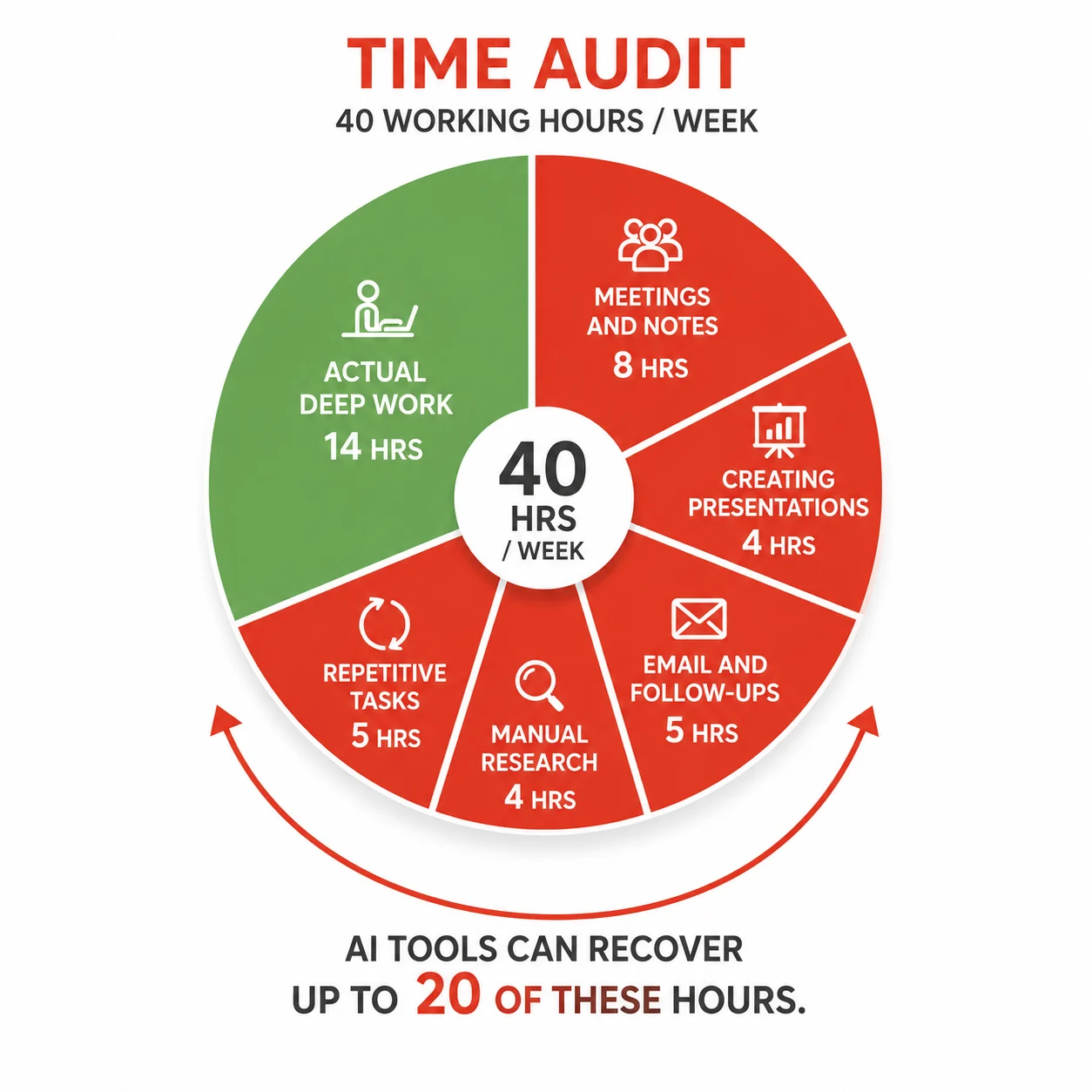
For most of last year, I worked 10-hour days and still felt behind. My calendar was full, my inbox was full, and my to-do list never got shorter. I was not lazy. I was using my time on the wrong tasks: writing meeting notes by hand, formatting slides for 90 minutes, searching for information I would forget by Friday, and re-explaining the same context to the same AI chatbot every single session.
When I finally mapped out where those hours were going, the pattern was obvious. I was spending 5 to 7 hours a week in meetings I could have summarised in 5 minutes. I was spending 3 hours building presentations that an AI could draft in 90 seconds. I was manually doing tasks that software could automate with a one-time setup.
The AI tools that save time in 2026 are not the famous ones. Most people using AI are still using it the slow way: typing one prompt, reading one answer, typing the next prompt. The tools in this guide work differently. They sit in the background, handle entire workflows autonomously, and give you finished outputs instead of raw text you still have to process.
Below are 10 tools most professionals have not tried yet, what each one does, what it costs, its real pros and cons, and exactly how to start using it today.
How each tool is reviewed in this guide
Every tool review in this article covers six things: what the tool actually does, the official website, current 2026 pricing tiers, honest pros, honest cons, and who it is best for. At the end of the article, a full comparison table puts all 10 tools side by side so you can find your best match in under 60 seconds.
None of these links is an affiliate link. Every site link goes directly to the tool’s official domain.
Tool 1: Fathom AI (free AI meeting notetaker)
What Fathom does
Fathom joins your Zoom, Google Meet, or Microsoft Teams calls as a silent recorder. While you are in the meeting, it transcribes every word in real time. The moment the call ends, usually within 30 seconds, Fathom delivers a structured AI summary broken into sections: key points, decisions made, and action items with the name of the person responsible for each one.
You stop taking notes entirely. You pay full attention to the conversation. You leave every meeting already knowing what you need to do next.
Official site: fathom.video
2026 pricing
- Free (individuals): Unlimited recording, unlimited transcription, unlimited AI summaries, no time limit. This is a permanent free tier, not a trial.
- Premium: Approximately $15 per user per month (annual billing) or $19 per user per month (monthly). Adds unlimited AI summaries with custom formats and keyword alerts.
- Team Edition: Approximately $19 per user per month (annual) or $29 per user per month (monthly). Adds CRM sync with Salesforce and HubSpot.
- Team Edition Pro: Approximately $29 per user per month (annual) or $39 per user per month (monthly). Full CRM automation and team analytics.
Pros
- The free individual tier is the most generous in the entire meeting AI category. Unlimited recording with no credit cap is genuinely rare.
- Post-call processing finishes in approximately 30 seconds. The summary is ready before you close your laptop.
- Transcription accuracy is among the highest in the category at approximately 95% in clear audio conditions.
- G2 rating of 5.0 from over 6,000 reviews as of early 2026, the highest in the meeting notetaker category.
- Summaries are concise and structured. Action items are extracted automatically with clear owner attribution.
Cons
- CRM sync (Salesforce, HubSpot) requires the paid Team Edition. The free tier has no CRM integration.
- Team collaboration features are more limited than Otter.ai at scale for larger organizations.
- The visible “Fathom Notetaker” bot joining calls can be noticeable to some meeting participants.
- The free tier is designed for personal use. Team features require a paid plan even for small groups.
Best for
Individual contributors, executives, consultants, and freelancers who want unlimited meeting transcription and AI summaries at zero cost. Sales teams needing CRM sync should evaluate the Team Edition or consider Fireflies.ai instead.
Time saved per week: 4 to 6 hours (eliminates manual note-taking across all recorded calls).
Tool 2: Gamma (AI presentation builder)
What Gamma does
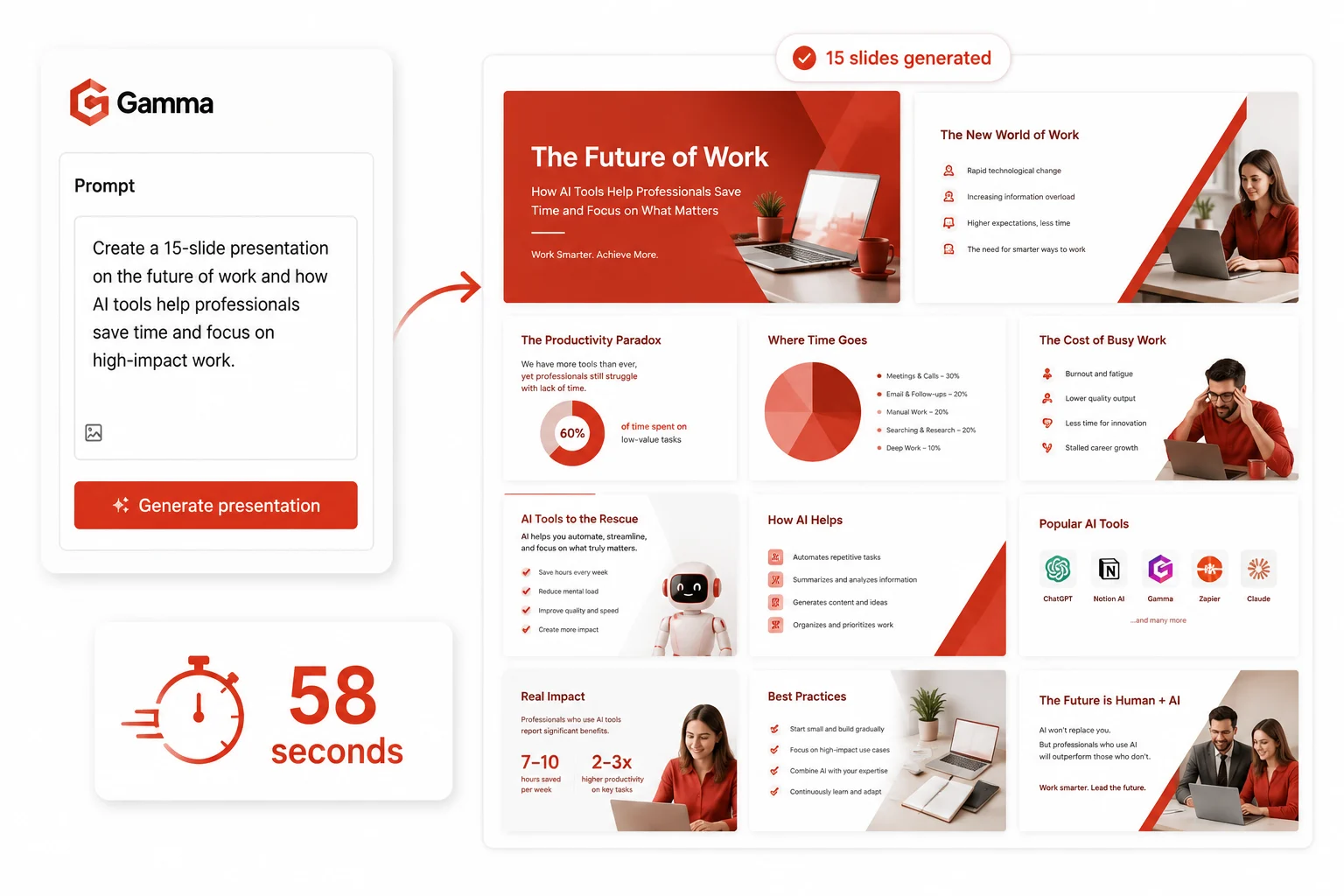
Gamma takes a text prompt and generates a complete, visually designed presentation in under 60 seconds. You type your topic, choose a style and tone, and Gamma produces a multi-slide deck with structured content, relevant visuals, and a coherent narrative. It also builds web-shareable documents and one-page websites using the same prompt-to-output workflow.
Gamma launched in 2020 and added AI generation in 2023. By 2026, it will have over 70 million users, $100M in annual revenue, and a $2.1 billion valuation, making it one of the most widely adopted AI productivity tools outside of the major AI assistants.
Official site: gamma.app
2026 pricing
- Free: 400 one-time AI generation credits (not monthly, a lifetime allocation). Exports have a Gamma watermark. No PowerPoint export on the free tier.
- Plus: $12 per month. Monthly credit refresh, watermark removal, PowerPoint export, and custom branding per presentation.
- Pro: $25 per month. Unlimited AI generation, team workspace, advanced analytics, priority support.
- Ultra: $100 per month. Maximum generation limits, dedicated support, and all Pro features.
- Team plans: Starting at $20 per seat per month.
Pros
- Fastest prompt-to-presentation pipeline in the category. A usable 15-slide deck appears in under 90 seconds.
- Content quality is significantly better than basic AI generation. Gamma structures arguments, adds relevant data points, and creates logical flow, not just filled slide templates.
- Gamma Imagine (launched March 2026) adds AI image generation for marketing assets inside the same tool.
- Web-first presentations are shareable via link without requiring the recipient to have PowerPoint installed.
- SOC 2 Type II certified as of October 2025. Content is not used for AI training on Team and Business plans.
Cons
- The free tier’s 400 credits are one-time, not monthly. Heavy testers exhaust them quickly before deciding whether to pay.
- The card-based web format does not map cleanly to fixed 16:9 PowerPoint slide dimensions. Exports to .pptx sometimes require manual formatting adjustments.
- No workspace-level brand enforcement. Individual users must manually select themes per presentation, which creates inconsistency in team outputs.
- Not ideal for data-heavy presentations that require complex embedded charts or real-time data connections.
Best for
Solo founders, consultants, educators, and marketers who create presentations regularly. Teams needing strict brand consistency across dozens of creators should evaluate purpose-built tools alongside Gamma.
Time saved per week: 2 to 4 hours (replaces manual slide building and formatting for first drafts).
Tool 3: Perplexity AI (AI research engine)
What Perplexity does
Perplexity is an AI-powered search engine that answers questions with cited, sourced responses rather than a list of links to click through. Instead of searching Google, opening five tabs, reading five articles, and synthesizing the information yourself, Perplexity does the synthesis and shows you the sources inline. Every claim is footnoted. You can verify anything instantly.
In 2026, Perplexity added a free AI browser called Comet with built-in deep research, voice mode, and shopping assistance. Deep Research runs multi-step research tasks autonomously and returns a fully sourced report, replacing what would take 2 to 3 hours of manual research.
Official site: perplexity.ai
2026 pricing
- Free: Unlimited standard searches. 5 Pro searches per day using advanced AI models (GPT-4o, Claude, Gemini). Access to the Comet browser at no cost.
- Pro: $20 per month (or $200 per year, approximately $16.67 per month). Unlimited Pro searches with advanced models, 20 Deep Research queries per day, file analysis, and image generation.
- Max: $200 per month. Unlimited Labs, full model suite including Claude Opus and GPT-4o at maximum throughput, and Perplexity Computer (10,000 monthly credits for autonomous agent tasks).
- Enterprise Pro: $40 per seat per month. Team collaboration, shared workspaces, and secure data handling.
- Education Pro: $10 per month for verified students and educators.
Pros
- Every answer cites its sources with inline footnotes. Verification takes one click, not a new search.
- Deep Research runs multi-step research workflows autonomously and delivers a structured report with sources in minutes.
- The free tier is genuinely useful for everyday research with unlimited standard searches.
- Comet browser is free and includes agentic search and page summarisation natively.
- Supports 30+ languages and handles technical, scientific, legal, and business research topics with comparable depth.
Cons
- Narrowly focused on search and research. Not a general-purpose writing or coding assistant.
- Heavy research threads exhaust the free Pro search cap (5 per day) quickly. Power researchers need the $20 Pro plan.
- Data on the free and Pro tiers may be used for model training. Users handling sensitive research should read the privacy policy carefully.
- The Max plan at $200 per month is significantly priced for individuals, though competitive for enterprise research teams.
Best for
Researchers, analysts, journalists, consultants, and knowledge workers who spend significant time gathering and synthesizing information. The free tier handles casual research; Pro handles daily intensive research workflows.
Time saved per week: 3 to 5 hours (eliminates multi-tab research sessions and manual source synthesis).
Tool 4: Make.com (visual AI workflow automation)
What Make does
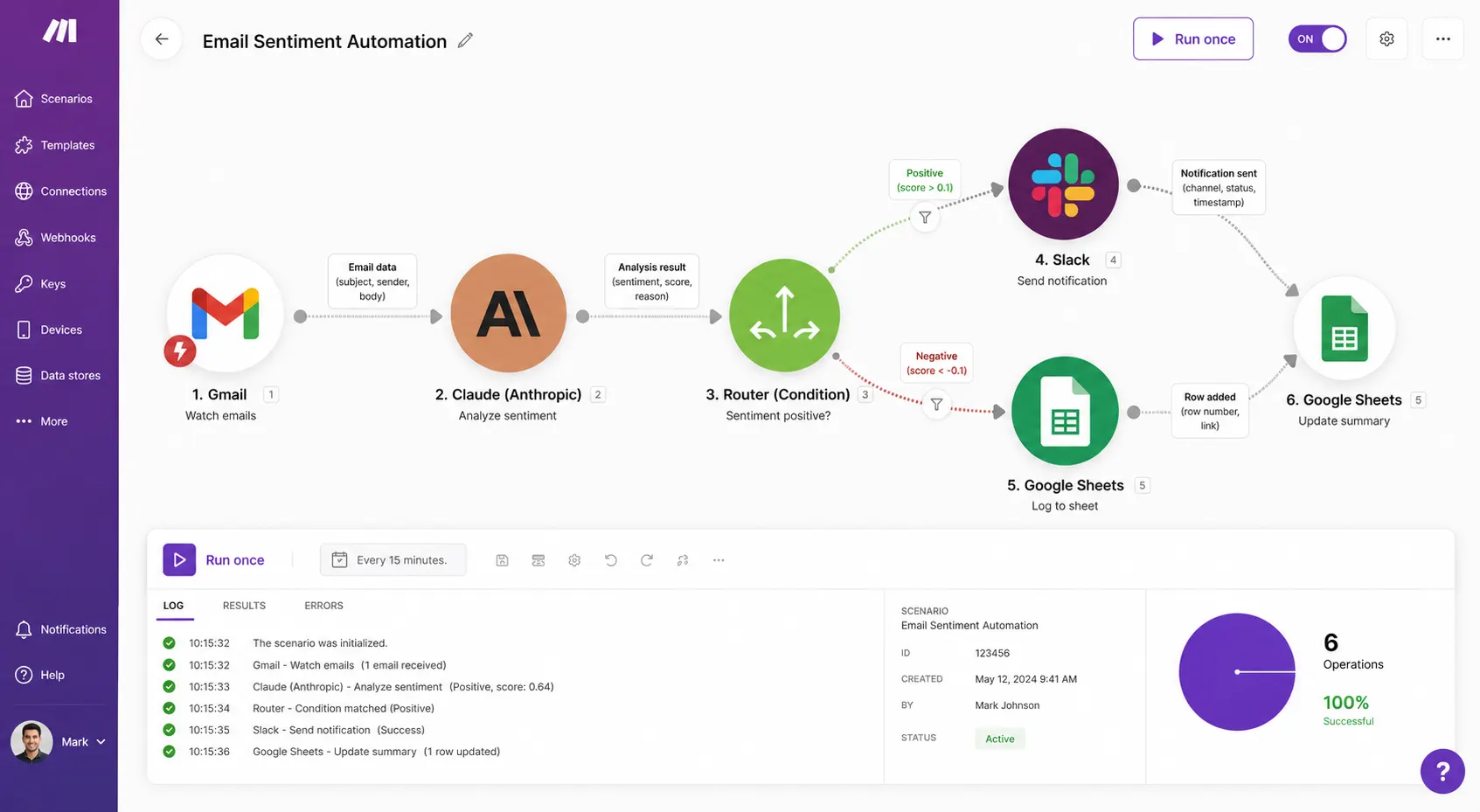
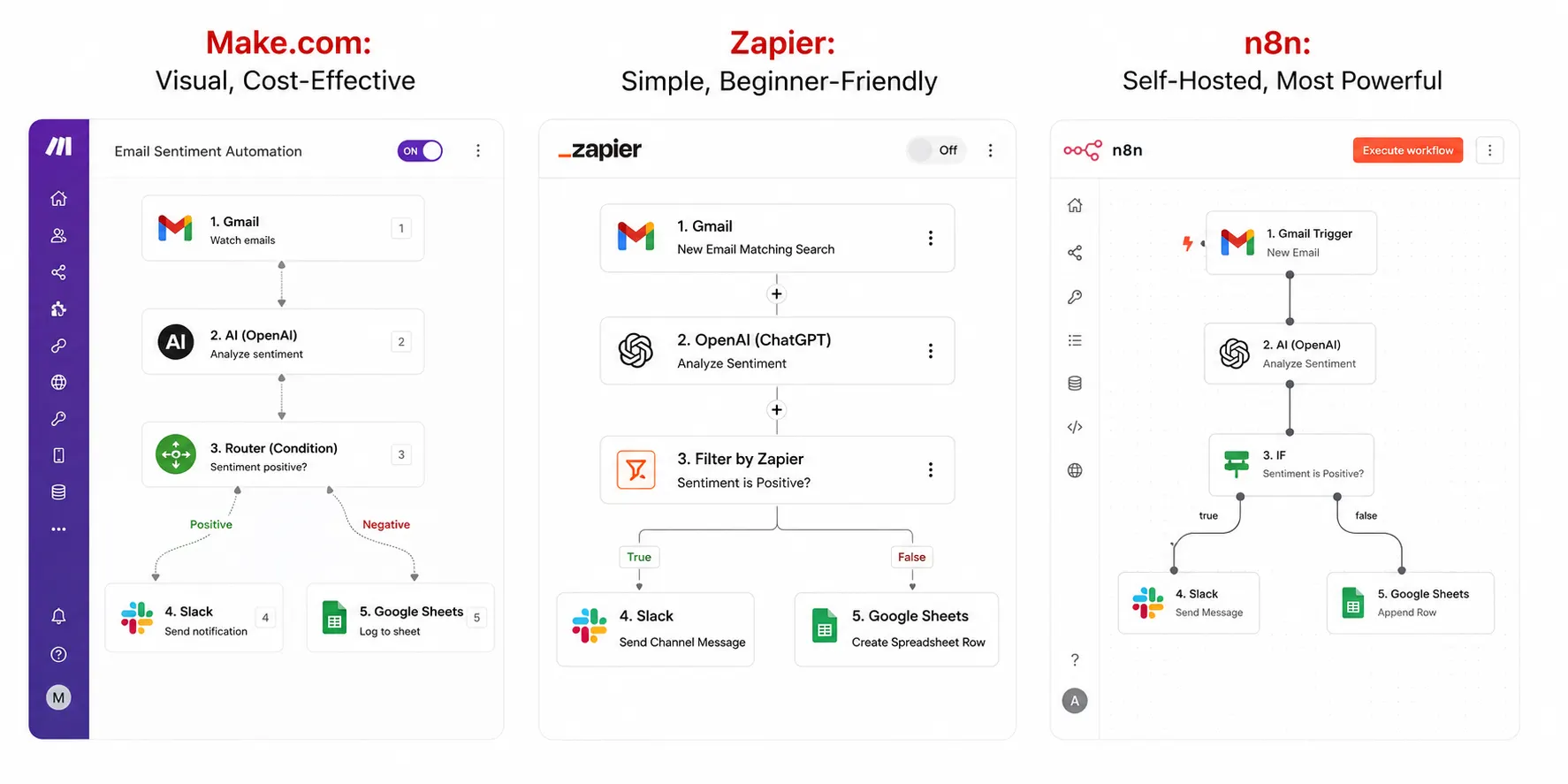
Make (formerly Integromat) is a visual workflow automation platform that connects apps and automates multi-step processes without writing code. You build automation visually on a canvas by connecting app modules with lines and logic branches. When a trigger fires (a form submission, an email, a new row in a spreadsheet), the workflow runs automatically.
In 2026, Make includes native AI nodes that connect directly to GPT, Claude, and Gemini. You can build workflows that receive an email, pass its content through an AI model for classification or summarisation, and route the result to the right destination, entirely without writing a single line of code.
Official site: make.com
2026 pricing
- Free: 1,000 operations per month, 2 active scenarios, unlimited apps.
- Core: $9 per month. 10,000 operations, unlimited active scenarios, all app integrations.
- Pro: $16 per month. 10,000 operations with higher execution priority, full-text execution log, and custom variables.
- Teams: $29 per month. Multiple users, team management, and 10,000 shared operations.
- Enterprise: Custom pricing. Dedicated support, SLAs, and custom operation volume.
Pros
- Make handles complex multi-step workflows with branching logic, loops, and error handling that Zapier cannot match at the same price point.
- Charges per operation (per scenario run), not per task (per action step). A 5-step workflow running 500 times per month costs 2,500 operations on Make versus 2,500 tasks on Zapier’s much more expensive starter plan.
- Native AI integration nodes connect directly to OpenAI, Anthropic, and other LLM providers without third-party plugins.
- Visual canvas makes complex workflows easier to understand and debug than text-based builders.
- Connects to approximately 2,400 apps, including all major business tools.
Cons
- Steeper learning curve than Zapier. First-time automation builders typically need 30 to 60 minutes of tutorials before building confidently.
- Fewer app integrations than Zapier’s 7,000 to 8,000 connections. Niche or enterprise apps may not have a Make integration.
- Debugging complex scenarios requires reading execution logs carefully. Error messages can be cryptic for beginners.
- The free tier’s 1,000 operations per month are limited for teams. Meaningful automation usually requires the Core plan at $9 per month.
Best for
Marketers, operations managers, developers, and small business owners who want to automate repetitive multi-step workflows between apps. Teams with complex automation needs and moderate technical ability will get significantly more value per dollar from Make than from Zapier.
Time saved per week: 3 to 8 hours (eliminates manual data transfer and repetitive task chains across apps).
Tool 5: ElevenLabs (AI voice cloning and text-to-speech)
What ElevenLabs does
ElevenLabs converts text to natural-sounding speech in over 70 languages. It also clones your voice from a short audio sample so that any text you type sounds like you speaking it. The voice quality is significantly more natural than older text-to-speech tools: no robotic cadence, no unnatural pauses, no mispronounced names.
Content creators use it to add voiceover to videos without recording. Developers use its API to add speech to applications. Podcasters use voice cloning to maintain their presence on episodes without recording every segment live.
Official site: elevenlabs.io
2026 pricing
- Free: 10,000 credits per month (approximately 10 minutes of audio). Non-commercial use only. No attribution to ElevenLabs required for personal projects.
- Starter: $5 to $6 per month. 30,000 credits (approximately 30 minutes), commercial license, instant voice cloning from short audio clips.
- Creator: $22 per month. 100,000 credits (approximately 100 minutes), professional voice cloning from longer training samples, 192kbps audio quality.
- Pro: $99 per month. 500,000 credits (approximately 500 minutes), best value per minute for production workflows.
- Scale: $330 per month. 2 million credits, organization features, team seats.
- Business: $1,320 per month. 11 million credits, priority support, SLA.
Pros
- Widely regarded as the best AI voice quality available in 2026. Side-by-side comparisons consistently show ElevenLabs as the most natural-sounding option.
- Instant voice cloning from 1 to 5 minutes of audio creates a usable voice clone in seconds.
- Supports 70+ languages with accent and dialect options for multilingual content.
- The Starter plan at $5 to $6 per month is among the lowest entry costs for commercial-grade AI voice in the market.
- Full REST API access is included on all paid plans, making it practical for developer integrations.
Cons
- The free tier limits use to non-commercial projects. Any monetized content requires at a minimum the Starter plan.
- Professional Voice Cloning (higher accuracy, more realistic) requires the Creator plan at $22 per month or above.
- Pricing is measured in characters rather than minutes, which makes it harder to estimate costs upfront without calculating average words per minute first.
- The Creator plan’s 100,000-character limit equates to roughly one 10-minute YouTube video script per month. Heavy video creators will need the Pro plan.
- Voice cloning raises ethical questions around consent and misuse. ElevenLabs requires that cloned voices be of the user’s own voice or voices used with explicit permission.
Best for
Content creators, video producers, podcasters, developers, and e-learning builders. The Starter plan covers most individual creator needs. Teams producing high-volume audio content should evaluate the Creator or Pro tier based on their monthly minute requirements.
Time saved per week: 2 to 4 hours (eliminates recording sessions, re-recording for mistakes, and audio editing for voiceover-heavy workflows).
Tool 6: Mem AI (AI-powered second brain)
What Mem does
Mem is an AI-first note-taking app built around one premise: you should never have to organize your notes manually. Every note you create goes into a single stream. Mem’s AI reads your content, builds semantic connections between notes automatically, and surfaces relevant notes at the right moment without you ever creating a folder or tag.
When you write “need to follow up on the Q3 proposal,” Mem links that note to every other note you have written about that proposal, the client, and related meetings, without any manual tagging. When you need to find something, you ask Mem in plain English, and it retrieves across your entire knowledge base.
Official site: mem.ai
2026 pricing
- Free tier: Available with limited features and storage. Adequate for evaluating the tool.
- Mem Plus: $14.99 per month (or $12 per month billed annually). Full AI organization, unlimited notes, semantic search, and chat-with-your-notes features.
- Mem was funded by the OpenAI Startup Fund at $23.5 million. The Mem 2.0 update in early 2025 addressed significant performance and stability issues from earlier versions.
Pros
- Zero manual organization required. The AI handles tagging, linking, and categorization entirely in the background.
- Semantic search understands meaning, not just keywords. Searching “follow-up with the agency” finds notes about the relevant client even if you never used those exact words.
- Chat interface lets you ask questions across your entire note history: “What did I decide about the marketing budget?” returns the relevant note instantly.
- Works well for quick capture: ideas, meeting notes, article snippets, and fleeting thoughts all go into the same inbox without friction.
Cons
- Cloud-first architecture. All notes and AI processing happen in Mem’s cloud. Not suitable for users with strict data privacy requirements or offline needs.
- The automatic organization AI works best over time. New users with fewer than 50 notes see limited value from the AI connections feature.
- At $14.99 per month, it is more expensive than Obsidian (free for personal use) or Reflect ($10 per month) for users who need more control over their note structure.
- The single-stream interface feels disorienting for users who are accustomed to hierarchical folder structures in tools like Notion or Evernote.
Best for
Individual professionals, researchers, writers, and consultants who capture a high volume of notes and want AI to handle the organization entirely. Not the right tool for teams needing shared workspaces or users who prefer folder-based organization.
Time saved per week: 1 to 3 hours (eliminates manual note tagging, folder organization, and the time spent searching through disorganized notes).
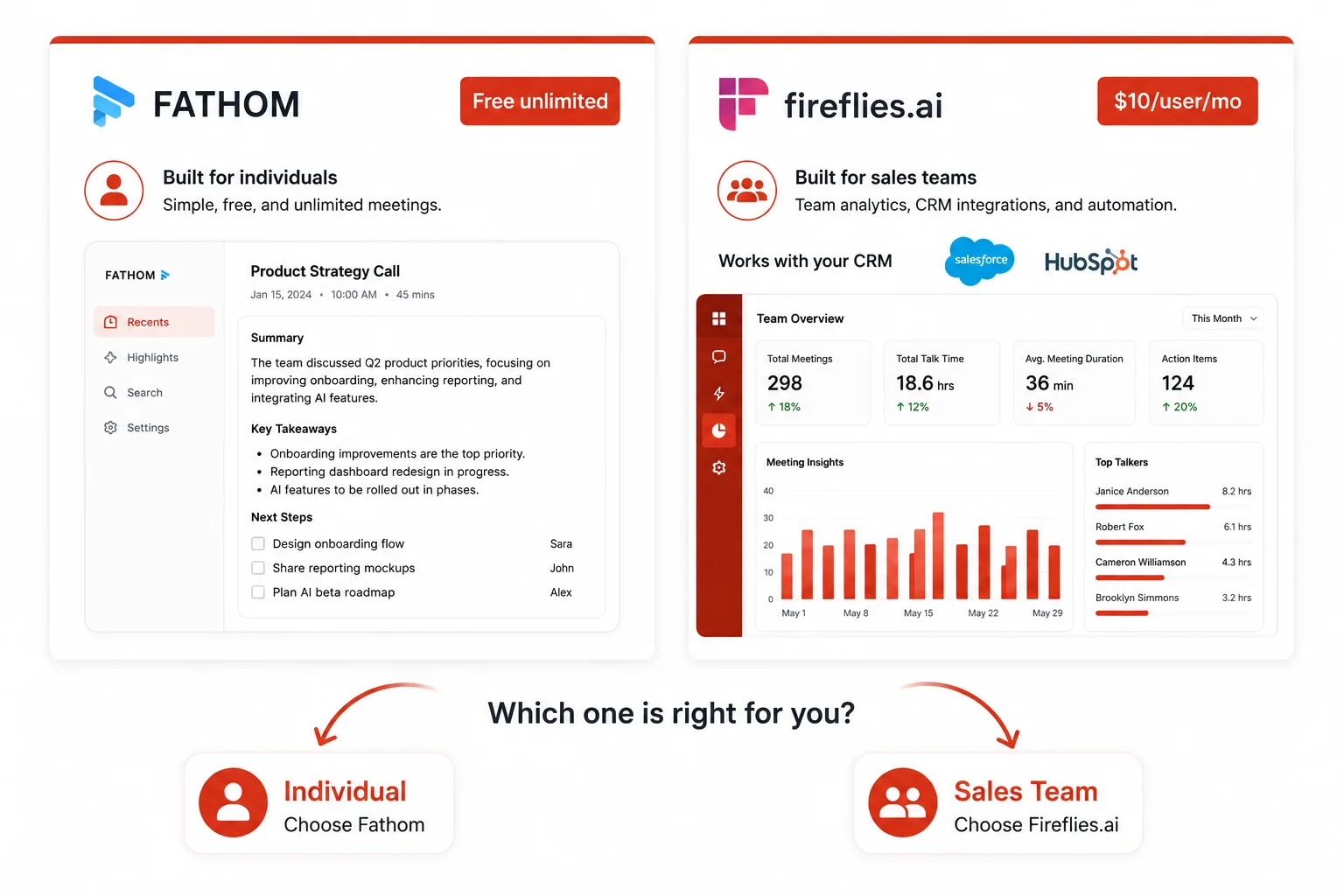
Tool 7: Fireflies.ai (AI meeting intelligence for sales teams)
What Fireflies does
Fireflies is an AI meeting notetaker that automatically joins your calls, transcribes them, and generates summaries. Its differentiating feature over Fathom is depth of integration: Fireflies connects to over 6,000 apps and pushes meeting summaries, action items, and transcripts directly to Salesforce, HubSpot, Pipedrive, and other CRMs without any manual copy-paste.
For sales teams, this means every discovery call, demo, and follow-up is automatically logged to the right contact or deal record. In early 2026, Fireflies added a “Talk to Fireflies” feature powered by Perplexity AI, which lets users ask questions and search the web from inside a meeting window.
Official site: fireflies.ai
2026 pricing
- Free: 800 minutes per month of transcription, 3-month storage for transcripts, and basic meeting summaries.
- Pro: $10 per user per month. Unlimited transcription, unlimited storage, AI summaries, conversation intelligence, and CRM integrations.
- Business: $19 per user per month. Video recording of calls, team analytics, custom vocabulary for industry terminology, and API access.
- Enterprise: Custom pricing. Dedicated support, SSO, and custom data retention policies.
Pros
- The broadest CRM and app integration coverage in the meeting AI category. Automatic CRM logging eliminates post-call data entry for sales teams.
- Cross-meeting search lets you ask questions across your entire meeting history: “What objections did enterprise prospects raise in Q1?” returns relevant transcript excerpts.
- The Pro plan at $10 per user per month is one of the best price-to-feature ratios for teams in the category.
- Conversation intelligence features track talk time ratios, sentiment, and topic frequency across meetings over time.
- The free tier at 800 minutes per month is the second most generous free tier in the category, after Fathom.
Cons
- The “Fireflies.ai Notetaker” bot joins calls visibly. Some clients and prospects find this off-putting, particularly in early-stage relationship calls.
- Interface is significantly more complex than Fathom. The feature density can feel overwhelming for users who only need basic transcription and summaries.
- The free tier stores transcripts for only 3 months. Teams needing long-term searchable history need the paid plan.
- Summaries can be verbose. Users report that Fireflies sometimes includes more detail than is needed, adding noise to the signal.
Best for
Sales teams, account managers, and revenue operations teams who need automatic CRM logging and cross-meeting analytics. Individual users who only need a clean summary are better served by Fathom’s free tier.
Time saved per week: 3 to 6 hours for sales teams (eliminates post-call CRM data entry and manual meeting reporting).
Tool 8: Runway (AI video generation and editing)
What Runway does
Runway is an AI video platform that generates video from text prompts or images, removes backgrounds from video footage in real time, applies cinematic effects, and provides an AI-powered video editor that operates from your browser. The flagship capability is text-to-video generation: describe a scene, and Runway generates several seconds of realistic video footage from scratch.
In 2026, Runway released Gen 4.5 with native audio generation, character consistency across shots, and multi-shot long-form generation. Runway raised a $315 million Series E round at a $5.3 billion valuation and introduced third-party model access, including Veo 3.1 and Kling 3.0 Pro inside the same platform.
Official site: runwayml.com
2026 pricing
- Free: 125 one-time credits (not monthly). Access to Gen-4 Turbo for image-to-video, 3 video editor projects, and 5GB storage. This is a sample, not a usable ongoing plan.
- Standard: $12 per month. 625 credits per month. Access to Gen-4 Turbo, full video editor, 100GB storage.
- Pro: Approximately $28 to $36 per month (annual billing). Higher credit allocation, Gen-4 and Gen-4.5 access, unlimited video editor projects.
- Unlimited: Approximately $76 per month. Unlimited standard video generation, all models, priority processing.
- Enterprise: Custom pricing. Dedicated infrastructure, private model hosting, API access at volume.
Pros
- Gen 4.5 produces the most cinematic and physically accurate AI video currently available on a commercial platform, outperforming earlier competitors on several benchmarks.
- Native audio generation in Gen 4.5 eliminates the need for a separate audio tool for short-form generated content.
- Multi-model marketplace includes Veo 3.1 and Kling 3.0 Pro alongside Runway’s own models in a single platform.
- A browser-based editor requires no software installation. Works on any modern computer.
- Strong adoption in professional media, entertainment, and advertising. Used by major studios and agencies.
Cons
- The free plan’s 125 one-time credits are not sufficient for ongoing evaluation. Meaningful testing requires the Standard paid plan.
- Credit-based pricing makes costs unpredictable for heavy users. Complex generations (longer videos, higher resolutions) consume significantly more credits.
- Video generation is still limited to short clips (typically 5 to 10 seconds per generation). Long-form video creation requires stitching multiple generations together.
- Learning the prompting language for consistent, high-quality output requires practice. Generic prompts produce generic results.
Best for
Content creators, marketing teams, ad agencies, filmmakers, and social media professionals who need AI-generated video footage or AI-assisted video editing. The Standard plan is the minimum viable entry point for ongoing professional use.
Time saved per week: 2 to 6 hours, depending on video production volume (reduces footage acquisition, background removal, and basic editing time).
Tool 9: Ideogram (AI image generation with text rendering)
What Ideogram does
Ideogram is an AI image generator that solves one of the longest-standing problems in AI image generation: accurate text rendering inside images. Every other major AI image generator (Midjourney, Stable Diffusion, DALL-E) still struggles to place readable, correctly spelled text inside generated images. Ideogram was built specifically to handle this, making it the go-to tool for generating thumbnails, marketing graphics, social media posts, logos, and any image where text is part of the design.
Official site: ideogram.ai
2026 pricing
- Free: Limited monthly generation credits. Adequate for evaluating the tool and low-frequency personal use.
- Plus: $20 per month. 1,000 priority credits per month, commercial license, faster generation queue.
- Pro: $60 per month. 3,500 priority credits per month, batch generation, API access, and commercial rights.
- Teams: $30 per user per month. 1,500 priority credits per user, shared workspace, and brand management features.
- Enterprise: Custom pricing. Volume credits, dedicated support, and custom API integrations.
Pros
- Text-in-image accuracy is the best in the category by a significant margin. Readable, correctly spelled text inside generated images is a solved problem for Ideogram in 2026.
- Character consistency maintains the appearance of a specific character or person across multiple generated images in a session, useful for brand mascots or consistent illustration styles.
- Covers the gap that other image generators cannot: marketing graphics, YouTube thumbnails, promotional banners, and book covers, where text and design integrate.
- The free tier is genuinely usable for occasional personal projects without a paid plan.
- Commercial license is included on all paid tiers, making it safe for client work and monetized content.
Cons
- Not the strongest choice for photorealistic image generation. Midjourney produces more cinematically detailed images for photography-style prompts.
- The $60 per month Pro plan is on the expensive side for individual creators who do not need batch generation or API access.
- Batch generation is gated to the Pro plan. High-volume graphic production requires the more expensive tier.
- The Teams plan’s credit allocation (1,500 per user) may feel limited for design-heavy teams working at high output.
Best for
Social media managers, content marketers, YouTube creators, graphic designers, and anyone who regularly needs images with text as a design element. If your use case involves photorealistic images without text, evaluate Midjourney or Flux instead.
Time saved per week: 1 to 3 hours (eliminates manual graphic creation in Canva or Photoshop for templated visual content with text).
Tool 10: n8n (self-hosted AI workflow automation)
What n8n does
n8n (pronounced “n-eight-n”) is an open-source workflow automation platform that you host on your own server or use via their cloud offering. Like Make and Zapier, it connects apps and automates multi-step workflows visually. The key difference: n8n’s AI Agent nodes let you build fully autonomous AI agents that reason, decide, and take multi-step actions across dozens of connected apps, all within a single workflow.
Because it is open-source and self-hostable, n8n has zero data sovereignty concerns. Your workflow logic and the data passing through it never leave your own infrastructure. This makes it the preferred choice for regulated industries (legal, finance, healthcare) and teams with strict data handling requirements.
Official site: n8n.io
2026 pricing
- Self-hosted (free): Fully free. Download and run on your own server or VPS. No execution limits. All features included. Requires server setup and maintenance.
- Cloud Starter: $20 per month. 2,500 workflow executions, 5 active workflows, n8n-managed hosting (no server setup needed).
- Cloud Pro: $50 per month. 10,000 executions, unlimited active workflows, priority support.
- Cloud Enterprise: Custom pricing. Unlimited executions, dedicated infrastructure, SSO, SLAs, and dedicated support.
Pros
- The self-hosted option is completely free with no execution limits. Teams with a developer on staff can run unlimited automation at the cost of server hosting alone (typically $5 to $20 per month on a VPS).
- AI Agent nodes enable autonomous multi-step reasoning within a workflow: the AI can evaluate inputs, decide between paths, and take different actions based on context without predefined rules for every scenario.
- Full data sovereignty. No workflow data or API credentials leave your own infrastructure on the self-hosted version.
- Over 400 native app integrations with active community development. Custom nodes are buildable in JavaScript for integrations that do not exist yet.
- Execution-based pricing on the cloud version charges per workflow run, not per step. A complex 20-step workflow costs one execution regardless of how many steps it contains.
Cons
- The self-hosted setup requires Docker or Node.js knowledge. Non-technical users cannot self-host without assistance from a developer.
- The interface is significantly more complex than Make or Zapier. The learning curve for non-developers is steep.
- The cloud starter plan’s 2,500 executions per month are limited for high-frequency automation. Make’s Core plan at $9 per month offers 10,000 operations for less money if self-hosting is not an option.
- Community support quality varies. Enterprise users benefit from formal support contracts; individual users rely on the n8n community forum.
Best for
Developers, DevOps teams, technical founders, and organizations with data sovereignty requirements. Teams without technical resources should start with Make.com instead and graduate to n8n if they hit Make’s limitations or need self-hosted infrastructure.
Time saved per week: 4 to 10 hours for technical teams (enables automation of complex, multi-step processes that no-code tools cannot handle).
Full comparison table: all 10 tools at a glance
| Tool | Category | Free tier | Paid from | Best for | Weekly hours saved | Key limitation |
|---|---|---|---|---|---|---|
| Fathom | Meeting AI | Unlimited (individuals) | $15/user/mo | Individuals, consultants | 4 to 6 hrs | No CRM sync on the free tier |
| Gamma | Presentations | 400 one-time credits | $12/mo | Solo creators, educators | 2 to 4 hrs | Free credits are not monthly |
| Perplexity AI | AI research | Unlimited standard search | $20/mo | Researchers, analysts | 3 to 5 hrs | 5 Pro searches/day on free tier |
| Make.com | Automation | 1,000 ops/month | $9/mo | Ops teams, marketers | 3 to 8 hrs | Steeper learning curve than Zapier |
| ElevenLabs | AI voice | 10 min/month (personal) | $5/mo | Creators, podcasters | 2 to 4 hrs | Commercial use requires a paid plan |
| Mem AI | AI notes | Limited features | $14.99/mo | Individuals, researchers | 1 to 3 hrs | Cloud-only, no offline mode |
| Fireflies.ai | Meeting AI (sales) | 800 min/month | $10/user/mo | Sales teams | 3 to 6 hrs | Visible bot joins all calls |
| Runway | AI video | 125 one-time credits | $12/mo | Video creators, agencies | 2 to 6 hrs | Short clip length per generation |
| Ideogram | AI images (text) | Limited monthly credits | $20/mo | Marketers, designers | 1 to 3 hrs | Weaker for photorealistic images |
| n8n | Automation (dev) | Fully free (self-host) | $20/mo (cloud) | Developers, technical teams | 4 to 10 hrs | Requires technical setup to self-host |
How to decide which tool to try first
The fastest way to recover lost hours is to start with the tool that targets your biggest single time-drain. Run through these four questions:
- Do you attend 5 or more meetings a week? Start with Fathom. The free tier is unlimited, and the setup takes 10 minutes. You will see value on the very first call you record.
- Do you build presentations more than once a month? Start with Gamma. Open gamma.app, type your topic, and have a draft deck in 60 seconds. You will never start from a blank slide again.
- Do you spend more than 2 hours a week searching for information? Start with Perplexity AI. Switch your default research habit from Google to Perplexity for one week and measure the difference in how quickly you get to a finished, cited answer.
- Do you repeatedly do the same multi-step tasks across apps? Start with Make.com. Build one automation this weekend. The 30 to 60 minutes of setup will save that time every week indefinitely.
The compounding effect of stacking multiple tools
Each tool in this list saves time independently. The real leverage comes from stacking them. A meeting AI tool plus an automation tool means: Fathom transcribes your sales call, a Make scenario extracts the action items from the Fathom summary, and pushes each action item automatically to your project management tool with the right assignee and due date.
That full workflow, from call to organized action items in your task manager, happens automatically. You do nothing after hanging up the phone.
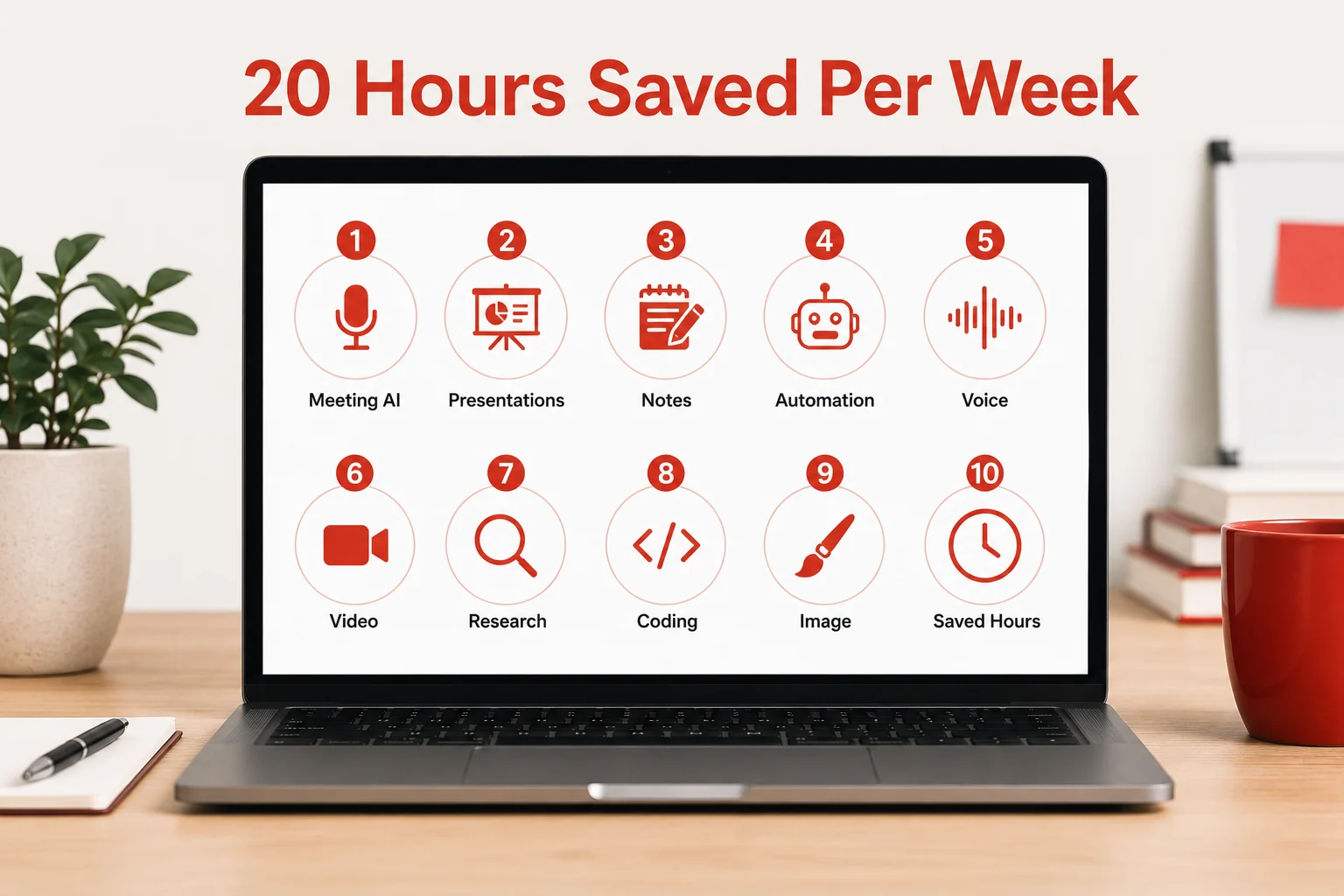
The 20 hours per week figure in the title of this article is not hyperbole. It is what happens when you systematically replace your 5 biggest manual time-drains with tools that automate them. The first tool saves 3 to 6 hours. The second saves another 2 to 4. Stack four tools correctly, and the savings compound.
You are not too late for this
The AI tool space in 2026 is still early enough that the majority of professionals are not using these tools in any meaningful, workflow-integrated way. The people who start now, this week, with even one tool from this list, will be operating at a fundamentally different speed from their peers by the end of the quarter.
Pick the one tool from the comparison table that targets your biggest time problem. Spend 30 minutes setting it up today. The compounding value starts on day one.
You may also like 7 New Free AI Tools in 2026 Doing the Work of a 3-Person Team (Updated May 2026)
Official tool links: