
If you open Conductor every morning to spin up three or four coding agents at once, this week probably ruined your coffee. Meta has bought the company, new sign-ups are closed, and Conductor Cloud goes dark on November 20. So the real question now is simple: which Conductor alternatives are actually worth moving to?
I’ve gone through the options that people are switching to right now, and I’ll keep this practical. You’ll get the dates that matter, a checklist to protect your work before the cloud shuts down, and seven Conductor alternatives sorted by the way you like to work. One of them doesn’t need any new tool at all.
Quick answer: If you want a desktop app that feels like Conductor, look at Orca or Emdash. If you live in the terminal, Claude Squad is the easiest open-source swap. If you’d rather not install anything, plain git worktrees plus your favourite agent CLI gets you 80% of the way there.
What happened to Conductor (and why the dates matter)
Conductor was a Mac app that let you run parallel coding agents side by side, each in its own isolated copy of your repo. Its homepage still describes it as a way to “create parallel Claude Code, Codex, and Cursor agents in isolated workspaces,” then review and merge what they produce. Simple idea, and a lot of developers built their whole day around it.
On November 4, 2026, Axios reported that Meta was acquiring the company. CEO Charlie Holtz confirmed it, and the team is joining Meta Superintelligence Labs. The Next Web’s report lists the timeline that matters for users:
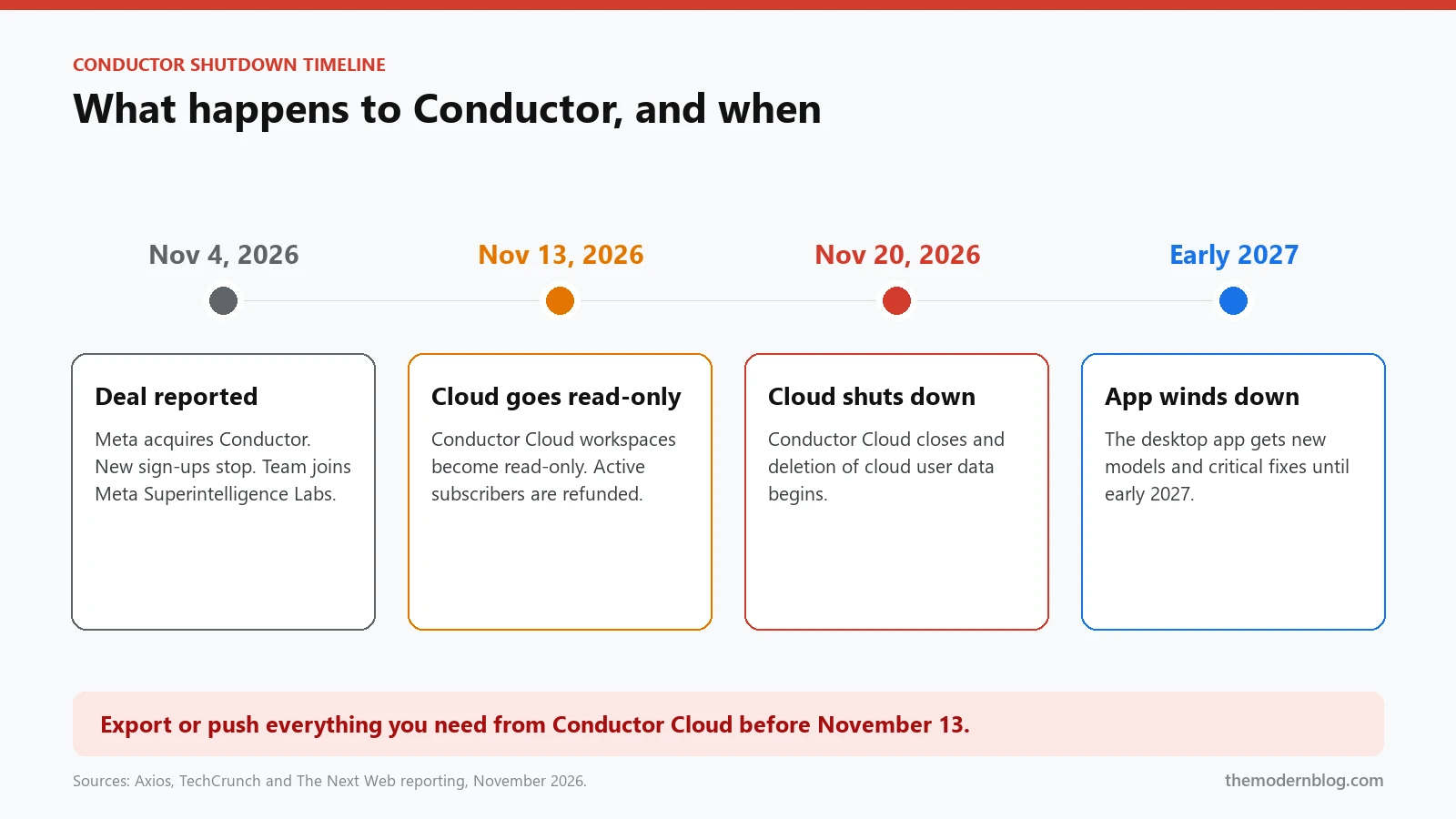
- November 4: new sign-ups stopped. Existing paying users can keep pro features for free.
- November 13: Conductor Cloud workspaces become read-only, and active subscribers get a refund.
- November 20: Conductor Cloud shuts down and deletion of cloud user data begins.
- Early 2027: the desktop app keeps getting new models and critical bug fixes until then, and then it winds down.
Holtz has hinted that the team is building “something new” at Meta. Maybe that will be great. But nobody has said it will support the same third-party agents, and nobody has promised a migration path. Meta already has its own coding agent, Muse Code, which it launched in August. Planning your workflow around an unannounced product is a gamble. That’s why it makes sense to look at Conductor alternatives now, while the desktop app still works and you’re not under pressure.
Before you switch: save your work from Conductor Cloud
If you only used the local Mac app, the Conductor shutdown hits you more slowly. Your code lives in normal git repositories on your own disk, and the app keeps working into early 2027.
If you used Conductor Cloud, treat November 13 as your real deadline, not November 20. After the 13th, workspaces are read-only, which means you can look but you can’t keep working. Here’s the short checklist I’d run today:
- Push every branch. Go through each cloud workspace and push its branch to GitHub or your own remote, even the half-finished ones. An unpushed branch is the one thing you can’t get back.
- Open draft pull requests for anything in progress. A draft PR keeps the diff, the description and the review comments in one place you control.
- Copy your setup scripts. If you relied on a
conductor.jsonor other setup and run scripts, save them in the repo. Most of the Conductor alternatives below can run the same commands. - Save your prompts and notes. Long-running agent tasks often carry context you typed once and forgot. Paste anything useful into the repo’s agent memory file. Our guide to AI agent .md files shows how to structure it.
- Check your refund. Active subscribers are supposed to be refunded automatically. If you don’t see it, ask support before the cloud goes away.
Ten minutes now saves you a very bad Friday later.
What makes good Conductor alternatives
Almost every tool in this space is built on the same trick: git worktrees. A worktree is a second working folder attached to the same repository, checked out on its own branch. Because each agent gets its own folder and branch, two agents can’t overwrite each other’s files, and your main checkout stays clean.
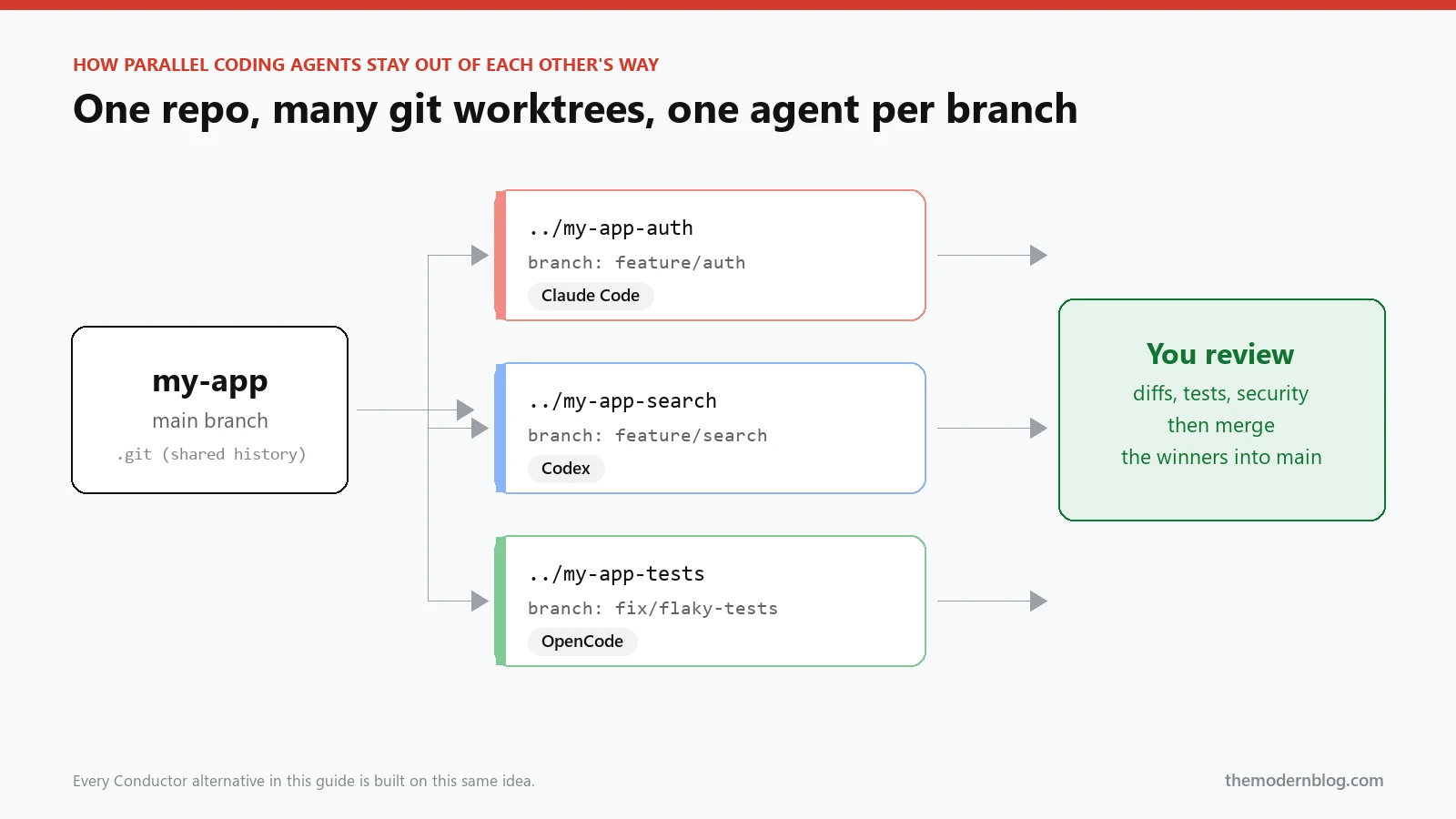
So when you compare Conductor alternatives, don’t get distracted by the UI first. Ask these questions instead:
- Isolation: does every agent get its own git worktree and branch, or are they sharing one folder?
- Agent support: can it run the agents you actually pay for, such as Claude Code, Codex, OpenCode or Amp? Being locked to one vendor is the exact problem you’re trying to escape.
- Review flow: can you see a clean diff per agent, run tests, and merge or throw away the result quickly? Parallel agents are only useful if reviewing them is fast.
- Where it runs: Mac only, or Windows and Linux too? Local only, or can you steer agents from your phone?
- Who owns it: open source, source-available or closed? After this week, that question matters more than it did last month.
The 7 best Conductor alternatives right now
I’ve ordered these by how close they feel to Conductor, then by how much control they give you. Feature details change weekly in this category, so I’ve linked each project. Check the repo for current platform support and licence before you commit a team to anything.
1. Orca: the closest drop-in Conductor alternative
Orca from Stably AI describes itself as an agentic development environment for running a fleet of agents on your own subscriptions, on desktop and mobile. Several of the roundups published this week call it the nearest thing to a drop-in replacement, because it follows the same mental model: one task, one worktree, one agent, then review.
Best for: Conductor users who liked the desktop app and want the least retraining.
Watch out for: it’s moving fast. Read the changelog before you roll it out to a whole team.
2. Emdash: open-source desktop app for any provider
Emdash is an open-source desktop app that runs multiple coding agents in parallel, each in its own git worktree, and it isn’t tied to one model provider. That last part is the selling point. If you bounce between Claude Code and Codex depending on the task, Emdash lets you keep both in one window.
Best for: people who want Conductor alternatives that are open source and provider-neutral.
Watch out for: as with any young open-source project, expect rough edges and file issues when you hit them.
3. Claude Squad: the terminal-first favourite
Claude Squad is a terminal app for running parallel coding agents. Each one runs in its own tmux session with its own git worktree, so work keeps going in the background even when you close the pane. Despite the name, it isn’t only for Claude. It supports Claude Code, Codex, OpenCode and Amp.
Best for: developers who already live in tmux and want something light and scriptable.
Watch out for: it’s a TUI, so there’s no fancy diff viewer. You’ll review in your editor or on GitHub, which honestly is fine.
4. Nimbalyst: parallel agents on a kanban board
Nimbalyst pairs parallel worktree sessions with a kanban board, and each session shows up as a card. It runs Claude Code, Codex and OpenCode. If your brain works in tickets (“this agent is on the auth bug, that one is on the flaky test”), the board view makes a surprising amount of sense.
Best for: leads juggling many small tasks who want to see status at a glance.
Watch out for: a board is only as good as the task descriptions you write. Vague cards give you vague agent output.
5. Paseo: agents on your own machine, steered from anywhere
Paseo takes a different approach. It’s a self-hosted daemon that runs parallel coding agents on machines you control, and you drive it from desktop, mobile, web or the CLI. It supports Claude Code, Codex, Copilot, OpenCode and Pi, and it says it collects no telemetry.
Best for: anyone who liked Conductor Cloud’s “it keeps running while I’m away” feel but now wants the hardware to be their own.
Watch out for: self-hosting means you own uptime, updates and security. Lock it down properly.
6. OpenAI’s Codex app: if you’re all-in on Codex
If you mostly used Conductor to run Codex, the simplest move might be OpenAI’s own Codex app. It handles several Codex threads in parallel and uses worktrees for isolation. You lose the multi-vendor mix, but you gain a tool from the company that makes the model. Our full Codex review covers how the agent itself behaves.
Best for: teams standardised on OpenAI.
Watch out for: it’s a single-vendor tool. That’s the same lock-in risk that just bit Conductor users, only with a bigger company.
7. Plain git worktrees: the Conductor alternative with zero lock-in
Here’s the one people forget. Everything Conductor did started with git worktree, which ships with git. You can recreate the core workflow in about a minute:
# one folder and branch per task
git worktree add ../my-app-auth -b feature/auth
git worktree add ../my-app-search -b feature/search

# start a different agent in each folder (separate terminal tabs)
cd ../my-app-auth && claude
cd ../my-app-search && codex
When an agent finishes, review its branch and merge it like any other pull request. Then tidy up:
# see every worktree, then remove the ones you have merged
git worktree list
git worktree remove ../my-app-auth
That’s it. No app, no account, nothing to shut down. You give up the dashboard, but you keep full control, and every other tool in this list can pick up these worktrees later if you change your mind. If you use Claude Code this way, our Claude Code guide has tips for keeping long sessions on track.
Best for: solo developers, small teams and anyone burned by tools disappearing.
Watch out for: you’ll need your own habits for naming branches and cleaning up old worktrees, or your disk fills up quietly.
Conductor alternatives compared side by side
| Tool | Interface | Agents it can run | Code on GitHub | Best for |
|---|---|---|---|---|
| Orca | Desktop + mobile | Multiple, on your own subscriptions | Yes (GitHub) | Closest Conductor feel |
| Emdash | Desktop app | Any provider | Yes | Provider-neutral teams |
| Claude Squad | Terminal (tmux) | Claude Code, Codex, OpenCode, Amp | Yes | Terminal power users |
| Nimbalyst | Visual workspace + kanban | Claude Code, Codex, OpenCode | Yes (GitHub) | Ticket-style planning |
| Paseo | Self-hosted daemon; desktop, mobile, web, CLI | Claude Code, Codex, Copilot, OpenCode, Pi | Yes (GitHub) | Running agents on your own hardware |
| Codex app | Desktop app | Codex only | No | OpenAI-only teams |
| git worktrees | Your terminal | Anything with a CLI | Part of git | Zero lock-in |
How to choose the right Conductor alternative
If you’re stuck, don’t overthink it. Pick based on where you already spend your day, not on a feature list.
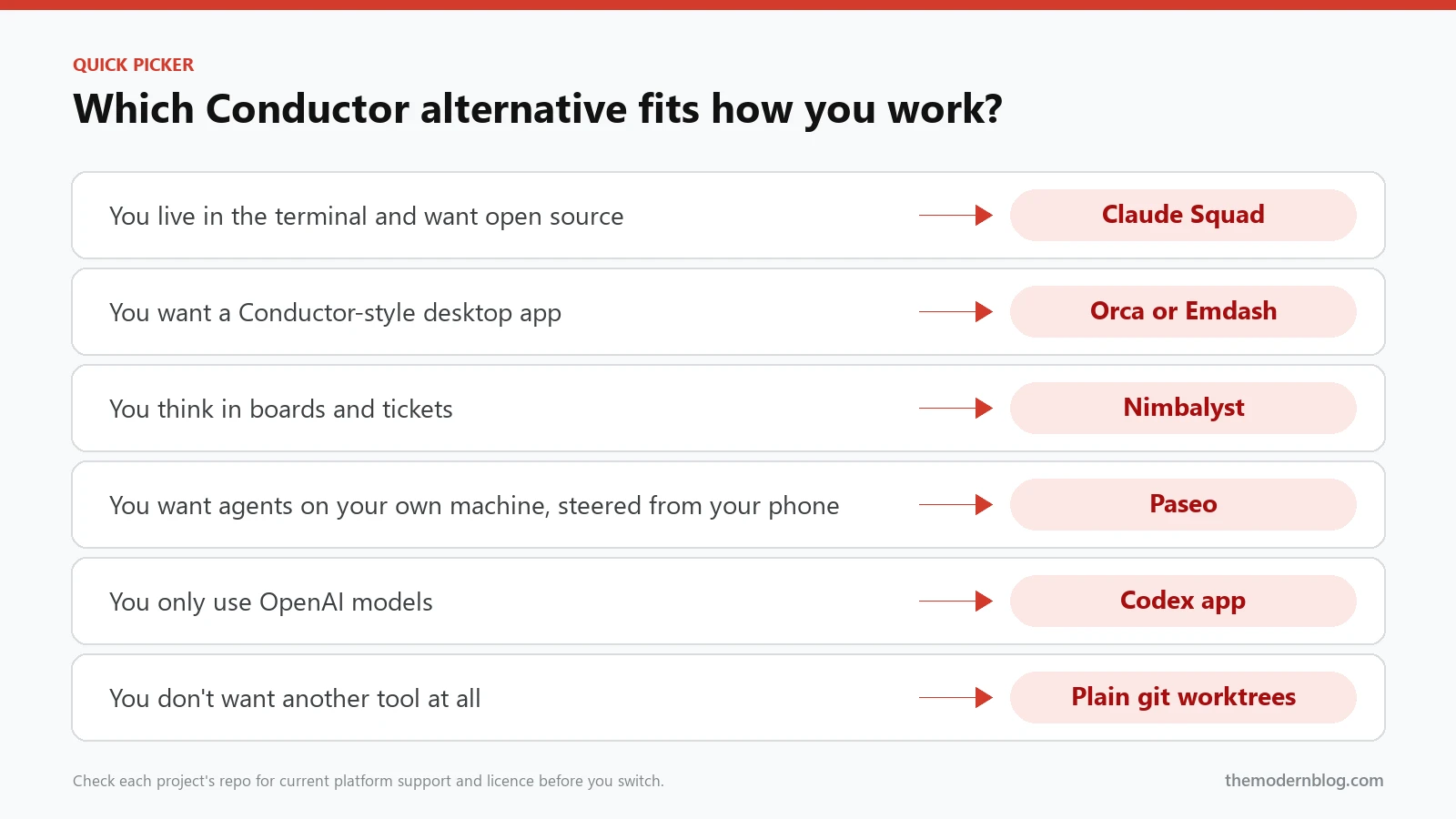
- You loved the Conductor app itself: start with Orca, and keep Emdash as your backup. Move one project first, not your whole team.
- You’re happiest in a terminal: Claude Squad, or plain worktrees if you want nothing extra installed.
- You manage a lot of small tasks: Nimbalyst’s board will probably feel natural.
- You miss “it keeps running while I’m away”: Paseo on a machine you own.
- You only use OpenAI: the Codex app is the path of least resistance.
One honest tip: whatever you pick, set up the plain git worktree workflow once as well. It takes five minutes, and it means the next acquisition can’t take your workflow away. That’s the real lesson of the Conductor shutdown.
A simple one-week plan to move your team
If several people on your team used Conductor, don’t switch everyone on the same afternoon. A calm week looks like this:
- Day 1: run the backup checklist above for every Conductor Cloud workspace, and confirm that every branch exists on your remote.
- Day 2: pick two Conductor alternatives from this list, usually one app and the plain git worktree setup, and try both on the same small task.
- Day 3: move your setup scripts (installing dependencies, seeding a database, copying
.envfiles) into the repo so any tool can run them. - Day 4: let one or two volunteers use the new tool on real tickets. Note what slows them down, especially during review and merge.
- Day 5: decide, write a one-page “how we run agents here” note, and link it from your README.
That note matters more than the tool. When the next tool changes hands, and in this market one will, you’ll swap the app and keep the process.
Running parallel coding agents safely
Switching tools is the easy part. The thing that actually decides whether parallel coding agents help or hurt is how you review their work. A few rules I’d keep no matter which of these Conductor alternatives you choose:
- Keep tasks small and separate. Two agents editing the same file in different worktrees still collide when you merge. Split work by feature or folder.
- Review every diff like a junior engineer’s PR. Agents are fast and confident, and sometimes confidently wrong. We explain why in why AI agents need human review.
- Never give agents your production secrets. Use scoped tokens and a separate dev environment. Our guide to AI coding security risks covers the common mistakes.
- Watch the bill. Four agents running at once can burn four times the tokens. Set budget alerts on every provider you connect.
- Clean up. Delete merged worktrees and branches every week, or your repo turns into a junk drawer.
If you’re newer to all of this, our complete guide to AI coding agents explains how these agents plan, call tools and recover from mistakes.
Frequently asked questions
Is Conductor shutting down completely?
Not all at once. The Conductor shutdown happens in stages. Conductor Cloud becomes read-only on November 13 and shuts down on November 20, 2026, when deletion of cloud data begins. The desktop app keeps getting new models and critical fixes until early 2027, and then it winds down.
Will my local Conductor workspaces disappear?
Local workspaces are ordinary git worktrees and branches on your own machine, so the code stays where it is. Still, push anything important to a remote so you’re not relying on an app that’s winding down.
What is the best free Conductor alternative?
Plain git worktrees cost nothing and can’t be shut down. If you want an interface, Claude Squad, Emdash, Nimbalyst and Paseo all have their code on GitHub. Check each licence, because “open source” and “source-available” aren’t the same thing.
Can I run Claude Code and Codex at the same time?
Yes. Give each agent its own worktree and branch, and they won’t step on each other. Every tool above except the Codex app lets you mix vendors like this.
Will Meta release a Conductor replacement?
Charlie Holtz has said the team has “big, crazy plans for the next interface,” and reports say something new could arrive early next year. Nothing has been announced about features, pricing or third-party agent support, so plan with what exists today.
Final thoughts
Conductor proved that parallel coding agents aren’t a gimmick. They’re a genuinely faster way to work when you keep the tasks small and the reviews honest. Losing the app is annoying, but the idea underneath it, isolated git worktrees with one agent each, isn’t going anywhere.
Save your Conductor Cloud work before November 13, pick one of these Conductor alternatives for a single project this week, and keep a plain worktree setup in your back pocket. If you try one of them, I’d genuinely like to hear how it goes. Tell us on the contact page, and we’ll keep this guide updated as the tools change.