
The moment I realized my editor was the bottleneck
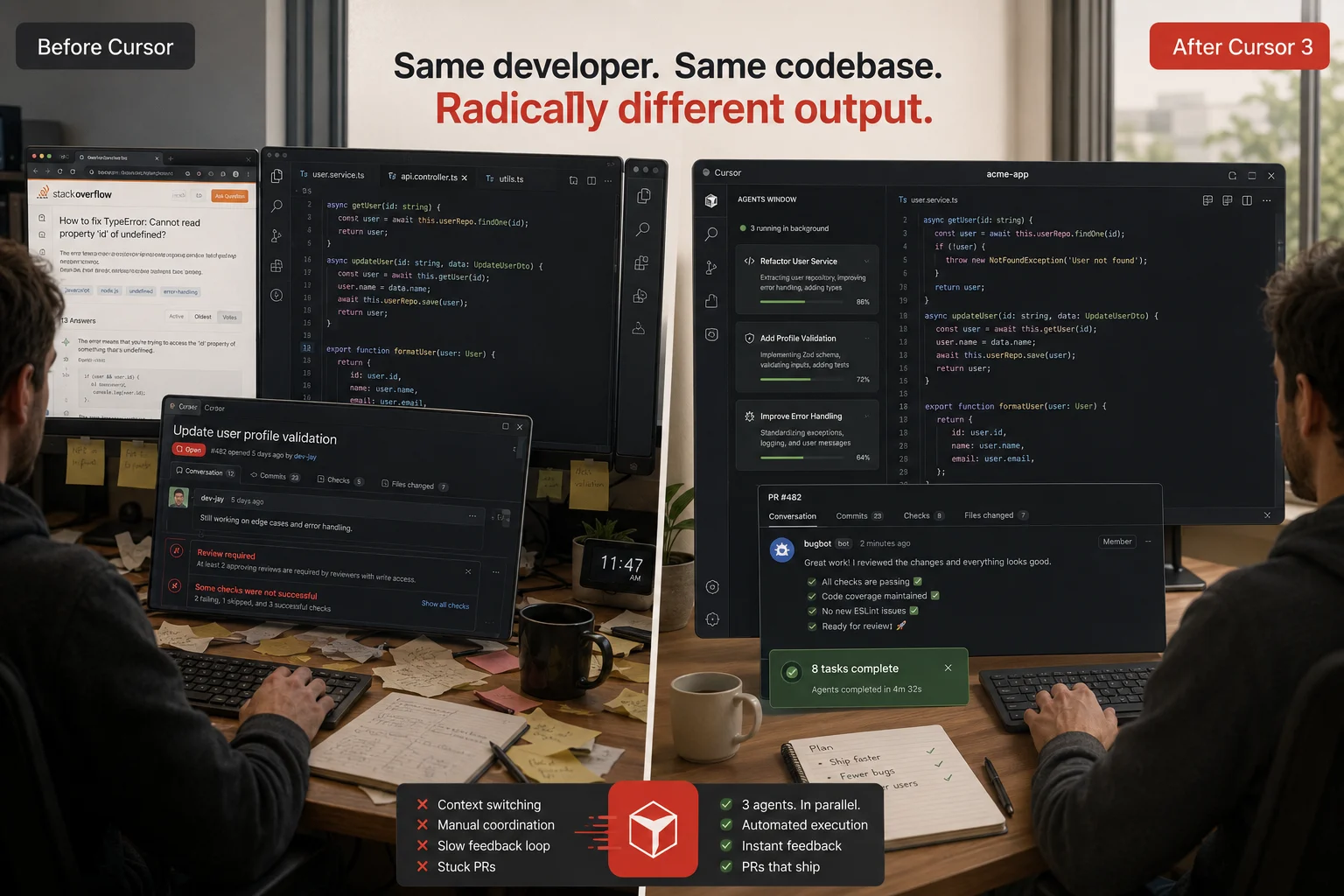
I had been using VS Code with GitHub Copilot for two years, and I thought I was moving fast. Then a colleague screenshared during a code review call, and I watched him handle a task in about four minutes that I would have taken forty minutes to finish (Cursor AI agent review).
He was not a better engineer than I. He was using Cursor.
I switched that afternoon. That was eight months ago. I have used Cursor as my primary editor every day since, across three different production codebases, and I have a clear and honest picture now of what it does well, what it fails at, and exactly who should spend money on it in June 2026.
This is that review.
What Cursor AI actually is in 2026
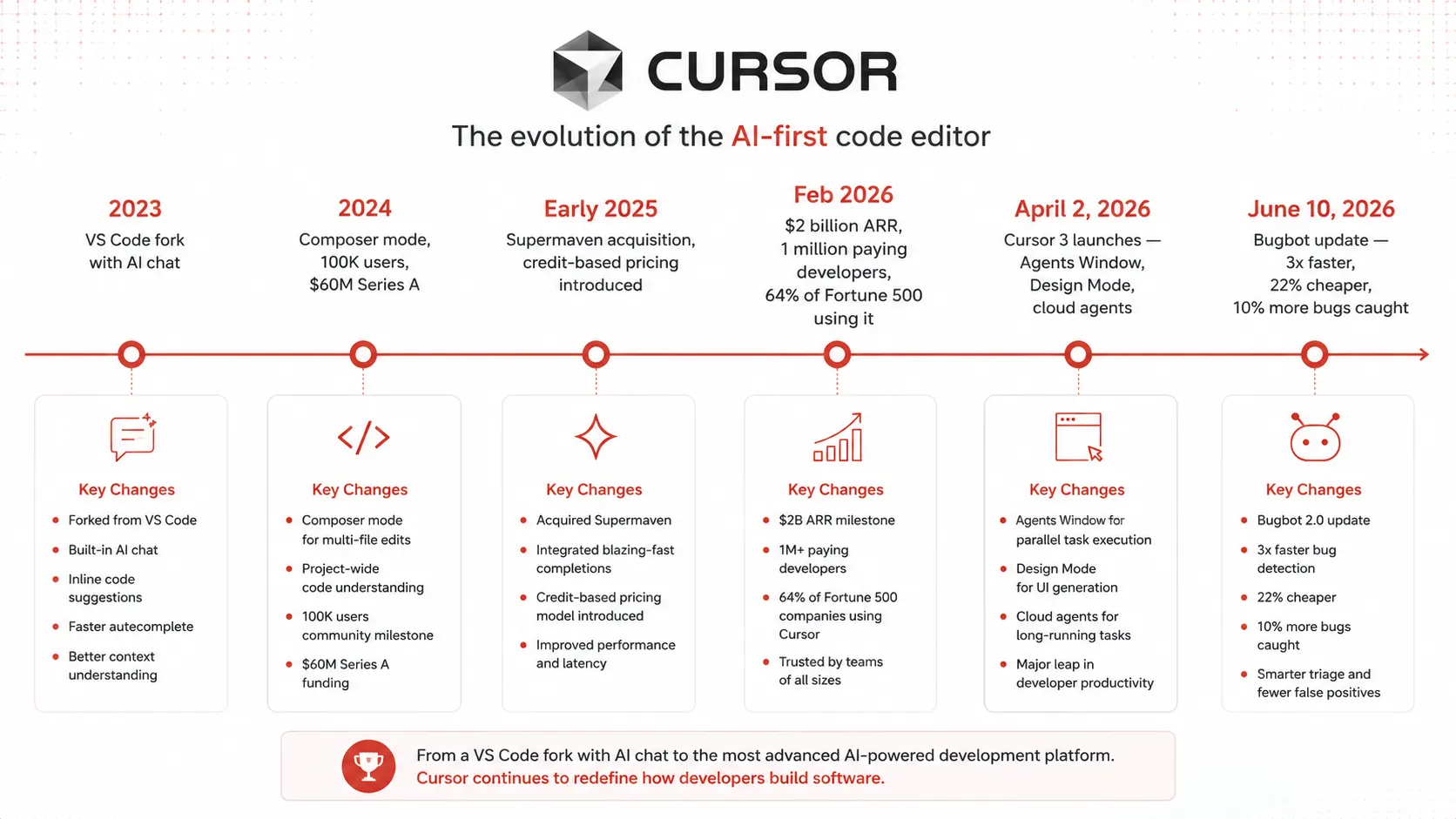
Cursor is an AI-native integrated development environment built on a VS Code fork by Anysphere Inc. It is not a plugin for VS Code. It rebuilt the editor around AI from the ground up.
What separates Cursor from AI coding plugins like GitHub Copilot is the depth of integration. Cursor is not an extension bolted onto an existing editor. It is an entire IDE redesigned around AI-first workflows. Tab completions predict your next edit. Agent mode handles autonomous multi-file changes. Background Agents work while you do something else entirely. And Bugbot reviews your pull requests on GitHub automatically.
The VS Code foundation is a genuine advantage, not just a selling point. Your existing extensions, themes, keybindings, and muscle memory carry over. The onboarding friction is close to zero if you already live in VS Code.
By February 2026, Cursor had crossed $2 billion in annualized revenue with over 1 million paying subscribers. It is now used inside 64 percent of Fortune 500 companies. This is no longer a developer curiosity. It is production infrastructure for some of the largest engineering teams in the world.
What changed with Cursor 3 in April 2026
Understanding where Cursor is right now requires understanding what Cursor 3 changed on April 2, 2026. This was not a point release. It was a foundational rebuild.
Cursor 3 replaced the Composer pane with a dedicated Agents Window, a full-screen workspace designed for running and managing multiple AI agents simultaneously. Previously, you had one chat, one agent, one task at a time. Now you orchestrate several.
The Agents Window is what made me stop thinking of Cursor as “VS Code with a good AI plugin” and start thinking of it as an agent execution platform that happens to have an editor attached. You spin up a background agent on a bug fix, keep working on a feature in the foreground, and pull whichever PR finishes first into your review queue.
Alongside the Agents Window, Cursor 3 shipped Design Mode, cloud agent handoff, and built-in Git tooling. Combined with worktrees, you can run several isolated tasks across branches at once and pull whichever succeeds into the foreground.
Then on June 10, 2026, Cursor shipped a major Bugbot update. Bugbot is now over 3x faster, 22% cheaper, and finds 10 percent more bugs per review. In practice, 90 percent of Bugbot runs now finish in under three minutes. The code review experience inside Cursor has become meaningfully better in just the past few weeks.
The five features that actually matter
1. Supermaven Tab autocomplete
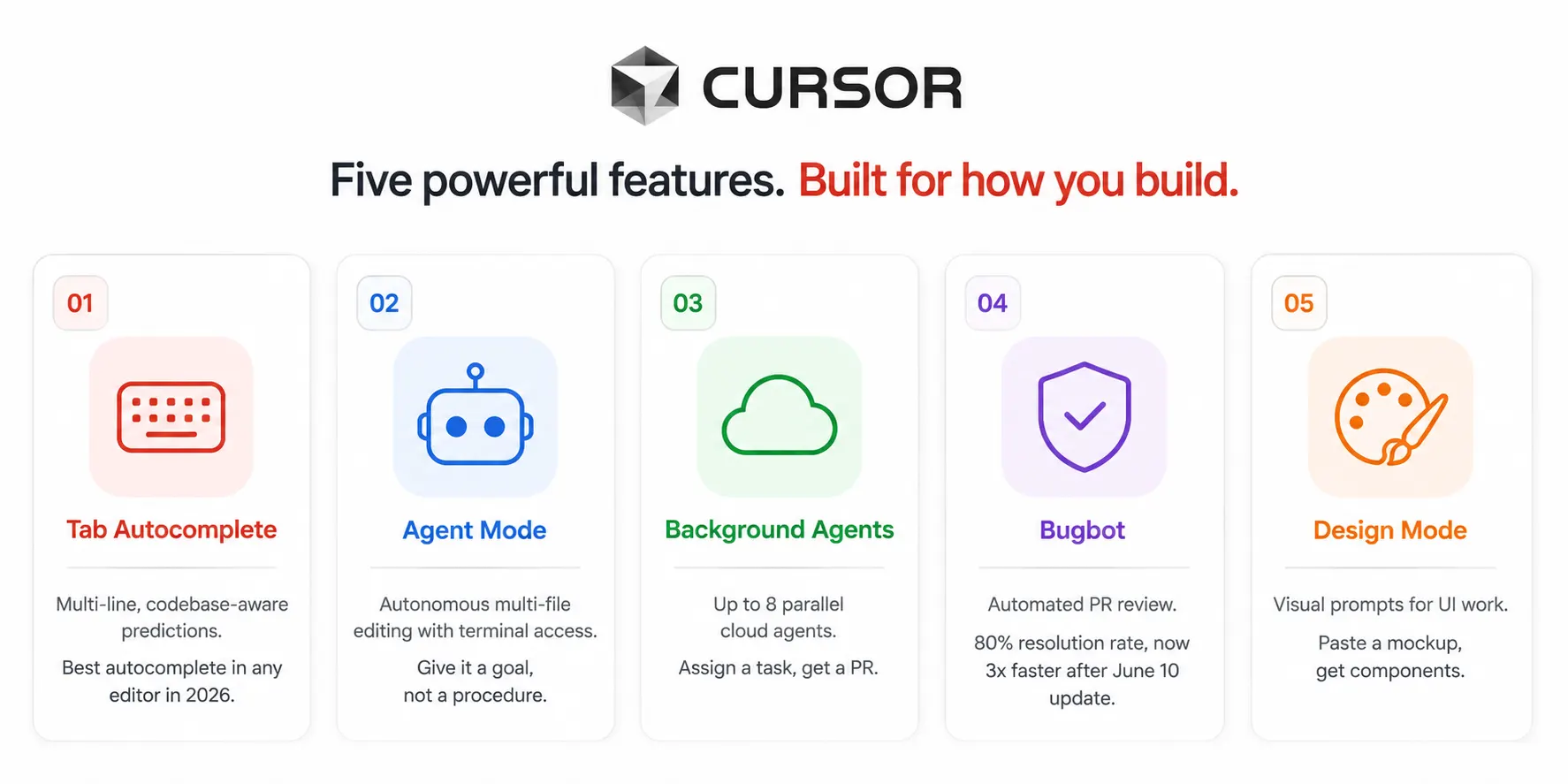
Tab completion is the feature you use the most and the one that is easiest to underestimate. Supermaven autocomplete is widely regarded as the best autocomplete available in any editor in 2026.
It is not completing the current line. It is predicting the next three to five lines based on what you are building, what patterns exist elsewhere in your codebase, and what you just wrote. On a good day, it feels genuinely telepathic. You press Tab, and the code you were about to write is already there.
This feature alone is available on the free Hobby plan and on Auto mode without using any credits. It is the single best reason to switch from plain VS Code, even before you touch Agent mode.
2. Agent mode with the Agents Window
Agent mode is the headline feature and the biggest differentiator in 2026. Describe a task like “add auth to these 12 endpoints” and Cursor plans, writes, and tests the code autonomously. What used to take an afternoon now takes minutes.
The agent reads your codebase, writes changes across multiple files, runs the terminal to execute tests, reads error output, fixes the errors, and iterates until the task is done or it hits a decision point that needs your input. You watch the diff accumulate in the sidebar. You accept, reject, or modify individual chunks.
In Cursor 3, you access the Agents Window with Cmd+Shift+P and typing “Agents Window.” In older versions, it lived inside Composer at Cmd+Shift+I. The new interface is cleaner and lets you see all running agents at a glance.
The key mental shift that makes Agent mode actually productive: give it a goal, not a procedure. “Add rate limiting to the user API” works well. “Open src/api/users.ts, find the handler function, add a check at line 47” is micromanaging an agent that can figure out the file and line on its own.
3. Background Agents running in the cloud
Background Agents are where Cursor moves from “AI-assisted coding” into something closer to “delegated engineering work.”
Clone your repo in the cloud, let agents work autonomously, and receive a pull request when they finish. You can run up to 8 agents in parallel. The agent runs on Cursor’s cloud infrastructure, not your local machine. Your laptop stays free for whatever you are working on.
I run background agents on dependency upgrades, test generation for existing code, and documentation tasks. I assign the task before I leave for lunch and review the PR when I get back. The workflow feels qualitatively different from anything I did with GitHub Copilot. You are not writing code together. You are reviewing code that was written for you.
4. Bugbot: automated PR review that learns
Bugbot is Cursor’s automated pull request reviewer. When Bugbot is enabled on a GitHub repo, it inspects every pull request, human-authored or agent-authored, and posts inline comments about regressions, missing error handling, and risky changes before a reviewer gets there.
As of April 8, 2026, Bugbot has a resolution rate nearing 80 percent, compared to 52 percent when it launched. In a benchmark across 50,310 PRs, it outperformed GitHub Copilot at 46.69 percent, CodeRabbit at 48.96 percent, and Greptile at 63.49 percent.
The June 10 update added the ability to run /review before pushing code. You can now run Bugbot and Security Review before pushing. This catches and fixes issues before the PR is even open. That is the right point to catch a bug: before it becomes a review comment, not after.
Bugbot also learns from your team’s feedback over time. It reads reactions and reviewer comments, generates rules from the signal, and promotes the ones that prove accurate over time. The longer your team uses it, the better its findings get for your specific codebase.
5. Design Mode: visual prompting for UI work
Design Mode shipped in April 2026 and got a significant update on June 5, 2026. It lets you direct agents using visual context alongside text prompts.
Design Mode lets you direct agents with visual prompts directly inside Cursor. You paste a screenshot of a UI mockup or a reference design, describe what you want to build, and the agent generates components that match the visual. It closes the loop between designer handoff and developer implementation in a way that text prompts alone cannot.
I have used it most for building admin dashboard components from Figma exports. It is not perfect on complex layouts, but for standard UI patterns, it gets you 80 percent of the way there on the first pass.
The .cursor/rules/ system: the feature nobody talks about enough
This is the single biggest lever for improving Cursor’s output quality, and most developers either ignore it or use it incorrectly.
Rules are the single biggest lever to make Cursor stop hallucinating in your codebase. The legacy .cursorrules file at repo root is now superseded by Project Rules: .mdc files inside .cursor/rules/, version-controlled per project, and scoped to specific globs.
Here is what the structure looks like in practice:
# Your project directory
.cursor/
  rules/
    global.mdc          # Applies to all files in the project
    backend.mdc         # Applies only to src/api/**
    frontend.mdc        # Applies only to src/components/**
    testing.mdc         # Applies only to tests/**
    database.mdc        # Applies only to src/db/**
Each .mdc file has a YAML frontmatter block that controls when the rule fires:

---
description: Backend API rules for the payments service
globs: src/api/**/*.ts
alwaysApply: false
---

# Payments API conventions

## Architecture
- All route handlers go through the RouteHandler base class. Never write raw Express handlers.
- Database access must go through the repository layer. No direct Prisma calls in controllers.
- Every public endpoint requires both AuthMiddleware and PermissionMiddleware decorators.
  Using only one is a security regression.

## Error handling
- All errors must be wrapped in our AppError class before being thrown.
  Raw Error objects will not serialize correctly in the response formatter.
- Never expose internal error messages to the client. Log the full error, return a sanitized message.

## Payments-specific rules
- All Stripe operations must set an idempotency key using the request ID.
  Missing idempotency keys will cause double charges on retries.
- Refunds above $500 require an AuditLog entry before processing.
  Single-step refunds above $500 are bugs, not features.

## What NOT to mention in rules
- "Use TypeScript" — obvious from the project
- "Follow best practices" — too vague to help the agent
- "Add comments" — specify where and what kind instead
Keep always-apply rules under 200 words to avoid the token tax. Every token loads in every single request, consuming your context window budget. The goal is to tell Cursor the non-obvious things specific to your codebase. The things a new contributor would get wrong in the first week. Not the things that are obvious from the language or framework.
After I wrote a proper .cursor/rules/ setup for our payments service, agent mode stopped touching files it was not supposed to touch and stopped writing Prisma calls directly in controller files. Two specific anti-patterns that had repeated several times per session disappeared completely. That alone saved more review time per week than the agent mode gained for me.
Pricing in June 2026: what you actually pay
Cursor’s pricing changed substantially in mid-2025 and has stayed stable since then. Cursor pricing in 2026 spans five tiers: Hobby at $0, Pro at $20 per month, Pro+ at $60 per month, Ultra at $200 per month, and Teams at $40 per user per month.
The credit system confuses most new users. Here is the clear explanation.
Your subscription cost equals your monthly credit pool. A $20 Pro plan includes $20 in credits. Free and minimal usage: Tab completions and Auto mode do not consume credits. Cursor picks the best model automatically in Auto mode. Credit-consuming usage: Manually selecting a specific frontier model like Claude Sonnet 4.6, GPT-5.4, or Gemini 2.5 Pro draws from your credit balance.
Based on median usage, the Pro plan covers approximately 225 Claude Sonnet requests, 550 Gemini requests, or 650 GPT-4.1 requests per month. The vast majority of Pro users do not exhaust their included credits.
The practical answer for most developers: use Auto mode and never think about credits. Cursor routes requests to the best available model for each task. Auto mode is unlimited on all paid plans. You only start burning credits when you manually pin a specific frontier model.
| Plan | Price | Credit pool | Background Agents | Best for |
|---|---|---|---|---|
| Hobby | Free | None | No | Evaluating before committing |
| Pro | $20/month | $20 monthly | Yes (up to 8 parallel) | Working developers on real projects |
| Pro+ | $60/month | $60 monthly (3x) | Yes | Heavy users consistently hitting Pro limits |
| Ultra | $200/month | $200 monthly (20x) | Yes (priority) | Full-time AI-native development, large migrations |
| Teams | $40/user/month | $20/user monthly | Yes | Engineering teams need shared rules and billing |
At $200 per month, Ultra is infrastructure spend rather than a productivity tool subscription. It is built for full-time AI-native development: running background agents continuously, working on large codebases with extensive context, and relying on frontier models for every interaction.
For most individual developers, Pro at $20 per month is the right answer. Start there, use Auto mode exclusively for the first month, and only consider upgrading if you are consistently exhausting your credits before the billing date.

Real productivity numbers from daily use
I am skeptical of productivity claims in software. “10x developer” is almost always marketing. But the numbers that have come out of Cursor usage in 2026 are specific enough to be worth including.
Based on developer surveys in 2026, Cursor users report saving an average of 90 minutes per day on routine coding tasks. The biggest gains are in writing boilerplate at 70 percent time reduction, debugging at 50 percent, and understanding unfamiliar code at 60 percent.
My personal experience tracks with the debugging and unfamiliar code numbers. Dropping into a service I have never touched and asking Cursor to explain the auth flow saves me an hour of spelunking through files. That alone would justify $20 per month.
Teams report 20 to 40 percent faster delivery on feature work when using Cursor agent mode consistently. That range is wide because it depends heavily on how well-defined the task is and how good the team’s cursor/rules/ setup is. Teams that invest in rules get closer to the 40 percent end. Teams that run agent mode without rules get closer to 20 percent, and more review overhead along the way.
What Cursor does well
After eight months of daily use, these are the task categories where Cursor consistently outperforms everything else I have tried.
Understanding a codebase you did not write. Asking the Cursor to explain a service’s data flow, trace a bug through call stacks, or map out which modules touch a specific database table is genuinely faster than reading the code yourself. The semantic codebase index it builds when you first open a project is what makes this possible. It is not searching for keywords. It understands relationships.
Repetitive implementation across multiple files. Adding consistent error handling across fifteen API endpoints. Migrating from one logging library to another. Adding TypeScript types to a previously untyped module. These tasks are well-defined, mechanically complex, and time-consuming for a human. Agent mode handles them reliably and correctly when the task is scoped clearly.
Writing tests for existing code. I have gotten into the habit of finishing a feature and immediately asking Cursor to write tests for it while the implementation is still in my context. The generated tests are accurate, cover the edge cases I would have remembered to cover and a few I would have forgotten, and follow the patterns in my testing rules file.
Learning an unfamiliar API or library. Asking Cursor to show me how to use a library I have never touched, with examples from my actual codebase rather than generic documentation examples, is faster than reading docs and faster than asking a colleague. The answers are concrete, not abstract.
What Cursor fails at: the honest limitations
No review is complete without this section, and most Cursor reviews either skip it or make it too gentle.
Agent mode overreaches on vague prompts. Agent mode sometimes refactors more than asked. Always review diffs before accepting. If you say “clean up the user service,” you might get back a diff that touches eleven files, renames three functions, and restructures the folder hierarchy. It was not wrong. It was not what you asked for. Scope your prompts carefully or use Interactive Planning to review the agent’s plan before it starts executing.
Performance degrades on very large projects. Performance on large projects lags behind vanilla VS Code. On a monorepo with 800,000 lines of code, I noticed meaningful lag in Tab completions that did not exist on smaller projects. The codebase indexing is a tradeoff: the semantic understanding requires holding a lot of context, and that costs performance at scale.
The credit system is confusing until it clicks. Despite Auto mode being unlimited, the credit system is poorly explained. New users see “credit pool” on the pricing page and assume everything is metered. Once you understand that Auto mode is unlimited and credits only apply to manual model selection, the anxiety goes away. But getting there requires reading more carefully than most people do before subscribing.
IDE lock-in if you use JetBrains or Vim. Cursor is a VS Code fork. If your team lives in IntelliJ, WebStorm, or any JetBrains IDE, Cursor is not a drop-in replacement. There is a JetBrains plugin now, but the experience is narrower than the full Cursor IDE. Vim users have even less overlap.
Every AI output still needs human review. This sounds obvious, but it bears repeating. Cursor handles a lot of the how. The what and the why are still entirely yours. Teams that treat Cursor’s agent output as a junior developer’s first draft and review it accordingly get good results. Teams that merge agent PRs without reading the diffs eventually get a production incident that erases weeks of velocity gains.
Cursor vs the alternatives: where each tool wins
| Feature | Cursor | Claude Code | GitHub Copilot | Devin |
|---|---|---|---|---|
| Operating model | AI-native IDE with agents | Terminal agent + VS Code extension | Plugin for the existing editor | Fully autonomous, runs separately |
| Best autocomplete | Yes (Supermaven, best in class) | Good (editor-native suggestions) | Good (Copilot model) | No (not an IDE tool) |
| Multi-file agent editing | Yes (Composer 2.5, Agent Window) | Yes (strongest for complex tasks) | Yes (agent mode, March 2026 update) | Yes (core product) |
| Background / async agents | Yes (up to 8 parallel cloud agents) | Yes (Routines and scheduled tasks) | Partial (GitHub Actions only) | Yes (core strength) |
| Automated PR review | Yes (Bugbot, 80% resolution rate) | Yes (Claude Code Review) | Yes (Copilot Code Review) | No |
| Multi-model support | Yes (Claude, GPT, Gemini, Grok) | Claude only | OpenAI models primarily | SWE-1.6 (Windsurf) + others |
| Works offline | No (requires internet for AI) | No | No | No |
| IDE required | Yes (Cursor IDE) | No (terminal-first) | Yes (VS Code, JetBrains, Xcode) | No (Slack or web UI) |
| Codebase-wide project rules | Yes (.cursor/rules/*.mdc) | Yes (CLAUDE.md) | Limited | Yes (REVIEW.md) |
| Starting price | Free (Hobby), $20/month (Pro) | Included in Claude Pro ($20/month) | $10/month | $20/month + $2.25/ACU |
| Best for | Daily interactive coding with agent delegation | Complex multi-service refactors and audits | Teams already in the GitHub ecosystem | Fully delegated async backlog work |
The honest summary: Cursor wins for day-to-day interactive development. You are at the keyboard. You want the best autocomplete, fast multi-file edits, and background agents taking off the tedious work while you focus on the hard problems.
Claude Code wins when the task is architecturally complex and touches multiple services. Its multi-agent coordination for large refactors is stronger than Cursor’s current agent model for those specific scenarios.
Devin wins when you want to fully walk away from a task. Cursor’s background agents require you to stay logged in and return to review. Devin is purpose-built for async delegation, where you come back to a finished PR hours later.
GitHub Copilot wins for teams that are already paying for it and do not want to add another subscription. The agent features have improved significantly in 2026, and the value-per-dollar for teams already in the Microsoft ecosystem is hard to beat.
Who should pay for Cursor in June 2026?
I want to be direct here instead of hedging, because most reviews give you a list of use cases and let you figure it out yourself.
For any developer who codes more than 10 hours per week: yes. At 90 minutes saved per day, that is over 30 hours per month. The $20 is the best ROI tool available to developers in 2026. That is not my claim. It matches what I have experienced in eight months of daily use on real production work.
For developers who code occasionally on simple projects, the free tier or GitHub Copilot is probably the right answer. Cursor’s power is in codebase-aware agent tasks and background agents. If you are writing small scripts or making infrequent changes, you will not use the features that justify the upgrade.
For JetBrains users who are happy with their setup, the switching cost is real. The Cursor JetBrains plugin is available, but the full experience is in the Cursor IDE. You need to want the IDE change to get the full value.
For engineering teams, the Teams plan at $40 per user per month adds shared .cursor/rules/ files, centralized billing, Bugbot across all team repos, and admin visibility into AI usage. The shared rules file alone is worth the premium for teams where multiple engineers are working in the same codebase. Consistent agent behavior across the whole team requires shared conventions, and shared conventions require a shared rules file.

Further reading
- Cursor Official Changelog: All Feature Updates Including June 2026 Bugbot Improvements
- Cursor Documentation: Project Rules and .cursor/rules/ Format Guide
- Cursor Documentation: Background Agents Setup and Configuration
The editor is no longer the bottleneck
That colleague I mentioned at the start, the one who finished in four minutes what would have taken me forty? He was not smarter. He had just built a workflow where the repetitive implementation work, the context gathering, the boilerplate writing, and the PR review were all handled by agents. His brain was free for the ten minutes of actual thinking the task required.
That is what Cursor Pro at $20 per month buys you in June 2026. Not a better autocomplete. A different relationship with your work queue.
The time you used to spend writing the obvious code is now spent reviewing what an agent wrote. The time you used to spend reading an unfamiliar codebase is now spent asking Cursor to explain it and verifying the answer. The time you used to spend waiting for a colleague to review your PR is now occupied by Bugbot catching the issues before the PR is even opened.
The bottleneck in my engineering day is no longer the editor. It is my own thinking time. That is the shift Cursor made for me, and it is the one I would not trade back.