
I thought building an AI agent was just about picking the right model
The first AI agent I built was embarrassingly naive. I picked a good model, wrote a system prompt, gave it a couple of tools, and pointed it at a task. It worked, sort of, until it did not. It would lose track of what it was doing halfway through a complex task. It would call the wrong tool because two descriptions sounded similar. It would hit the context limit and start producing incoherent output. It would loop endlessly when a tool returned an error it did not understand.
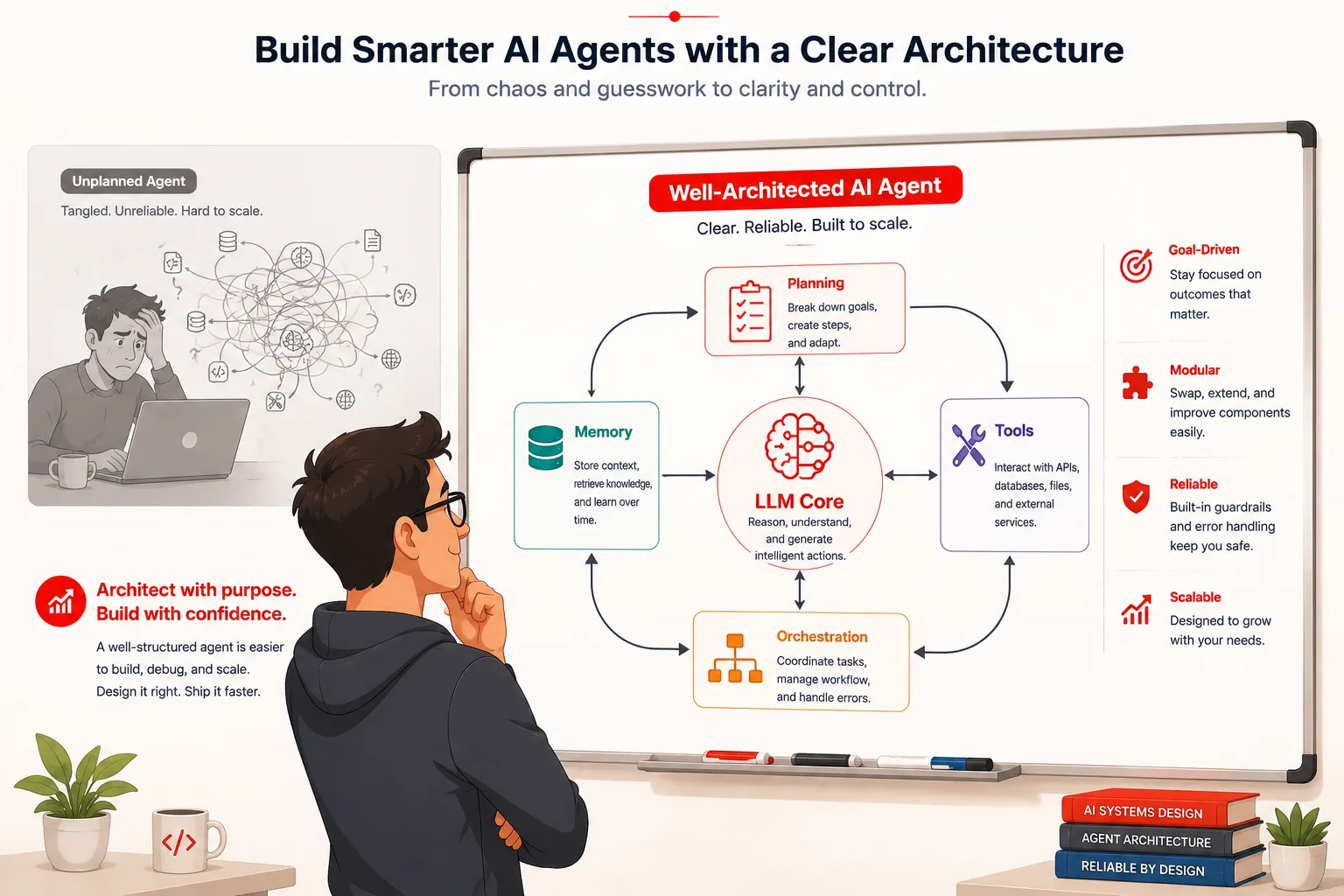
Every one of those failures had the same root cause. I had focused entirely on the LLM and almost nothing on the architecture surrounding it. The model was not the problem. The scaffolding was. Choosing the right model turns out to be maybe twenty percent of building a reliable AI agent. The other eighty percent is the architecture you wrap around it.
This guide is the resource I needed back then. It covers every layer of a well-designed AI agent architecture, explains why each layer exists, shows you what it looks like in code, and tells you exactly where things go wrong when a layer is missing or poorly designed. By the end, you will have a clear mental model of how modern AI agents are actually built and what separates ones that work reliably from ones that fall apart on anything non-trivial.
What is an AI agent architecture?
AI agent architecture is the overall design of the systems, components, and connections that allow a language model to perceive inputs, reason about goals, use tools, maintain context across steps, and produce meaningful outcomes in the real world. It is the blueprint that turns a text prediction model into something capable of autonomous, multi-step work.
A language model on its own is a stateless function. You send it text, and it returns text. Everything that makes an agent feel like an agent, including the ability to search the web, remember what happened earlier in a task, call an API, write and run code, plan ahead, and recover from errors, comes from the architecture built around that core model. The model provides the reasoning. The architecture provides everything else.
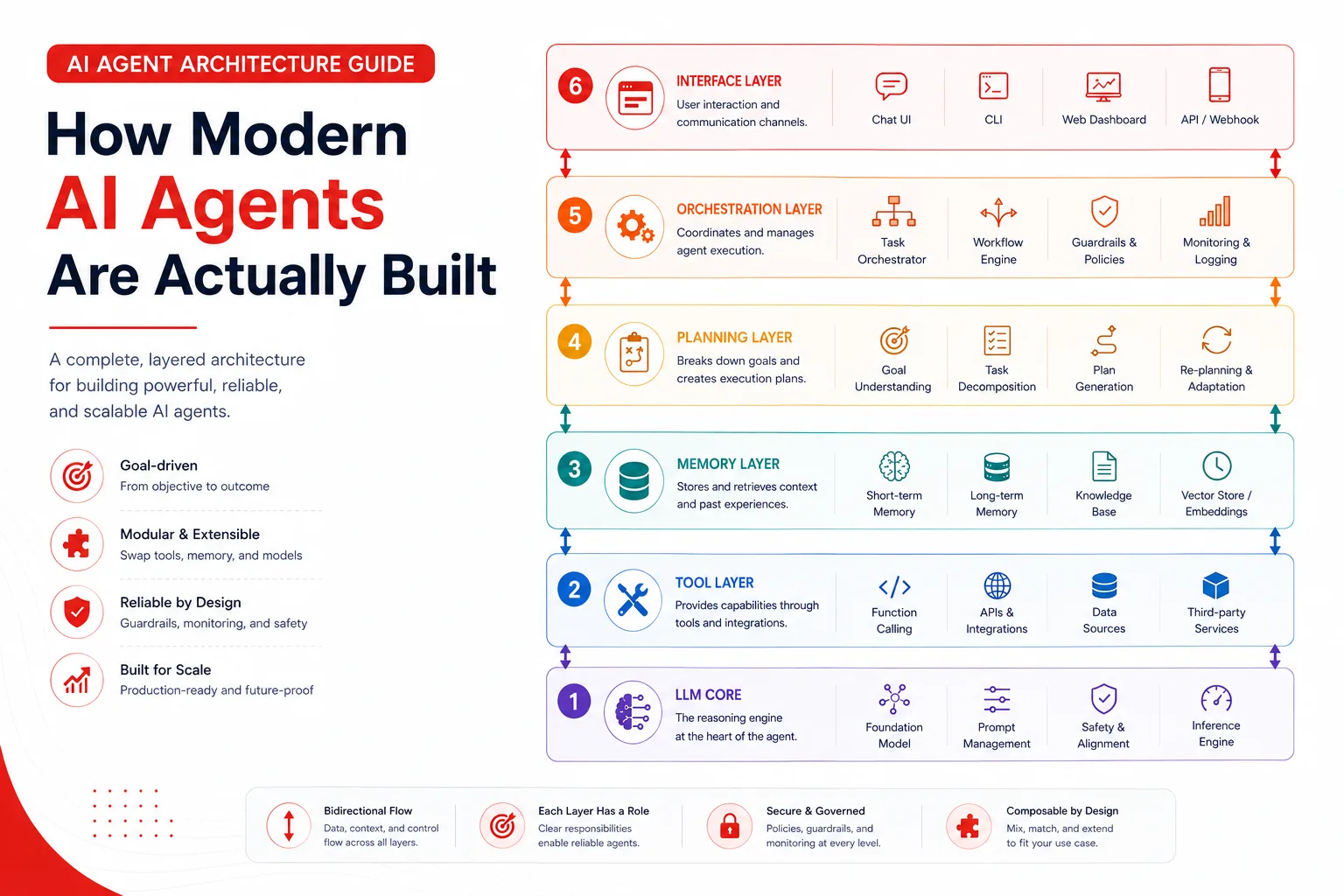
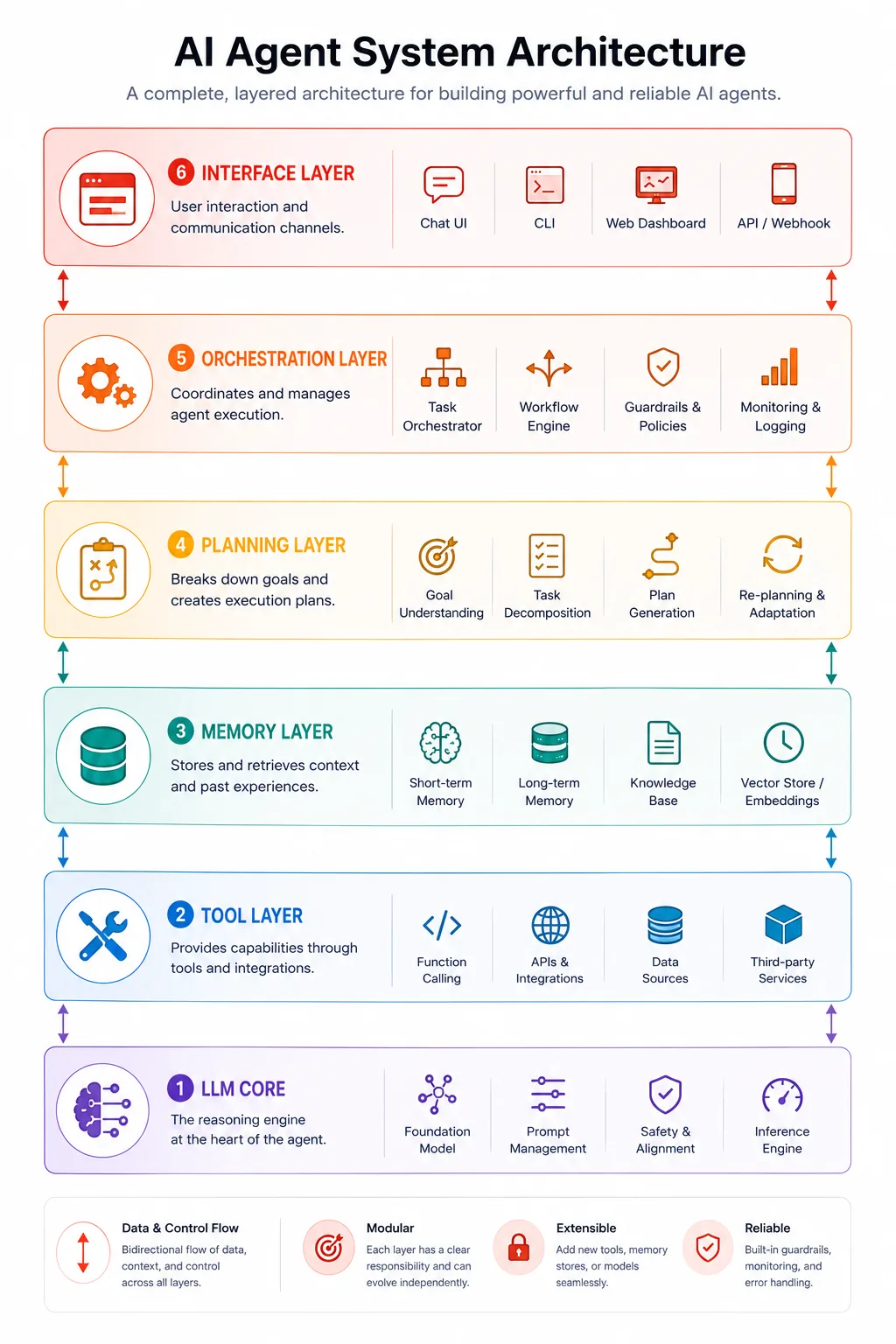
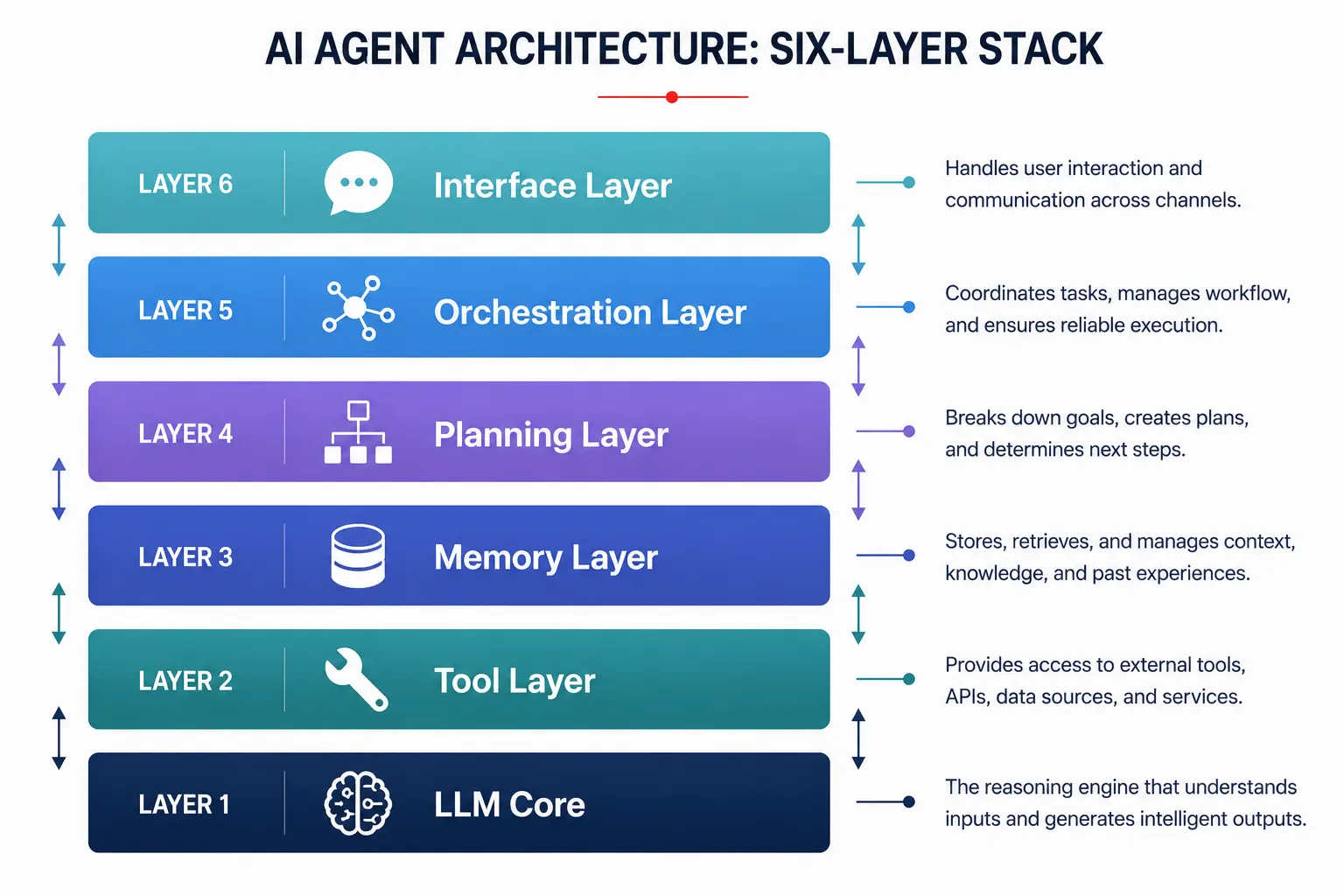
Well-designed agent architecture has six distinct layers, and each one has a specific job to do. Skip any layer, or design it carelessly, and you will feel the consequences in production in exactly the ways you least expect.
The six layers of a complete AI agent architecture
Think of a well-built AI agent the way you would think of a well-built web application. There is a database layer, a business logic layer, an API layer, and a presentation layer. Each has a defined responsibility. Each communicates with the others through defined interfaces. AI agents have an analogous structure, and understanding it at this level of detail makes everything about building and debugging agents much clearer.
Layer 1: the LLM core
The LLM core is the reasoning engine at the center of everything. It is the model that reads context, thinks through problems, decides what to do next, generates text, and requests tool calls. Everything else in the architecture exists to give this layer the right information at the right time and to execute the actions it decides to take.
Choosing the right model for your core matters more than most developers initially realize, and the right choice is rarely the biggest model available. The relevant dimensions are reasoning quality for your specific task domain, context window size relative to the information your agent needs to hold, tool calling reliability, cost per token at your expected usage volume, and latency at your required response speed.
A few principles about the LLM core that experienced agent builders have learned the hard way:
- The system prompt is your most important piece of procedural memory. Write it with the same care you would give to a senior engineer’s onboarding document. Define the agent’s role, its boundaries, its output format, and how it should handle uncertainty.
- Temperature settings matter enormously for agents. Higher temperature produces more creative output but also more unpredictable tool selections. Most production agents run at low temperature settings for reliability.
- The model you choose should be evaluated specifically on tool use quality, not just general benchmark scores. A model that scores slightly lower on reasoning benchmarks but calls tools far more accurately in practice will produce a better agent.
Layer 2: the tool layer
The tool layer is how your agent interacts with the world outside the model. Without it, the LLM core can only reason and generate text. With it, the agent can search the web, read and write files, query databases, call external APIs, run code, send messages, and take virtually any other action a developer can implement.
The tool layer has three responsibilities: defining what tools exist and what they do, executing tool calls when the model requests them, and returning results in a format the model can reason over effectively.
// A well-structured tool definition
const tools = [
  {
    name: "search_codebase",
    description:
      "Search the codebase for files, functions, or patterns matching a query. " +
      "Use this when you need to find where something is defined or used across the project. " +
      "Do not use this for reading a specific file you already know the path to.",
    input_schema: {
      type: "object",
      properties: {
        query: {
          type: "string",
          description: "The search term or pattern to look for"
        },
        file_type: {
          type: "string",
          description: "Optional. Filter by file extension, e.g. 'ts', 'py', 'md'",
        }
      },
      required: ["query"]
    }
  }
];

// A well-structured tool execution router
async function executeTool(toolName, toolInput) {
  const handlers = {
    search_codebase: (input) => searchCodebase(input.query, input.file_type),
    read_file: (input) => readFile(input.path),
    write_file: (input) => writeFile(input.path, input.content),
    run_tests: (input) => runTests(input.test_path),
  };

  const handler = handlers[toolName];
  if (!handler) {
    return {
      error: true,
      message: `Tool "${toolName}" is not available. Available tools: ${Object.keys(handlers).join(", ")}`
    };
  }

  try {
    const result = await handler(toolInput);
    return { success: true, result };
  } catch (error) {
    return {
      error: true,
      error_type: error.constructor.name,
      message: error.message,
      suggestion: "Try a different approach or check the input parameters."
    };
  }
}
The single most important thing about tool layer design is the quality of your tool descriptions. The description field is not documentation for humans. It is the instruction the model reads when deciding whether to call that tool. Vague descriptions produce inconsistent tool selection. Descriptions that explain both when to use the tool and when not to use it produce reliable behavior.
Always return structured errors from your tool handlers. When a tool throws an unhandled exception, the agent has no information to work with and typically stalls or loops. A structured error response gives the model enough context to decide whether to retry, try a different tool, or surface the problem to the user.
Layer 3: the memory layer
The memory layer is responsible for what the agent knows and remembers across the span of a task and across multiple sessions. A language model has no built-in persistence. Every API call starts from zero. Everything that feels like memory in a working agent is something the architecture is explicitly managing and injecting back into the model’s context at the right moment.
There are four types of memory that a complete agent architecture needs to handle:
In-context memory
In-context memory is everything inside the current prompt window: the conversation history, tool results, retrieved documents, and any other information injected into the current request. It is the fastest and most immediate form of memory, but it is bounded by the context window size and disappears completely when the session ends. Managing it well means summarizing older content before it overflows and being selective about what gets injected versus what gets retrieved on demand.
External semantic memory
External memory is a persistent store the agent can read from and write to across sessions. The most common implementation is a vector database that stores embeddings of facts, documents, and past interactions. At query time, the agent retrieves the most semantically relevant stored content and injects it into the context window. This is the foundation of RAG (Retrieval-Augmented Generation) and the right solution for anything that needs to outlive a single conversation.
Episodic memory
Episodic memory stores records of past events, specifically what the agent did, what the outcome was, and what the context was at the time. It lets the agent learn from past mistakes and avoid repeating dead ends. In production systems, it is usually implemented as a structured log with metadata that enables filtering by time, user, task type, or outcome.
Procedural memory
Procedural memory encodes how the agent should behave. In practice, this lives in the system prompt and in any fine-tuning applied to the model. It is the always-on layer that governs tone, output format, escalation rules, and behavioural guardrails without needing to be retrieved at runtime.
// Memory management: inject relevant context without overflowing the window
async function buildAgentContext(userMessage, sessionHistory, userId) {

  // 1. Retrieve semantically relevant long-term memories
  const queryEmbedding = await embedModel.embed(userMessage);
  const relevantMemories = await vectorStore.similaritySearch(
    queryEmbedding,
    { topK: 5, filter: { userId } }
  );

  // 2. Retrieve recent episodic history for this user
  const recentHistory = await episodicStore.getRecent(userId, { limit: 10 });

  // 3. Summarize session history if it is getting long
  const managedHistory = await summarizeIfNeeded(sessionHistory, {
    tokenLimit: 4000,
    keepRecentTurns: 6
  });

  // 4. Assemble context in priority order
  return {
    systemPrompt: buildSystemPrompt(),
    memories: relevantMemories.map(m => m.content),
    episodicContext: recentHistory,
    conversationHistory: managedHistory,
    userMessage
  };
}
Layer 4: the planning layer
The planning layer is where the agent decides what to do with a goal before it starts doing things. Without a planning layer, an agent just reacts. With one, it reasons about the best sequence of steps, identifies dependencies between actions, and has a framework for recovering when something goes wrong partway through.
The planning layer does not always mean generating a formal upfront plan. It is a spectrum from lightweight inline reasoning all the way to full multi-step plan generation with replanning triggers. The right point on that spectrum depends on your task type.
Inline reasoning with ReAct
The ReAct pattern (Reason and Act) is the foundation of most agent planning systems. Before each action, the model generates an explicit reasoning step: what it knows, what it needs, and why it is about to take the next action. This reasoning becomes part of the context for subsequent steps, creating a self-correcting loop where each observation informs the next decision.
// ReAct-style planning loop
async function runReActLoop(goal, tools, memory) {
  const history = [];
  let iterations = 0;
  const MAX_ITERATIONS = 20;

  while (iterations < MAX_ITERATIONS) { iterations++; const response = await llm.call({ system: `You are a precise agent. Before every action, output your reasoning. Format: THOUGHT: [your reasoning] then ACTION: [tool call or DONE]`, messages: [...memory.context, ...history, { role: "user", content: goal }], tools }); // Agent signals it is finished if (response.stop_reason === "end_turn") { return { success: true, result: response.content, iterations }; } // Agent requests a tool call if (response.stop_reason === "tool_use") { const toolCalls = response.content.filter(b => b.type === "tool_use");
      history.push({ role: "assistant", content: response.content });

      const toolResults = await Promise.all(
        toolCalls.map(async (call) => ({
          type: "tool_result",
          tool_use_id: call.id,
          content: JSON.stringify(await executeTool(call.name, call.input))
        }))
      );

      history.push({ role: "user", content: toolResults });
    }
  }

  return { success: false, reason: "Max iterations reached", iterations };
}
Plan and execute for structured tasks
For tasks that are well-defined and where the path to completion is largely predictable before you start, plan-and-execute works well. A planner step generates the full sequence of actions first. An executor steps through them one by one, with a replanning trigger for when an early step reveals something that changes what later steps need to do.
Reflexion for iterative improvement
Reflexion adds a self-critique step after a failed attempt. Instead of just retrying, the agent writes a verbal reflection on what went wrong and what it would do differently. That reflection gets stored in memory and injected into the next attempt. For tasks that have a clear success criterion and that the agent will run multiple times, Reflexion produces measurable quality improvements with minimal additional overhead.
Layer 5: the orchestration layer
The orchestration layer becomes relevant once your agent system grows beyond a single agent working on a single task at a time. It manages how multiple agents or multiple instances of the same agent coordinate their work, share state, hand off tasks, and assemble their outputs into a coherent result.
Most production agent systems eventually need this layer. A single agent trying to do everything serially hits two problems: it becomes too slow on tasks that could be parallelized, and it becomes too generalist to do specialized work well. The orchestration layer solves both.
// Orchestrator coordinating specialized subagents
async function runOrchestrator(projectGoal) {
  const orchestrator = new Agent({
    role: "orchestrator",
    instruction: `Break the given goal into subtasks. Assign each subtask to the
                  appropriate specialist agent. Assemble the results into a final output.
                  Available agents: researcher, coder, reviewer, writer.`
  });

  // Orchestrator produces a task plan
  const plan = await orchestrator.plan(projectGoal);

  // Execute tasks, running independent ones in parallel
  const results = await Promise.all(
    plan.parallelTasks.map(async (task) => {
      const agent = getAgent(task.assignedTo);
      return await agent.execute(task.description, task.context);
    })
  );

  // Sequential tasks that depend on parallel results
  for (const task of plan.sequentialTasks) {
    const agent = getAgent(task.assignedTo);
    const priorContext = collectPriorResults(results, task.dependsOn);
    const result = await agent.execute(task.description, priorContext);
    results.push(result);
  }

  // Final assembly
  return await orchestrator.assemble(results, projectGoal);
}
Orchestration introduces coordination overhead and makes debugging more complex. Before adding this layer, honestly ask whether a well-designed single agent with good planning can handle your use case. Add orchestration when you have genuinely parallelizable workstreams, when different subtasks require meaningfully different tools or expertise, or when single-agent context limits are constraining what you can accomplish.
Layer 6: the interface and observability layer
The interface layer is how users or other systems interact with the agent. The observability layer is how you, the developer, understand what the agent is actually doing so you can debug failures, measure performance, and improve behavior over time. They are often treated as separate concerns, but they belong in the same architectural layer because they share the same requirement: every meaningful event in the agent’s execution needs to be captured and surfaced.
Interface considerations
The interface your agent exposes shapes how it gets used and misused. A chat interface suggests conversational interaction and implicit goals. A task submission interface suggests explicit, well-scoped assignments. A background job interface suggests delegated work that the user checks on rather than watches in real time. Match your interface design to the way your agent actually works best, not to the interface that is easiest to build.
Observability requirements
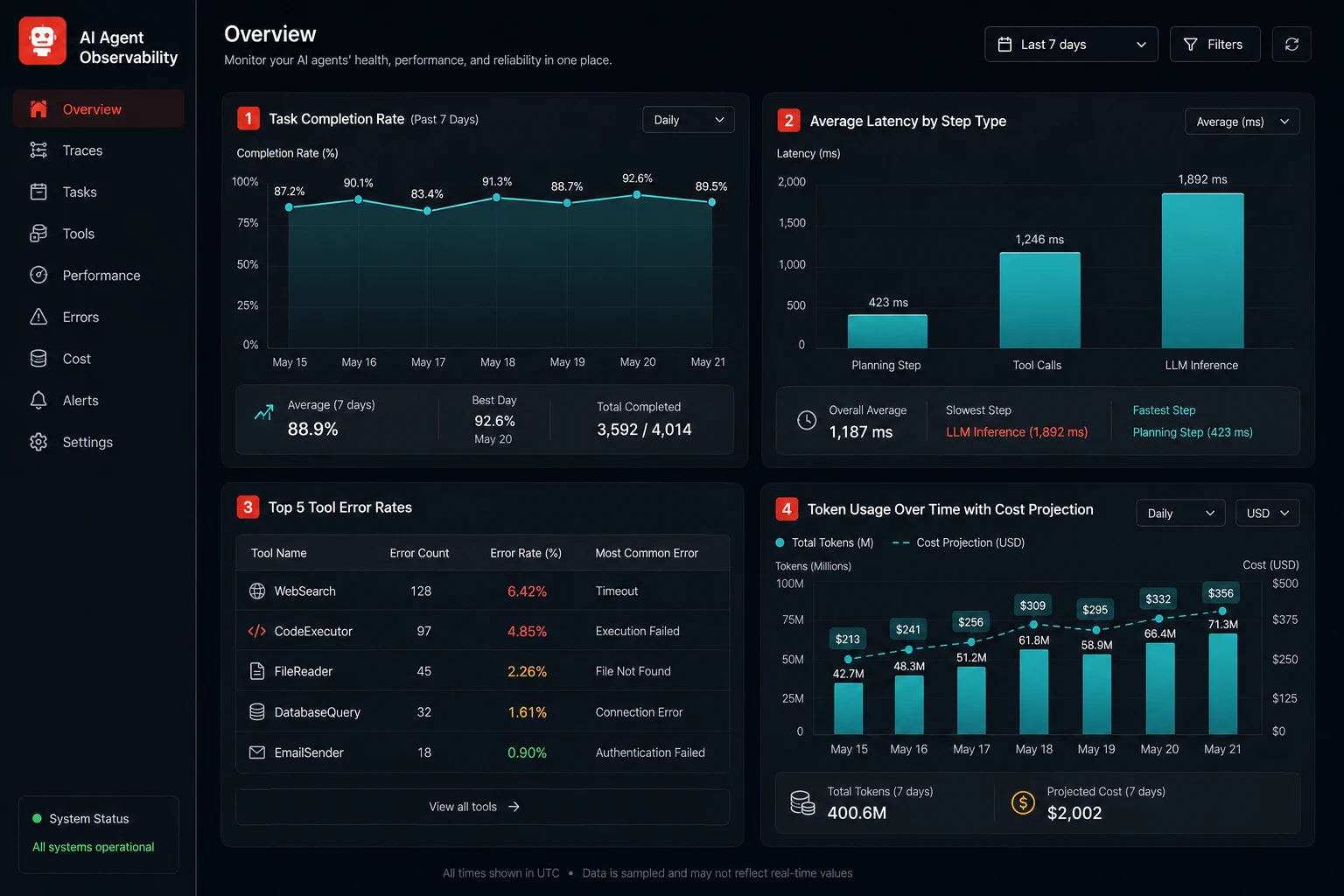
An agent without observability is a black box that produces outputs you cannot explain and failures you cannot debug. Every production agent system needs at a minimum:
- Full trace logging: every thought, every tool call, every tool result, every model response, timestamped and tied to a session ID
- Token usage tracking per step and per session, so you can catch runaway costs early
- Error rate monitoring per tool, so you can identify which integrations are fragile
- Latency tracking per planning step, tool call, and end-to-end task completion
- A way to replay any session from its logged trace for debugging purposes
// Minimal observability wrapper for any agent step
class ObservableAgent {
  constructor(agent, logger) {
    this.agent = agent;
    this.logger = logger;
  }

  async execute(task, context) {
    const sessionId = generateId();
    const startTime = Date.now();

    this.logger.info("agent.task.started", {
      sessionId,
      task,
      contextKeys: Object.keys(context)
    });

    try {
      const result = await this.agent.execute(task, context);

      this.logger.info("agent.task.completed", {
        sessionId,
        durationMs: Date.now() - startTime,
        tokenUsage: result.usage,
        stepCount: result.steps?.length
      });

      return result;

    } catch (error) {
      this.logger.error("agent.task.failed", {
        sessionId,
        durationMs: Date.now() - startTime,
        error: error.message,
        stack: error.stack
      });

      throw error;
    }
  }
}
How the six layers connect: a complete data flow
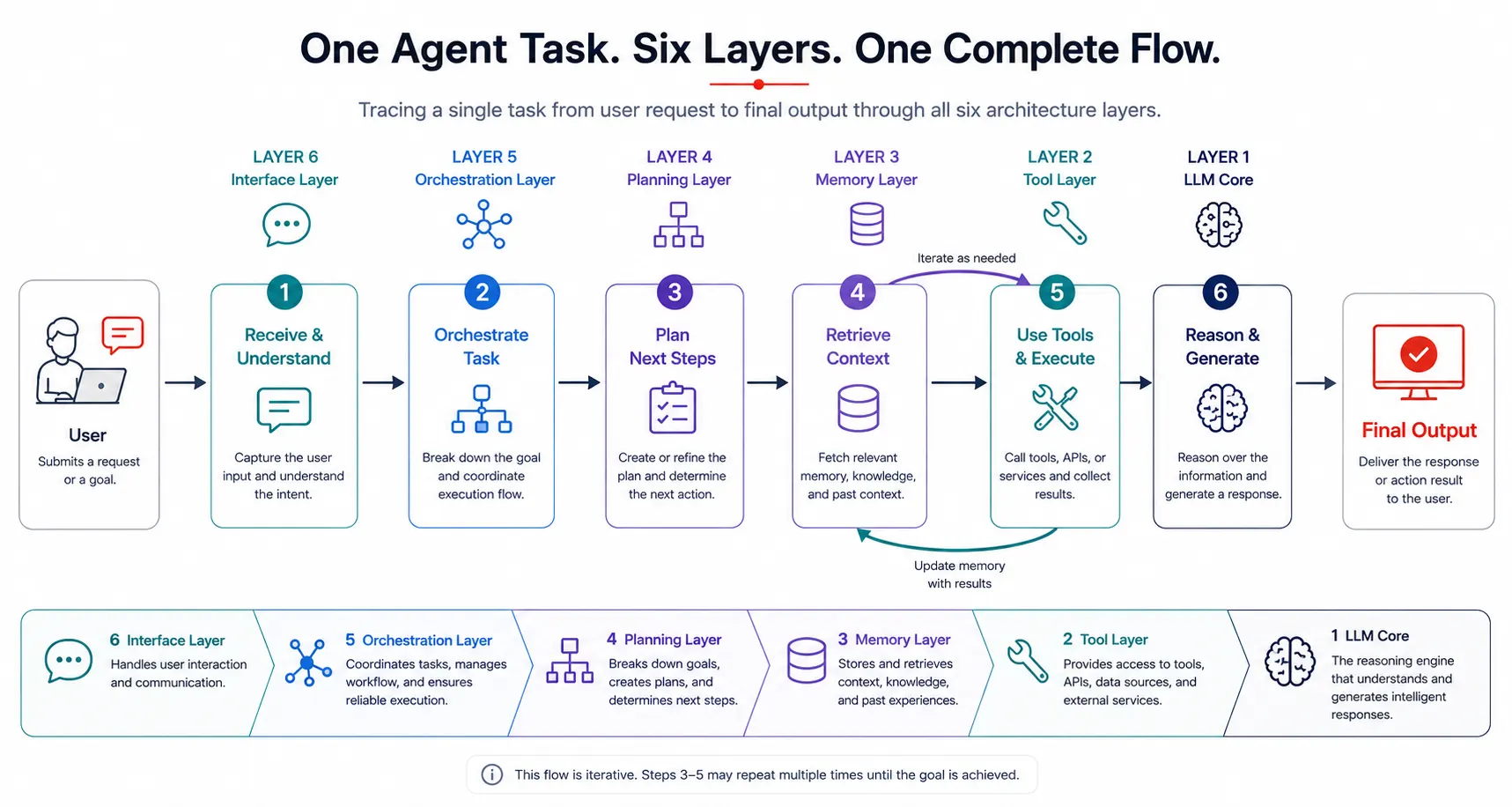
Understanding each layer in isolation is useful. Understanding how they connect is what lets you actually build and debug a real system. Here is the complete data flow for a single agent task from user input to final output:
- A user submits a task through the interface layer. The session is logged with an ID.
- The memory layer retrieves relevant semantic memories and recent episodic history, and assembles them with the conversation history. It summarizes if the token count is approaching the context limit.
- The planning layer receives the assembled context and the task. It either generates a full plan upfront (plan-and-execute) or prepares the model for inline reasoning (ReAct).
- The LLM core receives the full context, including system prompt, memories, task, and plan. It generates a response that is either a final answer or a tool call request.
- If a tool call is requested, the tool layer routes it to the appropriate handler, executes it, and returns a structured result. The result gets added to the context and the loop continues from step 4.
- If a final answer is generated, the memory layer writes any important facts or events from this session to persistent storage.
- The interface layer presents the result to the user. The observability layer logs the full trace, token counts, step count, and total latency.
- If the orchestration layer is present, it evaluates whether any subtasks should be dispatched to other agents before the final result is assembled.
Where AI agent architectures most commonly fail
Missing the memory layer entirely
Agents built without explicit memory management feel sharp for the first few exchanges and then deteriorate. The context fills up with raw history, important early instructions get truncated, and the agent starts contradicting itself. Building in context summarization and external storage from the start is far less painful than retrofitting it after the problem appears in production.
Treating the tool layer as an afterthought
Developers who focus most of their design energy on the LLM and planning layers often bolt on tool definitions at the end without much care. The result is vague descriptions that lead to wrong tool selections, no structured error handling that causes the agent to stall on the first API failure, and no schema constraints that cause malformed inputs to reach your downstream services. The tool layer deserves the same design rigour as any other part of the system.
No iteration limit in the planning loop
An agent planning loop without a hard maximum iteration count is a runaway process waiting to happen. A confused agent that cannot resolve a tool failure or an ambiguous goal will loop indefinitely if nothing stops it. Every planning loop in production needs both a maximum step count and a maximum cost or token budget. Both guards together, not just one.
Building orchestration before it is needed
Multi-agent orchestration is compelling on paper, and it is genuinely powerful for the right problems. But it adds significant complexity in coordination, state sharing, debugging, and cost. Many problems that seem to need orchestration are actually solvable with a single well-designed agent and a good planning layer. Build orchestration when you have clearly hit the limits of a single agent, not because it seemed like the right architecture on day one.
No observability until something breaks in production
Agent failures are uniquely difficult to debug without a full execution trace. Unlike a deterministic function, where you can reproduce a failure with the same input, an agent’s behavior depends on model state, retrieved memories, tool results, and iteration history. By the time a user reports a problem, recreating the exact conditions that caused it is nearly impossible without logs. Observability is not a feature you add later. It is infrastructure you build from the start.
Skipping evaluation before shipping
Agent behavior is probabilistic. The same input can produce meaningfully different outputs across runs. Shipping without an evaluation suite means you have no baseline to measure improvements against and no way to catch regressions when you update the model, the system prompt, or any tool definition. Even a small set of twenty representative test cases with expected outcomes gives you enormous confidence before deploying changes.
AI agent architecture quick reference
| Layer | Primary responsibility | Key design decision | Common failure mode |
|---|---|---|---|
| LLM Core | Reasoning, decision making, text generation | Model selection and system prompt design | Wrong model for the task domain, vague system prompt |
| Tool Layer | Connecting the agent to real-world actions and data | Tool description, quality, and structured error handling | Vague descriptions, unhandled tool errors causing stalls |
| Memory Layer | Persisting and retrieving context across steps and sessions | Context window management and retrieval strategy | Context overflow, no cross-session persistence |
| Planning Layer | Deciding what steps to take and in what order | ReAct vs plan-and-execute vs Reflexion based on task type | No replanning triggers, no maximum iteration guard |
| Orchestration Layer | Coordinating multiple agents or parallel workstreams | When to add orchestration vs keeping a single agent | Added before it was needed, increasing complexity without benefit |
| Interface and Observability | User interaction and execution visibility | Full trace logging and session replay capability | No logging until something fails in production |
Putting it all together: what a production-ready agent looks like
A production-ready AI agent is not the most sophisticated version of any one layer. It is a system where all six layers are designed deliberately, each communicating with the others through clean interfaces, each failing gracefully when something goes wrong.
The LLM core has a carefully written system prompt that encodes procedural memory clearly. The tool layer has focused, single-responsibility tools with descriptions that guide selection and structured error responses that keep the loop moving even when an external service fails. The memory layer manages context size proactively, persists important information across sessions, and retrieves it selectively rather than dumping everything into the prompt. The planning layer has a maximum iteration guard, a goal-check step every few iterations, and a replanning trigger for when early results change what later steps need to do. The observability layer captures every meaningful event in a structured, queryable form. Orchestration is present only if the problem genuinely requires it.
That combination produces agents that are reliable, debuggable, and improvable over time. Each layer makes the others more effective. Together, they turn a capable language model into a system you can actually trust to do real work.
Further reading and resources
- ReAct: Synergizing Reasoning and Acting in Language Models (arXiv): the foundational paper behind the ReAct planning pattern that underlies most modern agent architectures
- Model Context Protocol documentation: the open standard for connecting AI agents to tools and data sources in a reusable and interoperable way
- Anthropic tool use documentation: the definitive guide to implementing the tool layer with Claude, including parallel tool calls and structured error patterns
Building a reliable AI agent is an architectural problem as much as it is an AI problem. The model provides the reasoning. The six layers provide the structure that lets that reasoning produce consistent, trustworthy, recoverable behavior in the real world. Neglect any one of them and the agent will eventually fail in exactly the way that layer was designed to prevent.
Start with the LLM core and the tool layer. Get those two right before adding anything else. Then add memory management as soon as context limits start causing issues. Add a planning layer when tasks grow complex enough to need multi-step coordination. Add observability as early as you can. Add orchestration only when a single agent has genuinely hit its limits. Build each layer deliberately, test it independently, and your agents will do what you designed them to do far more reliably than anything built without this kind of structure underneath it.