
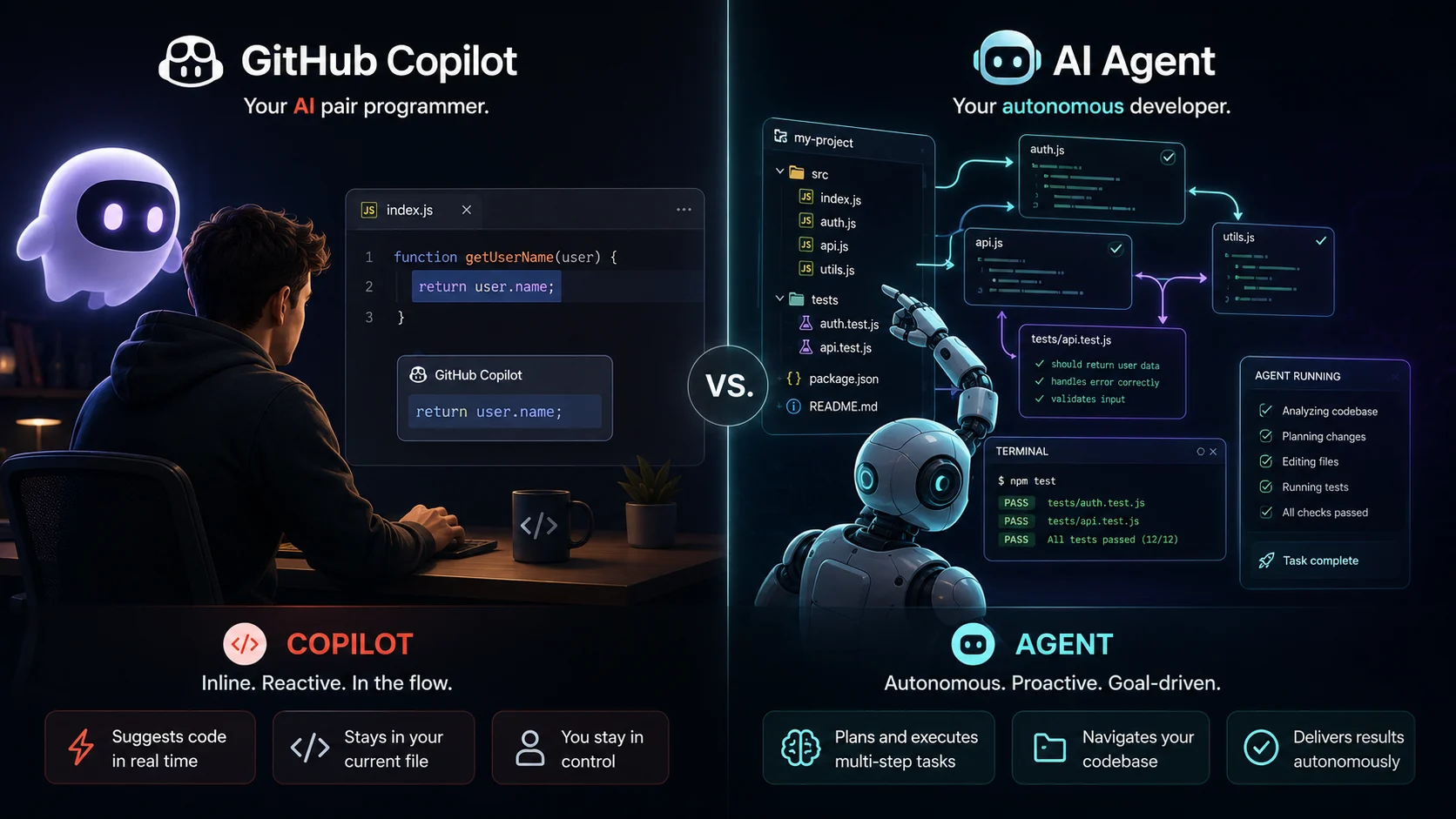
I used Copilot for two years before I realized I was reaching for the wrong tool half the time
GitHub Copilot changed how I write code. There is no honest way to say otherwise. The first time it completed an entire function I was about to write, from nothing but a comment describing what I needed, I sat back and stared at the screen for a moment. That was 2022. By 2023, I could not imagine coding without it.
Then I started experimenting with agentic tools. Claude Code, Cursor in agent mode, and a few others. What I ran into was not a better Copilot. It was something categorically different. A tool that did not wait for me to prompt it line by line, but took a goal and pursued it on its own. I gave it a task. It read my codebase, wrote files, ran tests, fixed failures, and came back with a result.
That experience forced me to confront something I had not fully worked out before. GitHub Copilot and modern coding agents are not competing versions of the same tool. They solve different problems entirely. Using one where the other belongs is like reaching for a scalpel when you actually need a power drill. Both are useful. Neither is a substitute for the other. This article is the comparison I wish I had when I started.
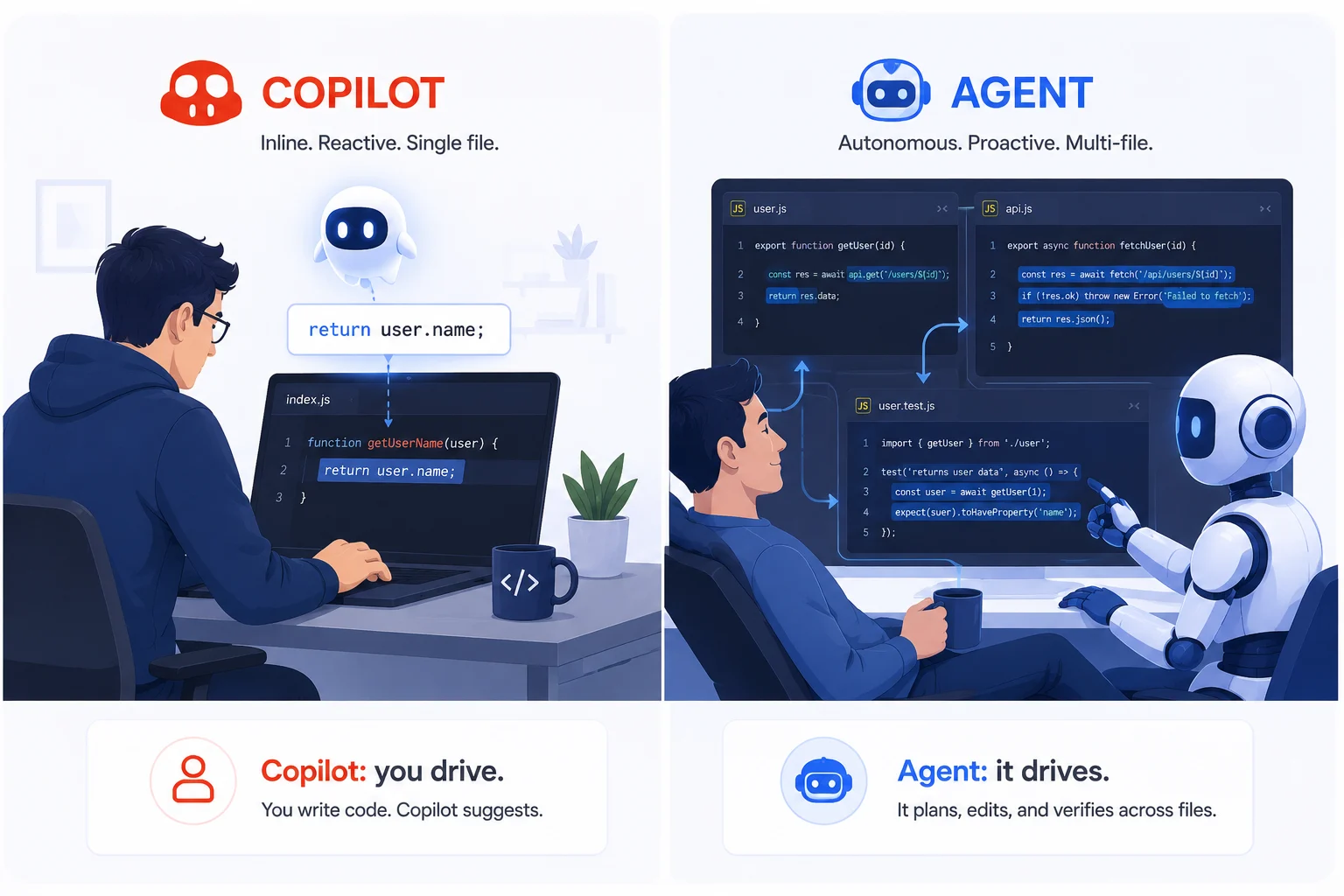
GitHub Copilot vs modern coding agents
What GitHub Copilot actually is and what it is not
GitHub Copilot is an AI-powered coding assistant that lives inside your editor and responds to what you are doing in real time. As you type, it generates inline suggestions like single lines, function bodies, test cases, and boilerplate. You accept them with Tab or dismiss them with Escape. It also has a chat panel where you can ask questions about your code, get explanations for errors, and request changes to specific files or functions.
Copilot is reactive by design. It responds to you. Every suggestion, every answer in the chat panel, requires you to initiate the interaction and you to apply the result. The execution of any generated code is entirely yours to manage. Copilot does not run anything, does not open terminals, and does not touch files you have not opened yourself.
That is not a limitation. It is a deliberate design choice that makes Copilot fast, low-friction, and safe to use alongside active development. You stay in control of every single action. The AI advises, and you decide what to do with that advice.
What Copilot does well
- Inline completions as you type, from single lines all the way to full function bodies
- Chat-based questions and answers about code you currently have open
- Generating unit tests for a selected function quickly and accurately
- Explaining unfamiliar code or confusing error messages in plain English
- Suggesting boilerplate for patterns you write repeatedly
- Pull request summaries and code review suggestions directly inside GitHub
Where Copilot stops
- It does not take action on your behalf. It cannot run commands, execute scripts, or modify files autonomously
- It does not coordinate changes across multiple files from a single instruction
- It does not iterate. If the generated code is wrong, it does not self-correct by running it
- It does not have a persistent memory of previous sessions or earlier conversations
- Copilot Workspace, GitHub’s newer agentic feature, moves in the agent direction but remains limited compared to tools built specifically for autonomous work
What modern coding agents actually are and what makes them different
A modern coding agent is a system that takes a goal, plans a sequence of steps to achieve it, executes those steps using real tools like file reading and writing, terminal commands, and test runners, observes the results, and keeps going until the task is complete. All of that happens without you managing each step in between.
The main tools in this category today are Claude Code from Anthropic, Cursor in agent mode, Devin from Cognition AI, and OpenAI’s Codex-based agents. Each takes a slightly different approach to the interface and execution environment, but they all share the same core property. They act. They do not just advise.
Give a coding agent the instruction “add rate limiting to all API endpoints in this Express app,” and here is what actually happens. It reads your existing route files. It understands the pattern your codebase uses. It installs the appropriate middleware. It applies the changes consistently across all routes. It updates any relevant tests. It runs the test suite. It fixes any failures it introduced along the way. Then it surfaces the finished result for your review.
What modern coding agents do well
- End-to-end feature implementation from a single natural language instruction
- Multi-file refactors that maintain consistency across an entire codebase
- Setting up scaffolding, configs, and project boilerplate without you touching a file
- Running, testing, and debugging code in a loop without any manual prompting from you
- Completing well-scoped tasks in the background while you work on something else
- Catching and correcting errors by actually executing code and reading the output
Where agents have real limits
- Vague goals lead to unpredictable results. Agents need clear and precise task definitions to perform well
- There is a higher risk of unreviewed changes since the agent acts autonomously across many files at once
- Each task costs more in tokens and compute compared to a simple inline completion
- They are harder to use during an active flow-state coding session, where you want instant feedback
- When something goes wrong, debugging requires inspecting a full execution trace rather than just dismissing a single bad suggestion
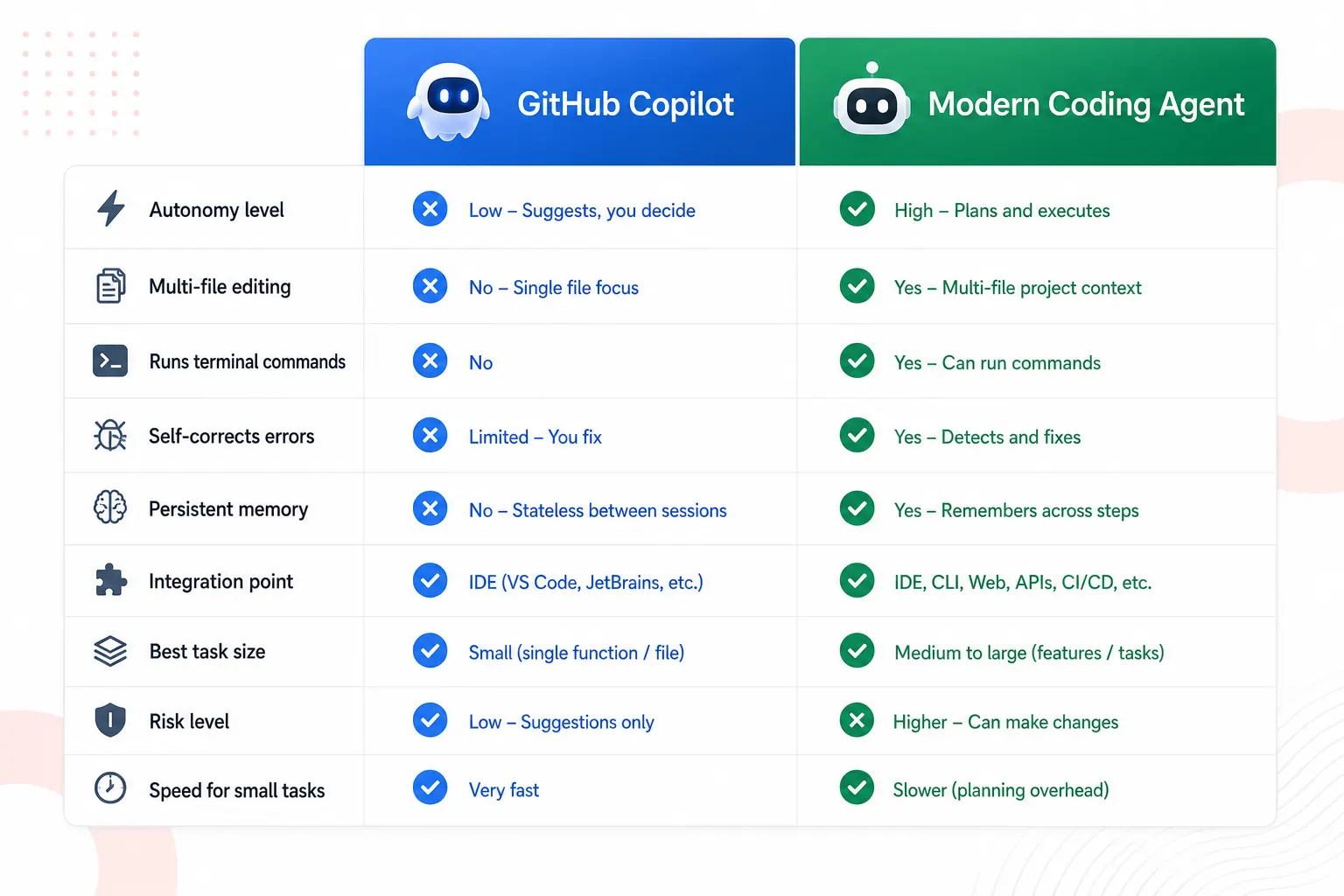
GitHub Copilot vs modern coding agents: head-to-head comparison
| Feature | GitHub Copilot | Modern coding agents |
|---|---|---|
| Core interaction model | Reactive. Responds to each prompt or keystroke | Autonomous. Pursues goals across multiple steps |
| Who takes action | You apply every suggestion manually | The agent acts, and you review the final result |
| Multi-file editing | Limited via Copilot Workspace, still experimental | Native. Reads and writes across the full repository |
| Runs terminal commands | No | Yes. Installs dependencies, runs tests, executes scripts |
| Self-correction loop | No. Generates once, and you fix any errors yourself | Yes. Runs code, observes output, and iterates automatically |
| Persistent memory | No. Each session starts completely fresh | Varies. Some agents support session and cross-session memory |
| Best task size | Small to medium tasks within a single file | Medium to large tasks spanning multiple files |
| Ideal during flow-state coding | Yes. Low friction and always on | No. Better suited for discrete tasks, you delegate and step away from |
| Risk of unreviewed changes | Low. You apply every change intentionally | Higher. Always review diffs carefully before merging |
| Token cost per task | Low | Higher due to multi-step reasoning and tool calls |
| Integration point | Inside your editor as you type | Terminal, dedicated IDE like Cursor, or a chat interface |
| Examples | GitHub Copilot, Amazon CodeWhisperer, Tabnine | Claude Code, Cursor agent mode, Devin, Copilot Workspace |
Real-world tasks: which tool actually wins?
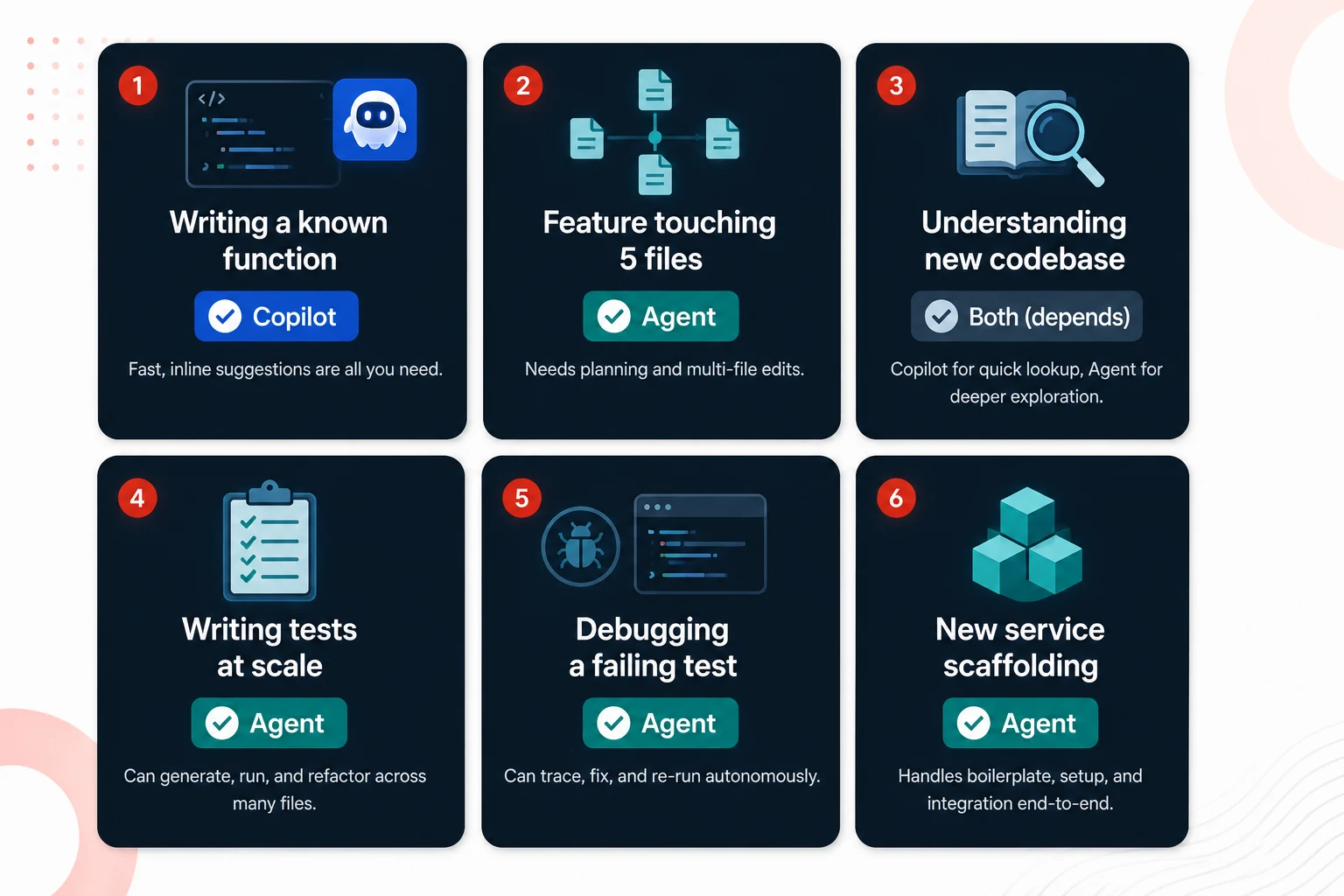
The comparison table tells you the capabilities. This section tells you which tool actually wins in the situations you run into every single day.
Writing a new function that you have written before
Copilot wins. You already know what you need. You start typing a function signature or drop in a comment describing the logic, and Copilot completes it in seconds. This is precisely what it was built for. It is fast, accurate, and low overhead. Reaching for an agent here adds latency to something you could ship in thirty seconds flat.
Implementing a feature that touches five files
Agent wins. Something like “add email notifications when a user changes their password” requires touching the user service, the email service, the event system, possibly the config, and the tests. Copilot can help you with each file one at a time, but it cannot coordinate the changes, maintain consistency across all of them, or catch the integration issue you quietly introduced between file three and file four. An agent handles this as a single delegated task from start to finish.
Understanding a codebase you just inherited
Copilot wins for questions. Agent wins for changes. Copilot’s chat panel is excellent for quick questions like “explain this function” or “why is this query slow.” You get fast answers while you navigate the code. But if you need to make systematic changes across that unfamiliar codebase, like renaming a pattern used in forty places or upgrading a deprecated API, an agent with full repository access is dramatically more effective than answering questions one at a time.
Writing unit tests for existing code
It depends on scale. For a single function you currently have open, Copilot is faster and perfectly adequate. For generating test coverage across twenty untested files, an agent that can scan the codebase, identify untested functions, write the tests, run them, and fix failures is far more efficient than doing it file by file with Copilot by your side.
Debugging a failing test
The agent wins when it has terminal access. Copilot can suggest fixes based on the code you show it. An agent can actually run the failing test, read the full stack trace, trace the failure through the call stack, fix the root cause, rerun the suite, and verify everything passes. For complex debugging chains that bounce across multiple files, that autonomy makes a genuine and measurable difference.
Boilerplate scaffolding for a new service
Agent wins decisively. “Create a new Express microservice with JWT auth, rate limiting, and a health endpoint” is a well-defined multi-file task with a predictable outcome. This is exactly where agents shine the most. The goal is clear, the output is known, and the steps are repetitive in a way that simply does not need your creative attention.
Where GitHub Copilot has a genuine edge
It is easy to read the scenarios above and conclude that agents are a strict upgrade over Copilot. They are not. Copilot has real advantages that matter in daily use, and ignoring them leads to frustration.
Zero friction during active coding. Copilot sits in your editor and works silently as you type. There is no context switching, no writing a task description, no waiting for a plan to execute. When you are in a real flow state and genuinely building something, that low-overhead presence is valuable in a way agents simply cannot replicate. An agent that takes thirty seconds to plan and execute is slower than Copilot for anything small.
Safer by default. Because Copilot never acts without your explicit acceptance, the impact of a bad suggestion is exactly one change you chose to apply. Agents write and modify files on their own. A misunderstood instruction can produce a large wrong diff that takes real time to review and revert. For developers working in sensitive production codebases with limited review bandwidth, Copilot’s conservative model is not a weakness. It is a genuine feature.
Better IDE integration out of the box. Copilot is embedded in VS Code, JetBrains IDEs, Neovim, and every other major editor. It works inside your existing environment without requiring you to change your tooling setup at all. Most agentic tools today require either a dedicated IDE like Cursor, a terminal-first workflow like Claude Code, or a separate browser interface. Developers who have spent years fine-tuning their editor setup often find that kind of disruption jarring.
More predictable behavior. Copilot’s suggestion quality is consistent and bounded. It generates a completion, you evaluate it, and that is the end of the interaction. Agent behavior is harder to predict because it involves multi-step reasoning, tool calls, and real code execution across your project. When Copilot gives you a bad suggestion, you simply press Escape. When an agent misinterprets a task, you might not catch the problem until you are reading a twenty-file diff.
Where modern coding agents have a genuine edge
Scale that Copilot simply cannot match. A refactor touching a hundred files is a one-instruction task for a coding agent and a painful hours-long slog with Copilot. The difference in effort for large-scale work is dramatic, and it only grows as your codebase gets bigger.
Closed-loop verification. Agents do not just write code. They run it. A suggestion from Copilot might look syntactically correct and still fail at runtime. An agent that runs the test suite after every significant change catches integration failures before you ever see the output. That self-verification loop is qualitatively different from the suggestion-and-review model.
Parallel throughput. You can hand an agent a well-defined task and go work on something completely different while it executes. Copilot requires your presence. You have to be there to evaluate each suggestion as it arrives. For tasks that genuinely do not need your creative input, like upgrading a dependency or standardizing error handling across services, agents give you real-time feedback.
Built for systematic codebase-wide work. Anything that requires applying the same transformation consistently across many files is fundamentally better suited to an agent. Enforcing a naming convention, replacing deprecated API usage, and adding telemetry to every service endpoint. These are all tasks where an agent’s ability to scan, understand, and modify in bulk produces results that would take a human developer most of an afternoon.
The hybrid workflow: using both tools in the same workday
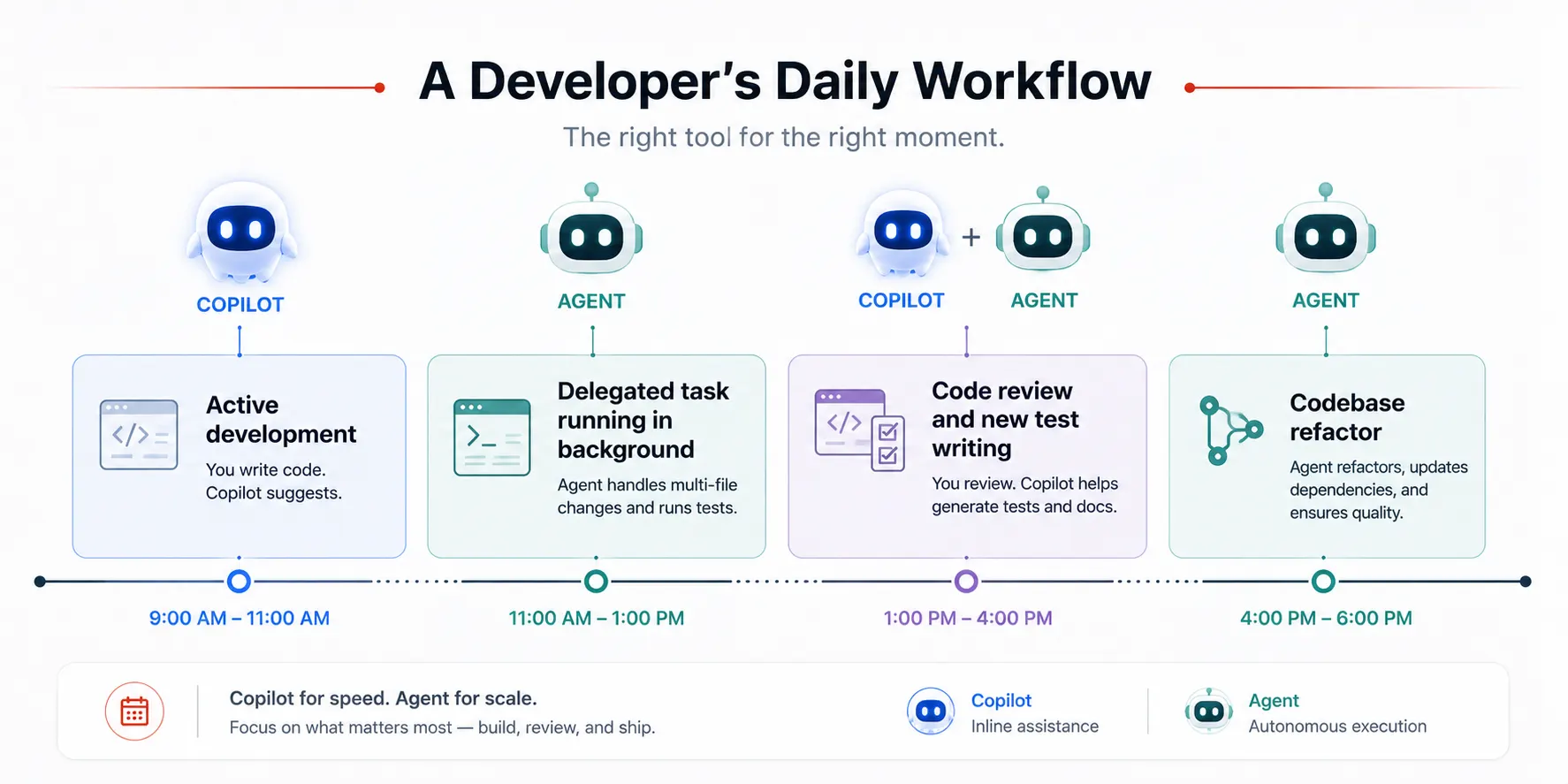
The most productive developers in 2025 are not choosing between Copilot and agents. They are using both in the same workday, deliberately, for different kinds of work.
Here is the workflow I have settled into after a lot of trial and error:
- Active feature development: Copilot stays on the whole time. As I write new code, it handles completions, boilerplate, and quick suggestions. Fast, frictionless, and completely in flow.
- Discrete delegated tasks: I switch over to an agent like Claude Code or Cursor agent mode for anything that crosses file boundaries or needs running code to verify. I write a clear task description, let it run, and come back to review the diff.
- Code review and explanation: Copilot chat handles quick questions about the code I am reading. The agent handles “why are these tests failing,” when I actually want it to go investigate and report back.
- Large refactors and scaffolding: Agent exclusively. There is no point in fighting Copilot’s file-by-file model for work that needs codebase-wide coordination from the start.
The pattern is straightforward. Copilot for the work I am doing right now. Agent for the work I am handing off and checking later. They operate in different modes of developer attention entirely, and treating them that way removes most of the frustration that builds up when you reach for the wrong one.
Common mistakes when switching between the two
Expecting Copilot to just go do it
Copilot does not execute. Typing “add authentication to this app” into the Copilot chat and expecting it to make changes across your codebase will produce a text explanation you have to implement yourself. If you want autonomous execution, you need an agent. The tool is working exactly as designed. Calibrate your expectations accordingly.
Giving agents goals that are too vague
Agents act on exactly what you tell them. “Make the app better” is not a task. It is an invitation for the agent to do something you did not actually intend. “Refactor all fetch calls /src/api to use the new apiClient module and update any failing tests” is a real task. The more precise and testable your instruction, the more reliable and useful the agent’s output will be.
Not reviewing the agent output before merging
The agent ran the tests, and they passed. That does not automatically mean the implementation is correct, readable, or does what you actually intended. Always read the diff before merging. Agents can produce working code that still violates your team’s conventions, introduces subtle logic errors, or solves the wrong interpretation of your instructions. Think of agent output the same way you would think of a pull request from a capable but very new team member.
Using an agent for tasks that are genuinely tiny
Spinning up an agent to write a single utility function adds latency, token cost, and review overhead to something Copilot handles better in about five seconds. Reserve agent workflows for tasks that are genuinely worth the overhead. As a rule of thumb, anything multi-file, multi-step, or requiring code execution to verify is worth delegating. Anything else probably is not.
Abandoning Copilot the moment you discover agents
Developers who have first experience coding agents sometimes drop Copilot entirely and treat it as obsolete. It is not. For inline completion during active writing, Copilot’s low-latency always-on presence is still the right tool for that specific job. Agents do not replace it. They cover the territory where Copilot simply cannot go.
Choosing the right tool: a clear decision guide
| If your task is… | Use this tool | The reason why |
|---|---|---|
| When writing code, you are actively composing right now | GitHub Copilot | Zero friction, inline, and no context switching required |
| Explaining a confusing block of code | GitHub Copilot chat | Instant answers without ever leaving your editor |
| Generating a unit test for one function | GitHub Copilot | Fast and accurate for single-file generation tasks |
| Implementing a feature that spans three or more files | Coding agent | Coordinates all the changes and maintains consistency across files |
| Debugging a failing test end-to-end | Coding agent | Can actually run the test, trace the failure, fix it, and verify the fix |
| Generating test coverage across many files at once | Coding agent | Scans the whole codebase, writes the tests, and runs them in bulk |
| Scaffolding a new service or module from scratch | Coding agent | Creates all the files from a single clear instruction |
| A codebase-wide refactor or major migration | Coding agent | Applies changes in bulk and verifies nothing broke in the process |
| Sensitive production code that needs your full attention | GitHub Copilot | You apply every single change. Nothing happens autonomously. |
| Work you want to hand off while you focus elsewhere | Coding agent | Runs on its own and surfaces the result for you to review when it is done |
Further reading and resources
- GitHub Copilot official documentation — complete reference for all Copilot features, editor integrations, and Copilot Workspace
- Claude Code overview on Anthropic’s documentation site — how Claude Code works as a terminal-native autonomous coding agent
- GitHub research on Copilot’s productivity impact — the controlled study behind the 55% task completion speed improvement
GitHub Copilot and modern coding agents are not rivals. They are teammates with different strengths and different roles in your workflow. Copilot is the tool you work alongside in real time as you build. Agents are the tools you delegate to when you have a clear goal and want to review the outcome rather than manage every step of getting there.
The developers getting the most out of both are the ones who stopped asking which tool is better and started asking which tool is right for the next thirty minutes of their actual workday. Once you make that shift, using these tools stops feeling like a constant experiment and starts feeling like a natural part of how you work.