
The moment I realized LLMs can’t actually do anything on their own
I was demoing an AI agent to a colleague when she asked a simple question: “But how does it actually search the web? Doesn’t the AI just know things?” I paused. Because the honest answer that a language model, by itself, knows nothing about what happened last Tuesday, can’t run a Python script, can’t check a database, and can’t send an email is one that most AI demos carefully obscure.
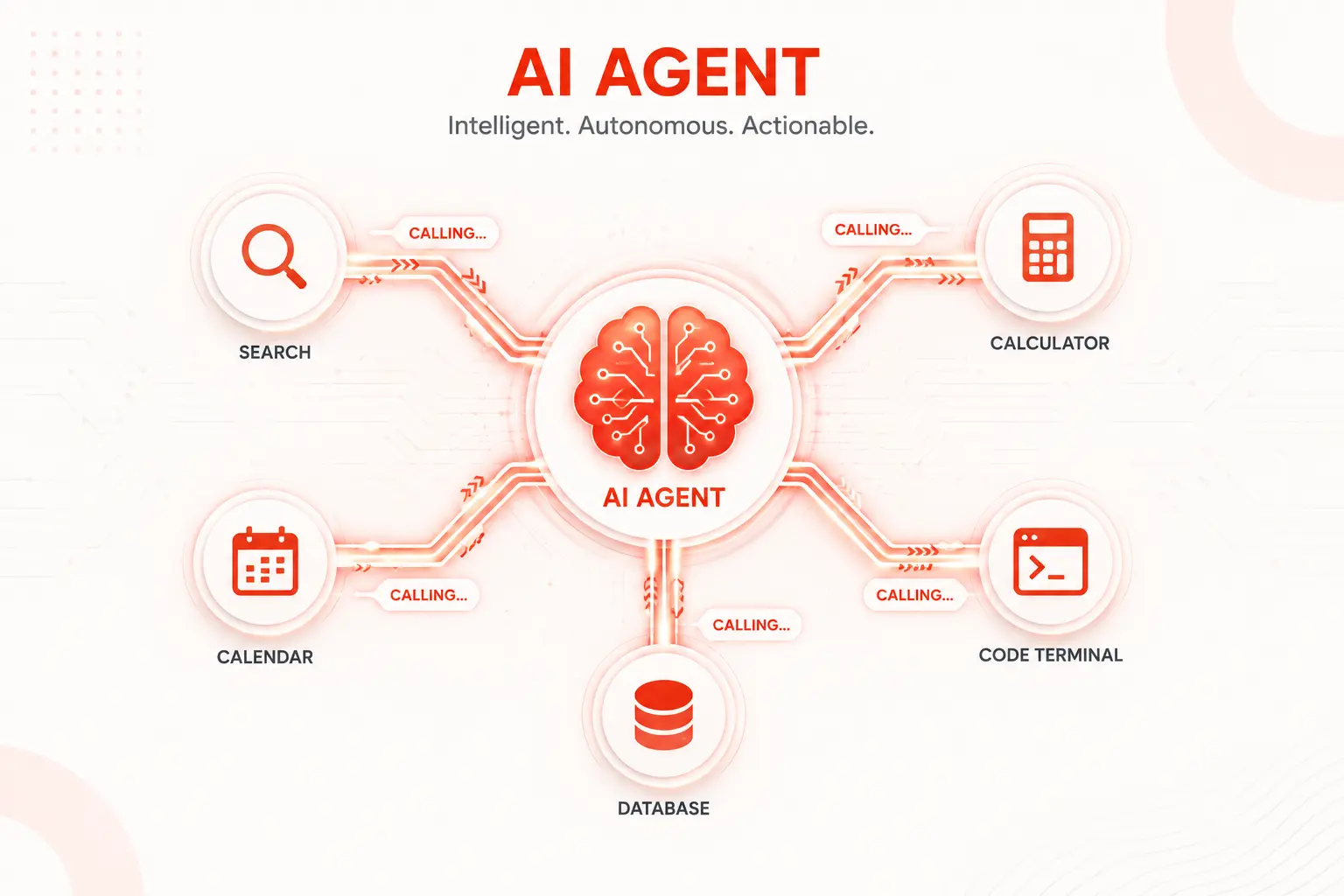
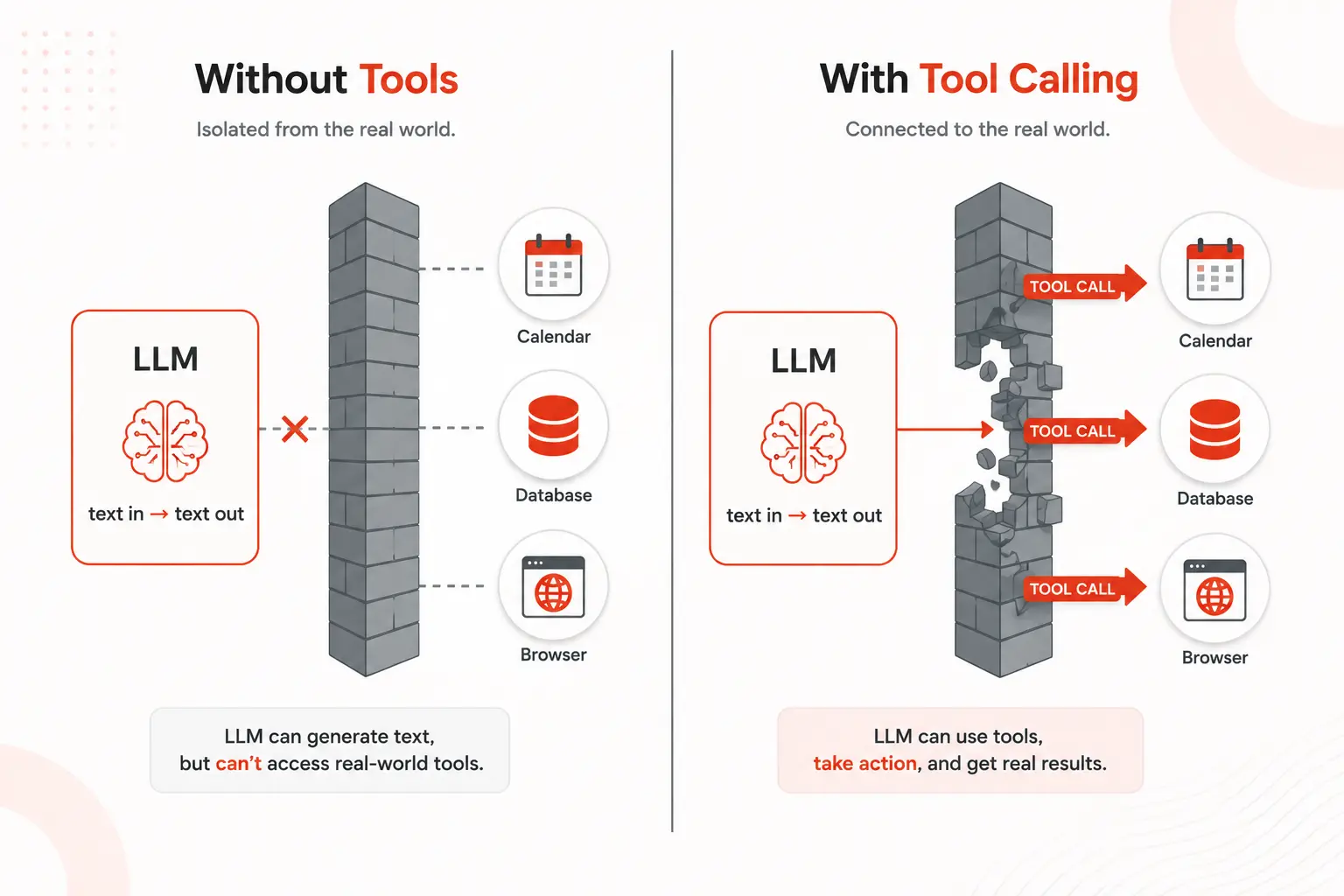
An LLM on its own is a text-in, text-out function. Everything that makes an AI agent feel like it’s doing things, browsing, calculating, writing files, calling APIs comes from tool calling. It’s the mechanism that connects a language model’s reasoning to the real world, and it’s one of the most important concepts to understand if you’re building, deploying, or evaluating AI agents.
This article explains exactly how AI agent tool calling works, from the underlying mechanics to how you design tools well, where it breaks, and how to fix it.
What is tool calling?
Tool calling, also called function calling, is the mechanism by which an LLM signals that it wants to invoke an external function and receives the result back to continue its reasoning. The model doesn’t execute anything directly. It generates a structured output that says “I want to call this function, with these arguments.” Your application code intercepts that output, runs the actual function, and feeds the result back into the model’s context.
That handoff model requests, code executes, result returns is the entire engine behind every AI agent that does anything useful in the real world.
The major LLM providers all support this natively. OpenAI calls it function calling. Anthropic calls it tool use. Google calls it function calling too. The mechanics differ slightly by provider, but the concept is identical across all of them.
How AI agent tool calling works, step by step
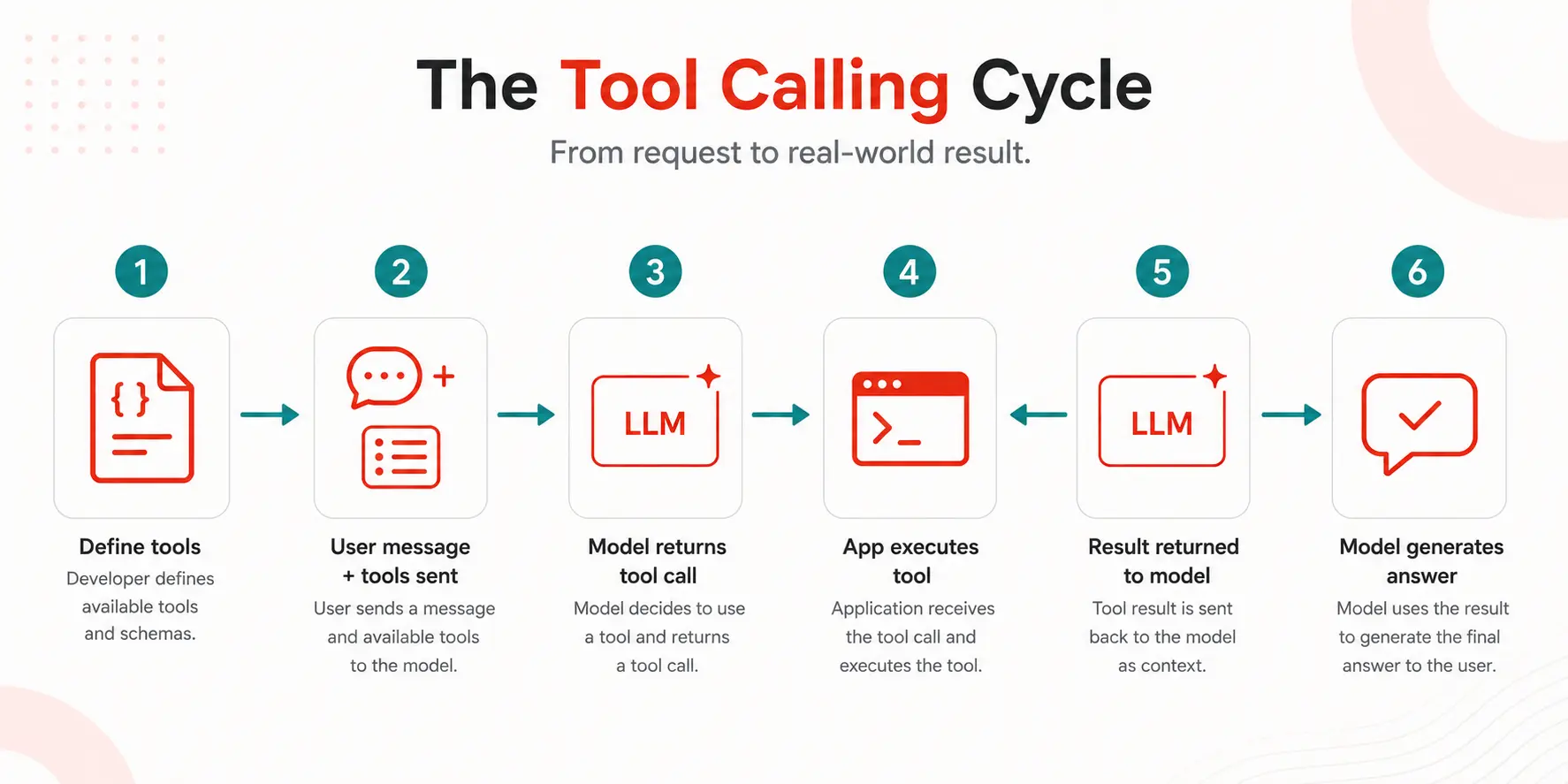
Let’s walk through a complete tool calling cycle from the first prompt to the final answer, the unobscured version.
Step 1: Define your tools
Before the conversation starts, you tell the model what tools are available. Each tool is described using a structured schema, typically JSON Schema, that specifies the tool’s name, what it does, and what arguments it accepts.
// Tool definition (OpenAI / Anthropic style)
const tools = [
  {
    name: "search_web",
    description: "Search the internet for current information on a topic. Use when the user asks about recent events, current data, or anything that may have changed. Do NOT use for general knowledge you can answer from training.",
    input_schema: {
      type: "object",
      properties: {
        query: {
          type: "string",
          description: "The search query to run"
        },
        num_results: {
          type: "integer",
          description: "Number of results to return. Default 5, max 10.",
          default: 5
        }
      },
      required: ["query"]
    }
  },
  {
    name: "run_python",
    description: "Execute a Python code snippet and return stdout output. Use for calculations, data processing, or anything requiring computation.",
    input_schema: {
      type: "object",
      properties: {
        code: {
          type: "string",
          description: "Valid Python code to execute"
        }
      },
      required: ["code"]
    }
  }
];
The description field is not decorative. It’s how the model decides when to call the tool. Write it like documentation for a colleague who needs to know exactly what the tool does and when to reach for it.
Step 2: The model receives the user message and tool list
When the user sends a message, you pass both the conversation and the tool definitions to the API. The model reads both and decides whether it can answer directly or whether it needs to call a tool first.
const response = await anthropic.messages.create({
  model: "claude-sonnet-4-20250514",
  max_tokens: 1024,
  tools: tools,
  messages: [
    { role: "user", content: "What's the current price of NVIDIA stock?" }
  ]
});
Step 3: Model outputs a tool call request
Instead of answering directly, the model returns a structured tool call. It does not return the answer; it returns its intent to look up the answer. This is the key moment most people misunderstand: the model isn’t fetching anything. It’s asking your code to fetch it.
// Model response (stop_reason: "tool_use")
{
  "stop_reason": "tool_use",
  "content": [
    {
      "type": "tool_use",
      "id": "tool_call_abc123",
      "name": "search_web",
      "input": {
        "query": "NVIDIA stock price today",
        "num_results": 3
      }
    }
  ]
}
Step 4: Your code executes the tool
Your application reads the tool call from the response, routes it to the actual function, and runs it. The model is not involved in this step at all. This is important: tool execution happens entirely in your code, which means you control what tools exist, what they can access, and what guardrails surround them.
// Your application handles the execution
async function handleToolCall(toolCall) {
  if (toolCall.name === "search_web") {
    const results = await searchWeb(toolCall.input.query, toolCall.input.num_results);
    return results;
  }
  if (toolCall.name === "run_python") {
    const output = await executePython(toolCall.input.code);
    return output;
  }
  throw new Error(`Unknown tool: ${toolCall.name}`);
}
Step 5: The tool result is passed back to the model
You take the output of the tool execution and send it back to the model as a new message in the conversation, tagged as a tool result. The model now has the information it needed and can generate a final response.
// Send tool result back to model
const finalResponse = await anthropic.messages.create({
  model: "claude-sonnet-4-20250514",
  max_tokens: 1024,
  tools: tools,
  messages: [
    { role: "user", content: "What's the current price of NVIDIA stock?" },
    { role: "assistant", content: response.content },  // the tool call
    {
      role: "user",
      content: [
        {
          type: "tool_result",
          tool_use_id: "tool_call_abc123",
          content: JSON.stringify(searchResults)
        }
      ]
    }
  ]
});
Step 6: The model generates the final answer
With the tool result in context, the model now has what it needs to answer the original question. It synthesizes the retrieved data into a natural language response, and if it needs another tool call to complete the answer, the loop continues.
Parallel AI agent tool calling: doing multiple things at once
Modern LLMs can request multiple tool calls in a single response. If a user asks “Compare NVIDIA and AMD stock prices,” the model doesn’t have to search for one, wait for the result, then search for the other. It can request both in parallel.
// Model requests two tools at once
{
  "stop_reason": "tool_use",
  "content": [
    {
      "type": "tool_use",
      "id": "call_001",
      "name": "search_web",
      "input": { "query": "NVIDIA stock price today" }
    },
    {
      "type": "tool_use",
      "id": "call_002",
      "name": "search_web",
      "input": { "query": "AMD stock price today" }
    }
  ]
}

// Execute both in parallel, return both results
const [nvidiaResult, amdResult] = await Promise.all([
  handleToolCall(toolCalls[0]),
  handleToolCall(toolCalls[1])
]);
Parallel tool calling cuts latency significantly on tasks that require multiple independent lookups. Always execute parallel tool calls concurrently in your application code running them sequentially when the model intended them in parallel wastes time unnecessarily.
Designing good tools: the part most tutorials skip
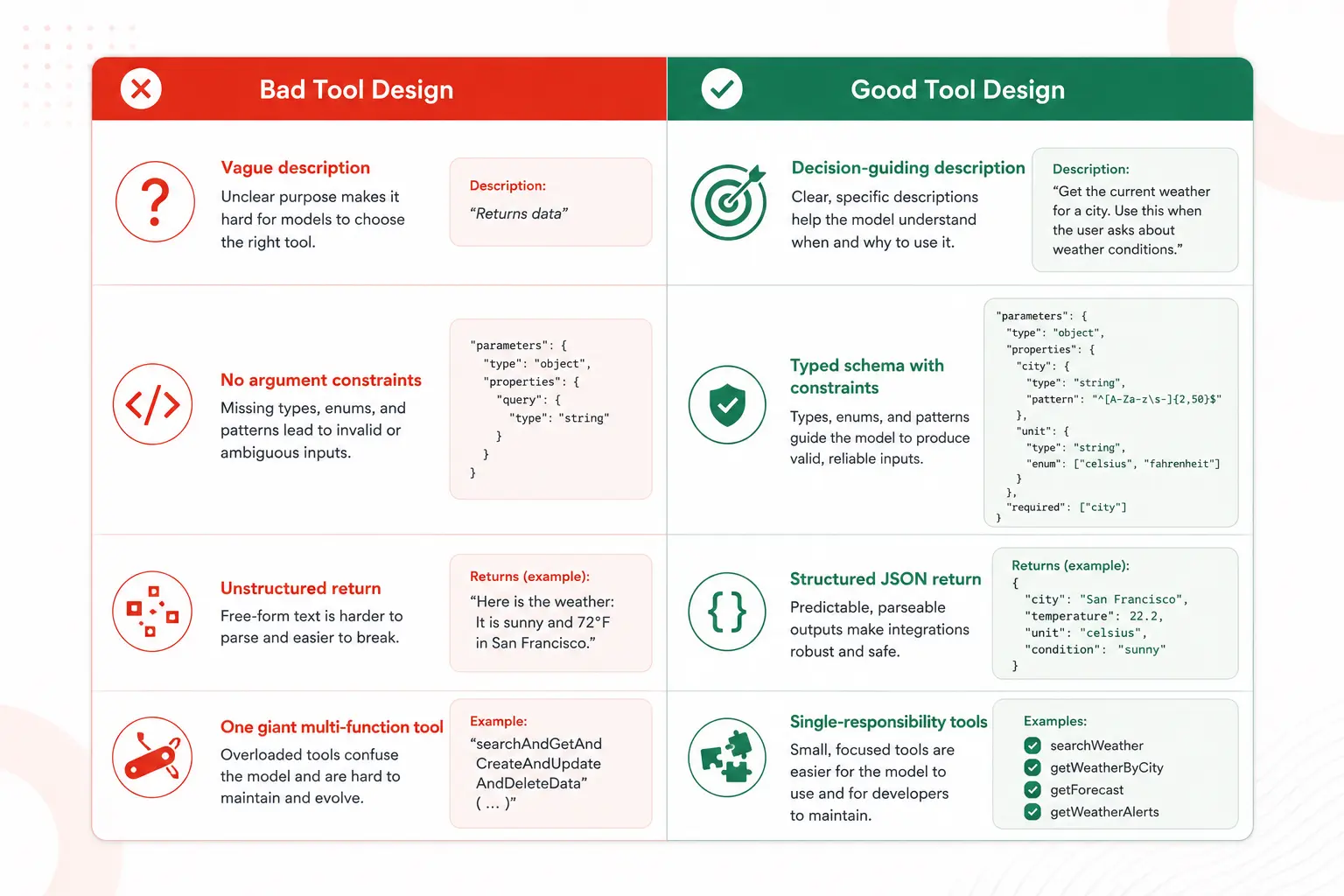
The quality of your tool definitions directly determines how well your agent performs. A poorly described tool gets called at the wrong time, with the wrong arguments, producing results the model doesn’t know how to use. Here’s what separates good tool design from bad.
Write descriptions that answer “when, not just what.”
Most developers write tool descriptions that explain what the tool does: “Searches the web.” That’s necessary but not sufficient. The model needs to know when to call it versus not. Add decision guidance:
// Weak description
"description": "Search the web for information."

// Strong description
"description": "Search the web for current, real-time, or recent information.
Use when the user asks about events after your knowledge cutoff, current prices,
live data, or anything that may have changed recently. Do NOT use for general
knowledge questions you can answer from your own training."
Use precise argument types and constraints
The model will pass arguments exactly as your schema allows. If you accept a string with no constraints, you’ll get strings of any length, format, or language. Be specific:
// Vague schema
"date": { "type": "string", "description": "A date" }

// Precise schema
"date": {
  "type": "string",
  "description": "Date in ISO 8601 format (YYYY-MM-DD). Example: 2025-06-01.",
  "pattern": "^\\d{4}-\\d{2}-\\d{2}$"
}
Keep each tool focused on one thing
A tool that does too many things gets called inconsistently. A A manage_calendar tool that can create, read, update, and delete events is harder for the model to use correctly than four separate focused tools. Single-responsibility tools produce more reliable behavior.
Return structured, parseable results
What the tool returns matters as much as what it accepts. Return JSON with consistent keys rather than raw text blobs. The model will reason over the structure of your output; inconsistent formats degrade reasoning quality.
// Unstructured return (hard to reason over)
return "NVIDIA is trading at $924.31, up 2.3% today";

// Structured return (easy to reason over)
return {
  ticker: "NVDA",
  price: 924.31,
  change_percent: 2.3,
  currency: "USD",
  timestamp: "2025-06-01T14:32:00Z"
};
The tool calling loop in multi-step agents
Most real tasks require more than one tool call. An agent asked to “research recent AI developments and write a summary” might call a search tool five or six times, then synthesize everything. The model keeps calling tools, and your application keeps executing them and returning results until the model decides it has enough information to give a final answer.
// Multi-step tool loop
async function runAgentLoop(userMessage, tools) {
  const messages = [{ role: "user", content: userMessage }];

  while (true) {
    const response = await llm.call({ messages, tools });

    // If model is done, return the final text
    if (response.stop_reason === "end_turn") {
      return response.content.find(b => b.type === "text").text;
    }

    // Handle all tool calls in this response
    const toolCalls = response.content.filter(b => b.type === "tool_use");
    messages.push({ role: "assistant", content: response.content });

    const toolResults = await Promise.all(toolCalls.map(async (call) => ({
      type: "tool_result",
      tool_use_id: call.id,
      content: JSON.stringify(await handleToolCall(call))
    })));

    messages.push({ role: "user", content: toolResults });

    // Safety: prevent infinite loops
    if (messages.length > 50) throw new Error("Max iterations exceeded");
  }
}
The max iterations guard is not optional. Without a hard stop, a confused or looping agent will run indefinitely, consuming tokens and budget with no exit condition.
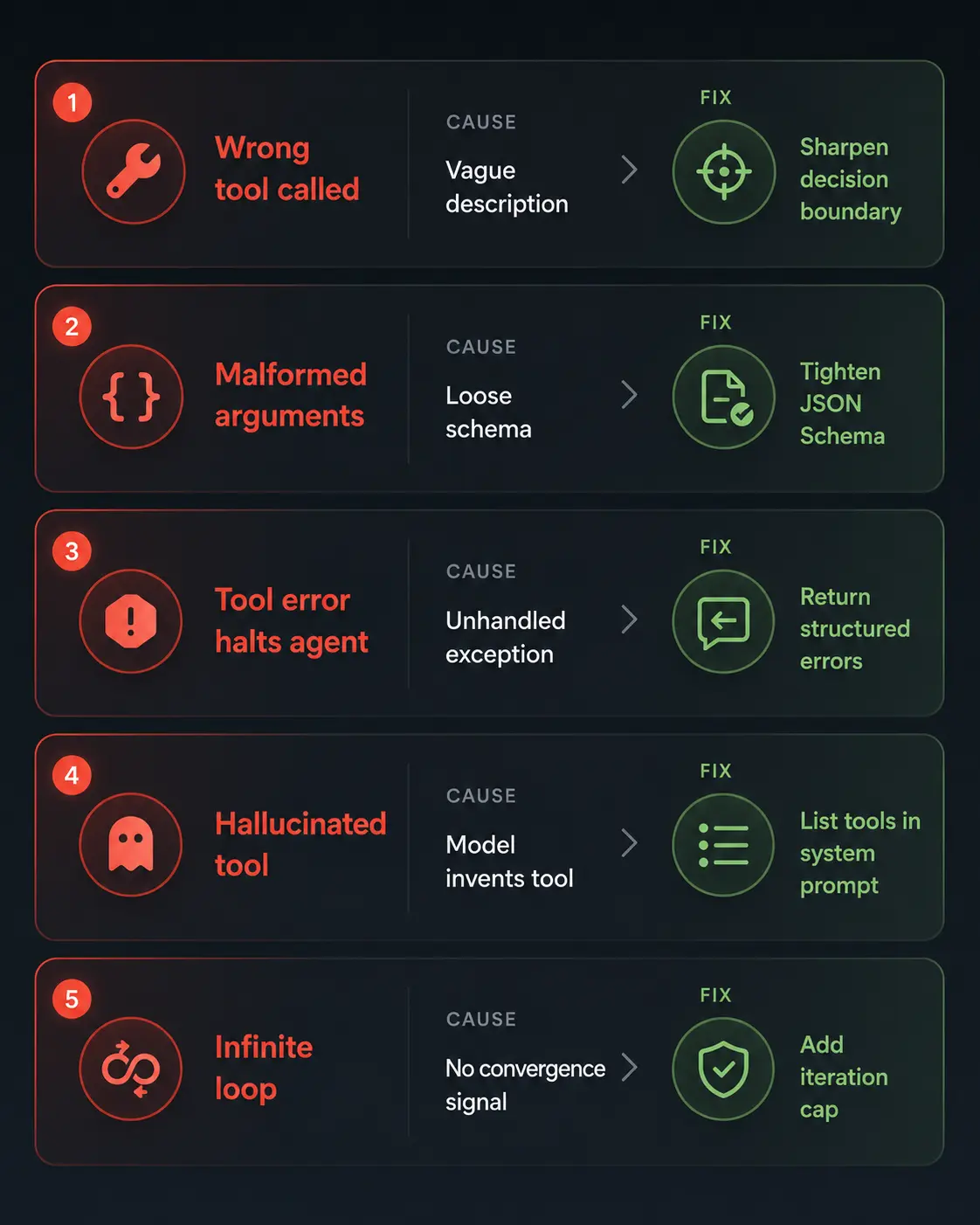
Common tool calling failures and how to fix them
The model calls the wrong tool
The model reaches for a tool that isn’t the right one for the task, usually because descriptions overlap or are too vague. Fix by sharpening the decision boundary in your descriptions. Make each tool’s “when to use” and “when NOT to use” explicit.
Model passes malformed arguments
The model generates an argument value that doesn’t match the expected type or format, a string where an integer was expected, a date in the wrong format, or a missing required field. Fix by tightening your JSON Schema constraints. Add patterns for strings, ranges for numbers, and explicit examples in descriptions.
The tool returns an error, and the agent halts
A tool fails network timeout, invalid API key, rate limit and the agent doesn’t know what to do with the error. Always return structured error responses that the model can reason about:
// Instead of throwing, return a structured error
try {
  return await callExternalAPI(args);
} catch (err) {
  return {
    error: true,
    error_type: "api_timeout",
    message: "The external service timed out after 10 seconds.",
    suggestion: "Retry the request or try a different data source."
  };
}
When the model receives a structured error, it can decide to retry, try a different tool, or explain the problem to the user rather than silently stalling.
Model hallucinates a tool that doesn’t exist
In some cases, especially with less capable models, the model will generate a tool call for a function you never defined. Your router will throw an “unknown tool” error. Fix by explicitly listing available tools in the system prompt and handling unknown tool calls gracefully with a message back to the model: “That tool is not available. Available tools: [list].”
Infinite tool call loops
The agent calls tool A, gets a result, calls tool A again slightly differently, gets another result, and repeats, never converging on a final answer. This usually happens when the tool’s output doesn’t give the model enough signal to decide it has what it needs. Fix by enriching tool return values with a completeness signal, and implementing a hard iteration cap in your loop.
Tool security: what most developers ignore until it’s too late
Tool calling is powerful precisely because it lets an AI agent interact with real systems. That power requires guardrails.
Principle of least privilege. Every tool should have the minimum permissions needed to do its job. A search tool doesn’t need write access to your database. A calendar reader doesn’t need the ability to send emails. Scope your tool implementations as narrowly as possible.
Validate all arguments server-side. The model generates arguments, but your code executes them. Never trust the model’s output as inherently safe. Validate argument values against your own rules before passing them to an API or database, just as you would with user-submitted form data.
Confirm before destructive actions. If a tool can delete, modify, or send something on behalf of a user, build in a confirmation step. Have the agent present what it’s about to do and require explicit approval before executing. An AI that can silently delete files is a liability.
Log every tool call. Every tool invocation name, arguments, result, and timestamp should be logged. This is your audit trail for debugging, compliance, and detecting misuse.
Tool calling quick reference
| Concept | What it means | Key implementation note |
|---|---|---|
| Tool definition | Schema describing name, purpose, and arguments | Description quality directly affects call accuracy |
| Tool call request | Structured output that the model returns when it wants to invoke a tool | The model doesn’t execute your code |
| Tool execution | Your application runs the actual function | You control permissions, validation, and error handling |
| Tool result | Output sent back to the model as context | Return structured JSON for the best reasoning quality |
| Parallel tool calls | Multiple tool call requests in a single model response | Execute concurrently, not sequentially |
| Tool loop | Repeated call-execute-return cycle until the goal is met | Always enforce a maximum iteration limit |
| Tool security | Permissions, validation, and confirmation for destructive actions | Treat tool arguments like untrusted user input |
Further reading and resources
- Anthropic Tool Use documentation, a complete guide to implementing tool use with Claude, including parallel calls and error handling patterns
- OpenAI Function Calling guide: OpenAI’s reference for function calling with structured outputs and JSON Schema examples
- Understanding JSON Schema essential reference for writing precise tool argument schemas that constrain model behavior
- AI Tools: 10 AI Tools You Are Not Using Yet That Will Save You 20 Hours a Week
Once you understand tool calling, a lot of things about AI agents suddenly make sense, both the impressive parts and the frustrating ones. The agent isn’t magic. It’s a reasoning engine connected to real-world functions through a structured request-execute-return loop that you design and control.
That’s actually the most empowering realization: the model handles the reasoning. You handle everything else, such as which tools exist, what they can access, what they return, and what happens when they fail. Build that layer carefully, and your agent becomes genuinely capable. Neglect it, and no amount of model intelligence will save you from the gap between “it can reason about the problem” and “it can actually solve it.”