
I asked an AI to “just fix the bug” — and that’s when I realized the difference
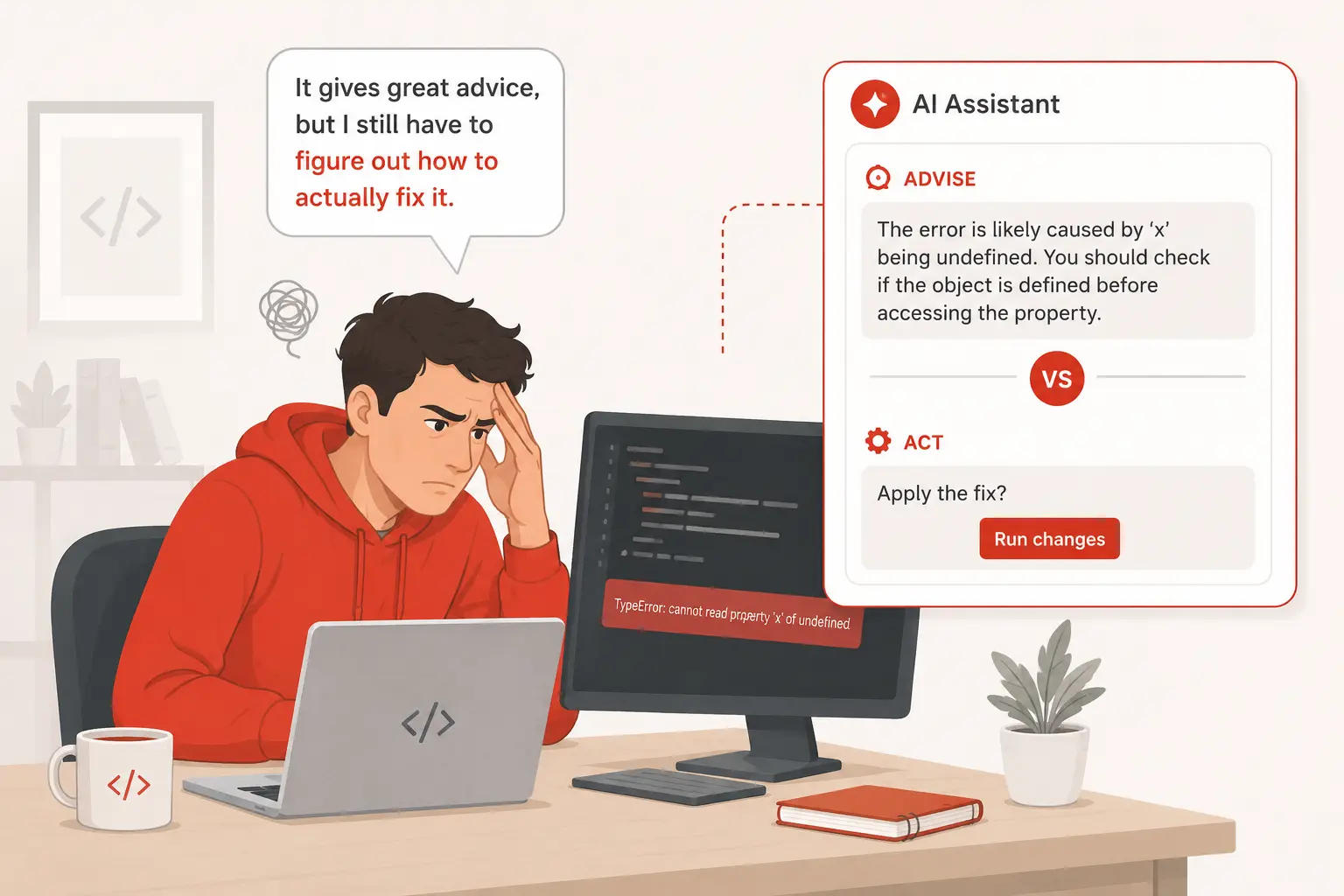
I was about 40 minutes into a debugging session when I finally gave up and typed into my AI chat window: “Just go find the bug and fix it.” The response? A politely formatted explanation of what might be causing the issue — with suggestions I had to copy, paste, and apply myself.
That moment crystallized something I hadn’t fully understood before. The tool I was using was incredibly smart, but it wasn’t doing anything. It was advising. There’s a fundamental difference between an AI that helps you write code and an AI that actually writes — and runs — code on your behalf.
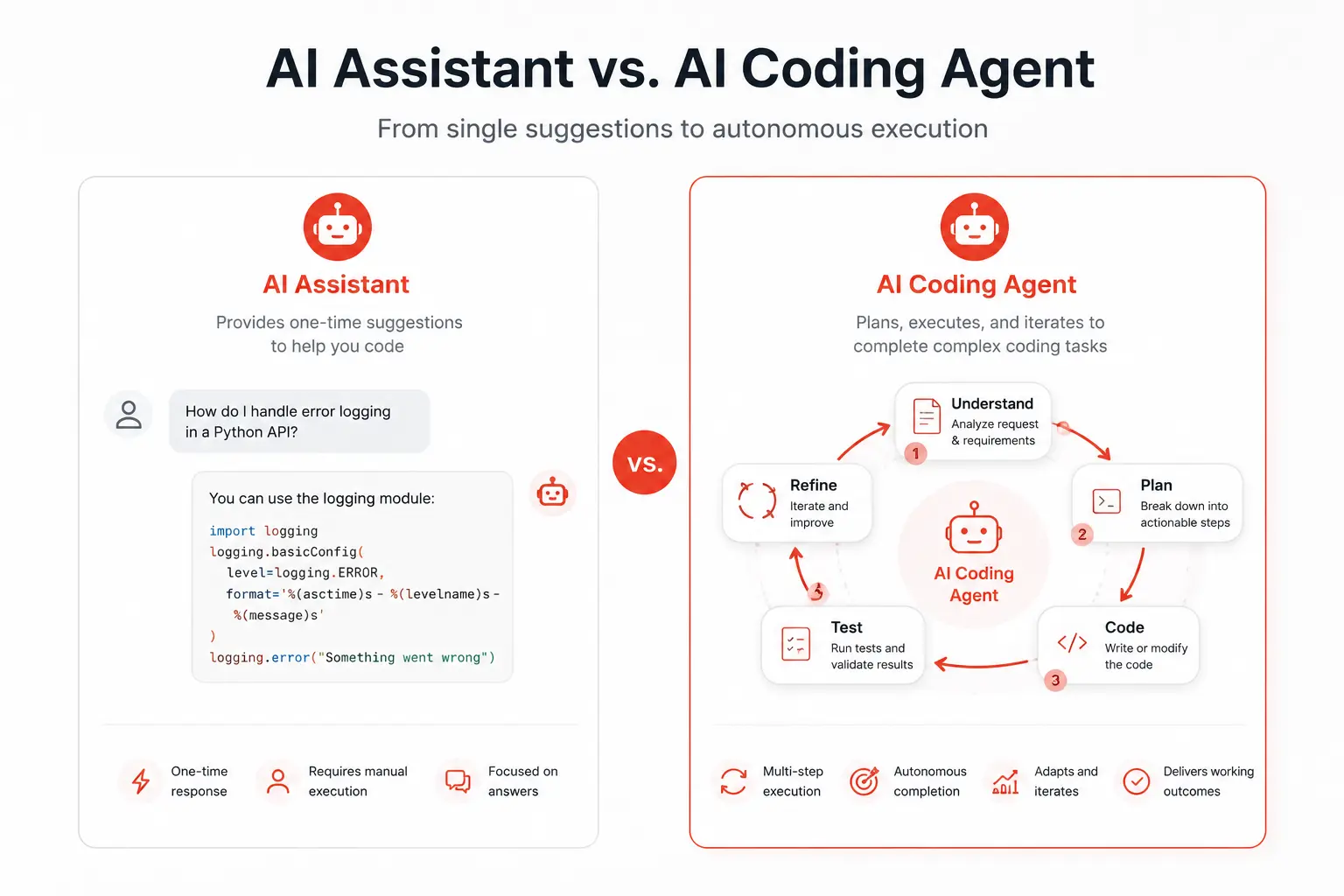
If you’ve been wondering why some AI dev tools feel like a supercharged autocomplete while others feel like a junior engineer you just hired, this article explains exactly why. The distinction between AI coding agents and AI coding assistants isn’t just marketing — it changes how you build, how fast you ship, and what kinds of tasks you should hand off to a machine.
What is an AI coding assistant?
An AI coding assistant is a tool that responds to your requests — in context, in real time — while you remain in control of every action. You write, it suggests. You ask, it answers. You decide what to accept, reject, or modify.
The most well-known example is GitHub Copilot. It lives inside your editor, watches what you type, and offers completions. It can generate a whole function from a comment, explain a block of code you’re confused about, or help you write a unit test. But it never takes action independently. It waits for you.
Other popular assistants include Cursor (in its default mode), Tabnine, Amazon CodeWhisperer, and the chat panel inside most modern IDEs. These tools dramatically reduce the time you spend on boilerplate, lookup, and translation — but they’re fundamentally reactive. They’re your co-pilot, not the pilot.
What AI coding assistants are good at
- Autocompleting lines, functions, and blocks as you type
- Answering questions about code snippets in context
- Generating boilerplate, test cases, and documentation
- Explaining unfamiliar code or error messages
- Suggesting refactors while you review them line by line
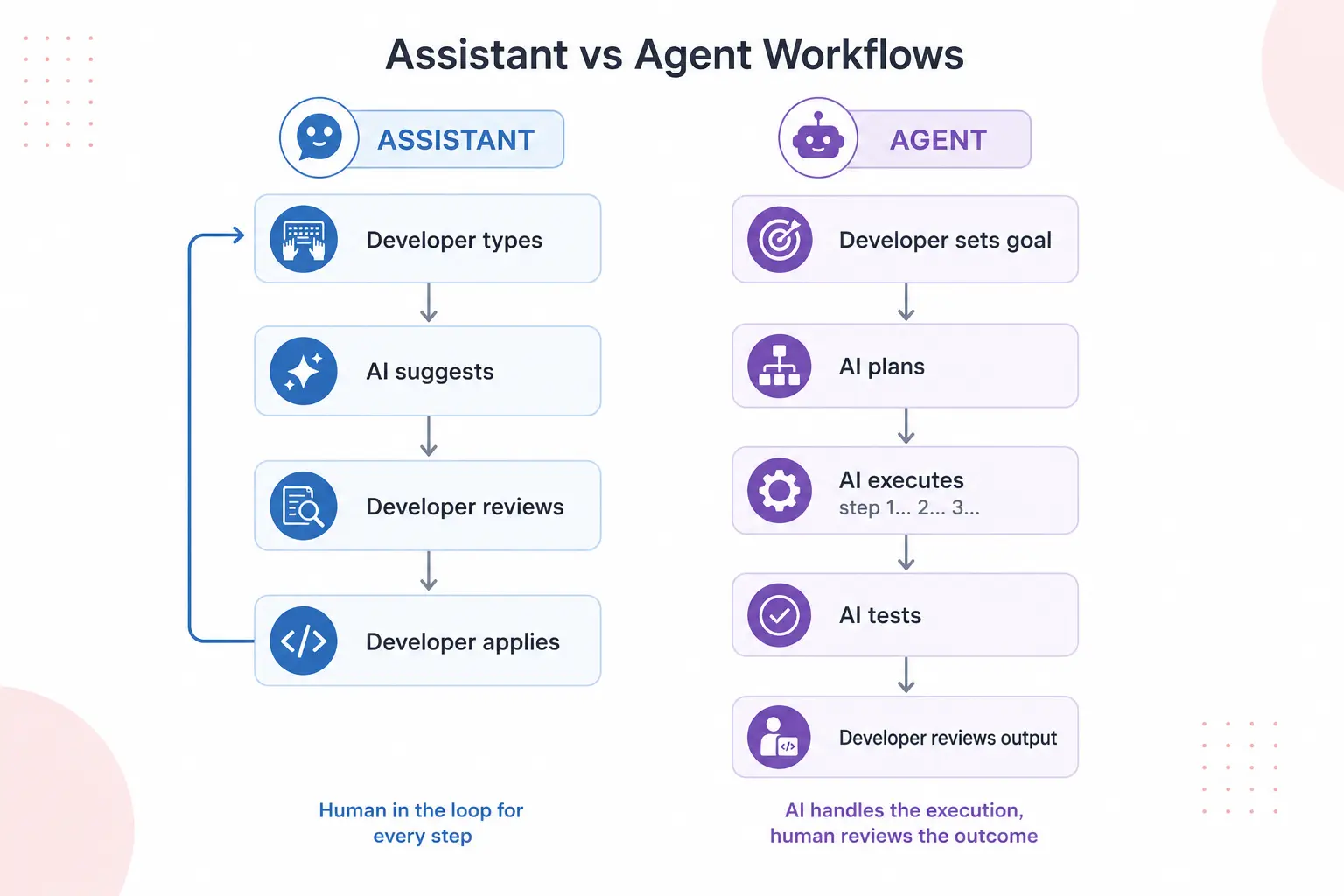
The pattern is always: you prompt → AI responds → you act. That loop is fast and low-risk, and for most day-to-day coding, it’s exactly what you want.
What is an AI coding agent?
An AI coding agent is a system that can take a goal and pursue it across multiple steps — autonomously. Instead of waiting for each prompt, it plans, executes actions, evaluates results, and iterates until the task is done or it gets stuck.
Give an AI coding agent a task like “add authentication to this Express app,” and it might: read your existing codebase, install the required packages, write the middleware, update your routes, add environment variable handling, write tests, and run them — all without you pressing a single button between steps.
Tools in this category include Claude Code, Devin (by Cognition), OpenAI’s Codex-based agents, and Cursor in its Composer/Agent mode. These tools have access to a shell, a file system, the ability to run commands, and sometimes even a browser. They operate more like a developer you’ve delegated a task to than a tool you’re actively using.
What AI coding agents are good at
- End-to-end feature implementation from a single instruction
- Automated refactors across many files simultaneously
- Setting up scaffolding, configs, and boilerplate for new projects
- Running, testing, and debugging code in a loop without your input
- Completing well-defined tasks while you work on something else
The pattern is: you define the goal → AI plans and executes → you review the result. That’s a fundamentally different working relationship.
The core technical difference: reactive vs agentic
The real distinction comes down to autonomy and tool access. An assistant operates within a single context window — it sees what you show it, responds, and stops. An agent operates across a loop: it can call tools, read results, make decisions, and continue acting based on what it finds.
This is sometimes called the ReAct pattern (Reason + Act): the model reasons about what to do, takes an action (like running a command), observes the output, and reasons again. Repeat until done. Assistants don’t do this — they reason and respond, but don’t act independently.
Here’s a simplified mental model:
// AI Assistant mental model
user_prompt → LLM generates text → user reads, applies manually

// AI Agent mental model
user_goal → LLM plans steps → LLM calls tool (run file, exec command)
         → observes output → LLM re-reasons → next action → ...repeat → done
This is why agents need things like shell access, file read/write permissions, and the ability to run code. Without those, they’re just very confident assistants.
When should you use an assistant vs an agent?
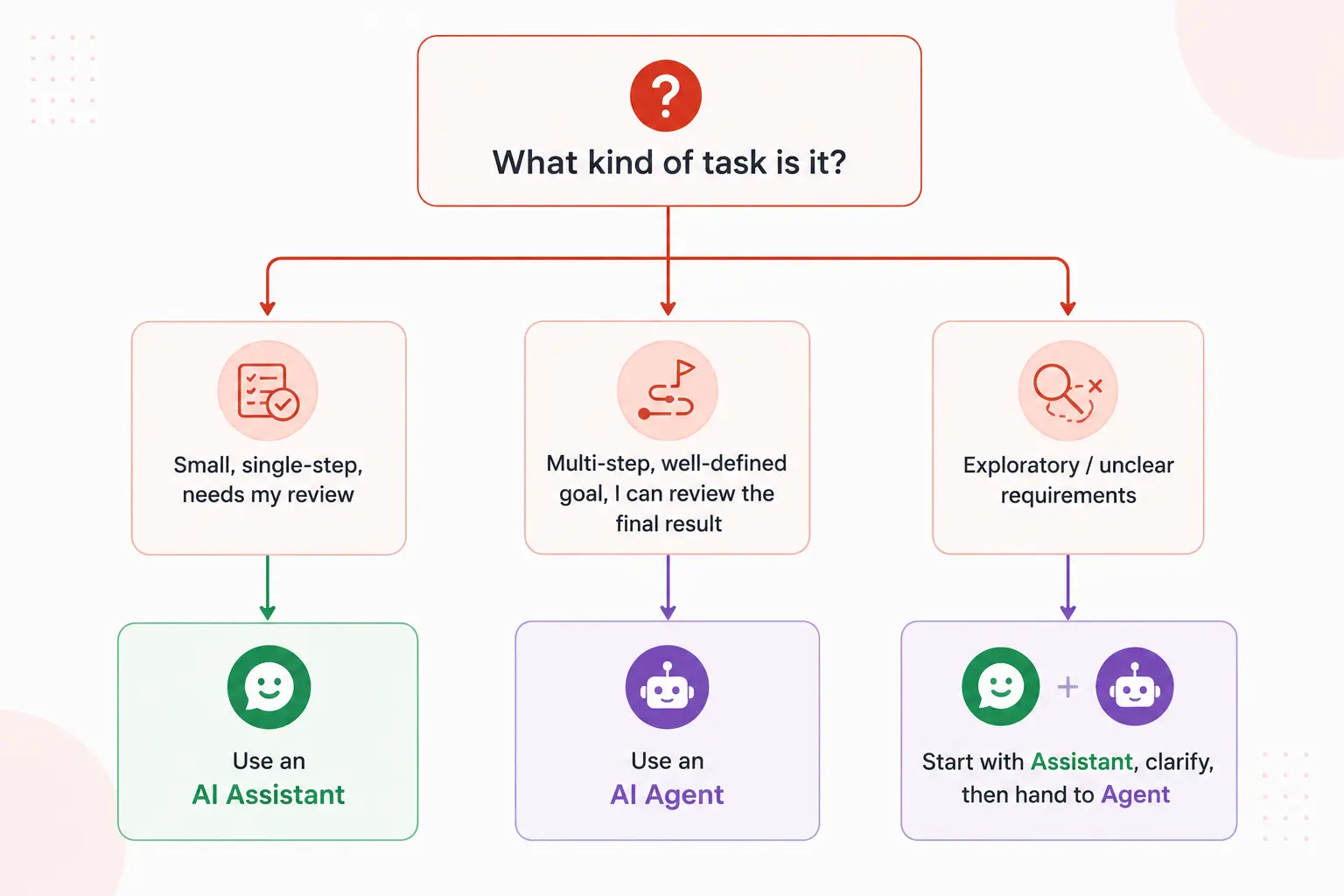
Neither is always better. They solve different problems, and the best developers in 2025 know which one to reach for depending on the situation.
Reach for an AI coding assistant when:
- You’re actively writing code and want inline help
- The task is small — a function, a test, a regex
- You need to understand what you’re accepting before it lands in your codebase
- You’re learning and want to see the “how” alongside the output
- The context is sensitive (production secrets, complex auth logic) and you want full review control
Reach for an AI coding agent when:
- The task is multi-step and well-defined (“scaffold a REST API with these endpoints”)
- You don’t want to babysit every action — you want to delegate and check results
- The task involves touching many files and you’d rather not do it manually
- You’re doing repetitive work: upgrading dependencies, reformatting, adding tests to existing code
- You want to parallelize — have the agent work on one thing while you do another
Real examples side by side
| Task | AI Assistant approach | AI Agent approach |
|---|---|---|
| Write a sorting function | Suggests the function inline as you type | Overkill — assistant is the right tool here |
| Add JWT auth to an API | Generates code snippets you assemble manually | Reads your codebase, installs deps, writes full implementation, runs tests |
| Rename a variable across 200 files | Tells you how to do it or shows one example | Executes the rename across all files, verifies nothing broke |
| Explain a confusing stack trace | Instantly explains it in plain English | Would work, but assistant is faster for pure Q&A |
| Scaffold a new microservice | Generates files one at a time as you ask | Creates the full folder structure, config, boilerplate, and README in one go |
| Write tests for existing code | Generates tests for whichever file you have open | Scans all untested files, writes tests for each, runs them, fixes failures |
The risks of each — and how to work around them
Understanding the risks is just as important as knowing the strengths.
AI coding assistant risks
Hallucinated APIs and functions. Assistants can confidently suggest methods that don’t exist in the version of a library you’re using. Always verify generated code against official docs.
Context blindness. If the assistant can’t see your full codebase, it may suggest solutions that conflict with your existing patterns. Give it more context when the suggestions feel off.
AI coding agent risks
Compounding errors. Agents act in loops. If they misunderstand the goal early, they can build a lot of wrong code before you catch it. Write tight, specific task descriptions and check in at milestones.
Unexpected side effects. An agent with shell access can install packages, delete files, or make changes across your repo. Always run agents in a sandboxed environment or on a separate branch until you trust the output.
Overconfidence on ambiguous tasks. If your goal is vague (“make this app better”), an agent will still try to act — and the results will be unpredictable. Agents need crisp, testable goals.
Rule of thumb: The more autonomous the tool, the more precise your instructions need to be. Garbage in, garbage out — but at scale.
Quick reference: assistant vs agent at a glance
| Feature | AI Coding Assistant | AI Coding Agent |
|---|---|---|
| Autonomy | Low — responds to each prompt | High — pursues goals across steps |
| Who takes action | You do, based on AI output | AI does, you review results |
| Tool access (shell, files) | No | Yes |
| Best task size | Small to medium, single-file | Medium to large, multi-file |
| Learning curve | Low — feels like smart autocomplete | Medium — requires clear task scoping |
| Risk of unreviewed changes | Low | Higher — acts independently |
| Examples | GitHub Copilot, Tabnine, Cursor (chat) | Claude Code, Devin, Cursor (agent mode) |
| Ideal for | Active coding sessions, learning | Delegation, automation, bulk tasks |
Common mistakes developers make with these tools
1. Treating an agent like an assistant
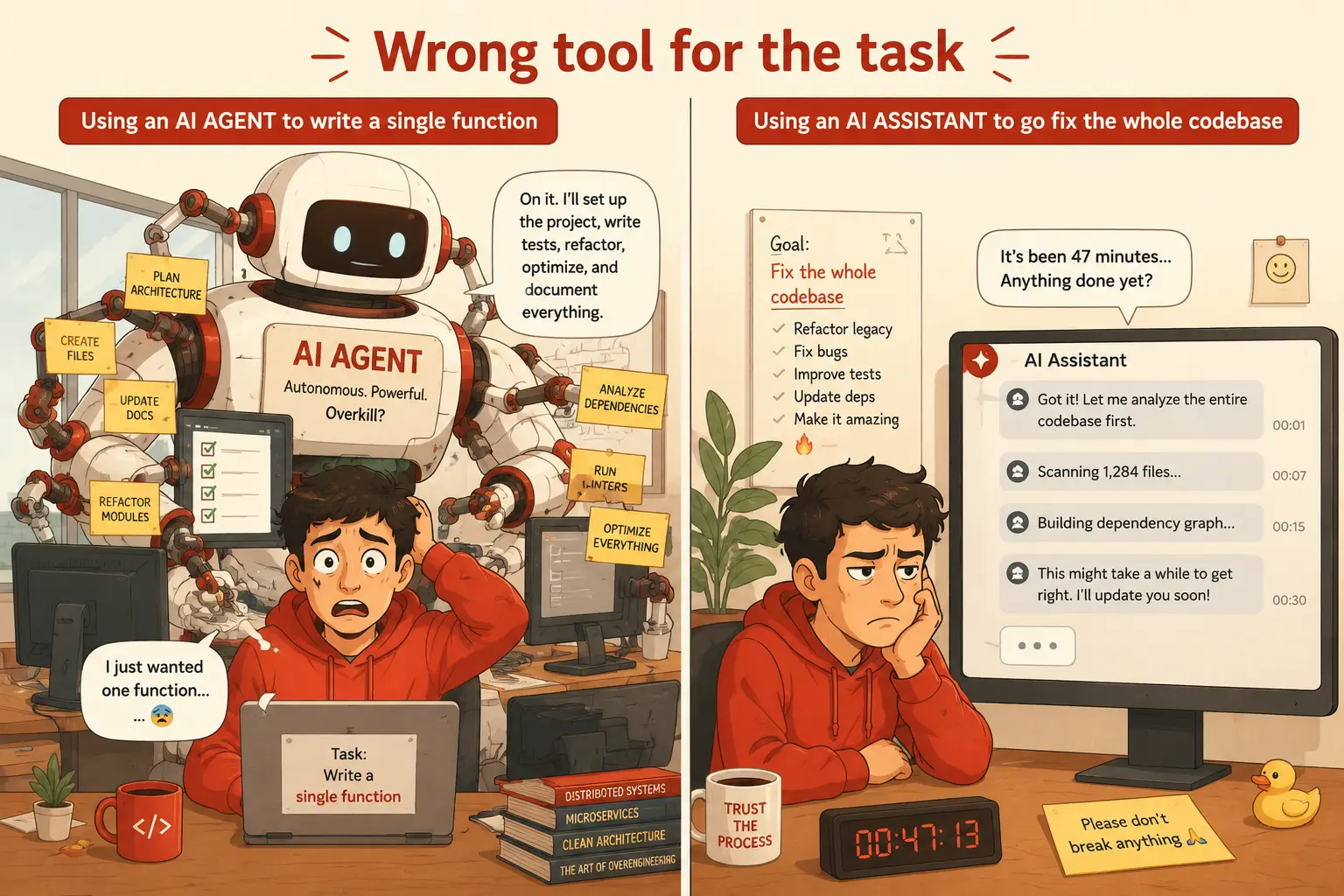
Asking an agent “how do I add pagination?” is using a race car to drive to the corner store. You’ll get an answer, but you’re wasting the tool’s biggest strength. Give agents tasks, not questions.
2. Treating an assistant like an agent
Expecting your AI chat panel to “just go fix it” will always disappoint. Assistants don’t act. They advise. Calibrate your expectations accordingly — and if you want autonomous execution, switch tools.
3. Giving agents vague goals
“Improve the codebase” is not a task. “Refactor all functions in /utils to use early returns instead of nested if-blocks” is a task. The more specific and testable your goal, the better the agent performs.
4. Not reviewing agent output
Agents are not infallible. Run the code. Read the diff. Check that tests actually pass. Autonomous doesn’t mean perfect — it means unsupervised. Build in review checkpoints, especially on anything touching production systems.
5. Picking the flashier tool instead of the right one
Agents feel impressive. But if you’re writing a React component and want inline suggestions, an assistant is faster, safer, and less friction. Match the tool to the task, not to the hype.
Where the lines are blurring in 2025
The distinction is getting harder to spot as products evolve. Cursor started as an assistant-style editor but added full agent (Composer) mode. GitHub Copilot has added multi-file editing and workspace context. Claude Code operates as a terminal-native agent but can also answer questions conversationally.
The honest truth is that the best tools in 2025 are hybrid: they slide on a spectrum from “reactive assistant” to “autonomous agent” depending on how you invoke them. The concept is what matters — understanding whether you’re interacting in a prompt-response loop or delegating to an autonomous actor determines how you should scope your tasks and review your outputs.
Agentic capabilities are also moving into CI/CD pipelines, code review automation, and even product management. The shift isn’t just in your editor anymore — it’s in how entire software teams are structured around human-AI collaboration.
The mental model that ties it all together
Here’s the frame I use now: an AI coding assistant is a very fast, very knowledgeable pair programmer. An AI coding agent is a very fast, very capable junior engineer you can delegate tasks to.
You wouldn’t ask your pair programmer to go away and come back with a finished feature. And you wouldn’t ask your junior engineer to sit next to you and autocomplete every line you type. Each role has its place in the workflow — and so does each tool.
Once I started thinking this way, I stopped being frustrated when my assistant “wouldn’t just fix the bug” — and I stopped being surprised when my agent misinterpreted a vague task. The tools were working exactly as designed. I just needed to meet them where they are.
Further reading and resources
If you want to go deeper on how these tools work under the hood, these resources are worth your time:
- GitHub Copilot official documentation — comprehensive guide to assistant features and workspace context
- Claude Code overview (Anthropic docs) — how Claude operates as a terminal-native coding agent
- ReAct: Synergizing Reasoning and Acting in Language Models (arXiv) — the foundational paper behind how agentic AI tools reason and act in loops
The gap between “AI that helps you code” and “AI that codes for you” is real — and it’s only going to grow. Start by being intentional: use an assistant when you want to stay in the driver’s seat, and use an agent when you’ve got a clear destination and want the AI to handle the driving. That one shift in how you think about these tools will save you hours of frustration.